


One stolen client secret. No MFA, no Conditional Access, no endpoint to compromise — just a valid OAuth token and an API that hands you the keys to an entire Microsoft 365 tenant. This is the Microsoft Graph attack surface, and it's wider than most security teams realise.
Most post-compromise investigations for Microsoft 365 environments follow the same pattern: phished credentials, a bypassed MFA control, and a mailbox rule silently forwarding traffic. What does get missed? It's the layer sitting above it all.
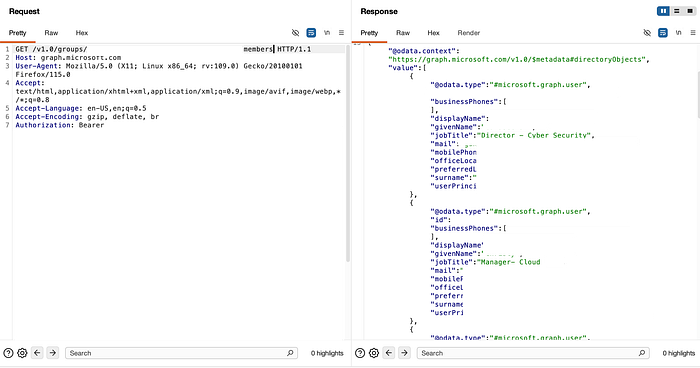
During a routine secret scanning session, I found a public Postman workspace containing live Microsoft Graph OAuth credentials belonging to a major FMCG company with around 59,000 employees. The workspace exposed the client_id (application identifier), client_secret (application password), and grant_type: client_credentials (machine-to-machine authentication method). A token was issued. Within minutes, I enumerated the full user directory, pulled group memberships (including job titles), and read Teams messages. There was no exploit, malware, or endpoint touched — just an API and a valid token.
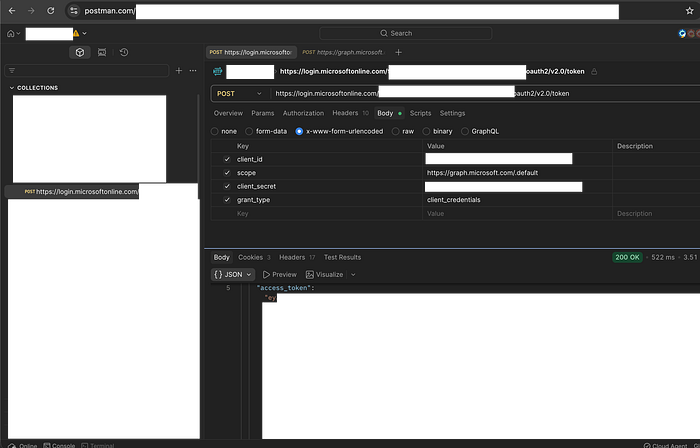
I didn't report it. The finding was serious. The organisation has no vulnerability disclosure programme, bug bounty, or sanctioned channel for unsolicited reports. This isn't an edge case; many large enterprises have mature Microsoft 365 deployments, substantial attack surfaces, and no responsible disclosure mechanisms. The credential may still be active. This article aims to address that gap.
This wasn't an unusual exposure vector. That same week, Handala, a threat group, wiped 200,000 devices using stolen admin credentials — no software exploits or malware required. Meanwhile, ShinyHunters shifted from stolen OAuth tokens to exfiltrating nearly a petabyte of data. A publicly accessible Postman workspace left open for API testing poses the same risk. Threat actors aren't breaking in — they're logging in
Microsoft Graph API is the single unified interface to all of Microsoft 365. One authenticated HTTP request can read email, list user accounts, access files, query device inventory, or pull security alert data. Access depends on token permissions. A token from client credentials — an application's identity, not a user's — lacks MFA, faces limited Conditional Access, and blends in with normal application traffic.
This article covers three things. First, the OAuth flows that produce Graph tokens, how they differ in their trust models, and their potential for abuse. Second, which Microsoft Graph API endpoints are commonly exploited and why? Third, where detection gaps occur in monitoring or alerting systems.
OAuth flows overview
The Postman finding in the introduction didn't require a sophisticated attack. It simply required recognising what to look for and understanding what a client credentials token is: a special code that lets an application prove its own identity and access resources directly, rather than acting on behalf of a user. Most write-ups skip that second part.
Microsoft's identity platform issues tokens differently depending on who — or what — is requesting them. Each flow, or method of obtaining tokens, has a distinct trust model. This model defines who authenticates, which multi-factor authentication (MFA) methods apply (where a user provides two or more verification factors), how long access lasts, and what Conditional Access policies can and can't enforce. Those differences aren't implementation details. They're the variables attackers optimise for when deciding how to obtain a token.
A stolen refresh token, which allows ongoing access without repeated user authentication, from a browser cache, is a different problem from a leaked client secret (an application's password) in a Postman workspace. A device code phishing campaign that tricks users with fake device activation steps produces a different detection footprint than a compromised service principal — an identity assigned to automated processes. Understanding the different flows helps you recognise these distinctions — both to exploit them and to detect them.
Three flows dominate in practice. Authorisation Code flow, which requires interactive user authentication, involves users logging in directly. Client Credentials flow is for application-to-application access when no user is present. Device Code flow is designed for devices with limited input capabilities, like smart TVs, but attackers repurpose it for phishing by generating a real device code and sending the legitimate Microsoft login URL to targets, who complete genuine authentication without realising they're handing over access to an attacker. Each flow can produce a valid Microsoft Graph token — a code that grants access to Microsoft data and resources. Each has a different blast radius when abused.
Authorization Code Flow
The standard interactive flow. A user clicks "Sign in with Microsoft," gets redirected to login.microsoftonline.com, authenticates, and an authorisation code is returned to the application. That code is exchanged on the server for an access token and a refresh token.
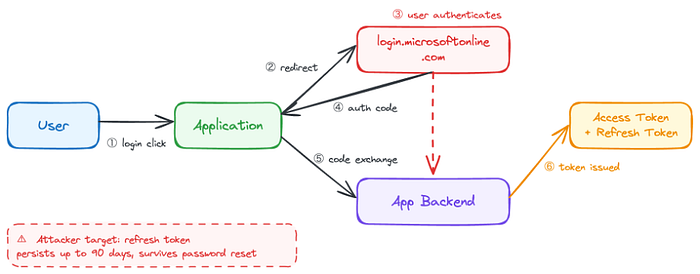
Key properties:
· Requires user interaction — browser redirect and active authentication
· Tokens are scoped to what the user consented to
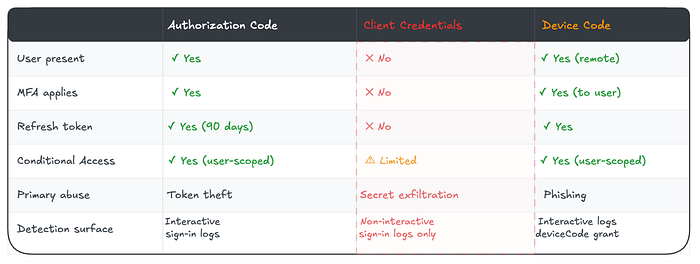
· Refresh tokens persist for up to 90 days with a sliding window.
· Consent can be granted per-user or tenant-wide by an admin.
Attacker relevance: The refresh token is the prize. It outlives the session, survives password resets in some configurations, and can be used to silently re-issue access tokens without the user re-authenticating. Steal it from a browser token cache, a compromised endpoint, a leaked application log, or an insecurely stored credential — and you have persistent, interactive-level Graph access for weeks.
Admin consent abuse is the other angle. When a user installs a third-party OAuth application and an admin grants tenant-wide consent, every user in the organisation can be reached through that application's delegated permissions. A malicious or compromised OAuth app with Mail.Read tenant-wide consent is an email access primitive across the entire directory — no credentials beyond the app's own registration are required.
Detection tell: Review tenant-wide admin consent grants regularly. Unfamiliar application IDs with broad delegated permissions — particularly Mail.Read, Files.ReadWrite.All, or User.Read.All— warrant investigation. Refresh token usage from unexpected locations or device profiles after a period of inactivity is worth flagging.
Client Credentials Flow
No user. No browser. No interaction. An application authenticates directly to Entra ID. It uses its own identity, either a client secret or a certificate, to obtain an access token. The token is scoped to application permissions rather than delegated user permissions.
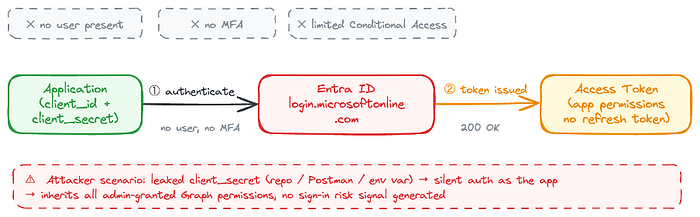
Key properties:
· Fully non-interactive — no user consent prompt, no MFA.
· Permissions are granted by an admin at the tenant level.
· Tokens represent the application, not a user.
· No refresh token — access tokens are re-issued on expiry (typically 1 hour)
Attacker relevance: This is the flow that makes compromised service principals so dangerous, and it is also the flow behind the finding described in the introduction. The credential was sitting in a public Postman workspace: client_id, client_secret, grant_type: client_credentials, and the tenant ID is embedded directly in the token endpoint URL. No rotation. No expiry. No detection.
If an attacker exfiltrates a client secret from a repository, a Swagger doc, an environment variable, a pipeline config, or a Postman workspace that is left public by default, they can authenticate as the application and inherit whatever Graph permissions an admin granted it. Often Mail.Read, User.Read.All, or broader. No MFA. No Conditional Access policy is applying to the user. No sign-in risk signal. A clean token indistinguishable from legitimate application traffic.
The disclosure problem compounds this. Unlike a compromised user account, where a password reset immediately terminates access, a leaked client secret requires someone to know it's been leaked, find it, and rotate it. If the affected organisation has no VDP, no bug bounty, and no external signal that its credentials have been exposed, the window remains open indefinitely.
Detection tell: Monitor service principal sign-in logs specifically for activity outside business hours, from unexpected IP ranges, or with atypical API call sequences. Additionally, keep in mind that client-credential tokens generate non-interactive sign-in events, which appear only in non-interactive sign-in logs — a detail many SOC teams overlook.
Device Code Flow
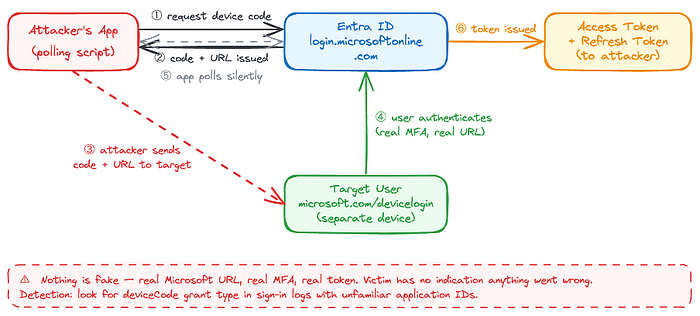
Designed for input-constrained devices — smart TVs, CLI tools, IoT hardware — where a browser redirect isn't possible. The application requests a device code from Entra ID and presents it to the user alongside a URL: microsoft.com/devicelogin. The user navigates to that URL on any device, enters the code, and authenticates. The application polls Entra ID until authentication completes and a token is issued.
Key properties:
· No redirect URI required — the app doesn't need to host a callback
· User authentication occurs on a separate device or in a different browser.
· The device code is valid for approximately 15 minutes.
· Access and refresh tokens are issued on successful completion.
· Fully bypasses redirect-URI validation.
Attacker relevance: Device code phishing is a reliable initial access technique precisely because nothing in the flow is fake. The attacker runs a script to generate a real device code from Microsoft's identity platform, then sends the legitimate microsoft.com/devicelogin URL and code to the target via email, Teams message, or another channel. The target navigates to a genuine Microsoft page, completes their normal authentication, including MFA, and hands the attacker a fully authenticated access and refresh token. The attacker's script receives it silently via polling.
The victim authenticated against a real Microsoft URL. MFA completed successfully. Nothing looked wrong — because nothing was wrong from Microsoft's perspective.
Detection tell: Look for deviceCode grant type in Entra ID sign-in logs, particularly where the application ID is unfamiliar, the device platform doesn't match the user's typical environment, or the authentication originates from an unusual location. Legitimate device code usage in most enterprise environments is narrow and predictable — any deviation warrants investigation.
Flow Comparison at a Glance
What Is Microsoft Graph?
Microsoft's cloud ecosystem wasn't unified from the start. Through the early 2010s, each service had its own API: the Outlook REST API for mail and calendar, Azure AD Graph for directory objects, the SharePoint REST API for files and sites, a separate API for OneDrive, and another for Teams. Developers building integrations had to authenticate separately against each surface, manage different token scopes, and handle inconsistent response formats. The operational overhead was significant — and so was the attack surface fragmentation that came with it.
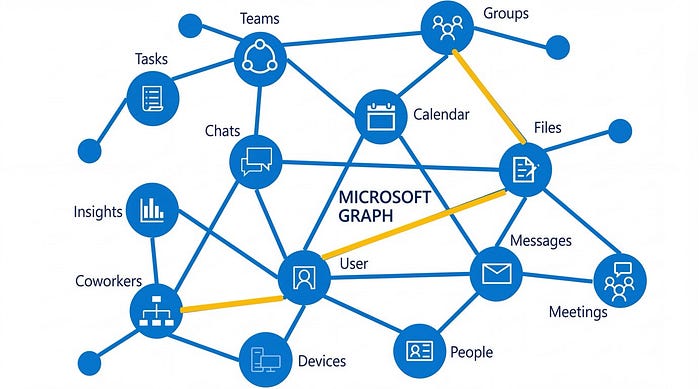
Microsoft Graph launched in 2015 as the answer to that fragmentation. The goal was a single, unified REST API endpoint — https://graph.microsoft.com — that would consolidate access to every Microsoft 365 and Entra ID service under a single authentication model, a single base URL, and a single permission framework. By 2017, it had become the primary API for Microsoft 365 development, with the legacy service-specific APIs progressively deprecated. Azure AD Graph reached end of life in 2023.
The design intent was developer productivity. One token, one endpoint, consistent query syntax using OData, and a permission model that lets applications declare exactly what they need access to. In practice, it achieved that goal — and created something else in the process.
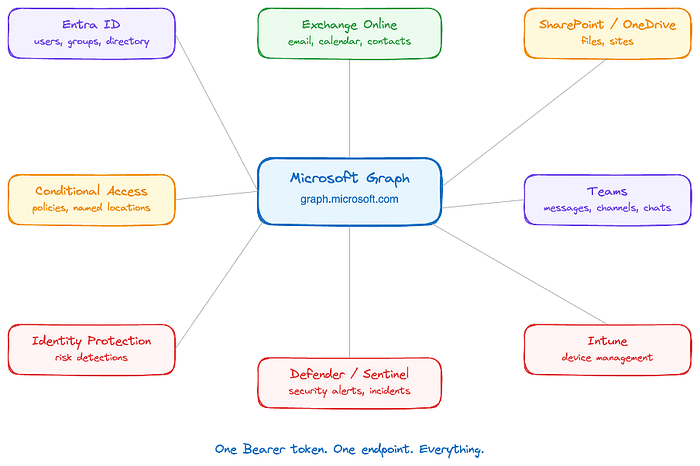
One token. One base URL. Access to:
· Users, groups, and directory objects (Entra ID)
· Email, calendar, contacts (Exchange Online)
· Files and sites (SharePoint / OneDrive)
· Teams messages, channels, chats
· Device management (Intune)
· Security alerts and incidents (Microsoft Defender, Sentinel)
· Identity risk detections
The permission model is layered. Delegated permissions act on behalf of a signed-in user — bounded by what that user can access. Application permissions act as the application itself, tenant-wide, regardless of any individual user, and that distinction is where the real blast radius lives. A delegated token for a standard user is sent to one mailbox. An application token with Mail.Read reaches every mailbox in the tenant.
The consolidation that made Graph useful for developers made it equally useful for attackers. Each flow produces a Bearer token. What that token can access is determined entirely by the permission type it carries and what an admin has decided to grant.
The Most Abused Graph Endpoints
These are the endpoints consistently appearing in post-compromise activity, red team engagements, and threat intelligence reporting. All endpoints follow the standard Graph request structure: {HTTP method} https://graph.microsoft.com/{version}/{resource} — full API reference at Microsoft Learn.
/v1.0/users — Tenant Enumeration
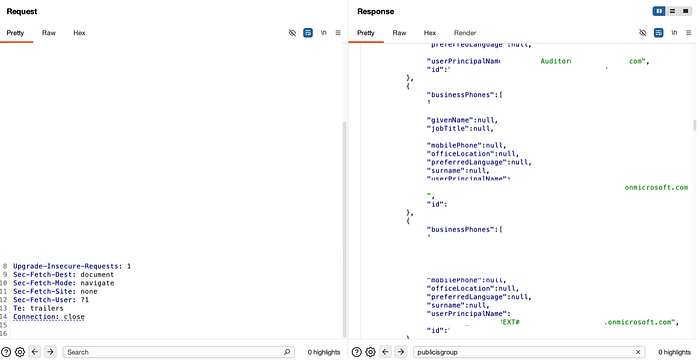
With User.Read.All or Directory.Read.All. All, this returns every user object in the tenant — display names, UPNs, job titles, departments, managers, phone numbers.
This was the first call made against the FMCG tenant from the Postman finding. Full directory returned — approximately 59,000 records. An org chart built in seconds, with no authentication challenge beyond the credentials sitting in a public workspace. Attackers use this to identify high-value targets, map BEC reporting structures, and build targeted phishing lists. With application permissions, it runs silently with no user interaction.
Defensive note: Audit which service principals hold User.Read.All at the application level. It is frequently over-provisioned.
/v1.0/users/{id}/messages — Email Access
With Mail.Read (delegated) or Mail.ReadWrite(application), an attacker can read, search, and exfiltrate email for any user in the tenant. OData query parameters allow precise targeting — searching for password reset emails, MFA codes, wire transfer requests, and contract attachments.
This is the engine behind most Graph-based BEC. Attackers monitor an executive's inbox for financial conversations, forward rules exfiltrate ongoing threads, and Mail.Send lets them send as the user from a legitimate mailbox — passing all email authentication checks.
Defensive note: Monitor for application-level Mail.Read and Mail.Send permissions. Legitimate applications rarely need both.
/v1.0/users/{id}/drive/root/children — OneDrive File Access
Files.Read.All or Files.ReadWrite.All at the application level gives tenant-wide OneDrive access. Sensitive documents, credential stores, internal wikis, HR data — all accessible through a single authenticated GET request. SharePoint sites are reachable via /sites with equivalent permissions. This is quiet, logged like normal API activity, and can stage data exfiltration at scale.

Defensive note: Application-level Files permissions are rarely necessary. Flag any service principal holding Files.ReadWrite.All.
/v1.0/servicePrincipals — Privilege Mapping
With directory read permissions, an attacker can enumerate all service principals in the tenant and their assigned Graph permissions. This is lateral movement reconnaissance — identifying which apps have privileged access and whether any have exposed secrets. Post-compromise, attackers map the app ecosystem looking for privilege escalation paths. A compromised low-privilege app that can read other service principals may identify a higher-privilege app whose secret is also retrievable.
Defensive note: Restrict Directory.Read.All at the application level. Enumerate your own service principals before an attacker does — look for stale apps with broad permissions and secrets that haven't been rotated.
/v1.0/users/{id}/sendMail — Impersonation
Mail.Send application permission allows sending email as any user in the tenant — no SMTP relay, no legacy auth required. The email originates from a legitimate mailbox, passes SPF, DKIM, and DMARC, and is indistinguishable from a genuine send. This is BEC without a phishing infrastructure.
Defensive note: Mail.Send at the application level is one of the highest-risk Graph permissions in existence. Any service principal holding it warrants scrutiny.
/beta/identity/conditionalAccess/policies — Policy Enumeration
With Policy.Read.All, an attacker can read the tenant's entire Conditional Access configuration — which users are excluded, which apps are in scope, which locations are trusted, which authentication strengths are required. This turns policy gaps into attack paths. An attacker who maps CA policy exclusions before making data access calls can route activity through the gaps deliberately.
Note that this endpoint uses the /beta path rather than /v1.0 — meaning it is part of Microsoft's preview API surface and subject to change. That it remains in beta does not reduce its operational value to an attacker; the data it returns is fully live and reflects the tenant's active policy configuration.
Defensive note: Policy.Read.All should be treated as a sensitive permission. An attacker with this access can map your entire defensive posture before touching a single piece of data.
Why Graph Changes the Post-Compromise Calculus
Think of your Microsoft 365 environment as a building. Traditional security is the building itself: locks on doors, guards at entrances, cameras in corridors. Endpoint detection is the CCTV. Network monitoring is the perimeter fence. All of it assumes the attacker has to physically enter and move through the space — and that movement generates evidence.

Graph credentials are a master key. Whoever holds one doesn't enter the building at all. They call the building management system from anywhere in the world and instruct it to open every door, copy every file, and forward every internal conversation. The CCTV never triggers. The guards never see anyone. The perimeter fence was never relevant. The Postman workspace in this article's finding was the lockbox left outside — a master key placed there for convenience, just temporarily, just for testing, and then forgotten.
Traditional endpoint-based attacks require staying resident on a machine. A foothold, a persistence mechanism, and lateral movement across the network. Each step generates artefacts — process creation events, file writes, network connections — that endpoint detection tools are built to catch.
Graph-based attacks are structurally different. They are API calls to a Microsoft-hosted service, authenticated with a legitimate token, that generate log entries identical to normal application activity. The attacker doesn't need to be on the network. They don't need to touch endpoints. They don't need to move laterally. They need a token, and the three flows covered in this article give them multiple paths to obtain one.
The FMCG finding illustrates this directly. A credential in a public Postman workspace. A token request against login.microsoftonline.com. A 200 OK. From that point: user directory, group memberships, Teams messages - all via authenticated HTTP requests to graph.microsoft.com. No malware. No lateral movement. No endpoint artefact of any kind. The entire operation was indistinguishable from a legitimate integration calling the same API.
It would be easy to dismiss that finding as an accident — one misconfigured workspace, one organisation that didn't clean up after an API test. Before reaching that conclusion, consider the data.
Eighteen months of monitoring publicly disclosed Postman artefacts, documented in Secrets in the Wild: 2025, produced 40 unique confirmed secrets across 29 organisations — in a single source category, from passive monitoring alone. Most of the findings didn't come from small startups. They came from mid-sized to large organisations in the 20,000–100,000 employee range, with the 100,000+ bracket also well represented. The sector distribution was equally broad: Telecommunications, Financial Services, Automotive, Oil and Gas. Not a niche problem. Not a startup problem. A complexity-and-scale problem that describes most enterprise Microsoft 365 environments.
The exposure pattern matters too. Twenty-two of the 29 organisations, 22 had a single identified secret. Most will never know it existed. There was no breach notification, no anomaly alert, no sign-in risk signal — because from the identity platform's perspective, nothing went wrong. A valid credential was used to request a valid token. 200 OK.
This is the environment in which infostealers now operate. Malware families like Redline, Lumma, and Raccoon harvest session cookies, saved passwords, and application tokens at an industrial scale, feeding logs into criminal marketplaces where valid Microsoft 365 session material is commoditised. The assumption that MFA closes the exposure gap doesn't hold when the token has already been issued. An infostealer that exfiltrates a valid refresh token bypasses MFA entirely — authentication already happened. The attacker inherits a completed session.
This is what has shifted the identity layer into a primary attack surface. Not credentials in the traditional sense — usernames and passwords that MFA was designed to protect — but tokens, secrets, and session state that exist downstream of authentication entirely. Graph sits at the end of that chain. A token reaches it regardless of how it was obtained — phished, stolen from a Postman workspace, exfiltrated by an infostealer, or generated by a compromised service principal. The API doesn't know the difference. It returns 200 OK.
For defenders, the implication is specific: identity is the perimeter, and Graph is the network. Monitoring needs to cover service principal credential activity — secret additions, certificate uploads, rotation gaps — alongside application permission grants, unusual Graph API call patterns, device code flow sign-ins for unfamiliar application IDs, and service principals with no interactive sign-in baseline.
Microsoft Entra's sign-in logs and the Unified Audit Log both capture Graph activity. The correlation gap — between application identity and human identity, between non-interactive sign-in events and the data access they enabled — is where most SOC teams are blind.
The organisation's findings show no VDP, no bug bounty, and no external signal that its credentials are exposed. That gap isn't unique to them. It is the default state for a significant proportion of enterprises running Microsoft 365, and Graph is the API sitting in front of everything those organisations are trying to protect.
Conclusion
Microsoft Graph is not a niche API used by developers. It is the operational backbone of every Microsoft 365 environment, and a single valid token, obtained through any of the three flows covered in this article, is sufficient to access it.
The controls most organisations rely on — MFA, Conditional Access, endpoint detection — were designed for a different threat model. They assume an attacker who needs to authenticate interactively, move laterally, and touch endpoints. Graph-based attacks skip all three steps. The token is the intrusion. The API call is the lateral movement. The log entry is indistinguishable from legitimate traffic.
Three things to take away:
Audit your service principals. Know which applications hold Mail.Read, User.Read.All, Files.ReadWrite.All, or Mail.Send at the application level. Treat any service principal holding *.All permissions with the same scrutiny you would a privileged human account.
Watch the logs most teams ignore. Non-interactive sign-in logs are where client credentials token activity lives. Device code flow sign-ins with unfamiliar application IDs are where phishing tokens land. Neither shows up in the interactive sign-in view that most SOC teams monitor by default.
Assume your secrets are findable. Postman workspaces, GitHub repositories, Swagger documentation, and environment variables in pipeline configs are the surfaces where client secrets reach attackers. Passive monitoring finds them. Attackers find them. The question is who finds them first — and whether your organisation has a way to be told.
Identity is the perimeter. Graph is the network. The building management system is running, the master key is somewhere outside, and most organisations don't have a way for someone to hand it.