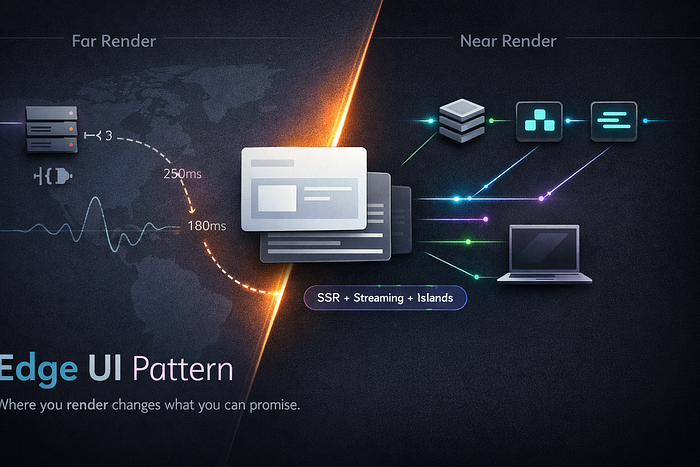

The Edge UI pattern makes rendering strategy a product decision. Learn when to use edge rendering, SSR/ISR, streaming, and hybrids for real UX wins.
You can ship the same UI two ways.
One feels instant. The other feels… fine. On your laptop. In your office. On perfect Wi-Fi.
And then reality shows up: India on a mid-range Android, Europe on shaky roaming, a US commuter in a subway tunnel, and a customer who doesn't care about your framework — only that the page loads now.
That's where the Edge UI Pattern starts: treating rendering strategy not as an implementation detail, but as a product lever.
Because once you move rendering decisions closer to the user, you're not just changing performance. You're changing what you can promise.
What "Edge UI" Actually Means
The Edge UI Pattern is simple to describe and annoyingly complex to execute:
Render (or partially render) the user interface at the network edge, using user context, and deliver the result with minimal round-trips.
It usually shows up as a blend of:
- Edge rendering: HTML (or parts of it) generated at edge locations
- Streaming SSR: send UI in chunks as data resolves
- ISR / cached SSR: serve pre-rendered pages with revalidation
- Edge personalization: user- or geo-specific variants computed near the user
- Client hydration strategy: deciding what must hydrate and what can stay static
So no, it's not "SSR at the edge." It's closer to: rendering as a distribution strategy.
Why Rendering Strategy Becomes a Product Decision
Rendering changes three things product teams care about — whether they say it or not:
1) Perceived speed (not just speed)
A product that feels fast wins. Users don't measure TTFB; they measure "did something useful appear quickly?"
Edge + streaming can show:
- above-the-fold layout
- skeletons that match real content
- meaningful text and navigation
This reduces rage clicks and bounce rates. That's product.
2) Personalization without turning into a latency tax
Personalization is great until every view becomes "call five services, wait, then render."
Edge UI can do lightweight personalization (geo, language, AB variant, device hints) without sending the user across the ocean to your origin.
But it also introduces product questions like:
- How personalized is "personalized enough"?
- Are we okay with slightly stale personalized content?
- Which segments deserve real-time logic?
Those aren't engineering questions. Those are roadmap questions.
3) Reliability as UX
Let's be real: when an origin service is slow, your UI becomes slow. When an origin is down, your UI becomes down.
With Edge UI, you can design graceful behavior:
- cached layout with "live data unavailable" banners
- fallback cards
- partial hydration
- "last known good" content
That's not just resilience. That's trust.
The Core Principle: Render Close, Hydrate Less
If you want a mental model, use this:
Render close to users. Hydrate only what must be interactive.
Most apps overhydrate. They ship huge JS bundles to make things clickable that could have been plain HTML.
The Edge UI Pattern asks a sharper question:
What is the minimum interactivity required for this screen to deliver value?
If the page is mostly reading and choosing, you can ship server-rendered HTML + tiny islands for interaction.
If it's real-time manipulation (dashboards, editors), you lean more client-side — but still edge-cache your frame and stream your data.
A Practical Architecture Flow
Here's a common Edge UI pipeline (simplified, but real enough to reason about):
User
  |
  v
CDN/Edge
  |--(A) Serve cached shell (HTML) + critical CSS
  |--(B) Edge middleware: locale, AB test, auth hints
  |--(C) Stream SSR: header + layout first
  |
  v
Origin APIs (only when needed)
  |-- pricing, inventory, user profile
  v
Edge assembles response
  |
  v
Client hydrates "islands" only
  |-- cart button, filters, search box
Key idea: the edge becomes your UI traffic controller — not just a static file dispenser.
The Four Rendering Modes (And What They Cost You)
1) Pure CSR (Client-Side Rendering)
When it shines: highly interactive apps (editors, complex dashboards)
Hidden cost: slow first meaningful paint, huge JS reliance, SEO friction.
If your product's first impression matters (marketing pages, onboarding, discovery feeds), CSR often underdelivers.
2) SSR at Origin
When it shines: dynamic pages with strong SEO requirements.
Hidden cost: global users pay global latency. Also, origin incidents become UX incidents.
3) SSR / Middleware at the Edge
When it shines: global performance + light personalization.
Hidden cost: edge runtime constraints, debugging complexity, and "where did this logic run?" confusion.
Also: not every dependency belongs at the edge. If your rendering needs heavy DB calls, you'll recreate origin latency — just with extra steps.
4) Hybrid: ISR + Streaming + Islands
When it shines: most product surfaces.
Hidden cost: you must design consistency intentionally:
- What can be stale?
- What must be real-time?
- What can be approximated?
This is where product and engineering finally have to agree on reality.
A Real-World Example: "Pricing Page That Can't Be Wrong"
Pricing pages sound easy until you ship in multiple regions with promos, taxes, and currency.
If you render pricing entirely client-side:
- SEO suffers
- users wait for JS
- you risk flicker (price changes after load)
If you render it at origin SSR:
- global latency grows
- traffic spikes hit your servers
Edge UI approach:
- cache most of the page (plan cards, features, layout) with ISR
- compute currency/locale at the edge
- fetch promo eligibility only when necessary
- stream the page so layout appears instantly, then price details finalize
Product decision here: Is it acceptable to show approximate pricing for 200ms and then finalize? Sometimes yes (with a subtle "estimated" label). Sometimes no. That's the point — rendering becomes policy.
A Code Sample: Streaming + "Islands" Mindset
Below is a minimal example of streaming HTML from a server route (conceptually similar to modern frameworks' streaming SSR), while keeping interactivity small.
import http from "node:http";

function renderShell() {
  return `<!doctype html>
<html>
<head>
  <meta charset="utf-8" />
  <title>Edge UI Demo</title>
  <style>
    body { font-family: system-ui; padding: 24px; }
    .card { border: 1px solid #ddd; border-radius: 12px; padding: 16px; margin: 12px 0; }
    .muted { color: #666; }
  </style>
</head>
<body>
  <h1>Store</h1>
  <p class="muted">Layout loads first. Data streams in.</p>
  <div id="feed">`;
}

function renderTail() {
  return `</div>
  <script>
    // "Island": only hydrate the button behavior
    window.addToCart = (id) => alert("Added " + id);
  </script>
</body>
</html>`;
}

async function fetchProducts() {
  // pretend this is slow
  await new Promise(r => setTimeout(r, 400));
  return [
    { id: "A12", name: "Chair", price: 49 },
    { id: "B55", name: "Desk", price: 129 },
  ];
}

http.createServer(async (req, res) => {
  if (req.url !== "/") return res.end("Not found");

  res.writeHead(200, { "Content-Type": "text/html; charset=utf-8" });

  // stream shell immediately
  res.write(renderShell());

  // stream content when ready
  const products = await fetchProducts();
  for (const p of products) {
    res.write(`
      <div class="card">
        <strong>${p.name}</strong>
        <div class="muted">$${p.price}</div>
        <button onclick="addToCart('${p.id}')">Add to cart</button>
      </div>
    `);
  }

  // finish response
  res.write(renderTail());
  res.end();
}).listen(3000);
Commentary (the part teams forget): this isn't about Node streaming. It's about experience sequencing:
- show structure first
- stream data as it arrives
- hydrate only the button, not the whole app
That's the Edge UI Pattern in micro form.
The Hard Part: Consistency and Debuggability
You might be wondering: what's the catch?
Here are the two big ones.
Edge logic multiplies environments
Now you have:
- edge middleware
- edge rendering
- origin rendering
- client hydration
If you don't define ownership boundaries, you'll get "it works locally" chaos.
Caching becomes UX policy
Caching isn't just an infra tweak. It changes what users see.
So you need product-level rules like:
- "Inventory can be stale for 30 seconds."
- "Prices must be real-time for logged-in users."
- "Homepage hero can be cached for 10 minutes, but notifications cannot."
If those rules aren't written down, they will be accidentally encoded in code and Redis keys.
When to Use the Edge UI Pattern
Use it when:
- global latency matters (international audience)
- SEO and first impression matter
- personalization exists but must not slow down the page
- reliability is a UX feature you want to ship
Avoid (or limit) it when:
- your UI is deeply interactive everywhere (think Figma-like)
- your backend is not designed for edge-friendly calls
- your team can't yet support multi-environment debugging
Edge UI is powerful, but it's not free.
Conclusion: Rendering Is a Product Promise
The Edge UI Pattern forces an honest conversation:
What do we want the user to feel in the first 2 seconds?
Because your rendering strategy determines:
- what appears first
- what can be cached
- what can fail gracefully
- what must be real-time
- how expensive your UX is to deliver
So yes — rendering strategy becomes a product decision. Not because engineers got dramatic. Because users notice.
If you're building a UI that competes on speed, trust, and global polish, you don't "pick SSR." You design an experience pipeline.
And you ship it like a feature.
CTA: If you've made (or regretted) a rendering choice in production, drop your story in the comments. I read them all — and the best ones deserve their own breakdown.