
The internet works because browsers, servers, and applications follow strict rules when communicating. One of the most important — yet often misunderstood — concepts behind this communication is URL Encoding.
If you're learning web development, penetration testing, or bug bounty hunting, understanding URL encoding is essential.
In this complete guide you will learn:
- What URL encoding is
- Why it exists
- How it works
- Types of URL encoding
- Real-world examples
- Security implications
- Advantages and disadvantages
- Common mistakes developers make
- How attackers abuse URL encoding
- How to encode and decode URLs easily
We'll also use a practical tool to demonstrate encoding and decoding:
URL Encoder/Decoder Tool:
IxEdge Forge | URL Encoder Tool
By the end of this blog, even if you are a complete beginner, you will fully understand URL encoding and how it is used in the real world.
Note: This tool is intended for educational and professional use by cybersecurity engineers, developers, and security researchers. Any misuse, illegal activity, or unauthorized use is strictly prohibited, and the developer (R0T-1G), Ixedge Forge, and contributors are not responsible for any damages or legal consequences resulting from its use.What is URL Encoding?
URL Encoding (also called Percent Encoding) is a method used to convert special characters into a format that can be safely transmitted over the internet.
URLs can only contain a limited set of characters. When other characters appear, they must be encoded so browsers and servers interpret them correctly.
Example:
Original URL:
https://example.com/search?q=hello worldEncoded URL:
https://example.com/search?q=hello%20worldHere:
space = %20The browser converts the space into %20 because spaces are not allowed inside URLs.
Why URL Encoding Exists
The internet originally allowed only ASCII characters in URLs.
Allowed characters include:
A–Z
a–z
0–9
- _ . ~
Everything else must be encoded.
Characters that must be encoded include:
space
&
=
?
%
#
+
/
@
:
If they are not encoded properly, the URL may:
- Break
- Be interpreted incorrectly
- Cause security vulnerabilities
How URL Encoding Works
URL encoding follows a simple rule:
Character → ASCII value → Hexadecimal → Prefixed with %Example:
Space character:
ASCII: 32
Hex: 20
Encoded: %20
Example:
# → ASCII 35 → Hex 23 → %23Example:
& → ASCII 38 → Hex 26 → %26Common URL Encoded Characters
CharacterEncodedSpace%20!%21"%22#%23$%24%%25&%26'%27(%28)%29*%2A+%2B,%2C/%2F:%3A;%3B=%3D?%3F@%40
Example: URL Encoding in Action
Original URL:
https://example.com/search?q=cyber security toolsEncoded version:
https://example.com/search?q=cyber%20security%20toolsAnother example:
Original:
https://example.com/?name=John & DoeEncoded:
https://example.com/?name=John%20%26%20DoeHere:
& → %26Types of URL Encoding
1. Percent Encoding
This is the standard URL encoding method.
Format:
%HEXExample:
space → %20
/ → %2F
This method is defined in RFC 3986.
2. Form URL Encoding
Used mainly in HTML forms.
Space becomes:
+Example:
hello worldEncoded:
hello+worldUsed in:
application/x-www-form-urlencoded3. Double Encoding
Sometimes a value is encoded twice.
Example:
../First encoding:
%2E%2E%2FDouble encoding:
%252E%252E%252FWhy?
Because:
% → %25Double encoding is frequently used to bypass security filters.
Where URL Encoding is Used
URL encoding is used almost everywhere in web communication.
1. Search Queries
Example:
https://google.com/search?q=ethical hacking toolsEncoded:
https://google.com/search?q=ethical%20hacking%20tools2. API Requests
Example:
https://api.example.com/user?name=John DoeEncoded:
https://api.example.com/user?name=John%20Doe3. Form Submissions
Forms encode values before sending them to servers.
Example:
username=John DoeEncoded:
username=John+Doe4. File Paths
Example:
https://example.com/files/My Documents/report.pdfEncoded:
https://example.com/files/My%20Documents/report.pdf5. Redirect URLs
Example:
https://site.com/login?redirect=https://example.com/profileEncoded redirect:
https://site.com/login?redirect=https%3A%2F%2Fexample.com%2FprofileURL Encoding in Cybersecurity
Understanding URL encoding is very important for penetration testing and bug bounty hunting.
Many web vulnerabilities involve encoded payloads.
Examples include:
- Path Traversal
- XSS
- SQL Injection
- Filter Bypass
Example: Path Traversal Using Encoding
Normal payload:
../../etc/passwdEncoded:
..%2F..%2Fetc%2FpasswdDouble encoded:
%252E%252E%252F%252E%252E%252Fetc%252FpasswdSome filters block ../ but allow encoded forms.
Example: XSS with URL Encoding
Payload:
<script>alert(1)</script>Encoded:
%3Cscript%3Ealert%281%29%3C%2Fscript%3EThis helps bypass simple filters.
Advantages of URL Encoding
1. Ensures Safe Transmission
Special characters do not break URLs.
2. Prevents Parsing Errors
Servers can correctly interpret query parameters.
3. Enables Complex Data in URLs
Supports spaces, symbols, and special characters.
4. Required for Web Standards
Modern browsers depend on encoded URLs.
5. Essential for APIs
APIs rely heavily on encoded parameters.
Disadvantages of URL Encoding
1. Reduces Readability
Encoded URLs look confusing.
Example:
https://example.com?q=cyber%20security%20tools2. Longer URLs
Encoding increases character length.
3. Security Bypass Risk
Attackers can use encoding to bypass filters.
4. Double Encoding Issues
Improper decoding can create vulnerabilities.
Common Mistakes Developers Make
1. Forgetting to Encode Input
This can break URLs or cause injection vulnerabilities.
2. Double Decoding
If a server decodes data twice, attackers can bypass security.
3. Encoding Entire URLs Incorrectly
Only certain parts of URLs should be encoded.
4. Improper Handling in APIs
Incorrect encoding breaks API calls.
How to Encode and Decode URLs Easily
Instead of manually converting characters, you can use an online tool.
Use the IXEdge Forge URL Encoder/Decoder Tool:
https://ixedgeforge.in/tools/ixeconud/
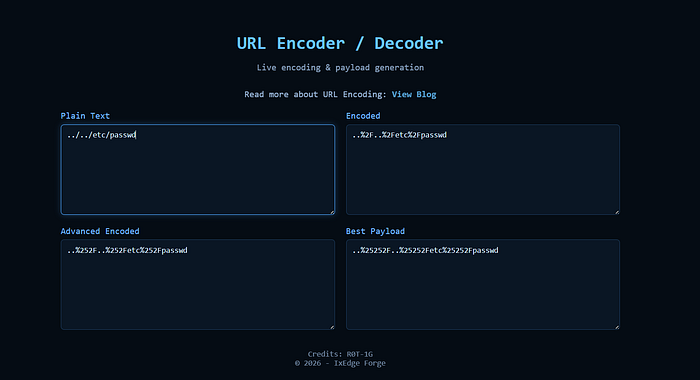
Features:
- Instant URL encoding
- Instant decoding
- Supports complex payloads
- Useful for pentesters and developers
- Works directly in browser
Simply paste your text and convert it instantly.
Real-World Example: Encoding an API Parameter
Input:
email=test+user@example.comEncoded:
email=test%2Buser%40example.comHere:
+ → %2B
@ → %40
Quick Practice Exercise
Try encoding this text:
hello hacker & cyber securityCorrect result:
hello%20hacker%20%26%20cyber%20securityYou can test it instantly here:
https://ixedgeforge.in/tools/ixeconud/
Key Takeaways
- URL encoding converts unsafe characters into a safe format.
- It uses percent encoding (
%HEX). - Spaces usually become
%20or+. - It is critical for web development, APIs, and cybersecurity.
- Attackers often use encoding to bypass filters.
- Developers must handle encoding properly to avoid vulnerabilities.
Final Thoughts
URL encoding might look simple, but it plays a crucial role in how the web works.
For developers, it ensures safe data transmission.
For cybersecurity professionals, it is a powerful technique used in exploitation and bypassing filters.
If you understand URL encoding deeply, you gain an advantage in:
- Web development
- API development
- Bug bounty hunting
- Penetration testing
And whenever you need to quickly encode or decode data, you can use:
If you found this guide helpful, consider following for more deep dives into cybersecurity, web vulnerabilities, and practical hacking knowledge. I regularly share tools, breakdowns, and real-world security concepts to help you learn faster and build stronger skills.
Stay curious, keep learning, and keep exploring the web beyond the surface. Till next Meetup, Bye Byee:>