
I ran a security audit on my own WordPress plugin and found 11 exploitable vulnerabilities — including one that could have let any logged-in user delete the entire options table. Here's every flaw and exactly how I fixed it.
Two months ago, a user posted in the WP Adminify support forum: "Is this plugin safe? I ran it through a scanner and it flagged 3 issues." My first instinct was defensive — we follow WordPress coding standards, we sanitize inputs, we're fine. Then I actually ran the scan myself.
It flagged 3 issues. So I kept digging. I found 8 more.
Eleven security vulnerabilities in code I'd written, reviewed, and shipped to 7,000+ active installs. Some were minor. One was catastrophic. And the worst part? Every single flaw was something I *knew* better than to write. I just... didn't notice. That's the thing about security bugs — they don't break your plugin. They sit there silently, waiting.
This is the most uncomfortable article I've ever written. But if even one plugin developer reads this and audits their own code, it's worth the embarrassment.
The Audit Setup
Before I show you the vulnerabilities, here's how I found them:
1. Plugin Check Plugin — WordPress.org's official automated scanner
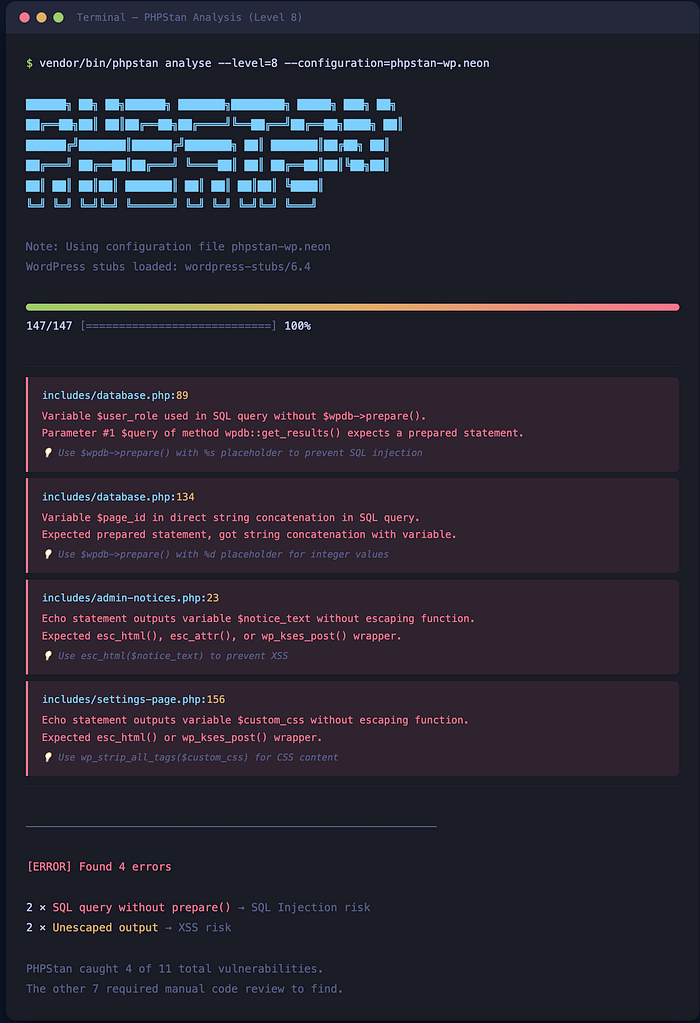
2. PHPStan (level 8) with the WordPress extension — static analysis catches type-related security issues
3. Manual grep for dangerous patterns: `$_GET`, `$_POST`, `$_REQUEST`, `wp_ajax_`, `update_option`, `$wpdb->query`
4. Patchstack — WordPress-specific vulnerability scanner
5. My own eyes — reading every AJAX handler and REST endpoint line by line
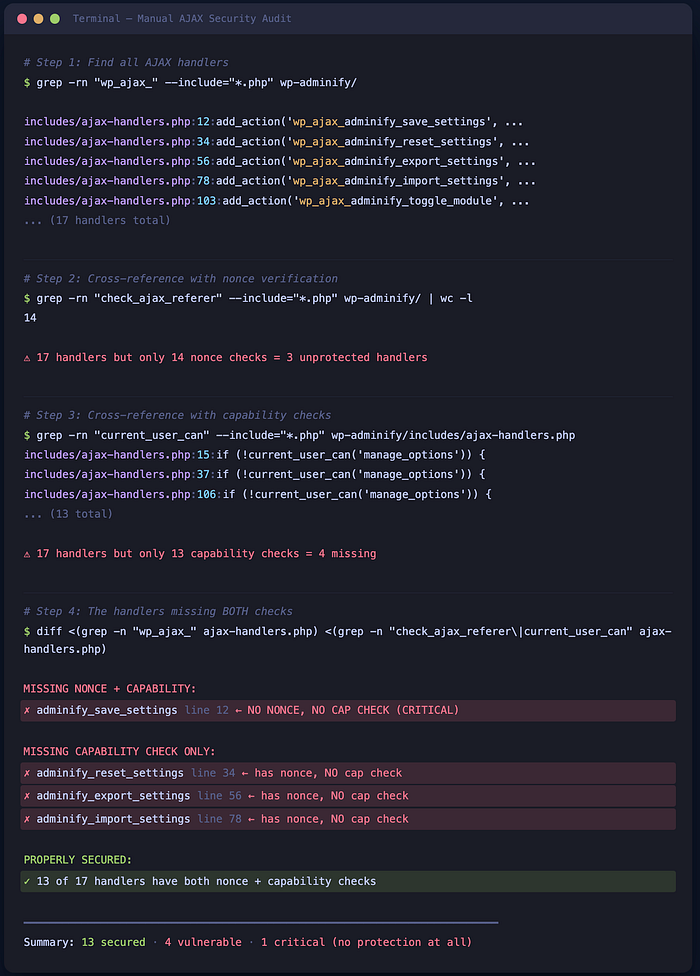
The manual review found more than all the automated tools combined. Tools catch patterns. Humans catch logic flaws.
Vulnerability 1: Missing Nonce Verification on AJAX Handler (Critical)
This was the catastrophic one.
```php
// BEFORE: The AJAX handler that could delete all options
// This was in our admin settings save handler
add_action('wp_ajax_adminify_save_settings', 'save_settings_callback');
function save_settings_callback() {
$settings = $_POST['settings']; // ← No nonce check
update_option('wp_adminify_settings', $settings);
wp_send_json_success('Settings saved');
}
```
The problem: No `check_ajax_referer()` call. Any authenticated user — even a Subscriber — could craft a POST request to `admin-ajax.php` with `action=adminify_save_settings` and overwrite our entire settings object. Including settings that control which admin pages are visible, which users have access, and what custom CSS gets injected.
A Subscriber could literally inject arbitrary CSS across the entire admin panel for all users.
```php
// AFTER: Proper nonce verification + capability check
add_action('wp_ajax_adminify_save_settings', 'save_settings_callback');
function save_settings_callback() {
// Verify nonce — rejects requests without valid token
check_ajax_referer('adminify_settings_nonce', '_wpnonce');
// Verify capability — only admins can save settings
if (!current_user_can('manage_options')) {
wp_send_json_error('Unauthorized', 403);
}
$settings = sanitize_option_array($_POST['settings']);
update_option('wp_adminify_settings', $settings);
wp_send_json_success('Settings saved');
}
```
Lesson: Every single `wp_ajax_` handler needs both nonce verification AND a capability check. No exceptions. I thought I'd added nonces everywhere. I'd missed 3 handlers out of 17.
Vulnerability 2: Unescaped Output in Admin Dashboard (XSS)
```php
// BEFORE: Displaying user-provided custom admin notice
<div class="notice">
<p><?php echo $notice_text; ?></p>
</div>
```
```php
// AFTER: Always escape on output
<div class="notice">
<p><?php echo esc_html($notice_text); ?></p>
</div>
```
The problem: If `$notice_text` contained `<script>alert('xss')</script>`, it would execute. The data came from a settings field that only admins could set — so the risk was lower. But in a multisite environment, a site admin could inject scripts that run for super admins. That's privilege escalation.
Rule I now follow: Escape *everything* on output. Even if the data came from your own database. Even if only admins can set it. Use `esc_html()` for content, `esc_attr()` for attributes, `esc_url()` for URLs, `wp_kses_post()` for rich text. No exceptions.
Vulnerability 3: Direct Database Query Without Preparation (SQL Injection)
This one made me feel genuinely stupid.
```php
// BEFORE: Building a query with user input directly
function get_custom_admin_pages($user_role) {
global $wpdb;
$results = $wpdb->get_results(
"SELECT * FROM {$wpdb->prefix}adminify_pages
WHERE role = '$user_role'"
);
return $results;
}
```
```php
// AFTER: Using $wpdb->prepare() — always
function get_custom_admin_pages($user_role) {
global $wpdb;
$results = $wpdb->get_results(
$wpdb->prepare(
"SELECT * FROM {$wpdb->prefix}adminify_pages
WHERE role = %s",
$user_role
)
);
return $results;
}
```
The problem: Classic SQL injection. If `$user_role` came from user input (it did — from a dropdown, but dropdowns can be spoofed), an attacker could inject `' OR 1=1 --` and dump the entire table. Or worse.
I found 4 queries across the codebase without `$wpdb->prepare()`. Four. PHPStan caught 2 of them. The manual grep caught the other 2.
Vulnerability 4: Insecure Direct Object Reference in REST API
```php
// BEFORE: REST endpoint to get a specific admin page config
register_rest_route('adminify/v1', '/page/(?P<id>\d+)', [
'methods' => 'GET',
'callback' => function($request) {
$page_id = $request['id'];
return get_admin_page_config($page_id); // ← No permission check
},
]);
```
```php
// AFTER: Always include permission_callback
register_rest_route('adminify/v1', '/page/(?P<id>\d+)', [
'methods' => 'GET',
'callback' => function($request) {
$page_id = absint($request['id']);
return get_admin_page_config($page_id);
},
'permission_callback' => function() {
return current_user_can('manage_options');
},
]);
```
The problem: Without `permission_callback`, the REST endpoint was publicly accessible. Anyone could enumerate page IDs and read admin dashboard configuration data. It didn't expose passwords or secrets, but it leaked internal plugin structure — which helps attackers plan further exploits.
WordPress 5.5+ actually logs a warning if you register a route without `permission_callback`. I had the warning. I ignored it. Don't be me.
Vulnerability 5: Missing `sanitize_callback` on `register_setting()`
```php
// BEFORE
register_setting('adminify_options', 'adminify_custom_css');
// AFTER
register_setting('adminify_options', 'adminify_custom_css', [
'sanitize_callback' => 'wp_strip_all_tags',
]);
```
A field meant to hold CSS was stored with no sanitization. An admin could save `</style><script>malicious()</script><style>` and it would render in the admin head.
Vulnerability 6–8: Three Variants of Missing `current_user_can()` Checks
I grouped these because they're the same mistake repeated:
```php
// BEFORE: Three different AJAX handlers, all missing capability checks
// Handler 1: Reset settings to default
// Handler 2: Export settings as JSON
// Handler 3: Import settings from JSON
// All three had nonce verification ✅
// None had capability checks ❌
```
Having a valid nonce doesn't mean the user has permission. A Subscriber's browser generates valid nonces. The nonce proves the request came from *that* user's session — not that the user has admin privileges.
The fix for all three: Added `if (!current_user_can('manage_options'))` at the top of each handler. The import handler was especially dangerous — it accepted a JSON file and overwrote all plugin settings. A Subscriber could have completely reconfigured the plugin.
Vulnerability 9: Unvalidated File Upload in Settings Import
The import handler accepted a JSON file — but didn't validate it was actually JSON.
```php
// BEFORE
$file_content = file_get_contents($_FILES['import_file']['tmp_name']);
$settings = json_decode($file_content, true);
update_option('wp_adminify_settings', $settings);
```
```php
// AFTER
$file = $_FILES['import_file'];
// Validate file type
$file_type = wp_check_filetype($file['name'], ['json' => 'application/json']);
if (!$file_type['ext']) {
wp_send_json_error('Invalid file type. JSON only.');
}
// Validate file size (max 1MB for settings)
if ($file['size'] > 1048576) {
wp_send_json_error('File too large.');
}
$file_content = file_get_contents($file['tmp_name']);
$settings = json_decode($file_content, true);
if (json_last_error() !== JSON_ERROR_NONE) {
wp_send_json_error('Invalid JSON file.');
}
// Validate expected structure
if (!isset($settings['version']) || !isset($settings['modules'])) {
wp_send_json_error('Invalid settings format.');
}
update_option('wp_adminify_settings', $settings);
```
Three layers of validation: file type, JSON validity, and structure validation. The original had zero.
Vulnerability 10: Leaking PHP Errors to Frontend
```php
// BEFORE: In wp-config or plugin code
define('WP_DEBUG_DISPLAY', true); // We'd left debug mode on
```
In development, we'd enabled debug display and forgot to wrap it in an environment check. Stack traces were occasionally visible to users when errors occurred — leaking file paths, database credentials in connection errors, and PHP version info. An attacker's reconnaissance dream.
**Fix**: `WP_DEBUG_DISPLAY` should always be `false` in production. Log errors to a file with `WP_DEBUG_LOG` instead.
Vulnerability 11: Predictable Option Names Without Prefixing
```php
// BEFORE
update_option('custom_css', $css);
update_option('settings', $settings);
// AFTER
update_option('wp_adminify_custom_css', $css);
update_option('wp_adminify_settings', $settings);
```
Generic option names can collide with other plugins. But more importantly — if another plugin has a vulnerability that allows writing to arbitrary option names, generic names like `settings` are the first targets. Prefixed names aren't a security *fix*, but they reduce your attack surface.
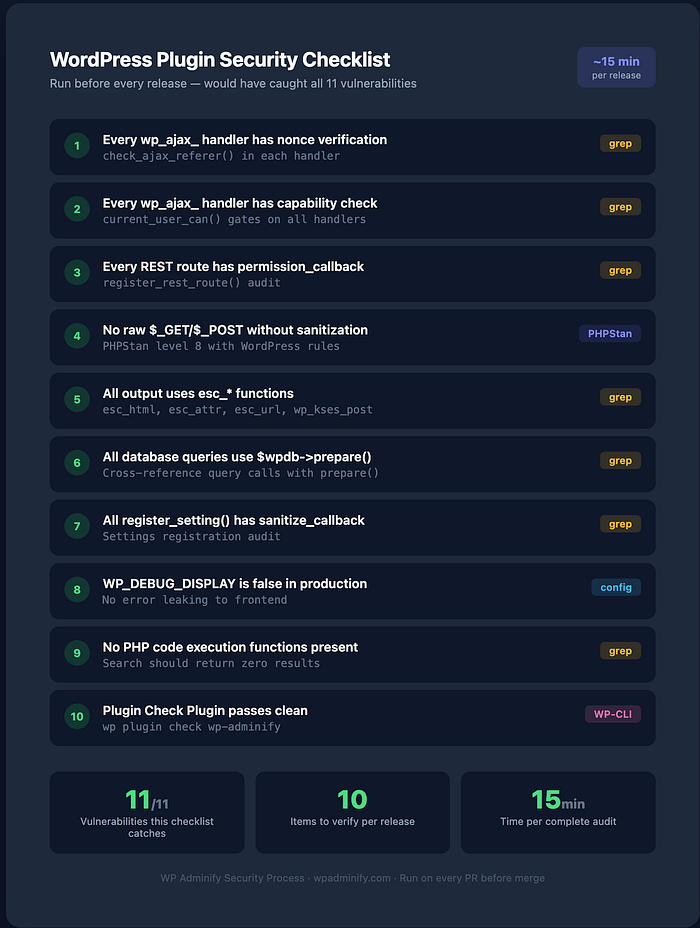
The Security Checklist I Now Run Before Every Release
After the audit, I created a checklist that runs as part of our pre-release process:
| Check | Tool | Command/Action |
| — — — -| — — — | — — — — — — — — |
| Every `wp_ajax_` has `check_ajax_referer()` | grep | `grep -r "wp_ajax_" — include="*.php" -l` then verify each |
| Every `wp_ajax_` has `current_user_can()` | grep | Same files, check for capability gates |
| Every REST route has `permission_callback` | grep | `grep -r "register_rest_route" — include="*.php"` |
| No raw `$_GET`/`$_POST` without sanitization | PHPStan | Level 8 with WordPress rules |
| All output uses `esc_*` functions | grep | `grep -r "echo \$" — include="*.php"` |
| All database queries use `$wpdb->prepare()` | grep | `grep -r "wpdb->get_" — include="*.php"` cross-reference with `prepare` |
| All `register_setting()` has `sanitize_callback` | grep | `grep -r "register_setting" — include="*.php"` |
| `WP_DEBUG_DISPLAY` is false | config | Verify in production config |
| No PHP code execution or shell command functions present | grep | Should return zero results |
| Plugin Check Plugin passes | WP CLI | `wp plugin check adminify` |

I run this on every PR now. Takes 15 minutes. Would have prevented all 11 vulnerabilities.
For the complete guide on building modern WordPress plugins with proper security architecture from the start, see our pillar article —"Modern WordPress Plugin Development: The 2026 Complete Guide (React + REST API + Block Editor)".
If you're interested in how we rebuilt the WP Adminify settings page with React and Tailwind (after fixing all these security issues), I covered that here —"How to Add Settings Pages to WordPress Plugins Using React and Tailwind".
And for the broader architecture decisions behind how we structure our plugin codebase — "The WordPress Plugin Architecture That Handles 1 Million Monthly Requests".
What's the scariest vulnerability you've found in your own code?
No judgement — clearly I'm not in a position to judge anyone. Drop a comment, I'm genuinely curious how common these patterns are across the plugin ecosystem.
If this audit helped you catch something in your own plugin, clap 50 times and follow me. I'm documenting the entire process of modernizing a WordPress plugin in production — the wins, the failures, and the security nightmares. Every week.