
Setting the Scene
It starts the way most corporate infections donot with a sophisticated zero-day, not with a nation-state APT, but with an email that looked completely normal.
Sara is an Accountant at Umbrella Corporation. She receives dozens of customer emails every day: invoices, receipts, follow-ups. So when a customer sent her a document with a macro, she didn't think twice. She opened it. The program crashed. She moved on.
Meanwhile, deep in the SIEM, an alert quietly fired.
This is the scenario I worked through in a recent SOC analyst lab, and it's one of the most realistic exercises I've come across. Here's how it unfolded.
Step 1: The SIEM Alert and Initial Triage
The starting point was a SIEM alert flagging outbound connections to a known malicious domain from an internal host. The first job as the analyst: figure out who and what.
Checking the email gateway logs for Sara's mailbox turned up nothing obviously suspicious: emails from customers, normal business traffic. This is a critical lesson right out of the gate:
The absence of a suspicious email doesn't mean there's no threat. When attackers compromise a trusted third party and send malware from a legitimate account, they inherit that sender's reputation. Gateway filters don't flag what they don't know is bad.
A quick call to Sara filled in the gap. She described opening an invoice document, a macro running, and then a crash, the classic sign of a malicious macro executing its payload in the background while throwing an error to the foreground to mask what just happened.
With that context established, the SOC team pulled a PCAP for deeper analysis.
Step 2: Identifying the Infected Host
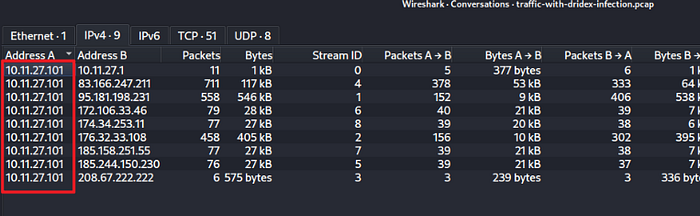
Finding: 10.11.27.101
The first task in any PCAP investigation is anchoring the malicious activity to a specific host. Filtering traffic and correlating connection patterns pointed clearly to the internal IP 10.11.27.101 (Sara's workstation) as the source of all suspicious outbound traffic.

Step 3: The Macro's Payload Download
Finding: spet10.spr
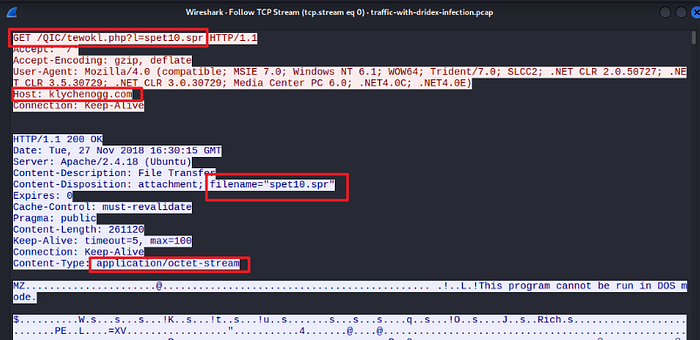
Digging into the HTTP traffic, the macro document was observed attempting to download a binary called spet10.spr from an external server.
The .spr extension is a deliberate misdirection. Malware authors routinely use non-standard extensions to slip past file-type filters and avoid raising eyebrows. What confirmed its true nature was the HTTP response header:
Content-Type: application/octet-stream This header tells us that the server is transferring raw binary data, not an image, not a web page, not a stylesheet. When we see this header paired with a suspicious domain and an odd filename, we're almost certainly looking at a payload download.
This was Ursnif establishing its foothold.

Step 4: Ursnif's C2 Communication
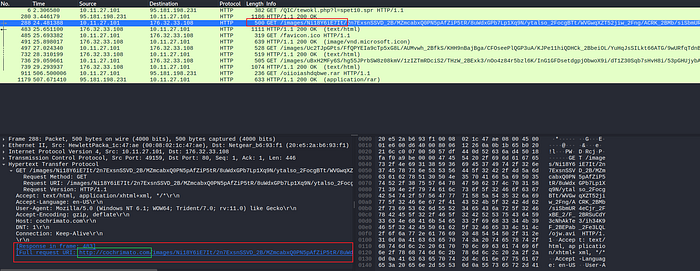
Finding: cochrimato.com (HTTP GET /images/)
Once installed, Ursnif (also known as Gozi) started beaconing home. The PCAP showed repeated HTTP GET requests to the /images/ path on the domain cochrimato.com.
This is a classic C2 evasion technique, disguising command-and-control traffic as routine image requests. To a casual observer or a basic network monitor, GET /images/ looks like a browser loading a webpage. Only when we look at the timing, frequency, and destination do the red flags emerge.
Ursnif's known C2 patterns include:
- HTTP GET requests to
/images/paths - Encoded data exfiltration embedded in the URI
- Communication mimicking legitimate browser traffic (user-agent strings, referrer headers)
This is why behavioral network analysis matters as much as threat intel lookups.

Step 5: Ursnif Drops Dridex
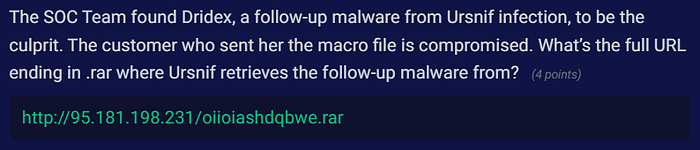
Finding: http://95.181.198.231/oiioiashdqbwe.rar
This is where the infection escalated significantly. Ursnif, acting as a loader, reached out to retrieve its follow-up payload (Dridex) from the following URL:
http://95.181.198.231/oiioiashdqbwe.rarTwo things stand out here:
- Direct IP instead of a domain. No DNS lookup means no domain-based reputation filtering. It's a deliberate bypass.
- Randomized filename.
oiioiashdqbwe.raris clearly auto-generated. This makes hash-based or filename-based detection useless across campaigns.
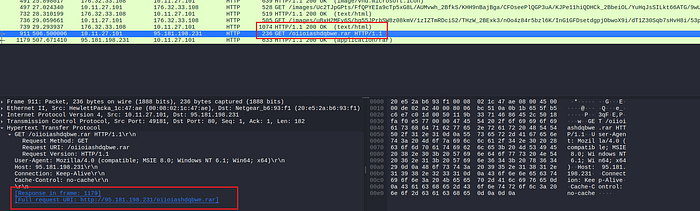
The full infection chain now looks like this:
Compromised Customer Email
    └─► Malicious Macro Document (sent to Sara)
            └─► Macro Executes → Downloads spet10.spr (Ursnif)
                    └─► Ursnif C2 → cochrimato.com/images/
                            └─► Ursnif fetches Dridex →
                                http://95.181.198.231/oiioiashdqbwe.rar
                                        └─► Dridex Executes
BUT what actually is Dridex?
Before the final finding, it's worth understanding what we're dealing with.
Dridex (also known as Bugat or Cridex) is one of the most prolific and long-running banking Trojans targeting Windows systems. Active since around 2011, it has been used in campaigns that have caused hundreds of millions of dollars in financial losses globally.
Its core capabilities include:
- Credential theft: targeting banking portals, email clients, and credential stores.
- Web injection attacks: modifying banking websites in-browser to capture credentials in real time.
- Lateral movement: spreading across networks once inside.
- Persistence : surviving reboots via registry modifications and scheduled tasks.
Dridex isn't opportunistic malware. It's a sophisticated, organized criminal tool and finding it on our network is a serious incident.
Step 6: Dridex's Post-Infection C2 Traffic
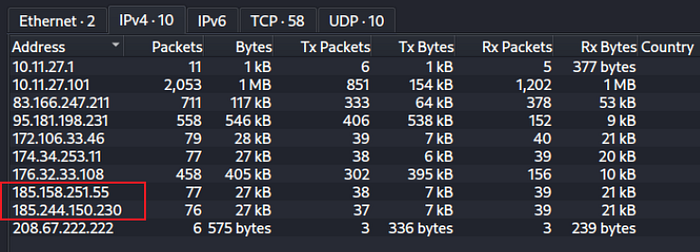
Finding: 185.244.150.230
After execution, Dridex began its post-infection beaconing. The PCAP showed C2 traffic going to 185.244.150.230.
Here's what made this finding interesting: this IP did not carry a malicious reputation at the time of investigation. A second IP 185.158.251.55 was flagged as malicious by threat intel feeds, but behavioral analysis showed it was not the active Dridex C2 in this session.
This is one of the most important lessons from this lab:
Threat intelligence feeds are a starting point, not the finish line. A clean reputation score doesn't mean clean traffic. Always combine IOC lookups with behavioral analysis, timing, packet patterns, data volumes, and communication cadence all tell a story that a reputation database can't.

Key Takeaways
Working through this lab reinforced several fundamentals that get talked about a lot but hit differently when we're actually hunting through packets:
1. Phishing still works, especially through trusted senders. Sara didn't click a random link from a stranger. She opened an invoice from a known customer. The attacker's real target was the customer, and Sara was collateral damage. Supply chain and third-party compromise is a real and underappreciated vector.
2. Macros remain a primary malware delivery mechanism. Despite years of awareness, macro-enabled documents are still among the most effective delivery methods. Enforcing macro policies via Group Policy and disabling them by default, is a low-effort, high-impact defensive control.
3. Multi-stage infections are designed to evade detection. Ursnif doesn't announce itself. It downloads quietly, communicates in disguise, and hands off to Dridex, a far more dangerous payload, before most defenders have pieced together what happened.
4. PCAP analysis is irreplaceable. Logs told us something happened. The PCAP told us exactly how. There's no substitute for full packet capture when we're trying to reconstruct an attack.
Final Thoughts
This lab is a great example of why SOC work is more art than checklist. The email gateway was clean. The sender was known. The file looked legitimate. Every surface-level indicator pointed to normal business activity, until we looked at the network.
Knowing what to look for, where to look, and how to connect the dots between a SIEM alert and a two-stage banking Trojan infection is exactly the kind of thinking that separates reactive security from proactive defense.
If you want to try this lab yourself, head over to Blue Team Labs Online — it's free to sign up and this challenge is still completable even in its retired state. I'm always working through new labs and challenges (more writeups incoming).
Security Blue Team Online Labs — https://blueteamlabs.online/
About Dridex — https://malpedia.caad.fkie.fraunhofer.de/details/win.dridex