June 2, 2026
BloodHound CE Is Better Than Ever
BloodHound CE opens the door to many more users for this fantastic network enumeration tool. Take a look at how to set it up and get started

Mark Puckett
3 min read
One of the best parts of running a penetration testing firm is watching the tools our team uses evolve. When SpecterOps released a completely reworked BloodHound Community Edition in late 2023, one of our lead pentesters, Andrew Trexler, was cautiously optimistic. Early on it was rough around the edges, and he held off on adopting it. Recently, though, he gave it another hard look, and he shares his findings in a new Raxis blog, which I'm highlighting today.
If you work in offensive security or you've ever hired a pentesting firm and wondered what's actually happening under the hood during an internal network assessment, keep reading.
What BloodHound Does (and Why It Matters)
BloodHound maps relationships inside a Windows Active Directory environment. That sounds dry until you realize those relationships are exactly what attackers abuse to move laterally across a network, escalate privileges, and ultimately land on a domain controller.
During an internal penetration test, we're not just running a vulnerability scanner and calling it a day. We're trying to answer the same question a real attacker would ask: given a low-privilege foothold, what's the fastest path to owning this domain? BloodHound answers that question visually and analytically, surfacing attack paths that would take hours to find manually.
The tool is valuable both for our pentesters and, frankly, for our customers. The output tells a remediation story. It's one thing to say "we escalated to domain admin." It's more useful to say, "here's the exact chain of misconfigurations and trust relationships that made it possible, and here's how to break each link."
The Community Edition Glow-Up
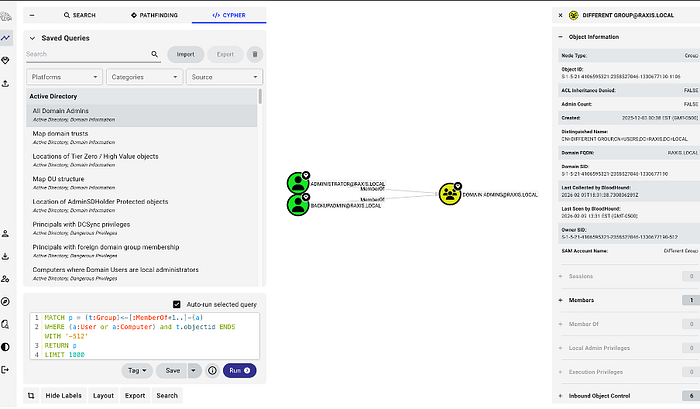
The original BloodHound had a legendary status in the pentesting community. The reworked CE initially drew some skepticism because it launched without full feature parity. Understandable. But the project has matured significantly, and the new interface brings real improvements, including a cleaner query experience and a built-in library of saved queries that are genuinely useful for jumping straight into finding privilege escalation paths.
Getting It Running
Installation is Docker-based now, which is a shift from the older setup. If you're already running Docker Desktop, it's actually straightforward. Andrew's full walkthrough on the Raxis blog covers this step by step, but the short version is:
- Download the latest release from the BloodHound GitHub.
- If you need the web interface accessible across your network (useful when running BloodHound on a VM), run the check command first to pull down the YAML files before installing.
./bloodhound-cli check./bloodhound-cli checkThen modify docker-compose.yaml to change the listening interface from 127.0.0.1 to 0.0.0.0. After that, run the install and decline to replace your modified YAML files when prompted.
./bloodhound-cli install./bloodhound-cli installThe installer outputs the initial admin password at the end. Log in, upload some data, and you're working.
Collecting the Data
Here's where things got tricky with CE for a while. The legacy SharpHound collectors are not compatible with the new version. For our team, this was the main holdup. We rely heavily on the Python-based collectors in Kali Linux, and the community needed time to build out CE-compatible versions.
That wait is over. Kali now includes bloodhound-ce-python in its package manager, which wraps dirkjanm's updated CE ingestor. A typical collection run looks like this:
bloodhound-ce-python -u administrator -p '<password>' - zip -op ce-test -d raxis.local -ns 10.110.110.2 -c allbloodhound-ce-python -u administrator -p '<password>' - zip -op ce-test -d raxis.local -ns 10.110.110.2 -c allA few notes on that command. The — zip flag bundles the output for easy upload into the UI. The -ns flag specifies the name server, which is worth including proactively since testing machines don't always resolve domain controllers automatically. The -c all flag runs all available collection methods.
One current limitation worth noting from the project's own documentation: GPO local groups are not yet supported, though all other collection methods are implemented. For most engagements this is a minor gap, not a dealbreaker.
What This Means for Pentesting Customers
If your organization is running internal network penetration tests, BloodHound CE output is something you should expect to see in your report. Any serious pentester should be using a tool like this to map out your Active Directory attack surface rather than relying purely on manual enumeration. If you're evaluating a pentesting vendor, asking whether they use BloodHound or similar graph-based AD analysis tools is a reasonable and revealing question.
The full tutorial from Andrew, including screenshots of each installation and configuration step, is live on the Raxis blog. It's written by someone who uses this tooling on real engagements, not a vendor pitch. Worth bookmarking if you're setting up your own lab or evaluating your internal security posture.
👉 Head over to Andrew's complete walkthrough to read more.