

Microsoft Blocks Windows 11 & Server 2025 Automated Installations Following Critical RCE Vulnerability
The enterprise IT landscape is currently undergoing a massive, forced architectural shift. For over fifteen years, Windows Deployment Services (WDS) has been the undisputed heavyweight of on-premises operating system provisioning. Sitting quietly in server rooms worldwide, WDS allowed system administrators to image, configure, and deploy thousands of Windows machines over a network with zero physical interaction.
But the era of legacy, monolithic network imaging is facing a hard, undeniable stop.
Following the disclosure of a highly critical Remote Code Execution (RCE) vulnerability — tracked as CVE-2026–0386 — Microsoft has announced a definitive end to automated, "hands-free" deployments for its newest operating systems. Workflows relying on boot.wim for Windows 11 and the upcoming Windows Server 2025 are now entirely blocked by default.
To understand why Microsoft is taking the drastic step of permanently amputating a core feature rather than simply patching it — and why traditional local provisioning is being abandoned — we must examine the threat intelligence landscape and the fundamental architectural flaws of legacy WDS.
The Blueprint of a Vulnerability: Legacy Architecture
To grasp the severity of CVE-2026–0386, we first need to look at the underlying mechanics of how native WDS provisions a machine, and exactly where the security perimeter collapses.
When an IT administrator uses WDS to deploy an OS via a Preboot Execution Environment (PXE) boot, the target machine connects to the network, receives an IP address via DHCP, and downloads a network bootstrap program (NBP). The machine then pulls down a boot image, typically boot.wim, extracted directly from Windows installation media.
To achieve true "hands-free" deployment — meaning the IT technician does not have to sit at the keyboard and manually type in passwords, domain configurations, regional settings, and product keys — the WDS server utilizes an Unattend.xml file (often called an answer file).
From a threat actor's perspective, this XML file is the holy grail. It routinely contains:
- Plaintext or easily reversible Local Administrator passwords.
- Domain Join credentials (often utilizing accounts with elevated directory privileges).
- Volume Licensing Keys (VLKs).
- Internal network routing, proxy configurations, and organizational unit (OU) structures.
The fatal vulnerability lies in how this highly sensitive file is transmitted across the local network.
CVE-2026–0386: The Anatomy of a Supply Chain Exploit
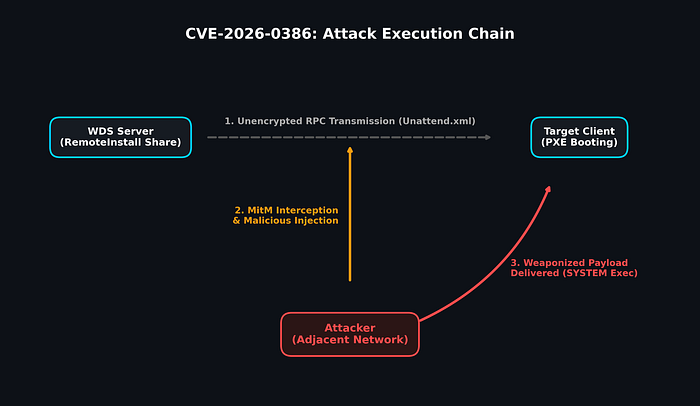
Categorized under CWE-284 (Improper Access Control), CVE-2026–0386 exposes a massive design flaw: when the booting client requests the Unattend.xml file, the WDS server transmits it via the RemoteInstall share over an unauthenticated and unencrypted Remote Procedure Call (RPC) channel.
Because this channel relies on legacy protocols lacking modern authentication or transport-layer encryption, any attacker positioned on the same adjacent network segment can easily execute a Man-in-the-Middle (MitM) attack.
Threat actors do not need domain administrator rights to pull this off. A compromised IoT device (like a smart TV in a conference room), a rogue Raspberry Pi plugged into a lobby ethernet jack, or a low-level compromised workstation can be used to passively sniff or actively intercept the RPC request.
Escalation from Data Theft to Remote Code Execution
The risk extends far beyond simple credential harvesting. Because the RPC channel is unauthenticated, the booting client performs zero integrity checks on the file it receives. It blindly trusts whatever Unattend.xml file is handed to it.
Threat intelligence researchers have demonstrated that an attacker can intercept the client's request and dynamically inject a malicious, modified Unattend.xml file.
The Windows Setup process (OOBE) executes the instructions within this answer file with absolute SYSTEM-level privileges. By injecting malicious PowerShell scripts, adding unauthorized local administrators, or embedding persistent backdoor binaries into the deployment sequence, the attacker gains complete control over the newly provisioned machine before the actual end-user even logs in for the first time.
In an enterprise environment where dozens or hundreds of machines might be imaged simultaneously, this flaw transforms a standard IT administrative tool into a devastating, supply-chain-level vector for mass ransomware deployment or persistent espionage.
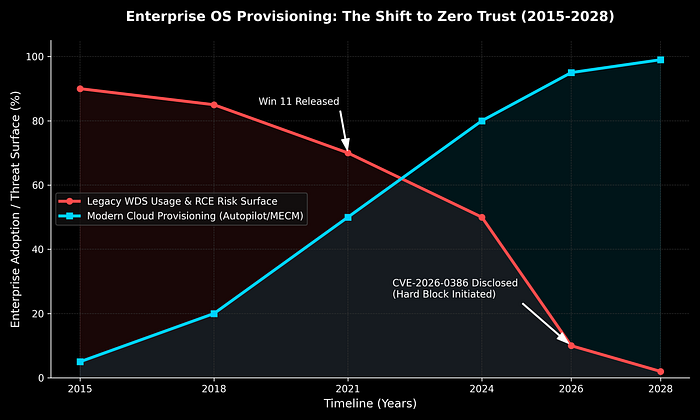
Why Not Just Patch It? The Shift to Zero Trust
A common question among system administrators is: Why doesn't Microsoft simply release a patch to encrypt the RPC channel?
The answer lies in technical debt and the industry-wide shift toward Zero Trust architecture. Modifying the underlying PXE boot and WDS RemoteInstall protocols to support modern, certificate-based authentication would require a massive overhaul of an outdated system. Furthermore, traditional "gold image" deployment is fundamentally misaligned with modern security postures.
Instead of patching a leaky, legacy boat, Microsoft is forcing organizations onto a new ship. They are actively pushing enterprises toward cloud-centric provisioning methods — like Windows Autopilot and Microsoft Intune — which natively support encrypted channels, multi-factor authentication, and Zero Trust verification directly from the OEM hardware level to the end-user.
The Hard Cutoff: The New WDS Support Matrix
Because the architectural flaw is deeply embedded in how native WDS operates, Microsoft is deprecating the functionality. Note: Microsoft Configuration Manager (MECM/SCCM) is NOT affected, as it uses custom boot images and secures its own distribution points, bypassing the vulnerable WDS RPC mechanism.
If your organization relies on native WDS running Windows Setup in WDS mode using a boot.wim, the support landscape has permanently changed. (Note: Attempting to deploy blocked versions will now result in a confusing "A media driver your computer needs is missing" error — this is the hard block in action).
Here is the exact status of WDS native deployments moving forward:
Windows 11:
- Status: COMPLETELY BLOCKED. You can no longer use native WDS and boot.wim to deploy Windows 11.
Windows Server 2025:
- Status: COMPLETELY BLOCKED. The upcoming server OS will reject legacy WDS deployments entirely.
Windows Server 2022:
- Status: DEPRECATED. Currently, the system will display a stark warning message regarding legacy deployment, but the workflow is not yet hard-blocked. It will be soon.
Windows 10 / Server 2016 & 2019:
- Status: SUPPORTED (Conditionally). You may continue to deploy these older OS versions, provided you are using a boot image from a currently supported version of Windows 10.
The Two-Phase Hardening Timeline
To prevent immediate, catastrophic disruption of enterprise deployment pipelines, Microsoft has initiated a two-phase mitigation rollout via KB5074952.
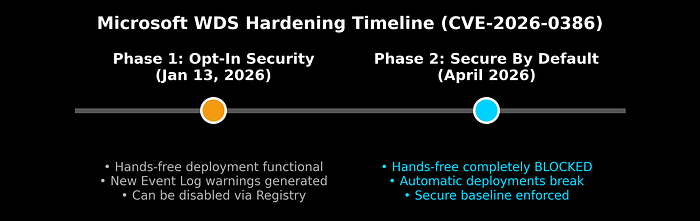
Phase 1: Opt-In Security (Active Since January 13, 2026) With the release of the January security update (including hotpatch KB5084597), Microsoft implemented strict registry-level controls and new event logging.
Currently, hands-free deployment remains technically functional, but it operates in a highly vulnerable state. WDS servers will now aggressively log Errors in the Microsoft-Windows-Deployment-Services-Diagnostics/Debug log, warning administrators: "This system is using insecure settings… This may expose sensitive configuration files to interception." Administrators must proactively edit the registry to secure their environment immediately.
Phase 2: Secure by Default (April 2026) Following the April 2026 cumulative security update, Microsoft will drop the hammer. Hands-free deployment over WDS will be fully disabled by default.
If an organization takes no action between January and April, their automated native WDS deployments will abruptly break. While a registry override will exist for extreme legacy edge-cases, Microsoft explicitly states that doing so constitutes an insecure configuration and advises against it.
Defending the Perimeter: Actionable Steps
The deprecation of boot.wim support for modern operating systems is a clear mandate: modernize your provisioning. To defend against CVE-2026–0386 and ensure business continuity, IT and Security teams must execute the following:
1. Immediate Mitigation: Enforce the Registry Block Do not wait for the April enforcement. Audit your network for Unattend.xml usage. If you must keep WDS running temporarily, apply the following registry key to block unauthenticated access (disabling the vulnerable feature):
- Path:HKLM\SYSTEM\CurrentControlSet\Services\WdsServer\Providers\WdsImgSrv\Unattend
- DWORD Name: AllowHandsFreeFunctionality
- Value: 0
2. Monitor Event Viewer Actively monitor your WDS server event logs. If you see Warning events stating, "Unattend file request was made over an insecure connection. Windows Deployment Services has blocked the request," your registry mitigation is successfully defending against insecure network queries.
3. Migrate Your Deployment Strategy Because Windows 11 and Server 2025 are permanently blocked from native WDS hands-free deployment, you must pivot to modern tools:
- Microsoft Intune & Windows Autopilot: The definitive future of endpoint provisioning. Devices are shipped directly to users and securely provisioned from the cloud upon first login, eliminating local imaging servers entirely.
- Microsoft Configuration Manager (MECM): If you operate in a highly regulated or air-gapped environment where cloud provisioning is impossible, MECM remains fully supported.

The message from Microsoft is unequivocal: the days of transmitting plaintext administrative credentials over unencrypted local network shares are over. By taking immediate action, IT administrators can neutralize this critical RCE threat and bring their infrastructure into the modern era of endpoint management.