
Content Security Policy (CSP) is a powerful web security standard designed to prevent cross-site scripting (XSS), clickjacking, and other code injection attacks. It works by allowing site owners to declare trusted sources for various types of content (scripts, styles, images, frames, etc.), so that the browser will only load resources from those approved origins. In practice, a CSP is sent by the web server as an HTTP response header (or <meta> tag in HTML) which the browser enforces on the loaded page.
For example, a policy like:
Content-Security-Policy: default-src 'self'; script-src 'self' https://cdn.example.comtells the browser to only load everything from the same origin ('self'), except that scripts can also come from cdn.example.com. Each piece of the policy is a directive (separated by semicolons) that applies to a specific resource type.
Figure: A CSP header consists of directives (like
default-src,img-src, etc.) each with allowed source values. This example allows images fromselforexample.comand all other resources only fromself.
A CSP provides defense-in-depth for web applications. Even if your site has a XSS vulnerability, a strong CSP can block the injected script from running by restricting where scripts may come from (or forbidding inline scripts altogether). For instance, setting script-src 'self' 'nonce-XYZ' allows only scripts loaded from your domain or explicitly marked with a matching nonce to execute. CSP can also disable unsafe features (like eval()), disable inline event handlers, and prevent the site from being framed (clickjacking). In short, CSP acts as an allow-list for content: if the browser tries to load a disallowed resource, it will refuse to do so.
History and Specification of CSP
CSP evolved from early content-restriction ideas (initially called "Content Restrictions" in 2004) and became a W3C Candidate Recommendation in 2012. It is now a formal web standard (Level 1, 2, and the draft Level 3) supported by all modern browsers. Its design and features have been expanded in CSP Level 2/3 (introducing directives like script-src-elem, report-uri, strict-dynamic, etc.), but the core concept remains: declare trusted sources via an HTTP header.
According to the W3C spec, the Content-Security-Policy header is the "preferred mechanism for delivering a policy from a server to a client". In practice, you can (and should) send this header on every HTTP response that serves an HTML page. (There is also a Content-Security-Policy-Report-Only header for testing policies without enforcing them.) Because the header is attached per response, each request/route can include a different CSP if desired.
In fact, each endpoint in your application can use its own CSP. The browser applies the CSP that it received with that particular response. For example, an application might do this in Nginx:
location /login {
    add_header Content-Security-Policy "default-src 'self'";
}
location /dashboard {
    add_header Content-Security-Policy "default-src 'self' https://cdn.example.com";
}
Here, the /login page has a very strict policy (only loading from self), while /dashboard allows scripts and other resources from cdn.example.com as well. Each page's browser enforcement depends only on that response's header. (In Django or other frameworks, you can similarly override the CSP per view.) Importantly, a CSP header must be set on every page you want protected; if an endpoint omits the header, it gets no CSP defense.
Figure: CSP fetch directives (like script-src, img-src) specify allowed source lists. Here img-src 'self' example.com means images can only come from the same origin or example.com
Why Use Different CSPs per Route?
There are good reasons to vary the CSP between pages. Different pages have different requirements. An authentication or payment page might want a very strict policy (no external scripts, no inline JS, etc.), while a rich web interface might need to allow fonts or analytics from third-party domains. By tailoring the CSP to each page's actual needs, you minimize the policy's impact on functionality while still enforcing security where it counts. For example, you might allow a CDN on your main app pages:
Content-Security-Policy: default-src 'self' https://cdn.example.com; script-src 'self' https://cdn.example.combut use a simpler policy on the login page:
Content-Security-Policy: default-src 'self'; script-src 'self'so that even if an attacker managed to inject a <script> tag on /login, the browser would block it. Similarly, some admin or API endpoints might even have CSP disabled (empty policy) if they serve only JSON or non-HTML content – but caution: as one Django security guide warns, weakening or disabling CSP on any page can compromise the security of the entire site. Because of the browser's same-origin policy, an attacker exploiting one page's weak policy (or missing CSP) could potentially pivot to other pages on the same origin
For more details, refer to the official Django documentation: https://docs.djangoproject.com/en/6.0/ref/csp/#module-django.views.decorators.csp
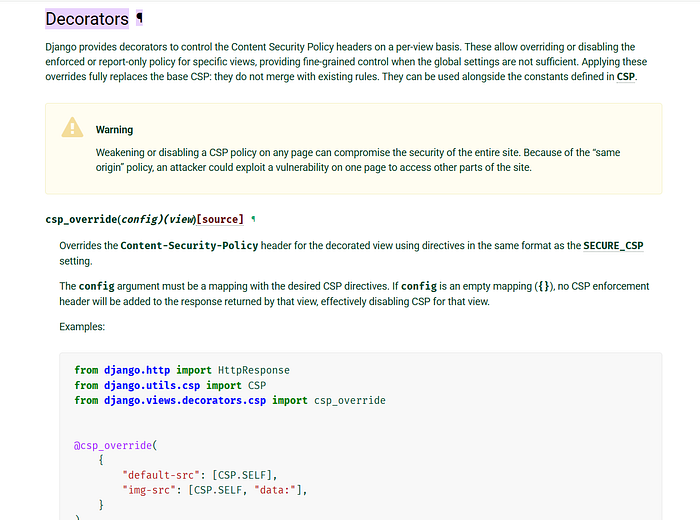
In short, think of CSP as a per-page defense. You cannot rely on a "global CSP for the whole app" unless you configure your server to apply the same header on every route. Instead, treat each endpoint independently when setting and testing CSP. Modern frameworks support this explicitly. For example, Django allows per-view CSP overrides via decorators, which completely replace the base policy for that page.
Implementing CSP in Code
How you set the CSP header depends on your stack. One common pattern is to configure the web server (Nginx, Apache) to add the header. For instance, in Nginx you could do:
# in nginx.conf
add_header Content-Security-Policy "default-src 'self'" always;
This will attach that CSP to all HTTP responses (the always ensures it even on errors). This is simple if your application can use the same policy everywhere. However, if you need different policies per route (e.g. login vs. user profile), it may be easier to set CSP in your app code. For example, in an Express (Node.js) app you could use middleware:
// Express example: set CSP header for all requests
app.use((req, res, next) => {
  res.setHeader(
    "Content-Security-Policy",
    "default-src 'self'; script-src 'self' cdn.example.com"
  );
  next();
});
This attaches the header on every response. You can also apply this only to specific routes:
app.get('/login', (req, res) => {
  res.setHeader("Content-Security-Policy", "default-src 'self'");
  res.send(loginPageHTML);
});
app.get('/dashboard', (req, res) => {
  res.setHeader(
    "Content-Security-Policy",
    "default-src 'self' https://cdn.example.com; script-src 'self' https://cdn.example.com"
  );
  res.send(dashboardPageHTML);
});
Each route's handler can emit a different CSP string. (Many frameworks have helpers: e.g. Express's helmet module can configure CSP per route, and Django has csp_override decorators.)
Other tools like CDN/service-worker (edge) can inject CSP as well. In fact, CSP experts sometimes add CSP via reverse proxies or service workers to cover multiple apps.
Real-World Examples of Mixed Policies
Differing CSPs per endpoint is common in real applications. A security write-up on Netlify illustrates this: the researcher found that most of the site's pages used a relaxed CSP, but the special image-servicing endpoint (/.netlify/images?url=...) returned a very strict policy:
Content-Security-Policy: script-src 'none'That meant no scripts were allowed at all on that route, so even though he could upload an HTML file with malicious JS (on the same domain), the browser refused to run it due to the strict header. In contrast, "other endpoints had CSP but it's very relaxed, in simple terms easy to bypass", so only the image endpoint got this extra protection. In other words, Netlify's server detected the path and served a different CSP configuration for that endpoint. This case highlights how per-route CSP differences can be intentional, but also how they must be carefully managed.
Another example: a Django developer might use @csp_override on one view to disable or loosen the policy there, but as the documentation warns, "weakening or disabling a CSP policy on any page can compromise the security of the entire site".
Because an attacker is in still same-origin, XSS on the weak page can lead to more damage (stealing cookies, CSRF, etc.) on other pages.
From a penetration-testing perspective, when you discover that different endpoints have different policies, treat them separately. Always fetch each route (login, dashboard, API, admin, etc.) and inspect its Content-Security-Policy header. Differences can be clues: a missing or weak CSP on a sensitive endpoint is a finding. For instance:
- If
/adminhas no CSP header, but/logindoes, the admin pages might be vulnerable to script injection. - If
/api/reporthasscript-src 'none', but/api/loginhasscript-src 'self' 'unsafe-inline', the latter is a potential bypass.
Common Misconfigurations and Bypasses
Even with CSP in place, many misconfigurations can render it ineffective. Bug hunters often look for:
unsafe-inlineorunsafe-evalinscript-srcorstyle-src. This essentially defeats CSP's purpose by allowing any inline JS oreval(). If you seescript-src 'unsafe-inline'or wildcardscript-src *, try injecting a<script>alert(1)</script>or useeval(); if it runs, CSP is failing.- Wildcard domains. E.g.
script-src https://*.example.comor even*. If any domain is allowed (especially subdomains you don't fully control), attackers might find a JSONP or open endpoint on one of those domains to run code. - Data URIs or blob URIs. Allowing
img-src data:orscript-src blob:can permit injection via base64 payloads or blob objects. (One common bypass is embedding a<script src="data:text/javascript;base64,...">if data: is allowed.) - Missing CSP on some pages. If a page has no CSP header at all, it's fully open. Sometimes dev teams forget to add CSP to legacy pages or API endpoints.
When a CSP differs across pages, an attacker will target the weakest policy. For example, if /profile has script-src 'self' but /settings has script-src 'self' 'unsafe-inline', the /settings page is the likely attack surface.
Remember, all pages on the same origin share cookies and DOM, so an XSS on one can compromise the whole site.
Best Practices and Mitigations
To get the most security from CSP, follow these guidelines:
- Start strict. A very restrictive base policy like
default-src 'none';and then explicitly allow only what's needed is safest. This could be accompanied by a Report-Only policy to debug functionality first. - Use nonces or hashes for scripts and styles, rather than
'unsafe-inline'. Generate a random nonce per response and apply it to your allowed<script nonce="...">tags. The header then includesscript-src 'nonce-XYZ'. This way, only your inline scripts with the correct nonce will execute. - Avoid wildcards. Never use
*or overly broad patterns unless absolutely necessary. Specify exact domains (e.g.https://cdn.trusted.com) and schemes (https:). - Enable reporting. Add
report-uriorreport-todirectives to collect violations. Browsers will send JSON reports whenever a CSP rule is broken. Monitoring these logs can reveal attempts to load forbidden content or mistakenly blocked legitimate content. - Use Subresource Integrity (SRI) for external scripts/styles. Even if you allow
cdn.example.com, attach an integrity hash (<script src="...js" integrity="sha256-...">) so that if the CDN is compromised, the wrong content is not executed. This complements CSP's allow-list. - Consistent coverage. Ensure every content-serving endpoint has an appropriate CSP header. For API endpoints that return JSON, CSP is irrelevant, but for any HTML page, an absence of CSP is a gap.
Finally, remember that CSP is not a silver bullet.
It should be part of a multi-layered defense: you still need proper input validation and output escaping. CSP's strength is in reducing the impact of any remaining XSS flaw.
By understanding how CSP headers work per response, and by carefully crafting and testing policies for each endpoint, you can significantly raise your application's resistance to client-side attacks.