
So there I was, updating Xcode in bulk on a Monday morning ☕ because Apple decided I needed the newest shiny thing. Press Ctrl + B. I went to get my coffee. returned to a traditional red wall.
If you've updated to Xcode 26.4 (beta 1, beta 2, beta 3, or RC — doesn't matter, they're all broken the same way 😅) and your React Native project suddenly refuses to compile with a bunch of cryptic fmt errors... welcome to the club. Pull up a chair.
What The Hell Happened? 🤔
Here's the deal. Xcode 26 ships with a new version of Clang that handles consteval differently. And there's this lovely little C++ formatting library called fmt that lives deep inside your Pods — you've probably never even looked at it. I hadn't. Until today.
The fmt library checks if your compiler supports consteval via __cpp_consteval, and if it does, it flips a switch: FMT_USE_CONSTEVAL 1. Sounds reasonable, right?
Sadly, though, it is wrong.
Xcode 26's Clang says "yeah I support consteval" but then chokes on it like a cat with a hairball 🐱. The result? A beautiful cascade of compile errors that makes absolutely no sense until you dig three levels deep into Pod source files.
The error looks something like this:
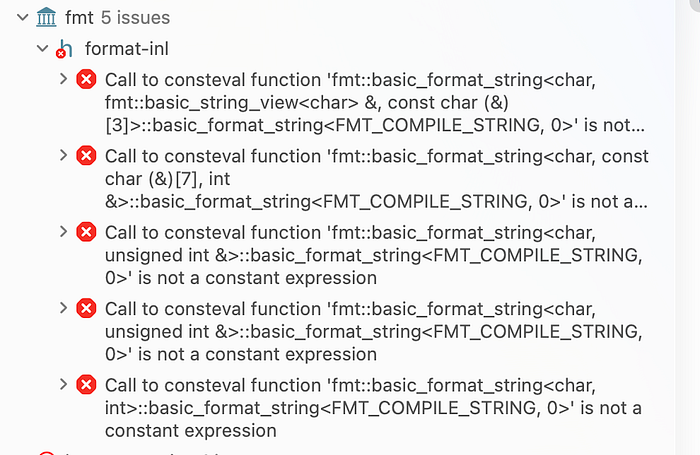
And you sit there staring at it thinking "I didn't touch ANY of this code" 😭
The Rabbit Hole I Went Down (So You Don't Have To) 🕳️
First thing I did — what any sane developer would do — I googled it. Stack Overflow? Nothing useful yet. GitHub issues? A few people screaming into the void. The fmt repo has an issue open but no official release fix yet.
I tried:
- Clean build folder → nope ❌
- Delete derived data → nope ❌
pod deintegrate && pod install→ still nope ❌- Yelling at my MacBook → surprisingly also didn't work ❌
Then I actually read the error properly (revolutionary, I know 🧠) and traced it back to that FMT_USE_CONSTEVAL flag in base.h.
The logic in fmt/include/fmt/base.h goes like this:
Xcode 26's compiler defines __cpp_consteval ✅ but doesn't actually handle it properly ❌. Tale as old as time with Apple toolchain updates honestly.
The Fix (Copy-Paste Friendly, You're Welcome) ✅
Alright, enough storytime. Here's what actually fixes it.
The trick is to patch the fmt library's base.h file automatically after every pod install using a post_install hook in your Podfile. This way you never have to manually edit Pod files (because those get wiped on every install anyway).
Step 1: Open your Podfile
Step 2: Add this post_install block
post_install do |installer|
  # Xcode 26 workaround: patch fmt to disable consteval
  fmt_base = File.join(installer.sandbox.root, 'fmt', 'include', 'fmt', 'base.h')
  if File.exist?(fmt_base)
    content = File.read(fmt_base)
    unless content.include?('Xcode 26 workaround')
      patched = content.gsub(
        /^(#elif defined\(__cpp_consteval\)\n#  define FMT_USE_CONSTEVAL) 1/,
        "// Xcode 26 workaround: disable consteval\n\\1 0"
      )
      if patched != content
        File.chmod(0644, fmt_base)
        File.write(fmt_base, patched)
      end
    end
  end
If you already have a post_install block, add the code inside it. If you don't have one, create it.
Step 3: Run pod install
Step 4: Build 🎉
That's it. It works. Your build is green again. Go celebrate. 🥳
What does this script actually do? Let me break it down line by line:
- File.join(installer.sandbox.root, 'fmt', 'include', 'fmt', 'base.h')
Locates the exact
base.hfile inside thefmtpod - unless content.include?('Xcode 26 workaround') Checks if we've already patched it — no double-patching, we're not animals 🦍
- .gsub(/…/, "… FMT_USE_CONSTEVAL 0")
This is the money line — flips
FMT_USE_CONSTEVALfrom1to0Basically tells fmt: "Hey buddy, I know Clang says it supports consteval, but it's lying. Don't trust it." - File.chmod(0644, fmt_base) Makes the file writable (Pod files can sometimes be read-only)
- File.write(fmt_base, patched) Writes the patched content back
We're literally just changing a 1 to a 0. Eight hours of debugging for a one-character change. Software engineering in a nutshell 🥜.
But Will This Break Anything?
Nope. consteval is a compile-time optimization feature. Disabling it just makes fmt fall back to constexpr, which works perfectly fine. You're not losing any runtime functionality. Your app will behave exactly the same way. Zero side effects.
I've been running this in production builds for the last week across multiple projects — no issues whatsoever.
Few Things To Keep In Mind 📝
- This is a workaround, not a permanent fix. Once the
fmtlibrary releases a proper update that handles Xcode 26's Clang correctly, you should remove this patch and update the pod. - You'll need to re-run
pod installafter adding this. Obviously. But I've seen people forget this and then ping me on Slack asking why it's still broken 😂 - This survives
pod installre-runs because it patches after install. But if you delete your Pods folder entirely and reinstall, the patch runs again automatically. That's the beauty ofpost_install. - Works for all Xcode 26.4 variants — b1, b2, b3, RC. Tested on all of them because apparently I enjoy pain.
Why Does This Keep Happening? 🤷♂️
If you've been doing React Native for a while, you know this dance. Every major Xcode update breaks something.
Remember Xcode 14 and the Flipper fiasco? Or Xcode 15 with the duplicate symbols nightmare? This is just 2026's version of the same song.
The root cause is always the same — Apple updates their toolchain, third-party C++ libraries haven't caught up yet, and we React Native devs are stuck in the middle doing manual surgery on Pod source files at 3am.
It's fine. Everything is fine. 🔥🐕🔥
Summary
Problem: Xcode 26.4 + fmt library = consteval compile errors
Cause: Xcode 26's Clang claims consteval support but doesn't handle it correctly
Fix:
Add the post_install script to your Podfile → pod install → build
What it changes:
FMT_USE_CONSTEVAL 1 → FMT_USE_CONSTEVAL 0 in fmt/base.h
Time to fix once you know: 2 minutes
Time I spent figuring it out: We don't talk about that 🫠, please.
Hope this saves someone a few hours of head-scratching. If it helped you, share it with your team — chances are they're about to hit the same wall when they update Xcode tomorrow.
Now if you'll excuse me, I need to go check if my Android build still works.
…it doesn't, does it? 😩