Introduction
Cross-Site Scripting (XSS) is a client-side web vulnerability that allows attackers to inject malicious JavaScript into web applications. When executed in a victim's browser, the script can manipulate webpage content, steal session cookies, redirect users, or perform actions on behalf of the victim.
This lab demonstrates two major types of XSS vulnerabilities:
- Reflected XSS
- Stored XSS
Both vulnerabilities occur due to improper validation and sanitization of user input.
Reflected Xss
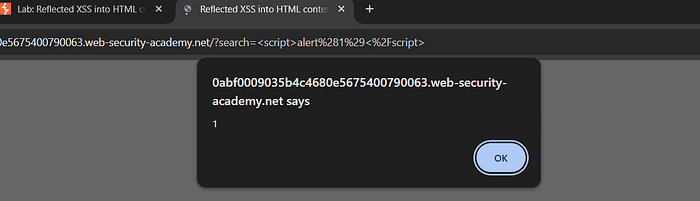
Reflected Cross-Site Scripting (XSS) occurs when user input is reflected in the response without proper sanitization, allowing execution of malicious scripts.
Steps to Reproduce
1. Navigate to the search functionality
2. Modify URL:
( /search.jsp?query=<script>alert(1)</script> )
3. Submit the request
4. Observe the alert popup
Impact
- Execution of arbitrary JavaScript
- Session hijacking
- Cookie theft
- Phishing attacks
Conclusion
This lab demonstrated practical exploitation of both Reflected and Stored XSS vulnerabilities. Reflected XSS executes immediately through crafted URLs, whereas Stored XSS persists in application storage and affects multiple users. Proper validation and encoding of user input are essential to protect web applications from such attacks.
Stored XSS
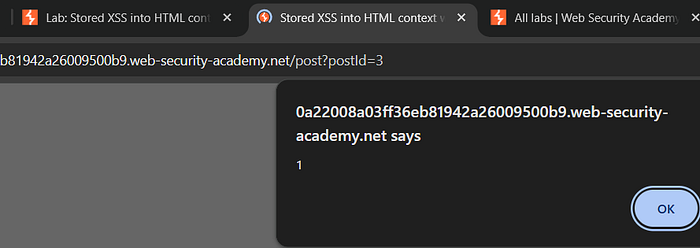
Stored XSS was tested by injecting JavaScript payloads into input fields such as the feedback form.
Steps
1. Enter payload
<script>alert(1)</script>
2. Submit form
3. Reload
Impact
- Session Hijacking
- Account Takeover
- Data Theft
- Website Defacement
Conclusion
Stored XSS vulnerabilities pose serious risks to both users and web applications. Since malicious scripts remain permanently stored on the server and execute automatically for every visitor, they can lead to session hijacking, data theft, phishing attacks, and large-scale compromise. Therefore, proper input validation and output encoding are essential to prevent Stored XSS attacks.
Information Disclosure
Introduction
Information disclosure vulnerabilities occur when a web application unintentionally exposes sensitive internal details such as error messages, configuration files, or backup files. Attackers can use this leaked information to understand application structure and plan further attacks.
This lab demonstrates two common types:
- Information disclosure via error messages
- Source code disclosure via backup files
Information Disclosure via Error Messages
Objective
The objective of this lab was to identify sensitive information leaked through improper error handling in the web application.
Step 1: Explore Application Behavior
The target web application was accessed and tested by interacting with different input fields and parameters.
Common testing methods included:
- Entering invalid values
- Modifying URL parameters
- Triggering unexpected requests
Example:
https://example.com/product?id=abcStep 2: Trigger an Error Condition
Instead of entering a valid numeric ID:
id=abcwas supplied.
This caused the application to generate an error message.
Step 3: Analyze the Error Response
The error message revealed sensitive internal information such as:
- Server software details
- File path locations
- Database query structure
- Application framework details
Example:
Warning: SQL error in /var/www/html/product.php on line 23Result
Sensitive internal information was disclosed through verbose error messages.
This confirmed the presence of an Information Disclosure vulnerability.
Impact
Improper error handling may expose:
- server directory paths
- database queries
- backend technologies
- application logic structure
Attackers can use this information for further exploitation.
Source Code Disclosure via Backup Files
Objective
The objective of this lab was to identify publicly accessible backup files that expose application source code.
Step 1: Identify Potential Backup File Locations
Developers often create backup copies of files using extensions such as:
.bak
.old
.backup
.zip
.tar
These files sometimes remain accessible on production servers.
Step 2: Test Backup File Access
Common filenames were tested manually in the browser address bar:
/index.php.bak
/config.php.old
/backup.zip
One of the backup files was successfully accessed.
Step 3: Download the Backup File
The backup file contained:
- application source code
- configuration details
- sensitive logic
Example:
database username
database password
API keys
Result
Sensitive source code was exposed through publicly accessible backup files.
This confirmed the presence of Source Code Disclosure vulnerability.
Impact
Backup file disclosure may expose:
- database credentials
- API keys
- authentication logic
- hidden application endpoints
Attackers can use this information to compromise the system.
Severity Level
Information disclosure vulnerabilities are considered medium to high severity because they:
- reveal internal system structure
- assist attackers in reconnaissance
- increase chances of further exploitation
Mitigation Techniques
To prevent information disclosure vulnerabilities:
- Disable detailed error messages in production environments
- Remove backup files from public directories
- Restrict directory access permissions
- Store sensitive files outside web root directory
- Implement proper server configuration
Conclusion
These labs demonstrated how improper error handling and exposed backup files can lead to information disclosure vulnerabilities. Such weaknesses allow attackers to gather sensitive internal details that may later be used for advanced attacks. Proper configuration management and secure deployment practices are essential to prevent these risks.
If your report also needs impact in short bullet points (like you asked earlier for XSS), I can add a concise version for quick submission sections.