

The internet is the biggest machine ever built. To make it work, engineers use a blueprint called the OSI Model (Open Systems Interconnection). It splits the complex job of sending a meme from your phone to your friend's phone into 7 simple steps (Layers).
Here is the master map we will refer. It reads from Top (User) to Bottom (Cables).
The Analogy: The International Assembly Line
You are the manager of a super-secure toy factory. You need to send a complex, top-secret blueprint (your 'Data') to a partner factory across the ocean.
You can't just throw the blueprint in the mail. It needs to be prepared, broken down, addressed, and protected.
The "Upper Layers" (The Software & Meaning)
These layers exist inside your computer's operating system and the application you are using (like Chrome or Whatsapp).
Layer 7: Application (The User Interface) This is where you stand. When you open Whatsapp and type a message, you are interacting with Layer 7. It is the closest layer to the end-user. It provides network services to your applications (like HTTP for web browsing).
Layer 6: Presentation (The Translator & Encryptor) Your blueprint (data) is written in English. But, let's say the destination factory speaks ASCII. Layer 6 is your translator. It formats the data.
- This layer handles Encryption (scrambling the data so hackers can't read it) and Compression (shrinking it).
Layer 5: Session (The Connection Manager) This is the manager who makes the phone call to the other factory. They say: "Hello, we are about to send data. Are you ready? Okay, let's keep this line open." This layer establishes, manages, and terminates the connection (the 'session') between the two endpoints.
The "Heart of the Model" (Where Data meets the Network)
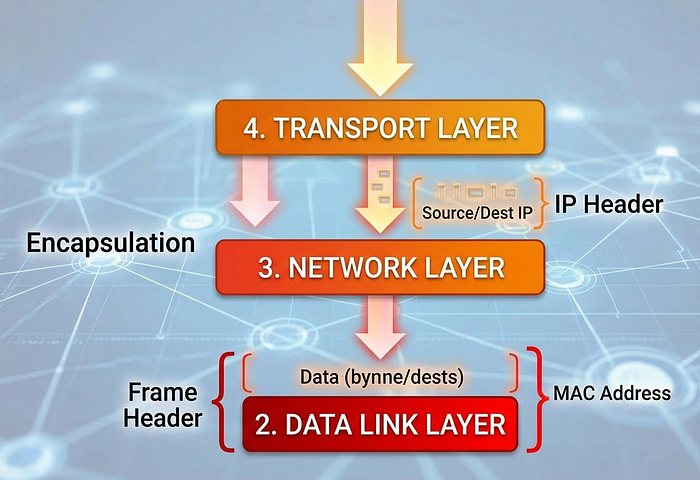
This next image is the most critical concept for you to visualize. As we move down from Layer 7 to Layer 1, something happens to your data: we add "headers" (like envelopes inside envelopes) in a process called Encapsulation.
The The "Lower Layers" (Transportation & Addressing)
These layers are where IT professionals and network engineers spend their time.
Layer 4: Transport (The Reliable Shipper — segments) Our blueprint is too big for one envelope. Layer 4 breaks the large data chunk into smaller pieces called Segments. It decides which protocol to use:
· TCP: (Transmission Control Protocol) is like "Quality Control" or registered mail. It numbers every segment and guarantees delivery. If one piece is lost, it asks for a resend. Used for emails and web pages.
· UDP: (User Datagram Protocol) is like "Express Drop" or regular mail. It just sends it. If it gets lost, too bad. Used for video streaming (your Zoom call doesn't stop if one pixel is dropped).
Layer 3: Network (The Global Router — Packets) This is the critical layer shown in Image 2. Layer 3 receives the Segments from Layer 4. Its job is to figure out the path across the whole internet to the destination factory. It is like "Global Courier" (DHL/FedEx).
· It adds the Logical Address (IP Address). Think of this like the Mailing Address (123 Internet Lane, Mumbai).
· The data structure here is called a Packet.
· Key Hardware: Routers live at Layer 3. They only read the IP address to decide where to send the packet next.
Layer 2: Data Link (The Local Delivery — Frames) Once the Packet (with the IP address) arrives at the final city (your local network), it is handed to Layer 2. This layer handles delivery inside the building (from your router to your specific phone). It is like "Office Mailroom".
· It adds the Physical Address (MAC Address). Every network card has a unique, permanent MAC address burned into it by the factory. Think of this like a Social Security Number for your network hardware.
· The data structure here is called a Frame (as seen in Image 2).
· Key Hardware: Switches live at Layer 2.
Layer 1: Physical (The Cables & Electricity — Bits) Finally, the Frame (the double-wrapped package) is broken down into raw binary code (1s and 0s), which are called Bits. This layer is the actual hardware: the fibre optic cables, the copper wires, or the radio waves (Wi-Fi). It just transmits electricity or light.
Understanding Data Flow (Encapsulation vs. Decapsulation)
This is the whole concept in motion. Referencing the complete stack from Image 1, visualize how data moves when you click "Send":
1. Sending (Top to Bottom): This is Encapsulation. You start at L7 (Protocol Data Units (PDU)). As it moves down, each layer adds its own 'envelope' (Header) around the previous layer's work. L4 adds port numbers, L3 adds IP addresses (Packet), L2 adds MAC addresses (Frame), and L1 turns it into electrical pulses (Bits).
2. Receiving (Bottom to Top): The destination computer does the reverse, called Decapsulation. It receives Bits (L1), builds a Frame, reads the MAC address (L2), strips the Frame header, reads the IP address (L3), strips the IP header, reads the port numbers (L4)… and finally presents the raw Data (L7) to your friend's Whatsapp.
Conclusion
Understanding the OSI model is like learning the anatomy of the human body for a doctor. When something goes wrong (the network is slow), you need to know which layer is sick. If you want to defend a system, you must understand exactly where the attacker is striking.
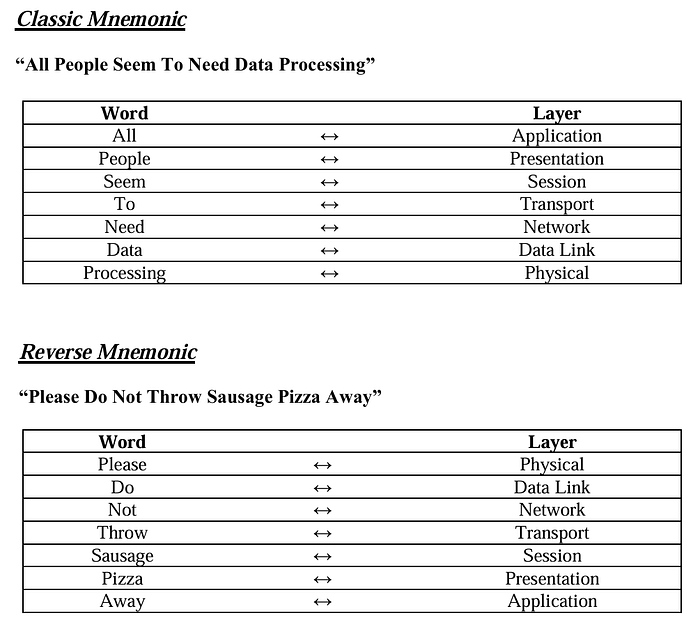
Memory Map: The Cheat Sheet
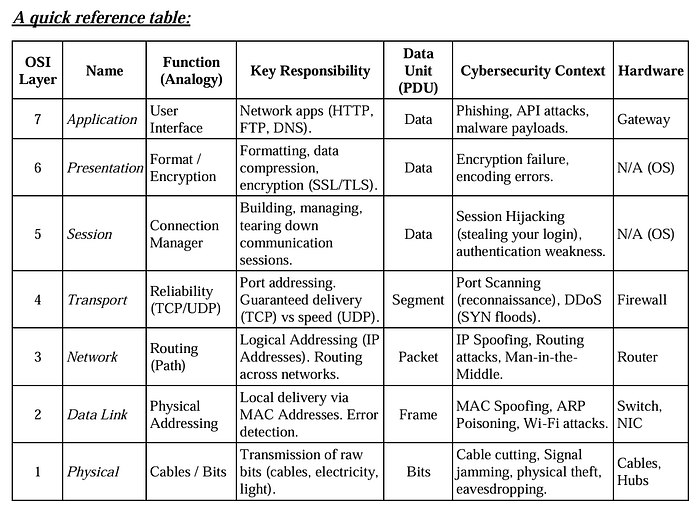
Importance in Cybersecurity:-
· Application Layer → Attacks like phishing, malware
· Transport Layer → Port scanning, TCP attacks
· Network Layer → IP spoofing
· Data Link Layer → MAC spoofing
· Physical Layer → Hardware attacks
Hackers can target any layer, so understanding OSI = understanding attack surface.