

Hey, let me save you a few days of frustration
If you've ever tried to integrate gRPC with Mendix and ended up staring at a wall of Java errors and missing JARs, This blog is for you guys!!
This guide covers: what gRPC is, why you'd use it with Mendix, setting up the project, generating Java stubs, downloading the right JARs, writing the Java Action, and testing end-to-end with a mock server.
what even is gRPC?
gRPC stands for Google Remote Procedure Call. In plain English: it lets one application call a function on another application — even if they're on different servers or written in different languages — as if it were a local function call.
Think of it like a restaurant. You (the client) place an order. The kitchen (the server) prepares it and sends it back. You don't care how the kitchen works — you just order and receive. gRPC is the waiter in this scenario.
gRPC vs REST — what's the difference?
You probably already use REST in Mendix. Here's how gRPC compares:
The biggest practical difference: gRPC is much faster and strongly typed. Every field is defined in a contract file upfront. If the contract changes, both sides know immediately.
The .proto file — the heart of everything
Before writing any Java code, you need a .proto file. This defines what data you send and what you get back. Think of it as an empty form template — it defines the fields but not the values.
USER.PROTO
syntax = "proto3";
option java_package = "yourmodulename.actions";
option java_outer_classname = "UserProto";
message UserRequest {
string user_id = 1;
}
message UserResponse {
string name = 1;
string email = 2;
string status = 3;
}
service UserService {
rpc GetUser (UserRequest) returns (UserResponse);
}
The numbers (= 1, = 2, = 3) are field IDs used by Protocol Buffers for binary serialization. Never renumber them once in production — it breaks everything. To generate the userproto.java -> Install protoc from link. Then run this in PowerShell from inside your proto/ folder:
protoc --java_out=. yourfilename.protoThis generates UserProto.java in your proto/ folder. Copy it into javasource/yourmodule/actions/.
The proto file is NEVER deployed to Mendix. It stays on your developer machine as a source file. Only the generated Java files go into your Mendix project.
Project folder structure
Here is exactly how your Mendix project should be organised:
YourMendixProject/
├── proto/ ← create this yourself
│ └── user.proto ← your proto file lives here
├── javasource/
│ └── yourmodule/
│ └── actions/
│ ├── UserProto.java ← generated
│ ├── UserServiceGrpc.java ← generated/manual
│ └── GetUserAction.java ← you write this via mendix studio pro
└── userlib/
├── grpc-api-1.63.0.jar
├── grpc-core-1.63.0.jar
├── grpc-netty-shaded-1.63.0.jar
├── grpc-protobuf-1.63.0.jar
└── … (all 13 JARs)
The complete JAR list — every single one you need
This is the section nobody documents properly. Through trial and error, here is the complete list of JARs you need in your userlib/ folder. Download each one from Maven Central:
1. grpc-api-1.63.0.jar
https://repo1.maven.org/maven2/io/grpc/grpc-api/1.63.0/grpc-api-1.63.0.jar
2. grpc-core-1.63.0.jar
https://repo1.maven.org/maven2/io/grpc/grpc-core/1.63.0/grpc-core-1.63.0.jar
3. grpc-netty-shaded-1.63.0.jar
https://repo1.maven.org/maven2/io/grpc/grpc-netty-shaded/1.63.0/grpc-netty-shaded-1.63.0.jar
4. grpc-protobuf-1.63.0.jar
https://repo1.maven.org/maven2/io/grpc/grpc-protobuf/1.63.0/grpc-protobuf-1.63.0.jar
5. grpc-protobuf-lite-1.63.0.jar
https://repo1.maven.org/maven2/io/grpc/grpc-protobuf-lite/1.63.0/grpc-protobuf-lite-1.63.0.jar
6. grpc-stub-1.63.0.jar
https://repo1.maven.org/maven2/io/grpc/grpc-stub/1.63.0/grpc-stub-1.63.0.jar
7. grpc-context-1.63.0.jar
https://repo1.maven.org/maven2/io/grpc/grpc-context/1.63.0/grpc-context-1.63.0.jar
8. protobuf-java-3.25.0.jar
https://repo1.maven.org/maven2/com/google/protobuf/protobuf-java/3.25.0/protobuf-java-3.25.0.jar
9. protobuf-java-util-3.25.0.jar
10. javax.annotation-api-1.3.2.jar
11. guava-32.0.1-jre.jar
https://repo1.maven.org/maven2/com/google/guava/guava/32.0.1-jre/guava-32.0.1-jre.jar
12. perfmark-api-0.26.0.jar
https://repo1.maven.org/maven2/io/perfmark/perfmark-api/0.26.0/perfmark-api-0.26.0.jar
13. error_prone_annotations-2.18.0.jar
After copying all JARs into userlib/, always close Studio Pro completely and reopen it. Studio Pro rescans userlib/ only at startup. If you add JARs while it is running, they will not be picked up.
Creating UserServiceGrpc.java manually
Normally this file is auto-generated by the grpc-java plugin for protoc. Since setting up the plugin on Windows without Maven is painful, here is the complete file you can create manually. Save it as UserServiceGrpc.java in javasource/grpc/actions/:
Sample of mines
package yourmodulename.actions;
import io.grpc.Channel;
import io.grpc.MethodDescriptor;
import io.grpc.protobuf.ProtoUtils;
import io.grpc.stub.AbstractBlockingStub;
import io.grpc.stub.ClientCalls;

public final class UserServiceGrpc {
  public static final String SERVICE_NAME = "UserService";
  private static volatile MethodDescriptor<
      UserProto.UserRequest, UserProto.UserResponse> getGetUserMethod;

  public static MethodDescriptor<UserProto.UserRequest,
      UserProto.UserResponse> getGetUserMethod() {
    MethodDescriptor<UserProto.UserRequest, UserProto.UserResponse> m = getGetUserMethod;
    if (m == null) { synchronized (UserServiceGrpc.class) { m = getGetUserMethod;
      if (m == null) { getGetUserMethod = m =
        MethodDescriptor.<UserProto.UserRequest, UserProto.UserResponse>newBuilder()
          .setType(MethodDescriptor.MethodType.UNARY).setFullMethodName(SERVICE_NAME + "/GetUser")
          .setRequestMarshaller(ProtoUtils.marshaller(UserProto.UserRequest.getDefaultInstance()))
          .setResponseMarshaller(ProtoUtils.marshaller(UserProto.UserResponse.getDefaultInstance()))
          .build(); } } } return m; }

  public static UserServiceBlockingStub newBlockingStub(Channel ch) {
    return new UserServiceBlockingStub(ch); }

  public static final class UserServiceBlockingStub
      extends AbstractBlockingStub<UserServiceBlockingStub> {
    private UserServiceBlockingStub(Channel ch) { super(ch, io.grpc.CallOptions.DEFAULT); }
    private UserServiceBlockingStub(Channel ch, io.grpc.CallOptions o) { super(ch, o); }
    protected UserServiceBlockingStub build(Channel ch, io.grpc.CallOptions o) {
      return new UserServiceBlockingStub(ch, o); }
    public UserProto.UserResponse getUser(UserProto.UserRequest r) {
      return ClientCalls.blockingUnaryCall(getChannel(), getGetUserMethod(), getCallOptions(), r); }
  }
}
Create the Java Action in Studio Pro
Below is the sample code which I used to test.
import io.grpc.ManagedChannel;
import io.grpc.ManagedChannelBuilder;
import yourmodulename.actions.UserProto;
import yourmodulename.actions.UserServiceGrpc;

// Step 1: Open a channel to the gRPC server
ManagedChannel channel = ManagedChannelBuilder
    .forAddress("localhost", 50051)
    .usePlaintext()
    .build();

try {
    // Step 2: Create the stub (the remote caller)
    UserServiceGrpc.UserServiceBlockingStub stub =
        UserServiceGrpc.newBlockingStub(channel);

    // Step 3: Build the request
    UserProto.UserRequest request =
        UserProto.UserRequest.newBuilder()
            .setUserId(userId)
            .build();

    // Step 4: Make the gRPC call
    UserProto.UserResponse response = stub.getUser(request);

    // Step 5: Return result to Microflow
    return response.getName() + " | " + response.getEmail();

} finally {
    channel.shutdown();
}
Setting up a mock gRPC server for testing
If you dont have gRPC server try to setup the mock server for testing, The mock server can be of any language python,java or go. For testing I used python server.
Step 1 — Install Python gRPC tools
pip install grpcio grpcio-tools
Step 2 — Generate Python stubs
cd C:\YourProject\proto
python -m grpc_tools.protoc — python_out=. — grpc_python_out=. -I. user.proto
Step 3 — Create mock_server.py
import grpc
from concurrent import futures
import user_pb2
import user_pb2_grpc

class UserServiceServicer(user_pb2_grpc.UserServiceServicer):
    def GetUser(self, request, context):
        print(f"Received request for user_id: {request.user_id}")
        return user_pb2.UserResponse(
            name="Guru",
            email="gurumoorthy@gmail.com",
            status="active"
        )

def serve():
    server = grpc.server(futures.ThreadPoolExecutor(max_workers=10))
    user_pb2_grpc.add_UserServiceServicer_to_server(UserServiceServicer(), server)
    server.add_insecure_port('[::]:50051')
    server.start()
    print("Mock gRPC server started on port 50051...")
    print("Waiting for requests from Mendix...")
    server.wait_for_termination()

if __name__ == '__main__':
    serve()
Run and test
- Start the mock server: python mock_server.py
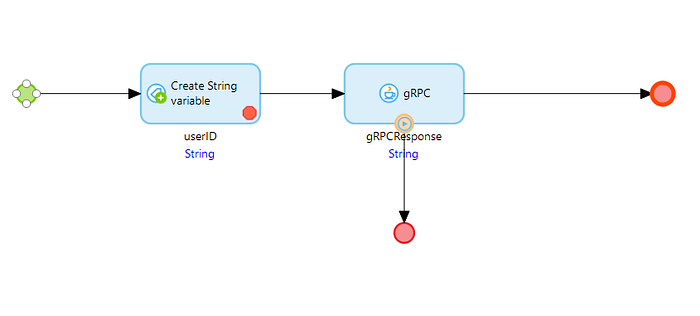
- create a microflow in mendix to call your gRPC with the userId as we create with sample codes-> userID=123
Conclusion:
Found this useful? I'm also working on a Mendix Marketplace module that bundles all 13 JARs and provides a ready-to-use Java Action — no manual setup needed.
Thanks for reading Do let me know if anything else is needed.