
This is the first piece of our series as discussed in this article. Some concepts will be introduced with an end goal of its major use case, but some, if too theoretical, will be the article as is. Only explaining the theory in great detail. So we start off…
Why must you always define a data type? This lesson comes from the very first chapter of CS:APP (Computer Systems: A Programmer's Perspective) in the lifecycle of a program. Most of us have seen this error "error: unknown type name" in C, or "NameError: name 'thisname' is not defined" in Python, or "ReferenceError: thisname is not defined" in JavaScript. All these are one and the same. The difference is that in C it is described as a compilation error because it happens at compilation, while in Python or JS, it is a runtime error because it happens at runtime. Why this is so is a story for another day and will be discussed in an article in the near future.
To understand the origin of this error, we must first understand the underlying concepts and the lifecycle of running a program. Take a simple C program, hello.c. The file looks as below;
1 #include <stdio.h>
2
3 int main()
4 {
5 printf("hello, world\n");
6 return 0;
7 }
When a program such as this one is written, it begins its lifecycle. This means it begins its life as a high-level language. The language being C, and can be anything from C++, Python, JS, name it. A high-level language is simply one that is readable by humans. Machines understand and execute machine code, and a low-level language is the closest to this. Reading a low-level language will most times look like gibberish to the human reader. You have probably opened a file that looked like this;
7f 45 4c 46 02 01 01 00 00 00 00 00 00 00 00 00
02 00 3e 00 01 00 00 00 40 10 40 00 00 00 00 00
48 65 6c 6c 6f 2c 20 57 6f 72 6c 64 21 0a 00 00
The file just didnt make sense to you, right? But that is the language that maps closely to machine code(the one the machine executes). So, when you write a simple program, it is translated via several steps, depending on the high-level language to a low-level language, then to machine code for execution.
But what is this machine code? These are the raw bytes. Pause. This will get easier now as I will explain this better. So in the lifecycle, the program starts as a source program, like our hello.c, when you type and save the text file. The source program is a sequence of bits (of values 0 or 1), organized in 8-bit chunks known as bytes. Each byte represents a text character in our program.
Therefore, the hello.c program is stored in a file as a sequence of bytes. Each byte has an integer value that corresponds to some character. For example, the first byte has the integer value 35, which corresponds to the character '#'. The second byte has the integer value 105, which corresponds to the character 'i', and so on.
Most computer systems represent text characters using the ASCII standard that represents each character with a unique byte-size integer value. What does an ASCII standard mean? ASCII is the mapping system that lets computers store text as numbers, since computers only understand numbers. We therefore need an agreed-upon lookup table that says "this number = this character". That is what ASCII. You probably have already figured that there are other standards. Some standards such as ASCII are limited in that it only maps characters common to the English language. So this leaves characters such as accented letters, letters from other languages, emojis, etc out. Newer standards cater to these and the most commonly used standard of our time is UTF-8 and I'm sure you have come across this somewhere. Other standards are Latin-1 (ISO 8859–1), Unicode, UTF-16, UTF-32.
So in the example of the hello.c program, the ASCII representation would look like the image below;
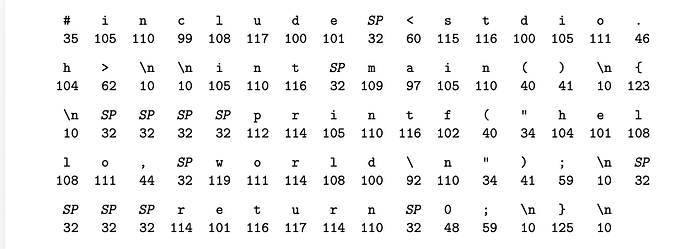
Files such as hello.c that consist exclusively of ASCII characters are known as text files. All other files are known as binary files. Text files are files that are human-readable, such as files with the extensions: .html, .txt, .c, .csv, .json, and so on. Binary files are those that contain data that is not exclusively standard text. They include special bytes that represent instructions, images, sounds, or other non-textual information. They usually have file extensions such as; .mp3, .jpg, .bin, .exe, e.t.c.
So, from this representation and understanding, our hello.c is a text file. Another important thing we can pick from this explanation is that all information on a system, be it disk files, programs stored in memory, user data stored in memory, or data transferred across a network, is represented as a bunch of bits. This means that the only thing that distinguishes different data objects is the context in which we view them. For example, in different contexts, the same sequence of bytes might represent an integer, floating-point number, character string, or machine instruction.
Everything in a system looks like just another. An image will look just like an instruction, will look like a letter, or a number. They are all just bits. The computer does not automatically know what those bytes represent. This is done by the context you give. The way you define.
Which brings us to the main point of our article today. The way you define the data is what tells the machine what it actually is.
A practical example looks like this; Say we have these 4 bytes in memory:
01000001 01000010 01000011 01000100Depending on the context, this exact same sequence could represent:
- An integer: If interpreted as a 32-bit integer: 1,094,861,636
- A floating-point number: If interpreted as a 32-bit float: 32.2145
- A character string: If interpreted as ASCII characters: "ABCD" (01000001 = 'A', 01000010 = 'B', etc.)
- Machine instructions: If interpreted as CPU instructions: A sequence of operations that the processor should execute
As you can see, this can be very confusing for the machine to interpret with no context. When you declare a variable with a specific data type, you're essentially saying: "Interpret these bytes in this particular way."
Data types are important because they tell the program how to interpret those raw bytes.
And there you have it! This is why you will come across those errors when you fail to define or declare data types for your variables and the like. So don't find it exhausting, you're only helping the system understand your intentions better!
This will be it for today. Our next article will continue on this program lifecycle of our hello.c, with new lessons, and build on the concepts we have learned from this today.