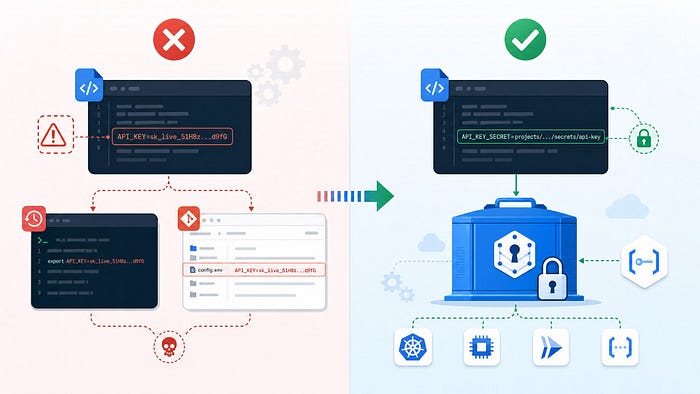

Why This Matters: Real-World API Key Leaks
OpenAI API keys in client-side code — The LLM Consumption Crisis: Developers building AI applications hardcoded API keys into JavaScript frontends, thinking they were hidden. Once deployed publicly, attackers found them instantly via source maps, browser DevTools, or CDN caches. They immediately started generating text and images at scale.
The damage is brutal: A single exposed key generated $10,000+ in charges within hours. Another developer reported $200,000+ in fraudulent usage before they could revoke the key. Recovery is messy-you can't selectively delete transactions; you dispute with OpenAI support (takes weeks).
OpenAI keys are now the fastest-growing category of leaked credentials. GitGuardian's 2024 State of Secrets Sprawl report shows a 1,212% increase in exposed OpenAI keys from 2022 to 2024. Why? Because they convert directly to compute spend:
- No infrastructure compromise needed
- No privilege escalation required
- Just a string + HTTP request = charges on your bill
Students, indie developers, and small teams have reported $1,000-$50,000+ bills from keys leaked in repos, Jupyter notebooks, and Discord. Read more: OpenAI API Key Exposure Risk Analysis (Rafter)
Why leaks are so dangerous:
- They bypass authentication entirely
- APIs often don't have rate limits (abuse at scale = expensive)
- Many keys grant admin permissions (not scoped down)
- Bots scan GitHub, docker images, and cloud logs 24/7 for leaked credentials
OpenClaw users are building production AI agents with real API keys. If your secrets are sitting unencrypted in config files, backups, or bash history, you're one compromised server away from a nightmare.
Let's fix that.
The Problem
Traditional config management stores secrets like this:
{
  "gateway": {
    "auth": {
      "token": "ghp_abc123xyz..."
    }
  },
  "plugins": {
    "google": {
      "webSearch": {
        "apiKey": "AIzaSyDefghijk..."
      }
    }
  },
  "channels": {
    "telegram": {
      "botToken": "123456:ABCDefghijk..."
    }
  }
}
Problems:
- ❌ Plaintext in config files
- ❌ Visible in bash history: cat openclaw.json
- ❌ Accidentally committed to git
- ❌ Visible in process memory
- ❌ No audit trail for secret access
- ❌ Rotation requires code deployment
Attack scenario:
Attacker gains VPS access
→ Reads openclaw.json
→ Finds all API keys
→ Compromises all connected services
Why .env Files Aren't Enough
Before jumping to the full solution, let's acknowledge where most teams start: .env files.
How .env works:
OpenClaw loads environment variables in this order:
1. Process environment (systemd, Docker, shell)
2. ~/.openclaw/.env file
3. Inline env block in config
A typical .env looks like:
ANTHROPIC_API_KEY=sk-ant-xxx...
TELEGRAM_BOT_TOKEN=123456:ABCDef...
OPENAI_API_KEY=sk-xxx...
Then reference them in your config:
{
  "models": {
    "providers": {
      "anthropic": {
        "apiKey": "${ANTHROPIC_API_KEY}"
      }
    }
  }
}
Why it's not enough:
.env files are plaintext sitting on disk — no encryption, no audit trail, no rotation policies. When things go wrong, they go really wrong:
- Accidental sharing: Someone copies the .env file into a Slack DM when onboarding a teammate
- Machine sprawl: The same stale API key lives on dev laptops, staging servers, and prod machines — updating it means manual changes everywhere
- Zero audit trail: You never know who accessed what secret or when
- Hard to rotate: A compromised key means pushing changes to every machine using it
- Shared server risk: If an attacker gets filesystem access, .env files are high-value, unencrypted targets
Basic safeguards help a little:
# File permissions
chmod 600 ~/.openclaw/.env
chown youruser:youruser ~/.openclaw/.env

# Gitignore + pre-commit hook
# Add to .gitignore: .env
# Install gitleaks or truffleHog to scan for tokens
But permissions and pre-commit hooks are band-aids. .env is a stepping stone to something better — a proper secrets manager.
The Solution
Use Secret Manager (GCP, AWS Secrets Manager, Vault, etc.) via exec provider:
{
  "gateway": {
    "auth": {
      "token": {
        "source": "exec",
        "provider": "gcp",
        "id": "gateway-token"
      }
    }
  },
  "plugins": {
    "google": {
      "webSearch": {
        "apiKey": {
          "source": "exec",
          "provider": "gcp",
          "id": "gemini-key"
        }
      }
    }
  }
}
Benefits:
- ✅ Secrets never in config files
- ✅ Dynamic fetching at runtime
- ✅ Centralized secret management
- ✅ Rotation without code changes
- ✅ Audit trail of who accessed what
- ✅ Encryption at rest + in transit
Architecture
┌──────────────────────┐
│  OpenClaw Gateway    │
│  starts up           │
└──────────┬───────────┘
           │
           │ 1. Load config (has SecretRef)
           │    {token: {source: exec, id: "gateway-token"}}
           ↓
┌──────────────────────────────────────┐
│  gcp-secret-resolver (wrapper)       │
│  - Receives SecretRef JSON           │
│  - Calls GCP Secret Manager API      │
│  - Fetches secret via REST           │
└──────────┬───────────────────────────┘
           │
           ↓
┌──────────────────────────────────────┐
│  GCP Secret Manager                  │
│  - Encrypted storage                 │
│  - Access logs                       │
│  - Rotation policies                 │
└──────────┬───────────────────────────┘
           │
           │ 2. Return decrypted secret
           ↓
┌──────────────────────────────────────┐
│  OpenClaw Gateway                    │
│  - Uses secret in memory             │
│  - Never written to disk             │
│  - Logs only access, not the secret  │
└──────────────────────────────────────┘
Step 1: Create Secrets in GCP Secret Manager
Create secrets (one per API key)
# Create secrets (one per API key)
gcloud secrets create gateway-token --data="ghp_abc123xyz..."
gcloud secrets create gemini-key --data="AIzaSyDefghijk..."
gcloud secrets create anthropic-key --data="sk-ant-xxx..."
gcloud secrets create openai-key --data="sk-xxx..."
gcloud secrets create telebot-token --data="123456:ABCDefghijk..."
Verify:
gcloud secrets list
# Output: anthropic-key, gateway-token, gemini-key, openai-key, telebot-token
Test access:
gcloud secrets versions access latest --secret="gateway-token"
# Output: ghp_abc123xyz...
Step 2: Install Wrapper Script
OpenClaw's exec provider expects a specific protocol. The wrapper script fetches secrets from GCP Secret Manager using REST API + ADC (Application Default Credentials), supporting multiple GCP projects:
cat > /usr/local/bin/gcp-secret-resolver << 'EOF'
#!/bin/bash
# GCP Secret Manager resolver using REST API + ADC
# Implements the exec SecretRef provider protocol
# Supports multiple GCP projects via GOOGLE_CLOUD_PROJECT env var

PROJECT_ID="${GOOGLE_CLOUD_PROJECT:-your-default-project}"

REQUEST=$(cat)
TOKEN=$(gcloud auth application-default print-access-token 2>/dev/null)

if [ -z "$TOKEN" ]; then
  echo '{"protocolVersion": 1, "values": {}, "errors": {"_": {"message": "Failed to get access token"}}}' >&2
  exit 1
fi

IDS=$(echo "$REQUEST" | jq -r '.ids[]' 2>/dev/null)
VALUES='{}' ERRORS='{}'

for SECRET_ID in $IDS; do
  API_RESPONSE=$(curl -s \\
    -H "Authorization: Bearer $TOKEN" \\
    "<https://secretmanager.googleapis.com/v1/projects/$PROJECT_ID/secrets/$SECRET_ID/versions/latest:access>")

  SECRET_VALUE=$(echo "$API_RESPONSE" | jq -r '.payload.data' 2>/dev/null)

  if [ -z "$SECRET_VALUE" ] || [ "$SECRET_VALUE" = "null" ]; then
    ERROR_MSG=$(echo "$API_RESPONSE" | jq -r '.error.message // "Secret not found"' 2>/dev/null)
    ERRORS=$(echo "$ERRORS" | jq --arg id "$SECRET_ID" --arg msg "$ERROR_MSG" '. += {($id): {"message": $msg}}')
  else
    DECODED=$(echo "$SECRET_VALUE" | base64 -d 2>/dev/null)
    if [ $? -eq 0 ]; then
      VALUES=$(echo "$VALUES" | jq --arg id "$SECRET_ID" --arg val "$DECODED" '. += {($id): $val}')
    else
      ERRORS=$(echo "$ERRORS" | jq --arg id "$SECRET_ID" '. += {($id): {"message": "Failed to decode"}}')
    fi
  fi
done

echo "$(jq -n --argjson values "$VALUES" --argjson errors "$ERRORS" '{protocolVersion: 1, values: $values, errors: $errors}')"
EOF

chmod +x /usr/local/bin/gcp-secret-resolver
Test it:
export GOOGLE_CLOUD_PROJECT="your-project"
echo '{"ids": ["gateway-token", "anthropic-key"]}' | /usr/local/bin/gcp-secret-resolver
# Output: {"protocolVersion": 1, "values": {"gateway-token": "ghp_abc...", "anthropic-key": "sk-ant-..."}, "errors": {}}
Step 3: Update Config Files
Replace plaintext secrets with SecretRefs:
# openclaw.json — gateway token
jq '.gateway.auth.token = {"source": "exec", "provider": "gcp", "id": "gateway-token"}' \\
  ~/.openclaw/openclaw.json > /tmp/tmp && mv /tmp/tmp ~/.openclaw/openclaw.json

# openclaw.json — plugins (example)
jq '.plugins.google.webSearch.apiKey = {"source": "exec", "provider": "gcp", "id": "gemini-key"}' \\
  ~/.openclaw/openclaw.json > /tmp/tmp && mv /tmp/tmp ~/.openclaw/openclaw.json

# auth-profiles.json — model API keys (example)
jq '.anthropic.default.apiKey = {"keyRef": {"source": "exec", "provider": "gcp", "id": "anthropic-key"}}' \\
  ~/.openclaw/agents/main/agent/auth-profiles.json > /tmp/tmp && mv /tmp/tmp ~/.openclaw/agents/main/agent/auth-profiles.json
Pattern: Replace any plaintext secret with {"source": "exec", "provider": "gcp", "id": "secret-name"}.
Step 4: Configure OpenClaw Secrets Provider
Add to openclaw.json:
{
  "secrets": {
    "providers": {
      "gcp": {
        "command": "/usr/local/bin/gcp-secret-resolver",
        "timeoutMs": 20000,
        "projectId": "your-gcp-project"
      }
    }
  }
}
Step 5: Deploy & Verify
Restart the gateway:
openclaw gateway restartCheck logs for errors:
openclaw logs --followLook for: "resolving authentication…" and no secret errors. If it fails, verify:
- Wrapper script is executable: ls -la /usr/local/bin/gcp-secret-resolver
- GCP credentials are configured: gcloud auth application-default print-access-token
Clean up old plaintext:
# Remove config backups
rm -f ~/.openclaw/openclaw.json.backup.*

# Clear bash history (secrets may be visible there)
history -c && cat /dev/null > ~/.bash_history

# Verify no plaintext remains
grep -rE "sk-|ghp_|AIzaSy" ~/.openclaw/ 2>/dev/null || echo "Clean"
Step 6: Set Up Rotation (Optional but Recommended)
GCP Secret Manager automatically versioning, but here's a rotation helper:
cat > /usr/local/bin/rotate-gcp-secret.sh << 'EOF'
#!/bin/bash
# Rotate a single GCP secret

if [ -z "$1" ] || [ -z "$2" ]; then
  echo "Usage: $0 <secret-id> <new-value>"
  exit 1
fi

SECRET_ID="$1"
NEW_VALUE="$2"

gcloud secrets versions add "$SECRET_ID" --data="$NEW_VALUE"
echo "$SECRET_ID rotated. OpenClaw will pick up the new version on next restart."
openclaw gateway restart
EOF

chmod +x /usr/local/bin/rotate-gcp-secret.sh
Security Checklist
Verify your setup with this checklist:
- All secrets in GCP Secret Manager (not in config files)
- openclaw.json contains only SecretRefs, no plaintext values
- auth-profiles.json contains only SecretRefs, no plaintext values
- gcp-secret-resolver wrapper script installed and executable
- OpenClaw config points to GCP secrets provider
- Gateway starts without secret access errors
- Old plaintext backups deleted
- Bash history cleared
- Rotation procedure documented
Verification Commands
Check that everything is working:
# Gateway is running
openclaw gateway status

# No plaintext in configs
grep -rE "sk-|ghp_|AIzaSy" ~/.openclaw/openclaw.json || echo "Clean"

# GCP secrets exist and are accessible
gcloud secrets list --filter="name:gateway-token OR name:anthropic-key"
Comparison: Before vs After
Before (Vulnerable)
openclaw.json: {token: "ghp_abc123xyz..."}  ← Plaintext
↓ Backups: {token: "ghp_abc..."}  ← Plaintext copies
↓ Bash history: cat openclaw.json  ← Traces secret access
↓ Git repo: openclaw.json  ← Accidentally committed!
↓ VPS compromise: Attacker has all keys
After (Secure)
openclaw.json: {token: {source: "exec", id: "gateway-token"}}  ← Reference only
↓ Wrapper: Fetches from GCP dynamically at runtime
↓ GCP Secret Manager: Encrypted, audited, versioned
↓ Compromise: Only temporary; rotate key immediately
Advanced: Multi-Environment Secrets
For prod/staging/dev, use separate GCP projects:
{
  "secrets": {
    "providers": {
      "gcp": {
        "projectId": "${GOOGLE_CLOUD_PROJECT}"
      }
    }
  }
}
Set per environment:
# Prod
export GOOGLE_CLOUD_PROJECT="production-project"
openclaw gateway restart

# Staging
export GOOGLE_CLOUD_PROJECT="staging-project"
openclaw gateway restart
References
Result: Your API keys are now secure, auditable, and easily rotatable. No more plaintext in configs. Ever.
Originally published at http://github.com.