

The problem: secrets sprawl turns into platform debt
Azure Key Vault is easy to create. That is both the feature and the trap.
One app needs a connection string. Another team needs a certificate. A pipeline needs a token. A third-party integration needs an API key. Pretty soon, the platform has a pile of vaults, access policies, private endpoints, stale secrets, and nobody can explain who owns what without opening six tabs and hoping the naming convention still means something.
That is not a secrets strategy. That is encrypted clutter with better branding.
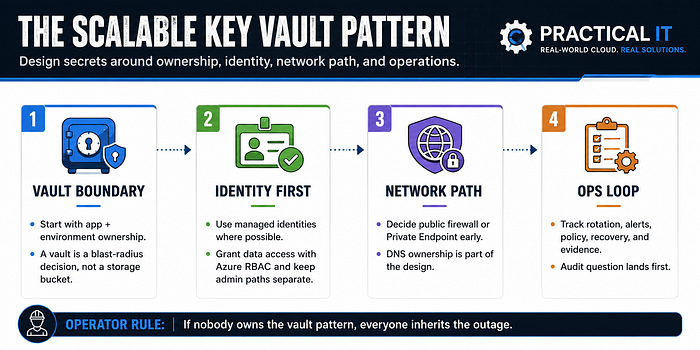
Key Vault scales best when you treat it as a platform pattern: ownership, identity, network path, recovery, and operations. The secret value matters, sure. The pattern around the secret matters more when apps, teams, and network boundaries start multiplying.
A Key Vault pattern should answer five questions fast: who owns it, what app uses it, how access is granted, what network path is allowed, and how recovery works when someone makes a bad day worse.
The simple mental model
At the beginner level, Azure Key Vault is a cloud service for storing and accessing things you want to tightly control: secrets, keys, and certificates. That could mean API keys, passwords, connection strings, signing keys, TLS certificates, or other sensitive values an app needs but should not hard-code.
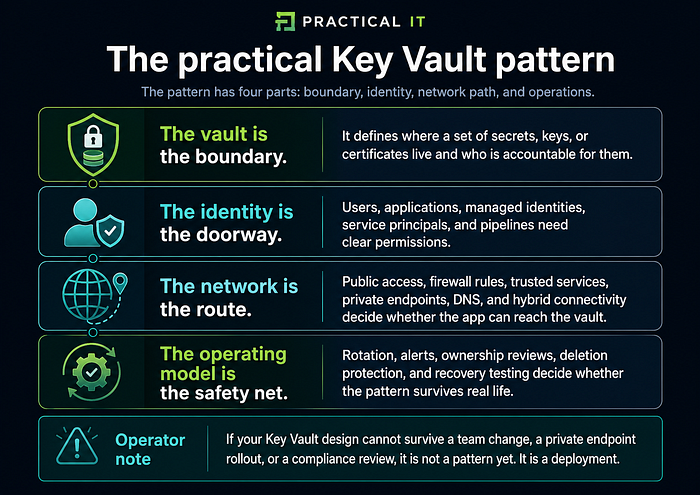
At the platform level, Key Vault is more than a secure drawer. It becomes a control point between apps, identities, networks, operators, and audit evidence.
That is why the design conversation should not start with "how many secrets do we have?" Start with "what boundary are we trying to protect?"
A useful way to think about it
Pattern 1: Start with the vault boundary
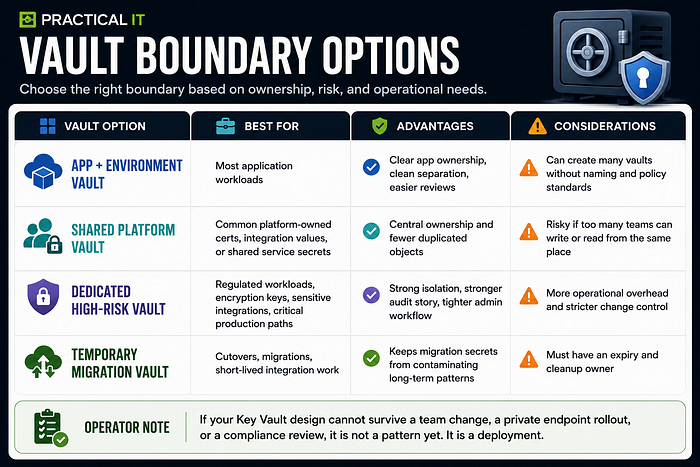
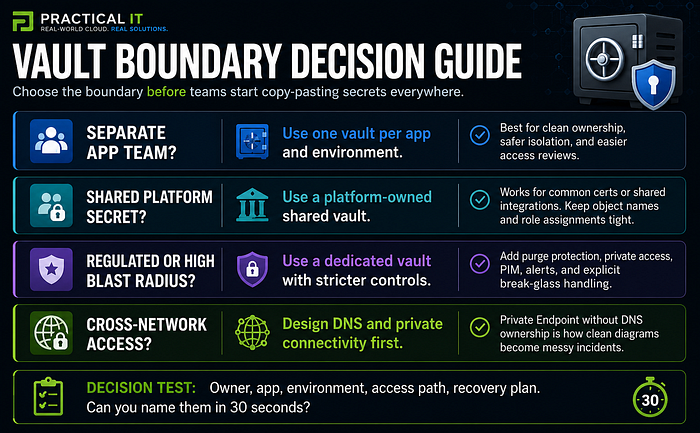
The first scaling mistake is creating vaults around convenience instead of ownership. A vault should not exist because someone needed a place to put three secrets on a Tuesday. It should exist because there is a clean boundary around an app, platform service, environment, business owner, or security requirement.
A good default for app-team isolation is one vault per application per environment. That is not because every environment needs more resources for fun. It is because separate vaults create a cleaner blast radius, cleaner RBAC, cleaner reviews, and cleaner recovery decisions.
Think about the difference between dev, test, and production. Production secrets usually need tighter access, stronger deletion protection, stricter monitoring, and a more careful recovery story. If dev and production live together because "it was easier," the platform has already accepted a weak boundary.
Pattern 2: Make identity the doorway, not the afterthought
A Key Vault with a messy identity is just a locked room with twenty copied keys.
For modern Azure patterns, prefer managed identities for Azure resources where possible. That gives the workload an identity without storing another secret just to retrieve a secret. Then use Azure RBAC for Key Vault data access so permissions are centralized, reviewable, and easier to govern across scopes.
This is where control plane and data plane thinking matters. The control plane manages the vault resource itself. The data plane works with the keys, secrets, and certificates inside the vault. Mixing those concepts is how operators accidentally give a deployment role the ability to read secrets, or give a secret reader too much ability to manage the vault.
Access pattern that scales
1. Create or confirm the workload identity. For Azure-hosted workloads, start with managed identity when the service supports it.
2. Assign the least privileged Key Vault data role needed for the workload. Secret read is not the same as key management.
3. Keep administrative roles separate from runtime roles. Operators who manage vault settings should not automatically read every production secret.
4. Use groups for human access where practical, not one-off user assignments scattered across vaults.
5. Use Privileged Identity Management for elevated administrative paths when the organization supports it.
6. Review assignments by owner, app, environment, and purpose. If the reason is missing, the access is probably stale.
If the access request says "just give the app full access so we can test," the answer is not yes. The answer is "what exact operation does it need and for how long?"
Pattern 3: Design the network path before the outage
Network boundaries are where clean Key Vault diagrams usually get humbled.
The simplest design is public access with strict identity, firewall rules, and monitoring. That can be fine for some workloads when the risk is understood and the access path is controlled.
For private workloads, Private Endpoint can bring Key Vault access into the virtual network using a private IP address. That sounds simple until DNS enters the chat. The app still calls the normal vault name, but the resolution needs to land on the private endpoint path from the right networks. If DNS is wrong, the app may fail, resolve publicly, or behave differently from one network segment to another.
This is why the private endpoint pattern should include DNS ownership, not just private endpoint creation.
Private access checklist
· Confirm which networks need vault access: app subnet, build agents, jump boxes, hybrid DNS clients, and support tooling.
· Confirm whether public network access should be disabled or restricted. Do not guess based on a nice-looking diagram.
· Create the private endpoint in the virtual network path that needs access. Private endpoint and VNet region alignment matters, even if the vault can be in a different region.
· Use the correct private DNS zone for Key Vault: privatelink.vaultcore.azure.net in public Azure.
· Link the private DNS zone to the right virtual networks or connect it through the approved DNS forwarding design.
· Test name resolution and traffic path from the same place the app runs. Testing from your laptop does not prove the workload works.
· Document who owns DNS changes. Otherwise, every private endpoint issue becomes a meeting with a packet capture attached.
Operator rule Private Endpoint is not the whole pattern. Private Endpoint plus correct DNS plus repeatable validation is the pattern.
Pattern 4: Build for recovery before deletion hurts
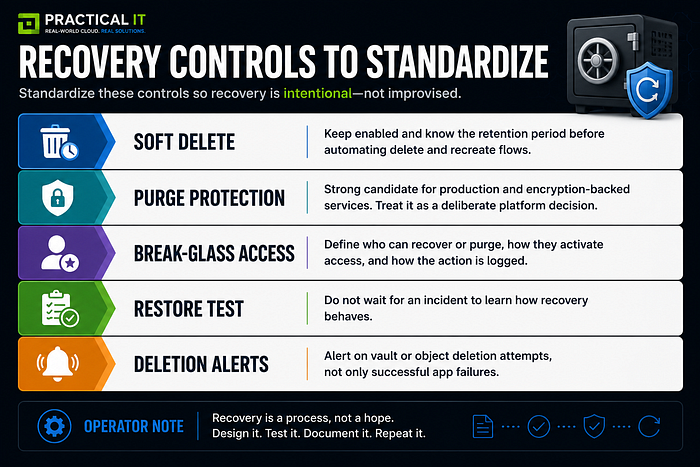
Key Vault recovery settings are not glamour controls. They are boring until somebody deletes the wrong thing, then they become everyone's favorite feature.
Soft delete gives you a recovery window for deleted vaults and objects. New vaults have soft delete enabled by default, and once enabled it cannot be disabled. Purge protection adds another layer by preventing permanent deletion during the retention period. For production workloads, especially workloads that use keys for encryption or integrate with services that depend on those keys, purge protection deserves serious consideration.
The catch: recovery settings affect how deletion and names behave. A soft-deleted vault name cannot simply be reused until the retention period clears or the right recovery and purge path is handled. That matters in automation, teardown scripts, test environments, and migration rehearsals.
Pattern 5: Make operations visible
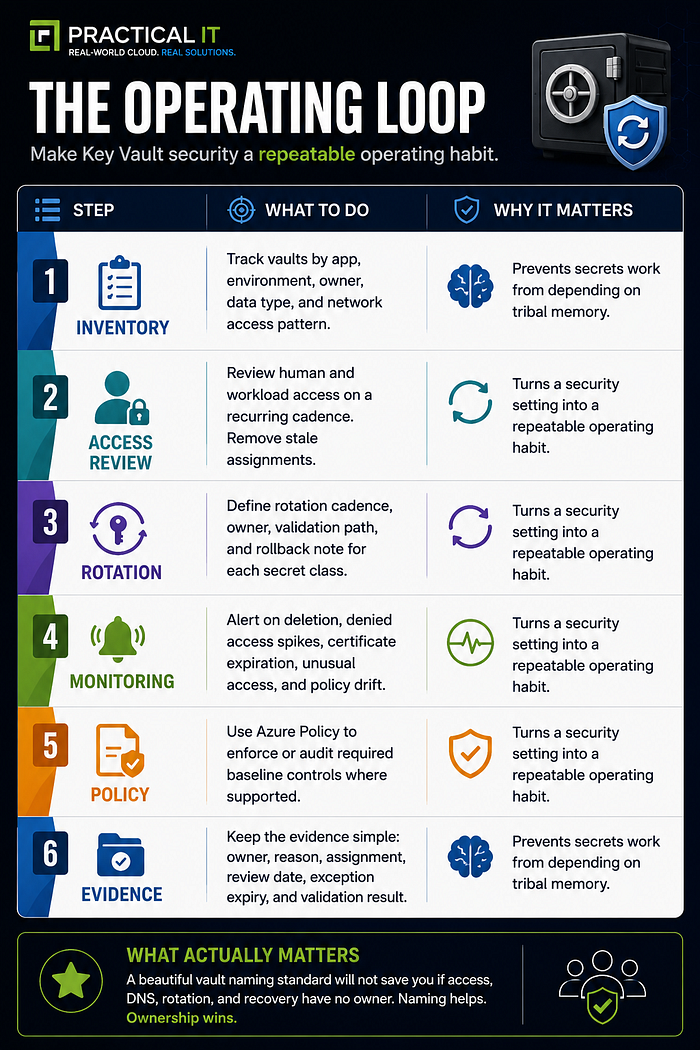
Most Key Vault failures are not because the service is mysterious. They happen because the operating loop was never defined.
Who rotates secrets? Who approves access? Who owns the private DNS zone? Who reviews stale role assignments? Who gets alerted when a production certificate is close to expiration? Who can recover a deleted vault? Who knows which app breaks if a key version changes?
That list is where Key Vault becomes platform work, not just security work.
A practical rollout model
1. Pick one workload family
Do not start with every vault in the estate. Choose one app family or platform service that crosses enough boundaries to teach you something.
2. Define the target pattern
Document the vault boundary, access model, network path, recovery controls, monitoring expectations, and naming/tagging rules.
3. Build the reference vault
Create one working example using IaC where possible. Include RBAC, private access if needed, diagnostics, tags, and policy alignment.
4. Validate from the workload
Test from the real execution point: app runtime, build agent, hybrid host, or support network. Validate DNS and permissions there.
5. Capture the support path
Write down who owns access requests, DNS issues, rotation, certificate expiration, recovery, and exceptions.
6. Turn the pattern into a reusable standard
Once the reference works, turn it into a template, checklist, or platform module. Make the right path easier than the random path.
Common gotchas that create pain later
· Using legacy access policies for critical workloads instead of moving toward RBAC-based patterns.
· Giving deployment contributors enough permission to grant themselves data-plane access.
· Creating one giant shared vault because it feels simpler during the first sprint.
· Adding Private Endpoint without owning the DNS path end to end.
· Disabling or ignoring diagnostics because the first version "just needs to work."
· Forgetting that certificate expiration is an operations problem, not only a security problem.
· Creating purge protection in lower environments without understanding the cleanup behavior.
· Letting secrets survive long after the app, integration, or migration that used them is gone.
Copy-and-paste standard starter
For each production Key Vault, document: vault owner, app owner, environment, data type, approved identity pattern, RBAC assignments, network access mode, private DNS owner, diagnostic destination, rotation cadence, recovery owner, purge protection decision, exception expiry, and last review date.
Make secrets boring on purpose
The best Key Vault pattern is not flashy. It is boring in the healthiest way.
The app knows where to go. The identity has the right access. The network path is predictable. DNS is not a mystery side quest. Operators know what changed, who approved it, and how to recover. Security can review the evidence without chasing screenshots. Finance does not have to fund a platform built on permanent exception handling.
That is the real win: less secret drama, fewer late-night access mysteries, and a platform pattern teams can repeat without reinventing the vault every time.
Clear takeaways
· Design the vault boundary around ownership and blast radius.
· Use managed identity and Azure RBAC patterns where practical.
· Treat Private Endpoint DNS as part of the architecture, not an afterthought.
· Standardize recovery, rotation, monitoring, and access reviews.
· Turn the pattern into a reusable sheet, template, or platform module.