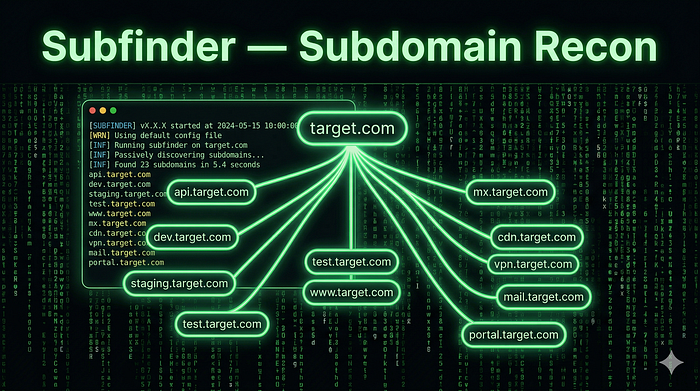

Aaj Kya Seekhenge?
- ✅ Subfinder kya hai bilkul basics se
- ✅ Install karna Kali Linux pe
- ✅ API Keys configure karna elite technique
- ✅ Basic se Advanced tak saare commands
- ✅ Elite hackers wale real workflows
- ✅ Subfinder + HTTPX + Nuclei pipeline
- ✅ Real bug bounty mein kaise use hota hai
💡 Kyun zaroori hai? Ek company ke paas sirf example.com nahi hota hazaron hidden subdomains hote hain! Aur woh subdomains often unpatched, forgotten, aur vulnerable hote hain! Wahan milte hain real bugs! 🎯
Pehle Samjho Subdomains Kya Hote Hain?
Ek analogy:
Main Domain = Ek Badi Building
                  🏢 example.com

Subdomains = Building ke alag alag floors/rooms

🏢 www.example.com        → Reception (main website)
🔒 admin.example.com      → Manager ka office
🧪 dev.example.com        → Construction zone
📊 api.example.com        → Backend server room
🗄️ staging.example.com   → Test environment
📧 mail.example.com       → Post office
Elite hacker kya karta hai?
Woh sirf reception nahi jaata poori building explore karta hai!
Staging server pe test credentials hote hain। Dev server pe debug mode on hoti hai। Old subdomain pe unpatched vulnerability hoti hai।
Yahi pe bounties milti hain! 💰
Subfinder Kya Hai?
Subfinder = ProjectDiscovery ka fast passive subdomain discovery toolprojectdiscovery
Yeh 26+ passive sources se subdomains dhundta hai:
Sources jinhe Subfinder use karta hai:
─────────────────────────────────────
✅ CertSh (SSL Certificates database)
✅ VirusTotal
✅ SecurityTrails
✅ Shodan
✅ GitHub
✅ DNSdumpster
✅ AlienVault OTX
✅ Censys
✅ CommonCrawl
✅ URLScan.io
... aur 16+ more!
Passive matlab yeh directly target server ko touch nahi karta! Safe aur stealthy!
Installation Kali Linux Pe
Method 1: apt se (Easiest)
sudo apt update
sudo apt install subfinder -y

# Verify karo
subfinder -version
Method 2: Go se (Latest Version)
# Go install karo pehle
sudo apt install golang -y

# Subfinder install karo
go install -v github.com/projectdiscovery/subfinder/v2/cmd/subfinder@latest

# PATH mein add karo
export PATH=$PATH:~/go/bin
echo 'export PATH=$PATH:~/go/bin' >> ~/.bashrc
source ~/.bashrc

# Verify karo
subfinder -version
Method 3: Binary Download (Fastest)
# Latest release download karo
wget https://github.com/projectdiscovery/subfinder/releases/latest/download/subfinder_linux_amd64.zip

# Unzip karo
unzip subfinder_linux_amd64.zip

# Move karo
sudo mv subfinder /usr/local/bin/

# Executable banao
sudo chmod +x /usr/local/bin/subfinder

# Test karo
subfinder -version ✅
API Keys Setup ELITE TECHNIQUE!
Yeh woh step hai jo 99% beginners skip karte hain aur yahi fark karta hai amateur aur elite hunter mein!
Bina API keys: Subfinder ~100–200 subdomains dhundta hai API keys ke saath: Subfinder ~1000–5000+ subdomains dhundta hai!
Step 1: Provider Config File Banao
# Config file location check karo
subfinder -ls
# Provider config file kholo
nano ~/.config/subfinder/provider-config.yaml
Step 2: API Keys Add Karo
# ~/.config/subfinder/provider-config.yaml
securitytrails:
  - YOUR_SECURITYTRAILS_API_KEY
shodan:
  - YOUR_SHODAN_API_KEY
virustotal:
  - YOUR_VIRUSTOTAL_API_KEY
censys:
  - YOUR_CENSYS_API_ID:YOUR_CENSYS_SECRET
github:
  - YOUR_GITHUB_TOKEN_1
  - YOUR_GITHUB_TOKEN_2
binaryedge:
  - YOUR_BINARYEDGE_API_KEY
urlscan:
  - YOUR_URLSCAN_API_KEY
fofa:
  - YOUR_EMAIL:YOUR_FOFA_KEY
Step 3: Free API Keys Kahan Se Milenge?
🔑 SecurityTrails  → securitytrails.com (Free: 50 queries/month)
🔑 Shodan          → shodan.io (Free: limited)
🔑 VirusTotal      → virustotal.com (Free account)
🔑 Censys          → censys.io (Free: research account)
🔑 GitHub Token    → github.com/settings/tokens (Free!)
🔑 URLScan         → urlscan.io (Free account)
🔑 BinaryEdge      → binaryedge.io (Free tier)
💡 Pro Tip: GitHub tokens sabse important hai — GitHub pe bahut saari companies ke subdomains certificates mein hote hain! Aur yeh bilkul free hai!
Basic Commands Zero Se Shuru
Command 1: Sabse Simple Ek Domain Scan
subfinder -d example.com
Output:
www.example.com
api.example.com
mail.example.com
dev.example.com
staging.example.com
...
Command 2: Output File Mein Save Karo
subfinder -d example.com -o subdomains.txt
# Verify karo
cat subdomains.txt | wc -l  # Total count dekhega
Command 3: Silent Mode Sirf Results
# Extra info nahi chahiye — sirf subdomains chahiye
subfinder -d example.com -silent
# Pipeline ke liye best hai!
subfinder -d example.com -silent > subdomains.txt
Command 4: Multiple Domains Ek Saath
# File mein domains list karo
cat > domains.txt << EOF
google.com
microsoft.com
apple.com
EOF

# Scan karo
subfinder -dL domains.txt -o all_subdomains.txt
Command 5: JSON Output Automation Ke Liye
subfinder -d example.com -oJ -o results.json
# Sources bhi include karo
subfinder -d example.com -oJ -cs -o results_with_sources.json
Advanced Commands Elite Level
Advanced 1: Sabhi Sources Use Karo (Maximum Results)
# -all flag = sabhi 26+ sources use karega
subfinder -d example.com -all -o subdomains_all.txt
# Warning: Slow hoga lekin maximum results!
Advanced 2: Specific Sources Choose Karo
# Sirf specific sources use karo
subfinder -d example.com -s github,certsh,virustotal
# Sources list dekho
subfinder -ls
Advanced 3: Recursive Subdomain Enumeration
# Subdomains ke bhi subdomains dhundho!
# example: dev.example.com → api.dev.example.com
subfinder -d example.com -recursive -o recursive_subs.txt
# Example output:
# dev.example.com
# api.dev.example.com        ← subdomain ka subdomain!
# test.api.dev.example.com   ← aur deeper!
🎯 Why Elite? Recursive mode se woh deeply nested subdomains milte hain jo competitors miss karte hain — aur wahan fresh bugs hote hain!
Advanced 4: Rate Limiting Stealth Mode
# Rate limit set karo (requests per second)
subfinder -d example.com -rl 10

# Specific sources ka rate limit
subfinder -d example.com -rls "securitytrails=5/s,shodan=2/s"
Advanced 5: IP bhi Include Karo Output Mein
# Active resolution ke saath IP bhi milega
subfinder -d example.com -active -oI -o subs_with_ips.txt
# Output:
# api.example.com,192.168.1.1
# dev.example.com,10.0.0.1
Advanced 6: Exclude Karo Specific Sources
# Koi source slow hai ya unreliable — exclude karo
subfinder -d example.com -es alienvault,zoomeye
Advanced 7: Proxy Se Run Karo (Anonymous)
# Burp Suite proxy se route karo (debugging ke liye)
subfinder -d example.com -proxy http://127.0.0.1:8080
ELITE WORKFLOWS Real Bug Hunters Yahi Use Karte Hain
Workflow 1: Subfinder + HTTPX Live Hosts Filter Karo
# Step 1: Subdomains dhundho
subfinder -d example.com -silent > subs.txt

# Step 2: Live hosts filter karo
cat subs.txt | httpx -silent > live_hosts.txt
# Ek liner version (piping):
subfinder -d example.com -silent | httpx -silent | tee live_hosts.txt
# Result: Sirf woh subdomains jo actually LIVE hain!
Workflow 2: Subfinder + HTTPX + Nuclei Full Auto Scan
# Yeh ek complete recon + scan pipeline hai!
subfinder -d example.com -silent | \
httpx -silent | \
nuclei -t ~/nuclei-templates/ -o vulnerabilities.txt
# Kya hota hai:
# Subfinder → Subdomains dhundta hai
# HTTPX     → Live ones filter karta hai
# Nuclei    → 5000+ vulnerability templates se scan karta hai
# Output    → Potential vulnerabilities list!
Workflow 3: Multiple Targets Mass Recon
#!/bin/bash
# elite_recon.sh — save karo aur use karo

TARGET=$1
OUTPUT_DIR="recon_$TARGET"
mkdir -p $OUTPUT_DIR

echo "🔍 Step 1: Subfinder running..."
subfinder -d $TARGET -all -silent \
  -o $OUTPUT_DIR/subdomains_raw.txt

echo "📊 Total subdomains: $(wc -l < $OUTPUT_DIR/subdomains_raw.txt)"

echo "🌐 Step 2: Live hosts filtering..."
cat $OUTPUT_DIR/subdomains_raw.txt | \
  httpx -silent -status-code -title -tech-detect \
  -o $OUTPUT_DIR/live_hosts.txt

echo "✅ Live hosts: $(wc -l < $OUTPUT_DIR/live_hosts.txt)"

echo "🎯 Step 3: Nuclei scanning..."
cat $OUTPUT_DIR/live_hosts.txt | \
  nuclei -t ~/nuclei-templates/exposures/ \
  -t ~/nuclei-templates/misconfiguration/ \
  -severity medium,high,critical \
  -o $OUTPUT_DIR/vulnerabilities.txt

echo "🔥 Potential vulns: $(wc -l < $OUTPUT_DIR/vulnerabilities.txt)"
echo "✅ Recon complete! Check $OUTPUT_DIR/"

# Run karo:
# chmod +x elite_recon.sh
# ./elite_recon.sh example.com
Workflow 4: Subdomain Takeover Check HIGH Bounty!
# Subdomains dhundho
subfinder -d example.com -silent > subs.txt
# Subjack se takeover check karo
subjack -w subs.txt -t 100 -timeout 30 \
  -ssl -c ~/go/src/github.com/haccer/subjack/fingerprints.json \
  -o takeover_candidates.txt
# Nuclei se bhi check karo
cat subs.txt | \
  httpx -silent | \
  nuclei -t ~/nuclei-templates/takeovers/ \
  -o takeovers.txt
🤑 Why High Bounty? Subdomain takeover = Attacker company ke subdomain pe apna content serve kar sakta hai phishing, malware delivery! Companies $500-$3000 tak deti hain!
Workflow 5: Git History + Subfinder Hidden Subdomains
# GitHub pe company ke old commits mein subdomains hote hain!
# GitHub dorking manually:
# site:github.com "*.example.com" - GitHub search mein
# Subfinder already GitHub source use karta hai API key se
subfinder -d example.com -s github -silent
# Combine karo gau (GetAllURLs) se bhi:
gau example.com | grep -Eo 'https?://[^/]+' | \
  sed 's/https\?:\/\///' | sort -u | \
  grep "example.com" > historical_subs.txt
Workflow 6: Continuous Monitoring Advanced Elite Setup
#!/bin/bash
# monitor_new_subdomains.sh
# Cron job se daily run karo — naye subdomains detect karo

TARGET="example.com"
DATE=$(date +%Y%m%d)
PREV_DATE=$(date -d "yesterday" +%Y%m%d)

# Aaj ke subdomains dhundho
subfinder -d $TARGET -all -silent -o "subs_$DATE.txt"

# Pehle wale se compare karo
if [ -f "subs_$PREV_DATE.txt" ]; then
  NEW_SUBS=$(comm -13 \
    <(sort "subs_$PREV_DATE.txt") \
    <(sort "subs_$DATE.txt"))

  if [ ! -z "$NEW_SUBS" ]; then
    echo "🚨 NEW SUBDOMAINS FOUND!"
    echo "$NEW_SUBS"
    # Turant live check karo
    echo "$NEW_SUBS" | httpx -silent > "new_live_$DATE.txt"
    # Nuclei scan karo
    cat "new_live_$DATE.txt" | \
      nuclei -severity high,critical \
      -o "new_vulns_$DATE.txt"
  fi
fi

# Cron setup:
# crontab -e
# 0 9 * * * /path/to/monitor_new_subdomains.sh
🏆 Elite Secret: Naye subdomains = Fresh attack surface = Minimum competition! Companies jab naye features launch karti hain pehle ghante/din mein bugs dhundne wale ko bonus bhi milta hai!
Real Bug Bounty Scenario Maine Kaise Use Kiya
Mujhe ek program mila jiska scope tha *.techcorp.com
# Step 1: Full recon
subfinder -d techcorp.com -all -silent > subs.txt
# 847 subdomains mile!
# Step 2: Live filter
cat subs.txt | httpx -silent -status-code > live.txt
# 234 live hosts mile
# Step 3: Interesting patterns dhundho
cat live.txt | grep -E "dev|staging|test|admin|api|old|backup"
# Results:
# dev.techcorp.com [200]
# staging-api.techcorp.com [200]
# admin-old.techcorp.com [403]
# backup.techcorp.com [200]  ← INTERESTING!
# Step 4: backup.techcorp.com explore karo
curl -I https://backup.techcorp.com
# Server: Apache/2.2.14  ← OLD VERSION!
# X-Powered-By: PHP/5.4  ← VERY OLD!
# Step 5: Nuclei scan
echo "https://backup.techcorp.com" | \
  nuclei -t ~/nuclei-templates/ \
  -severity high,critical
# RESULT: Remote Code Execution on backup.techcorp.com!
# Bounty: $2,500 💰
Poora chain: Subfinder → HTTPX → Pattern matching → Manual explore → RCE!
Subfinder Cheat Sheet Quick Reference
# ─── BASIC ───────────────────────────────────
subfinder -d example.com                    # Basic scan
subfinder -d example.com -silent            # Clean output
subfinder -d example.com -o out.txt         # File save
subfinder -dL domains.txt                   # Multiple domains
# ─── ADVANCED ────────────────────────────────
subfinder -d example.com -all              # All sources
subfinder -d example.com -recursive        # Recursive
subfinder -d example.com -active -oI      # With IPs
subfinder -d example.com -oJ              # JSON output
subfinder -d example.com -rl 5            # Rate limit
# ─── SOURCES ─────────────────────────────────
subfinder -ls                              # List sources
subfinder -d example.com -s github,certsh # Specific sources
subfinder -d example.com -es alienvault   # Exclude source
# ─── PIPELINES ───────────────────────────────
subfinder -d example.com -silent | httpx -silent
subfinder -d example.com -silent | httpx | nuclei -t templates/
subfinder -d example.com -silent | dnsx -silent
YouTube Resources
Subfinder Live Bug Bounty
youtube.com/watch?v=vedvk8n9YJU
Subfinder + Amass Ultimate Guide
youtube.com/watch?v=2UM41V__bSQ
Fast Subdomain Enumeration
youtube.com/watch?v=lu5xz8zQNsM
Subfinder Power Features
youtube.com/watch?v=vP_1gD_nZrA
Aaj Ka Homework
# 1. Subfinder install karo
subfinder -version
# 2. GitHub token banao → API config mein add karo
# 3. Yeh domain scan karo (legal, public bug bounty):
subfinder -d hackerone.com -silent > h1_subs.txt
cat h1_subs.txt | wc -l
# Kitne subdomains mile? Comment mein batao!
# 4. Live filter karo
cat h1_subs.txt | httpx -silent > h1_live.txt
# 5. Interesting subdomains dhundho
cat h1_live.txt | grep -E "dev|api|admin|test|staging"
Quick Revision
🔍 Subfinder    = Passive subdomain discovery tool
📡 26+ Sources  = CertSh, GitHub, Shodan, VirusTotal...
🔑 API Keys     = 10x zyada results — MUST setup!
🔄 Pipeline     = Subfinder → HTTPX → Nuclei
🎯 Elite Use    = Recursive + All sources + Monitoring
💰 Bug Type     = Subdomain Takeover, Old versions,
                  Forgotten endpoints, Exposed admin panels
Meri Baat…
Jab maine pehli baar subfinder -d target.com run kiya 23 subdomains mile।
Phir maine API keys add kiye 847 subdomains mile!
37x zyada results sirf API keys se।
Us din samjha ki tools ka proper setup hi elite hunter aur average hunter mein fark karta hai। Tools sab ke paas hote hain configuration sirf kuch logon ke paas hoti hai।
Agle article mein hum seekhenge Amass jo Subfinder se bhi zyada deep recon karta hai! DNS brute forcing, ASN enumeration, aur graph-based attack surface mapping! 🔥
HackerMD Bug Bounty Hunter | Cybersecurity Researcher GitHub: BotGJ16 | Medium: @HackerMD
Previous: Article #5 Scope Mastery Next: Article #7 Amass: Advanced Recon Mastery!
#Subfinder #Recon #BugBounty #EthicalHacking #Hinglish #SubdomainEnumeration #ProjectDiscovery #HackerMD