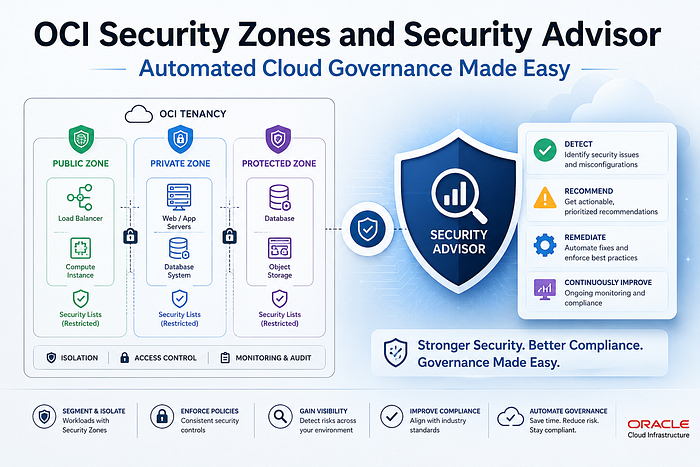

Introduction
Every cloud team eventually faces the same problem: someone misconfigures a resource, a storage bucket becomes public, a subnet gets an internet gateway it should never have, and suddenly your "secure" environment has a backdoor wide open. The bigger the team, the higher the probability of this happening.
Oracle Cloud Infrastructure addresses this with two powerful services that most OCI users underutilize: Security Zones and Security Advisor. Together, they shift cloud governance from reactive (detect and fix) to proactive (prevent before it happens). For enterprises managing production workloads, this difference is everything.
This blog walks through what these services are, how they work conceptually, and how to set them up step by step — with CLI commands included.
The Problem: Misconfiguration Is the #1 Cloud Risk
Before we talk solutions, let's be honest about the problem. In a large OCI tenancy, dozens of engineers might have permission to create compute instances, subnets, buckets, and databases. Each of those resources has configuration options that, if set incorrectly, can weaken your security posture — a public bucket, an unencrypted boot volume, a database with a public endpoint.
Traditional approaches rely on training, code reviews, and audits. These are all good practices, but they are reactive. By the time the audit catches the misconfiguration, it may have been live for days or weeks.
Security Zones take a different approach: they deny the misconfiguration at the moment it is attempted, before the resource is ever created.
What Is OCI Security Zones?
Security Zones let you be confident that your resources in OCI — including Compute, Networking, Object Storage, Block Volume, and Database resources — comply with your security policies. A security zone is associated with one or more compartments and a security zone recipe. When you create and update resources in a security zone, OCI validates these operations against the list of policies defined in the security zone recipe. If any security zone policy is violated, then the operation is denied.
Think of a Security Zone as a protective fence around a compartment. The fence has rules. If you try to build something inside the fence that breaks those rules, the action is blocked entirely. No exceptions, no overrides from the Console or CLI.
Oracle Security Zones is the preventive control measure, designed to stop you from making bad implementation choices that would weaken your security stance. OCI Security Zones enforce strict best practice security rules that are locked and cannot be modified.
Key Concepts
Term What It Means Security Zone A compartment (and all its sub-compartments) placed under active security policy enforcement Recipe A collection of security zone policies assigned to a zone — the rulebook Policy A single security rule, e.g., "no public buckets", "encrypt with customer-managed keys" Maximum Security Recipe Oracle's pre-built, fully curated recipe covering all available policies — unmodifiable Custom Recipe A recipe you create by cloning and selectively enabling/disabling policies Cloud Guard Target Automatically created when a security zone is set up — monitors for violations in existing resources
What Is the Maximum Security Recipe?
When you create a security zone you assign it a recipe, which is a collection of security zone policies. Your tenancy has a predefined recipe named Maximum Security Recipe, which includes a number of curated security zone policies. Oracle manages this recipe and you can't modify it. You can, however, create your own recipes that meet your specific security requirements.
The Maximum Security Recipe enforces the following core security principles across all covered resources:
- No public internet access — resources cannot be exposed directly to the internet
- Encryption with customer-managed keys — all data at rest must use keys you own and control via OCI Vault
- No resource movement outside the zone — data stays in the secure compartment
- Co-location of dependent resources — a compute instance and its boot volume must both be in the same security zone
- Automatic backups — resources must be regularly and automatically backed up
Because the policies of Maximum Security Recipe are relatively strict and not customizable, your organization must consider it for suitable workloads only after jointly evaluating the security zone with the application architect.
For most enterprises, a custom recipe cloned from Maximum Security is the right starting point — you get Oracle's best practices as a baseline and selectively relax only what your workload genuinely requires.
What Is OCI Security Advisor?
Security Advisor is the companion service to Security Zones. While Security Zones enforce rules, Security Advisor guides you to create resources the right way from the start.
OCI Security Advisor supports and reinforces Oracle security best practices, including the configuration requirements for resources in Security Zones. It combines and streamlines existing workflows to efficiently create resources that meet baseline security requirements from the outset. Specifically, you can assign a new customer-managed encryption key to a resource at the time that you create the resource, even if you have never created a vault or encryption key before.
In practice, Security Advisor simplifies the most error-prone part of secure cloud setup: encryption key management. Instead of requiring engineers to first understand OCI Vault, create a vault, generate a key, and then link it while creating a resource — Security Advisor handles that entire flow in one guided wizard.
Streamlined workflows reduce complexity and decision-making. Where you would otherwise need to choose between configuration options, Security Advisor provides only the more secure option. For example, Security Advisor only allows you to create master encryption keys that are 256 bits in length.
Security Advisor currently supports guided secure creation for:
- Object Storage buckets
- Block Volumes
- File Storage systems
- Compute instances (VMs)
How Security Zones and Security Advisor Work Together
Here is the mental model:
Developer tries to create a resource
         │
         ▼
Is this compartment in a Security Zone?
         │
    YES  │
         ▼
Does the resource configuration violate any recipe policy?
         │
    YES  │                     NO
         ▼                      ▼
   ❌ DENIED              ✅ ALLOWED — resource created
   Error returned
   Cloud Guard alerted
Security Advisor sits at the start of this flow. It pre-fills configurations to be zone-compliant before you even submit the request, reducing the number of denials developers hit during normal work.
Cloud Guard monitoring is integrated with Security Zones and monitoring targets are automatically generated that correspond to the security policy applied using Security Zones. The combination of Security Zones policy enforcement and Cloud Guard posture monitoring extends the scope of cloud security posture management tools to include active policy enforcement.
Prerequisites
Before you create a Security Zone, three things must be in place:
- Cloud Guard must be enabled in your tenancy — Security Zones depend on it for monitoring existing resources
- OCI Vault must be accessible — the Maximum Security Recipe requires customer-managed encryption keys
- IAM policies must be in place for the groups that will manage Security Zones
Required IAM policies for a SecurityAdmins group:
Allow group SecurityAdmins to manage security-zone in tenancy
Allow group SecurityAdmins to manage security-recipe in tenancy
Allow group SecurityAdmins to use cloud-guard-config in tenancy
Allow group SecurityAdmins to read cloud-guard-targets in tenancy
Allow group SecurityAdmins to inspect cloud-guard-problems in tenancy
Step-by-Step: Enable Cloud Guard
Cloud Guard is the prerequisite. Skip this only if it is already enabled.
- Open the OCI Console → hamburger menu → Identity & Security → Cloud Guard
- Click Enable Cloud Guard
- Choose a reporting region (this is permanent — choose carefully, it must comply with your data residency requirements)
- Accept the Oracle-managed detector recipes
- Set the target to your root compartment (or a specific compartment)
- Click Enable
Note: After enabling, Cloud Guard takes up to 3 hours to complete its first scan of existing resources.
Step-by-Step: Create a Custom Security Zone Recipe
Unless you want every single Oracle policy enforced with no flexibility, start with a custom recipe cloned from Maximum Security.
Via Console:
- Navigate to Identity & Security → Security Zones → Recipes
- Click the Actions menu on Maximum Security Recipe → Clone
- Give your recipe a name (e.g.,
prod-security-recipe) - On the Policies page, review each policy — deselect only what your workload genuinely cannot support
- Click Create
Via CLI:
First, get the Maximum Security Recipe OCID:
oci cloud-guard security-recipe list \
  --compartment-id <tenancy_ocid> \
  --query "data[?\"display-name\"=='Maximum Security Recipe'].id | [0]" \
  --raw-output
Clone it:
oci cloud-guard security-recipe create \
  --compartment-id <compartment_ocid> \
  --display-name "prod-security-recipe" \
  --description "Production recipe cloned from Maximum Security" \
  --source-recipe-id <maximum_security_recipe_ocid>
Step-by-Step: Create a Security Zone
With your recipe ready and Cloud Guard enabled, create the Security Zone for your production compartment.
Via Console:
- Navigate to Identity & Security → Security Zones → Overview
- Click Create Security Zone
- Enter a name (e.g.,
prod-security-zone) - Under Security Zone Recipe, choose:
- Oracle-managed → applies Maximum Security Recipe
- Customer-managed → select your custom recipe
- Select the compartment to protect
- Click Create Security Zone
Caution: Do not assign a security zone to the root compartment of the tenancy. Security zones applied to the root compartment might constrain the actions that are possible across an entire tenancy.
Via CLI:
oci cloud-guard security-zone create \
  --compartment-id <compartment_ocid> \
  --display-name "prod-security-zone" \
  --security-zone-recipe-id <your_recipe_ocid>
When you create a security zone for a compartment, Cloud Guard performs the following actions: deletes any existing Cloud Guard target for the compartment and its subcompartments, creates a security zone target for the compartment, and adds the default Oracle-managed detector recipe to compartments in the security zone.
Step-by-Step: Test the Zone (Trigger a Violation)
This is the most satisfying part — deliberately trying to break the rules to confirm the zone is working.
Try to create a public Object Storage bucket in the protected compartment:
oci os bucket create \
  --compartment-id <protected_compartment_ocid> \
  --name test-public-bucket \
  --public-access-type ObjectRead
Expected result:
ServiceError:
{
  "status": 400,
  "code": "SecurityZonePolicyViolation",
  "message": "The operation violated security zone policies:
              deny public access to Object Storage buckets"
}
The action is blocked. Cloud Guard logs the attempted violation. No resource was created. This is exactly the behavior you want in production.
Step-by-Step: Use Security Advisor to Create a Secure Bucket
Now do it the right way — using Security Advisor to create an encrypted private bucket in one guided flow.
- Navigate to Identity & Security → Security Advisor
- Click Create Object Storage Bucket
- Security Advisor walks you through:
- Selecting or creating an OCI Vault
- Generating a 256-bit AES encryption key (the only option offered)
- Setting bucket visibility to private (public is not available)
- Linking the key to the bucket at creation time
4. Click Create
The bucket is created fully compliant with Security Zone policies — no manual key management required, no policy violations.
Step-by-Step: Check for Policy Violations in Existing Resources
If your compartment had resources before the security zone was created, those resources may already violate policies. Cloud Guard identifies these over time.
Via Console:
- Navigate to Identity & Security → Security Zones → your zone
- Click the Associated Compartments tab
- Expand the compartment → click View Cloud Guard Problems
- Review violations and take corrective action on each
Via CLI (list Cloud Guard problems for a compartment):
oci cloud-guard problem list \
  --compartment-id <protected_compartment_ocid> \
  --lifecycle-state OPEN \
  --all
Each problem includes the resource OCID, the violated policy, the risk level, and suggested remediation steps.
Security Zones vs Security Lists vs IAM Policies
A common point of confusion for engineers new to OCI governance:
Layer What It Controls When It Acts IAM Policy Who can perform an action Before any API call is processed Security List / NSG Network traffic rules At the network packet level Security Zone Whether a resource configuration is compliant At resource creation/modification time Cloud Guard Detects violations in existing resources Periodically, after resources exist
These are complementary layers, not alternatives. A complete security posture uses all four.
Best Practices
- Start with a custom recipe, not Maximum Security, for your first production zone — review each policy with your architect before enabling
- Protect production and sensitive compartments first — dev/test compartments can use lighter recipes
- Never assign a security zone to the root tenancy compartment unless you have reviewed every policy against every workload
- Use Security Advisor for all new resource creation in security-zone-protected compartments — it prevents violations before they are even attempted
- The practice of limiting DELETE permission is especially critical for Security Zones — deleting a zone disables all security zone policies on resources in the zone's compartments, dramatically changing your security posture
- Review Cloud Guard problems within 24 hours of enabling a new zone — existing resources may have immediate violations
- Integrate Cloud Guard events with OCI Notifications to push alerts to Slack or email the moment a violation is detected
Real-World Use Case: Protecting a Production Database Compartment
Here is a concrete scenario. You have a production Oracle DB System in a compartment called prod-db. Your security requirements are:
- No public access to the database
- Encryption with your own keys
- No Data Guard associations outside the compartment
- Automatic backups enforced
Steps:
- Enable Cloud Guard (if not already done)
- Create a custom recipe cloning Maximum Security, enabling all database policies
- Create a security zone for
prod-dbusing that recipe - Run Cloud Guard problem check — remediate any existing violations
- From now on, any attempt to give the DB a public endpoint, disable backups, or move it out of the compartment is automatically blocked
No alerts needed. No human review needed. The policy is enforced at the infrastructure level.
Conclusion
Security Zones and Security Advisor represent a fundamental shift in how cloud governance works — from audit-and-fix to prevent-and-guide. For enterprises running critical workloads on OCI, this is not a nice-to-have. It is the right architecture baseline.
Security Zones extend the scope of security posture management beyond monitoring and visibility to active enforcement of resource-based security policy.
When combined with Cloud Guard for detection, OCI Vault for key management, and IAM for access control, Security Zones give you a defence-in-depth model where misconfiguration is structurally impossible — not just unlikely.
Start with a custom recipe. Protect your production compartments. Use Security Advisor for all new resource creation. And let the platform enforce what humans inevitably forget.
Oracle ACE Advocacy Series — OCI Security & Governance Collection
References: OCI Security Zones Documentation | Security Advisor Overview | Cloud Guard Getting Started