
Open-Source Intelligence (OSINT)
Open-Source Intelligence (OSINT) is the process of collecting, analysing, and interpreting information from publicly available sources such as social media, news outlets, websites, forums, and public records to produce actionable intelligence for security, business, and decision-making purposes.
Key Characteristics:
· Uses open and publicly accessible sources without breaching privacy or security controls.
· Focuses on analysis and interpretation, not just data collection.
· Transforms raw data into meaningful insights.
· Helps in threat detection, trend analysis, and risk assessment.
· Widely applied in cybersecurity, law enforcement, journalism, market research, and national intelligence.
· Can be used by security professionals and intelligence agencies, but may also be misused by cybercriminals if not handled responsibly.
History of Open-Source Intelligence (OSINT)
- Early Origins (Before World War II): OSINT existed in informal forms where governments and organizations analysed newspapers, books, public speeches, and radio broadcasts to understand political situations and public opinion.
- World War II Era: During World War II, OSINT became more organized. Intelligence agencies systematically collected and analysed enemy newspapers, radio communications, and propaganda materials to support military strategies.
- Rise of the Internet (1990s): The expansion of the internet revolutionized OSINT by providing easy access to global information through websites, online databases, and discussion forums.
- Social media and Big Data Era (2000s–Present): The growth of social media platforms and digital content introduced real-time data, images, videos, and geolocation information, significantly enhancing OSINT capabilities.
- Modern OSINT: Today, OSINT combines advanced analytical tools, automation, and artificial intelligence and is widely used in cybersecurity, law enforcement, journalism, business intelligence, and national security.
OSINT vs Hackers: What's the Difference?

OSINT (Open-Source Intelligence) means finding information that is already public. Whereas Hackers break into systems or bypass security to get information that is not meant to be public.
How They Work:
Think of information like a house:
OSINT
1. Uses public websites, news, maps, and social media
2. Searches, compares, and verifies information
3. Connects facts without breaking rules
It's like reading signs posted outside the house.
Hackers
1. Exploit software weaknesses
2. Guess or steal passwords
3. Enter private systems
That's like sneaking in through a window.
OSINT Process Cycle
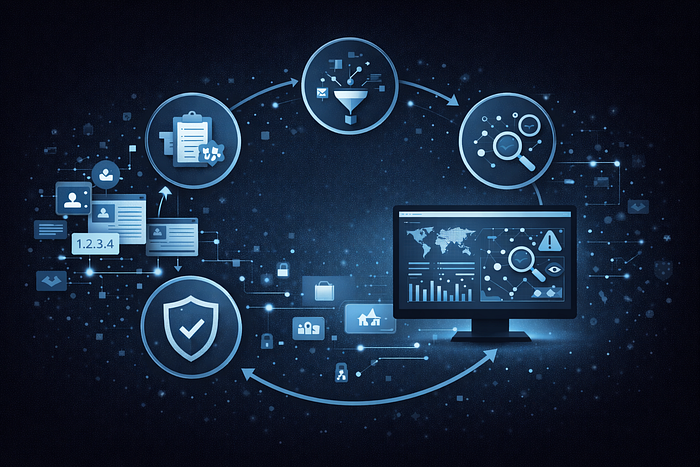
1. Planning & Direction (The "Question")
Before you touch a keyboard, you must decide what you are looking for.
- The Goal: Don't just "look for hackers." Instead, ask: "What are the current IP addresses used by phishing campaigns targeting students?"
- Why it matters: The internet is too big. Without a specific question, you will get lost in "information overload."
2. Collection (The "Gathering")
Now you go out and find the raw data. Since you are a beginner, you should use Passive Collection (looking at what's already public).
- Sources: Threat Feeds: Websites like Abuse.ch or AlienVault that list "Bad IPs."
- Social Media: Searching Twitter/X or Reddit for "New Cyber Attack" to see what people are reporting.
- Technical Tools: Using TheHarvester to find emails or subdomains related to a company.
3. Processing (The "Cleaning")
Raw data is messy. You might have a list of 5,000 IP addresses in a weird text file.
- The Task: You need to "clean" this data so it's useful.
- Example: Removing duplicates, making sure the IPs are still active, and putting them into a simple spreadsheet or a format your monitoring software can read.
4. Analysis & Production (The "Aha!" Moment)
This is the most important part. You look at your clean data and look for patterns.
- The Task: You compare the "Bad IPs" you found with your own network logs.
- The "Aha!": "Wait, I see that 3 of the 'Bad IPs' from my OSINT list tried to connect to my lab computer last night. This means someone is actively scanning us."
5. Dissemination & Feedback (The "Report")
The final step is telling the people who need to know.
- The Task: You create a simple report or an alert.
- The Result: You give this to your professor or "security team" so they can block those IPs. Then, you ask: "Was this helpful?" Their answer helps you start Step 1 (Planning) all over again for the next day.
Where the Information Comes From in OSINT

In Open-Source Intelligence (OSINT), information is collected from legally and publicly accessible sources, including:
1. Social Media Platforms: Posts, profiles, comments, images, videos, and connections from platforms like social networks and messaging apps.
2. News Media and Publications: Online newspapers, magazines, press releases, journals, and broadcast media.
3. Websites and Blogs: Personal websites, corporate pages, blogs, and archived web content.
4. Public Records and Open Data: Government databases, court records, company registrations, land records, and census data.
5. Online Forums and Communities: Discussion boards, Q&A platforms, and special-interest communities where users share information.
6. Multimedia Content: Images, videos, podcasts, and metadata that can reveal locations, timelines, and identities.
7. Technical and Cyber Sources: Domain records, IP address data, breach reports, code repositories, and security advisories.
Tools and Techniques been used
1. Top OSINT Tools (The "Searching" Part)
Shodan: "Google for Devices." It finds routers, webcams, and servers connected to the internet. You can search for "unsecured" things just by typing a brand name.
VirusTotal: A massive library of "Virus Fingerprints." You can paste a suspicious file or website link here to see if it's dangerous. It uses 70+ different antivirus scanners at once.
TheHarvester: A tool that automatically "scrapes" emails, names, and subdomains from Google and LinkedIn.It does hours of manual searching in about 30 seconds.
Abuse.ch: A community-run list of "Known Bad" IP addresses and URLs.
You can download a simple text list of "Bad Actors" for your project.
OSINT Framework: A website that is basically a "Map of the Internet's Secret Tools." It's a great "home base" to find new tools for any specific task.
2. OSINT Techniques (The "How-To")
A "technique" is just a specific way of using a tool to get better results.
Google Dorking: This isn't an insult! It's using advanced commands in Google to find things that aren't meant to be public.
- Example: Searching filetype:pdf "confidential" tells Google to only show PDF files that contain the word "confidential."
Pivoting: This is a detective trick. You start with one piece of info (like an email) and use it to find a second piece (like a username), which leads to a third (a social media account).
Metadata Analysis: Every photo you take has "hidden" data (metadata) like the date it was taken or the GPS location. Techniques like ExifTool allow you to "read" this hidden history.
Sock Puppeting: Security researchers often create fake, anonymous social media profiles (sock puppets) so they can look at hacker forums without using their real names.
3. Defensive Monitoring (The "Watching" Part)
Once you have your OSINT data (like a list of 10 bad IP addresses), you need to watch your network.
- Log Analysis: Every time a computer connects to your network, it creates a "log" (a line of text). Your technique is to use a tool (like Wireshark or a simple spreadsheet) to see if those "Bad IPs" appear in your logs.
- Alerting: You can set up a "tripwire." If your computer sees a connection from a country you don't live in, or from an IP on your "Bad List," it sends you an email.
The OSINT Risk Pyramid
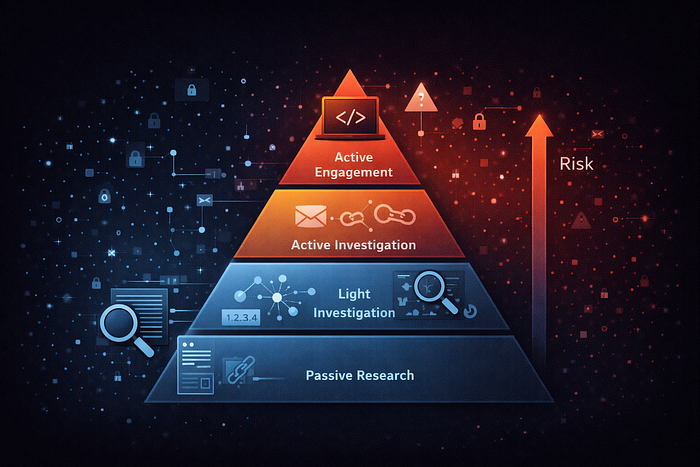
Level 1: Passive Research (Lowest Risk — Safe Base)
What it is: Viewing information already collected or cached by third-party platforms.
Examples:
- Checking IP reputation on VirusTotal
- Reviewing reports on Abuse.ch
Risk: Zero
- You interact only with third-party sites, not the hacker.
- The target has no idea you are investigating.
Level 2: Semi-Passive Research (Low Risk)
What it is: Accessing live public records or directories without touching the target directly.
Examples:
- WHOIS lookups
- Searching Shodan for exposed services
Risk: Very Low
- You interact with directories, not the target system.
- Rarely, advanced monitoring may log these lookups.
Level 3: Active Footprinting (Medium Risk)
What it is: Normal-looking interaction with the target's online presence for investigation.
Examples:
- Visiting a suspicious website
- Clicking a phishing link in a controlled environment
Risk: Medium
- Your IP address may appear in the attacker's logs.
- The target may realize they are being investigated.
Level 4: Active Engagement (Highest Risk)
What it is: Direct interaction with attackers or their infrastructure.
Examples:
- Running malware in a lab to observe communication
- Messaging threat actors on forums
Risk: High
- You become visible to the attacker.
- Without protection (VPN, fake identity), you may be targeted in return.
Conclusion
Open-Source Intelligence is not about collecting more data — it's about asking the right questions and analysing information responsibly. When done correctly, OSINT turns publicly available data into valuable insight that helps defenders identify threats and reduce risk. By following a structured process, respecting ethical boundaries, and understanding the risks involved, OSINT becomes a powerful defensive capability rather than a dangerous shortcut. In a world overflowing with information, the real advantage lies not in access to data, but in the ability to interpret and use it wisely.