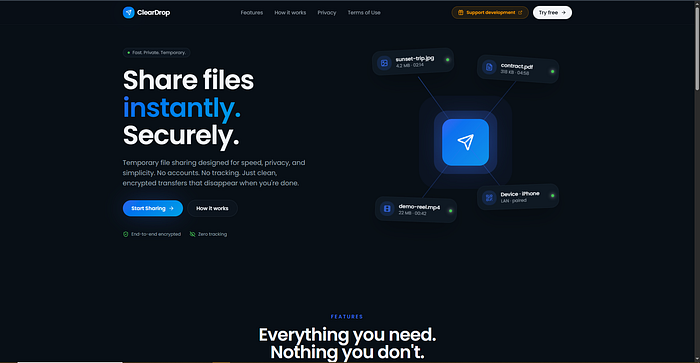

Building a local file-sharing app sounds deceptively simple. Generate a QR code, connect two devices, and transfer files peer-to-peer. That was the goal of ClearDrop, a progressive web app (PWA) I built using WebRTC, Supabase Realtime for signaling, and QR/link pairing.
At first, everything looked like it worked perfectly. The app transferred files instantly in my local test environment. Two tabs open in the same browser, same machine, smooth as butter.
The moment I tried two real, physically separate devices, everything broke.
If you've ever hit this wall where your WebRTC signaling succeeds but the peer connection never establishes, this post will save you weeks of debugging.
Here's exactly what went wrong, why it happened, and how I fixed it, step by step.
The Symptom: "It works on my machine."
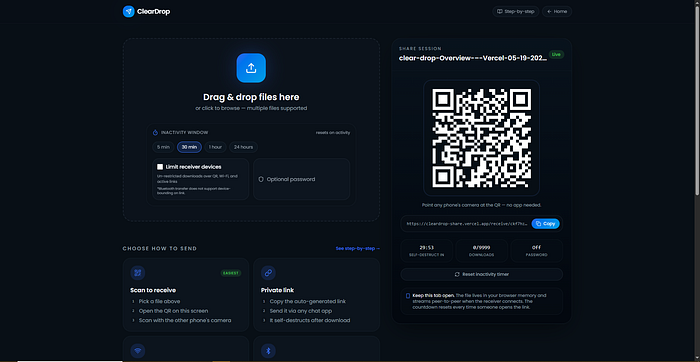
ClearDrop's flow was straightforward:
- Device A creates a room and gets a pairing QR code or link.
- Device B scans the QR code and joins the same signaling channel (Supabase Realtime).
- Both exchange SDP offers, answers, and ICE candidates.
- A direct peer-to-peer connection should open via
RTCDataChannel. - Files stream across the channel.
On the same device, everything succeeded.
But across different devices:
- phone to laptop
- laptop to another phone
- hotspot-connected tablets
…the transfer never started.
The browser console showed:
connectionState stuck at "connecting"
ICE connection state cycling or failing
RTCDataChannel never opening
No errors in the signaling logs
Supabase Realtime was delivering every message perfectly. The offers, answers, and candidates all arrived. Yet the peers refused to talk directly.
The critical realisation:
Signaling success ≠ peer connection success
The signaling server only exchanges metadata. It doesn't route media or data. If the underlying network can't establish a direct path, you get dead air.
Why does the same device deceive you?
When two peer connections run on the same machine, WebRTC can use host ICE candidates. Local IP addresses on the loopback interface (127.0.0.1) or the same network interface works instantly.
No NAT traversal. No firewall gymnastics.
Everything looks perfect.
Cross-device, reality strikes:
- different network interfaces
- NATs
- firewalls
- mobile carrier restrictions
- hotspot isolation
…all stand between the peers.
What works locally means almost nothing for production.
The biggest mistake: no TURN server
I fell for one of the most common beginner WebRTC pitfalls.
My initial RTCPeerConnection config used only a public STUN server:
const pc = new RTCPeerConnection({
  iceServers: [
    {
      urls: "stun:stun.l.google.com:19302"
    }
  ]
});
STUN helps devices discover their public IP address.
It does not relay traffic.
If the two peers are behind symmetric NATs, or if one is a mobile hotspot that isolates clients, a direct path is impossible.
What TURN actually does
TURN (Traversal Using Relays around NAT) acts as a fallback relay.
When direct peer-to-peer fails, traffic is routed through a TURN server:
Device A → TURN server → Device BWithout TURN, many real-world networks silently fail:
- school WiFi
- corporate networks
- mobile hotspots
- carrier-grade NAT
Adding a TURN server was the single most impactful fix.
I used a managed TURN service, but you can also self-host using coturn.
My config became:
const pc = new RTCPeerConnection({
  iceServers: [
    { urls: "stun:stun.l.google.com:19302" },
    {
      urls: "turn:your-turn-server.com:3478",
      username: "your-username",
      credential: "your-password"
    }
  ]
});
Instantly:
- cross-device transfers worked
- hotspot connections stabilised
- mobile devices connected reliably
The lesson:
Always provide both STUN and TURN.
STUN alone is a debugging illusion.
The sneaky ICE candidate race condition
Even with a TURN server, I saw intermittent failures.
Sometimes it worked.
Sometimes the ICE connection failed with cryptic "Unknown ufrag" errors.
The root cause?
I was adding ICE candidates before setting the remote description.
Incorrect flow:
socket.on("candidate", (candidate) => {
  peer.addIceCandidate(candidate); // too early!
});
// ... later ...
await peer.setRemoteDescription(offer);
WebRTC requires the remote description to be set before processing ICE candidates for that session.
Adding a candidate too early causes negotiation rejection and broken connections.
The fix: queue ICE candidates
const pendingCandidates = [];
socket.on("candidate", (candidate) => {
  if (peer.remoteDescription) {
    peer.addIceCandidate(candidate).catch(console.error);
  } else {
    pendingCandidates.push(candidate);
  }
});
// After setting remote description:
await peer.setRemoteDescription(offer);
for (const c of pendingCandidates) {
  await peer.addIceCandidate(c);
}
pendingCandidates.length = 0;
This simple change eliminated the random ICE failures and made negotiation reliable.
Correct WebRTC negotiation lifecycle
To avoid timing bugs, internalise this sequence.
Caller (initiator)
createOffer()setLocalDescription(offer)- Send offer via signaling
- Receive answer
setRemoteDescription(answer)- Process queued ICE candidates
Callee
- Receive offer
setRemoteDescription(offer)createAnswer()setLocalDescription(answer)- Send the answer via signaling
- Process queued ICE candidates
Always set the remote description before processing its corresponding candidates.
This cannot be a "maybe". It must be deterministic.
Mobile hotspot isolation: a hidden landmine
I spent an embarrassing amount of time debugging why two devices on the same Android hotspot couldn't connect.
The phone created a hotspot. The laptop joined. They were technically "on the same network".
Yet no host candidates worked.
Many Android hotspots isolate connected clients from each other.
They behave like routers, preventing client-to-client communication even when devices share the same subnet.
Local ICE candidates like:
192.168.x.x…become useless.
With TURN, traffic escapes the isolation through the relay.
Without TURN, you're dead.
If you're building a WebRTC app intended for local Wi-Fi use, always assume hotspot isolation can occur.
HTTPS: not optional
I tested early versions using:
http://192.168.x.x…on mobile browsers.
WebRTC behaved inconsistently:
- permissions dialogs failed
- service workers broke
- APIs became restricted
Modern browsers require a secure context for reliable WebRTC functionality.
Deploying over HTTPS dramatically improved stability.
Even locally, tools like:
- self-signed certificates
ngrok- local HTTPS proxies
…make a huge difference.
Large files: buffer overflow and backpressure
Once peer connections were reliable, another issue appeared.
Large transfers (100 MB+) would:
- freeze the UI
- crash mobile browsers
- stall the data channel
The culprit?
I was sending chunks too fast.
RTCDataChannel has a finite internal buffer.
The property:
dc.bufferedAmount…tells you how many bytes are queued but not yet transmitted.
Ignoring this eventually overwhelms the browser.
The fix: chunking + backpressure
async function sendFile(dc, file) {
  const chunkSize = 64 * 1024; // 64 KB
  let offset = 0;
  const reader = file.stream().getReader();
  while (true) {
    const { done, value } = await reader.read();
    if (done) break;
    for (let i = 0; i < value.byteLength; i += chunkSize) {
      const chunk = value.slice(i, i + chunkSize);
      // Wait if buffer is too full
      while (dc.bufferedAmount > 4 * 1024 * 1024) {
        await new Promise(resolve => setTimeout(resolve, 50));
      }
      dc.send(chunk);
    }
  }
}
This kept transfers stable even on resource-constrained mobile devices.
Important reality: "Bluetooth" in a browser is really WiFi + IP
Early in the project, I optimistically described ClearDrop as a "Bluetooth to Bluetooth" transfer tool.
That's misleading.
Browser-based WebRTC does not use:
- Bluetooth RFCOMM
- L2CAP channels
- native Bluetooth transport layers
Even when devices are physically nearby, browsers rely on:
- WiFi
- Ethernet
- mobile data
- IP networking
- NAT traversal
Bluetooth may assist discovery or tethering, but it is not the underlying transport.
This distinction matters because users often assume "nearby transfer" means offline Bluetooth-style networking.
Debugging like a pro
When WebRTC acts mysteriously, the browser becomes your best debugging tool.
Chrome's:
chrome://webrtc-internals…shows:
- ICE candidates
- DTLS handshakes
- connection states
- data channel stats
- transport graphs
This page alone saved me days.
In code, monitor these states:
pc.onconnectionstatechange = () =>
  console.log('connectionState:', pc.connectionState);
pc.oniceconnectionstatechange = () =>
  console.log('iceConnectionState:', pc.iceConnectionState);
pc.onicegatheringstatechange = () =>
  console.log('iceGatheringState:', pc.iceGatheringState);
Without visibility, you're debugging blind.
The final architecture that works
Frontend: React + Vite (PWA)
Signaling: Supabase Realtime (WebSocket-based)
Transport: WebRTC RTCDataChannel
Network: STUN + TURN (coturn / managed TURN)
Transfer: Chunked binary streaming with backpressure
Pairing: QR code + URL sharing
Security: DTLS-SRTP (native WebRTC)
Every piece became necessary.
Strip one away, and the whole system becomes fragile.
Key takeaways for WebRTC builders
- Works locally ≠ works in production
- Always test with real devices on different networks
- STUN is not enough
- Always deploy TURN
- Queue ICE candidates until the remote description is set
- Mobile hotspot isolation is real
- HTTPS is mandatory
- Implement backpressure for large transfers
- Use
chrome://webrtc-internals - Log connection states obsessively
Building ClearDrop taught me that WebRTC's complexity isn't in the API.
It's in the network.
Once you understand:
- NAT traversal
- ICE negotiation timing
- relay fallback
- real-world network behaviour
…WebRTC transforms from a frustrating black box into one of the most powerful technologies available in the browser.
Hopefully, this post helps you skip the weeks of debugging I went through.
Now build something that works beyond your own machine.