
Preface: A Letter from WordPress.org
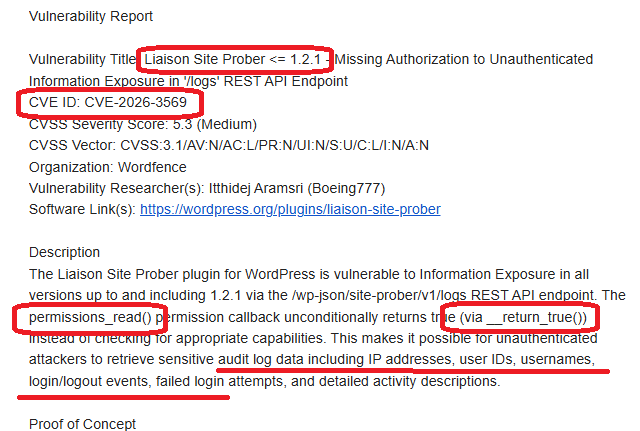
One morning in March 2026, I received an email from the WordPress.org Plugin Review Team. The subject line hit me like a cold shower: a security risk had been identified in my plugin, Liaison Site Prober. It was officially logged as CVE-2026–3569.
As a backend engineer deeply embedded in the WordPress ecosystem and a security practitioner, this was a loud, stinging slap in the face. It was a wake-up call that resonated with painful clarity.
Background: Why Build Liaison Site Prober?
In my experience, many PHP websites used by organizations and enterprises are aging relics. Often built by agencies using off-the-shelf templates, these sites rarely considered activity logging or performance monitoring. Even if a developer left behind a basic text-based log, only they knew how to use it. Fast forward a few years: the original developer is gone, budgets are tight, and the original agency has vanished.
When security vulnerabilities arise, the typical response is to buy the cheapest firewall possible via a low-bid contract. Maintenance is usually subpar; many outbound policies are "all-to-all," making the network as transparent as glass.
I developed Liaison Site Prober based on my personal experience to help developers track backend activity and optimize system stability. However, a security auditing plugin must be more secure than the average plugin — otherwise, sensitive data like host addresses and user info is left completely exposed.
Problem Analysis: The Root of All Evil — __return_true
The vulnerability was categorized as "Information Exposure." While developing the REST API endpoints, I used the built-in WordPress function __return_true in the permission_callback for testing convenience:
PHP
register_rest_route( 'site-prober/v1', '/logs', [
'methods' => 'GET',
'callback' => [ $this, 'get_logs' ],
'permission_callback' => '__return_true', // ⚠️ The Vulnerability
]);
"Convenience" quickly turned into "negligence." Anyone knowing the API path could read logs containing sensitive user behavior and IP addresses without logging in. In a production environment, this is a massive security hole.
Validation: From 401 Unauthorized to 200 OK
The fix seemed simple, but validating it in a local development environment (XAMPP/Apache) presented some interesting technical hurdles.
1. Implementing Proper Permission Checks
I updated the callback to a strict manage_options check, ensuring only administrators can access the data.
PHP
public function permissions_read() {
return current_user_can( 'manage_options' );
}
2. The Localhost Authentication Trap
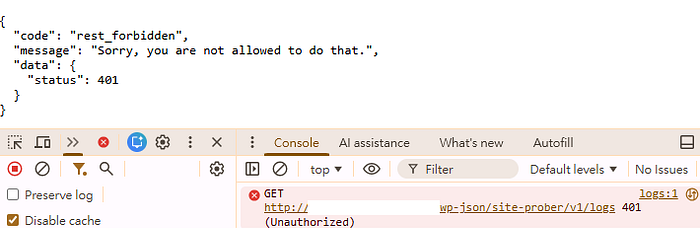
Even with Application Passwords, my API calls returned 401 Unauthorized in my local browser tests.
The Technical Interlude: The Vanishing Authorization Header
Apache, by default, often strips the Authorization header, preventing WordPress from receiving credentials. I had to add the following lines to the .htaccess file in the WordPress root directory to "pass the ID card" through to PHP:
Apache
<IfModule mod_rewrite.c>
RewriteEngine On
RewriteRule .* — [E=HTTP_AUTHORIZATION:%{HTTP:Authorization}]
</IfModule>
To verify the credentials were reaching the code, I wrote a debug snippet to manually parse the header:
PHP
// Dev test: Manually parse Basic Auth Header
$auth_header = $_SERVER['HTTP_AUTHORIZATION'] ?? ''
if ( strpos( $auth_header, 'Basic ' ) === 0 ) {
$credentials = explode( ':', base64_decode( substr( $auth_header, 6 ) ) );
$user_login = $credentials[0];
$password = $credentials[1];
$user = wp_authenticate( $user_login, $password );
if ( ! is_wp_error( $user ) && user_can( $user, 'manage_options' ) ) {
return true;
}
}
I followed this with a fetch script test:
JavaScript
const user = 'your_username'
const pass = 'your_24_digit_app_password'
const token = btoa(`${user}:${pass}`);
fetch('/wordpress/wp-json/site-prober/v1/logs', {
method: 'GET',
headers: {
'Authorization': `Basic ${token}`,
'Content-Type': 'application/json'
}
})
.then(res => res.json())
.then(data => console.log("API Result:", data));

Why did fetch work while the URL bar failed?
- Fetch: I manually injected the "ID card" (Header). WordPress verified it and returned 200 OK.
- Direct URL: Entering a URL in the browser triggers an anonymous GET request without custom headers. WordPress sees no Header or Cookie, identifies the user as "User ID: 0," and correctly returns 401.
3. End-to-End Verification
- External Access: Returns rest_forbidden (Success).
- Internal Access (Gutenberg): Uses @wordpress/api-fetch which automatically handles Nonces, allowing admins to view data seamlessly in the dashboard.
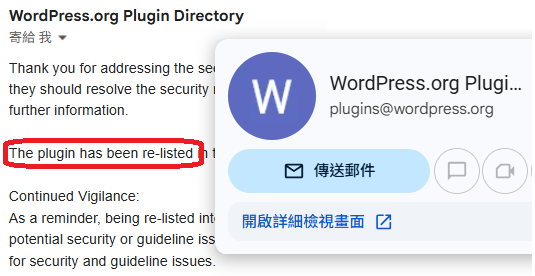
Within 24 hours of submitting my fix, I received the official nod: "The plugin has been re-listed."
Lessons Learned: Security Has No Shortcuts
"Temporary convenience" during testing is almost always the source of future vulnerabilities. Here are a few major incidents caused by similar "testing backdoors":
- 2023 iRent Data Leak: A cloud database (Elasticsearch) was left without a password. It was likely disabled for "easy access" during dev/test and never re-enabled for production. Result: 400,000 members' sensitive data exposed. A huge database of iRent car rental customers was exposed online.
- 2022 Taiwan Household Registration Leak: Hackers sold data for 23 million citizens. Investigations pointed to poorly managed legacy APIs or test nodes used for government inter-agency data sharing. A Government Database of 20 Million+ Taiwanese Citizens Leaked in Darkweb.
- 2023 Microsoft "Midnight Blizzard" Breach: Even tech giants fall. Russian hackers breached a legacy non-production test tenant using a password spray attack. This test account had excessive permissions, allowing access to high-level corporate emails. Microsoft Actions Following Attack by Nation State Actor Midnight Blizzard.
The takeaway: If a test environment can access production data, it is part of the production environment. Isolation is non-negotiable.
Postscript: The Zen of Maintenance
I discovered that the WordPress Plugin Check (PCP) tool doesn't actually catch REST API permission logic. It sees a permission_callback exists and gives it a green light — it doesn't care that the callback is an wide-open true. Since some APIs (like public product lists) should be open, PCP can't flag this as an error.
To prevent future regressions, I added PHPUnit test cases to my CI/CD pipeline. What I thought was a small "extra" task triggered a cascade of minor issues between PCP and PHPUnit (the "Placeholder" requirement vs. Static Analysis conflict), which I'll save for another post (The "Rabbit Hole" Part 1).
This reminds me that software problems aren't "solved" just because a product is shipped. Like a car, software requires ongoing maintenance and "oil changes" (patches).
I'm reminded of The Mythical Man-Month: software is a craft, not a factory automation. It revolves around people, logic, and creative design. It is linear and organic. Much like a pregnancy, "bringing nine women together cannot produce a baby in one month." Adding more people doesn't proportionally decrease time.
Even in the age of AI — where tool output far exceeds human capacity — many problems are unforeseen. You can't give AI the perfect prompt for a problem you haven't even anticipated yet. Engineering value today lies in the vigilance, the crisis management, and the constant refinement of the craft.