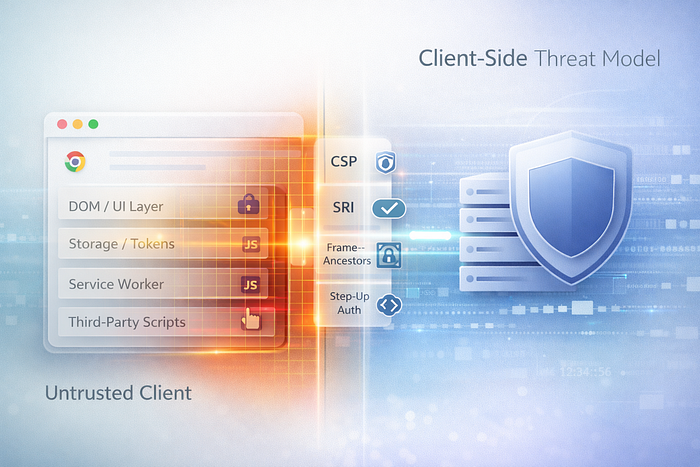

In 2026, client-side security is the blind spot: extensions, XSS, supply chain scripts, token theft, and UI redress. Fix your threat model and controls.
Most teams still treat the browser like a trusted little window into their backend.
It's not.
In 2026, the client is a fully programmable, easily instrumented execution environment running on a machine you don't control, with third-party code you didn't write, and UI surfaces you can't perfectly police. Let's be real: if your security story ends at "we use HTTPS and store tokens safely," you're defending the wrong boundary.
This article is a threat-model reset. Not paranoia. Just modern reality.
The Core Mistake: "The Browser Is Ours"
The old mental model looked like this:
- Backend = the serious stuff
- Client = the pretty layer
- Security = auth + TLS + server validation
But modern apps moved logic to the client:
- rich SPAs
- offline-first caches
- analytics SDKs and A/B frameworks
- embedded widgets
- payment flows and identity popups
- WebAssembly modules for performance
- service workers controlling network traffic
So the browser isn't a "view." It's a runtime. And runtimes get attacked.
The 2026 Client Threat Model (What You Must Assume)
1) The user's device can be hostile
Not because users are "bad," but because:
- malware exists
- devtools exist
- proxies exist
- compromised Wi-Fi exists
- corporate endpoint agents inject scripts
- browser extensions run with shocking power
If your app assumes "the client will behave," you've already lost the argument.
2) Third-party JavaScript is a supply chain
You might ship:
- analytics
- chat widgets
- tag managers
- experimentation SDKs
- error reporting
- payments
- social login
Each one is code with access to DOM, cookies (sometimes), storage, and user interactions. And if one vendor gets popped, your users get popped.
3) XSS is still the kingmaker
We keep inventing new frontend stacks, and yet:
- template bugs happen
- dangerous HTML rendering sneaks in
- markdown pipelines misbehave
- dependencies regress
- "quick hotfix" becomes permanent
XSS isn't "old." It's still the most direct path to session theft and action forgery in browser-first apps.
4) "Tokens in the browser" is a loaded decision
If you store long-lived tokens in localStorage, you've made XSS a credential breach. If you store tokens in memory only, you've improved exposure but increased complexity. If you use cookies, you've moved risk toward CSRF and misconfiguration.
There is no magic storage choice. Only trade-offs. The mistake is pretending the trade-off doesn't exist.
A Simple Trust Map (The Diagram Most Teams Skip)
Here's the trust boundary sketch I wish every product reviewed once:
[Your Backend]  <---trusted domain
   |  validates + logs + enforces policy
   v
[CDN / Edge]  <---semi-trusted (config + cache)
   |
   v
[Browser Runtime]  <---UNTRUSTED (extensions, XSS, user tools)
   | \
   |  \__ Third-party JS (semi-trusted, changes often)
   |
   v
[User Interaction Surface]  <---UNTRUSTED (clickjacking, overlays, UI redress)
If you treat the "Browser Runtime" box as trusted, you'll over-depend on client checks and under-invest in containment.
What Attacks Actually Look Like in 2026
Credential theft without "hacking your servers"
A single injected script can:
- read tokens from storage
- hook
fetch()and steal Authorization headers - scrape form fields before submit
- alter bank details or withdrawal address in the UI
- silently add "extra" API calls that look like real user actions
No firewall will save you from logic running inside the browser.
UI redress: the attack nobody tests
"Clickjacking" sounds old-fashioned until it happens through:
- embedded iframes
- overlays that match your UI
- spoofed "Approve" buttons
- permission prompts that users can't interpret
If your app authorizes sensitive actions with a single click, you're depending on perfect UI integrity. That's a big bet.
Silent data corruption
Not everything is theft. Sometimes it's subtle:
- tampered request payloads
- modified client-side validation logic
- swapping IDs in API calls
- forcing edge-case flows you never intended
If you don't validate every authorization decision server-side, you're trusting the client as a policy engine.
The Controls: How to Actually Defend
1) Stop treating client checks as security checks
Client-side validation is for UX. Security validation must happen on the server:
- ownership checks
- permission checks
- rate limits per user and per action
- replay protection for sensitive operations
You can still do client validation. Just don't confuse it with enforcement.
2) Make XSS harder than it needs to be
Use a layered approach:
- Content Security Policy (CSP)
- Trusted Types (where feasible)
- safe templating and escaping discipline
- avoid
innerHTML(or gate it behind sanitizers)
Example CSP (starter):
Content-Security-Policy:
  default-src 'self';
  script-src 'self' 'nonce-{{RANDOM_NONCE}}' https://trusted-cdn.example;
  object-src 'none';
  base-uri 'self';
  frame-ancestors 'none';
  require-trusted-types-for 'script';
This won't fix everything overnight, but it forces you to be intentional about where scripts come from.
3) Treat third-party scripts like production dependencies
Ask hard questions:
- Do we need this script on every page?
- Can it be loaded only on specific routes?
- Can we isolate it in an iframe?
- What happens if it goes rogue?
If you can't remove it, contain it:
- load less
- restrict origins
- consider sandboxed iframes for risky widgets
- avoid tag managers as "unlimited code execution platforms"
4) Use Subresource Integrity (SRI) when you can
When scripts are static and versioned, SRI helps prevent silent swaps.
<script
  src="https://cdn.example/sdk.v1.2.3.js"
  integrity="sha384-BASE64HASH"
  crossorigin="anonymous"></script>
It's not universal (dynamic scripts break it), but for stable libraries it's a strong move.
5) Design tokens like "radioactive material"
Assume any token exposed to JS can leak in an XSS scenario.
Practical patterns:
- prefer short-lived access tokens
- rotate refresh tokens carefully
- consider HttpOnly cookies for refresh tokens where it fits your model
- build revocation hooks for high-risk events (password change, suspicious login, device change)
And avoid storing secrets in localStorage unless you accept the consequences.
6) Make high-risk actions require "strong intent"
For actions like payouts, address changes, role grants:
- require re-authentication
- require step-up (passkeys/biometrics/OTP depending on context)
- require confirmation screens with details (not just "Confirm")
This is not just security. It's mistake-proofing.
7) Protect against UI embedding and framing attacks
If your app should not be embedded:
- use
frame-ancestors 'none'in CSP - set
X-Frame-Options: DENY(legacy, still helpful)
And if your app must be embedded, isolate sensitive flows into a top-level context.
The Practical Test: "Assume the Client Is Compromised"
Here's a simple question that changes architecture decisions fast:
If an attacker can run JavaScript in the user's browser, what can they do?
If your answer is "not much," you likely have:
- strong server-side authorization
- short-lived tokens
- CSP and safe rendering
- step-up auth for sensitive actions
- good anomaly detection
If your answer is "they can do basically anything," your app is relying on client integrity for security.
And that's the threat model most apps still ignore.
Conclusion: The Browser Is Not a Trusted Environment
Client-side security in 2026 is not one technique. It's a mindset shift:
- The client is untrusted.
- Third-party code is a supply chain.
- XSS is still the fastest path to real damage.
- UI integrity is a security surface.
When you accept that, your controls become obvious — and your incidents become rarer.
CTA: If you want, comment with your stack (Next.js, React, Vue, mobile web, embedded widgets, fintech, SaaS) and what you're most worried about (XSS, tokens, extensions, third-party scripts). I'll suggest a prioritized client-side security checklist for your situation. Follow for more security threat-model breakdowns that don't rely on buzzwords.