
Most of us reuse the same email and password across dozens of sites. When one of those services is hacked, attackers can reuse those credentials for account takeovers and phishing. Knowing where your email was leaked is the first step to protecting yourself.
Cyberraxha makes this easy with its built‑in BreachChecker. Per login, you can scan up to three email addresses and see if they appear in known data breaches.
1. Install Cyberraxha and Open BreachChecker
- Download and open the Cyberraxha AI app. Play Store: https://play.google.com/store/apps/details?id=com.cyberraxha.news.mobile&gl=us&hl=en App Store: https://apps.apple.com/us/app/cyberraxha-ai/id6753764492
- Login with your google or apple account
- Tap the "BreachChecker" tab in the bottom navigation.
4. You'll see your main email at the top and a big "Check My Account" button.
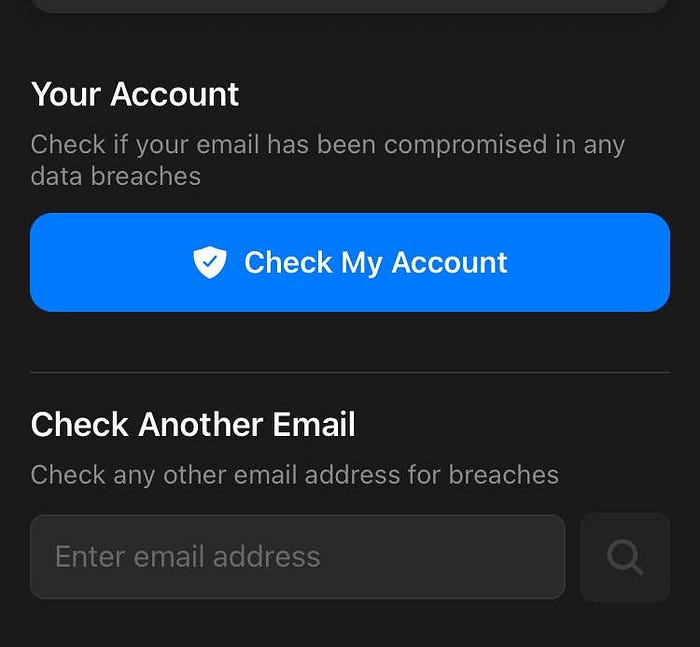
2. Run a Breach Check
- Tap "Check My Account".
- Cyberraxha checks whether this email appears in any recorded breaches.
- You'll either see no breaches found, or a list of services where your email was exposed.

Each entry shows:
- The breach name
- The date (and how long ago it happened)
- Which data types were compromised (email, passwords, etc.)
Icons highlight high‑risk breaches, especially where passwords were leaked.
3. Scan Up to 3 Emails per Login
You're not limited to one address. Per login, you can check three emails:
- In BreachChecker, scroll to "Check Another Email."
- Enter another email (personal, work, or backup).
- Tap the search icon to see its breach history.
Recently scanned emails appear under "Recently Checked", so you can reopen them quickly.
4. What to Do If You're in a Breach
If Cyberraxha shows your email in a breach:
- Change the password for that service immediately.
- If you reused it elsewhere, change it on those sites too.
- Turn on Two‑Factor Authentication (2FA) wherever possible.
- Be extra careful with emails or messages related to that service — scammers often target breach victims.
5. Make It a Monthly Habit
New leaks appear all the time. Make it a habit to:
- Run a quick Cyberraxha scan once a month for your three most important emails.
- Check again whenever you hear about a big breach in the news.
Key Takeaways
- Cyberraxha's BreachChecker shows if your email appears in known data breaches.
- You can scan up to three email addresses per login.
- For each breach, Cyberraxha shows where, when, and what was leaked.
- If you're affected, change passwords, enable 2FA, and stay alert for scams.