
Executive Summary
A class of Windows authentication bypass techniques — colloquially known as the "Utilman trick" or "sethc hack" — has existed since at least Windows XP. Despite its age, it remains one of the most reliably effective physical-access attack vectors in penetration testing engagements as of 2026. The technique exploits a fundamental architectural decision in Windows: accessibility features are invoked by the operating system before a user is authenticated, which means the process that launches them runs with SYSTEM-level privilege.
The attack requires no exploitable CVE, no network access, and no special tooling beyond a bootable USB drive. On unencrypted systems — which, despite years of guidance to the contrary, remain common in SMB and legacy enterprise environments — it takes under three minutes from physical access to a SYSTEM shell.
Risk level: Critical on systems without full-disk encryption. Effectively mitigated on systems with BitLocker + TPM + PIN + Secure Boot properly configured. The delta between those two states is the entire attack surface.
Introduction
There is a statement that every penetration tester internalizes early in their career: physical access is total access. It is not a hyperbole. It is an architectural truth. When an attacker can interact with a machine's hardware directly — its boot sequence, its storage media, its firmware — the operating system's authentication layer becomes a formality that can be routed around rather than defeated.
Windows has always understood this. The BitLocker documentation is explicit: the threat model BitLocker addresses is physical access to the device. The problem is that understanding and implementation are different things. In 2026, after more than a decade of Microsoft pushing disk encryption as a default, a significant portion of Windows machines — enterprise workstations, retail point-of-sale terminals, medical devices, legacy industrial controllers — still boot to unencrypted NTFS volumes. On those machines, the Utilman technique and its variants work exactly as they did fifteen years ago.
This article provides a research-grade analysis of the attack: what it exploits, why it works at a conceptual level, how modern Windows defenses are designed to stop it, and why those defenses are frequently absent or misconfigured in the field.
Background
The Windows Accessibility Architecture
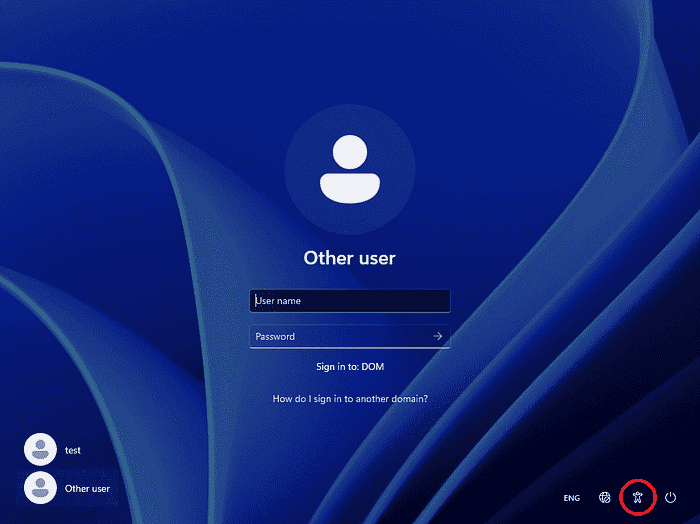
Windows ships with a set of accessibility features designed to assist users with physical or cognitive impairments. Sticky Keys, Magnifier, the On-Screen Keyboard, and the Ease of Access menu are among them. Several of these features can be triggered from the Windows login screen — before any user has authenticated — because their intended users may need them to complete the authentication process.
This design creates a specific executable invocation at the pre-authentication stage. The process is launched by winlogon.exe — the Windows login manager — which runs as SYSTEM. When it invokes a child process for accessibility, that child inherits the SYSTEM context.
The relevant binaries are:
sethc.exe— Sticky Keys, triggered by pressing Shift five timesutilman.exe— Ease of Access hub, triggered via Win+Uosk.exe— On-Screen Keyboardnarrator.exe— Screen reader
These executables live in C:\Windows\System32\. On a running Windows system, they are protected by Windows File Protection and cannot be replaced by a standard user or administrator. That protection, however, applies only when Windows is running. It has no effect on an offline file system.
How Windows Authentication Works at a High Level
When a Windows machine boots, it progresses through several layers before presenting the login screen. The firmware (UEFI/BIOS) initializes hardware and hands off to the bootloader. The bootloader loads the Windows kernel. The kernel initializes the Session Manager (smss.exe), which spawns winlogon.exe. Winlogon manages the Secure Desktop — the isolated desktop context in which login occurs — and presents the credential prompt via the Logon UI.
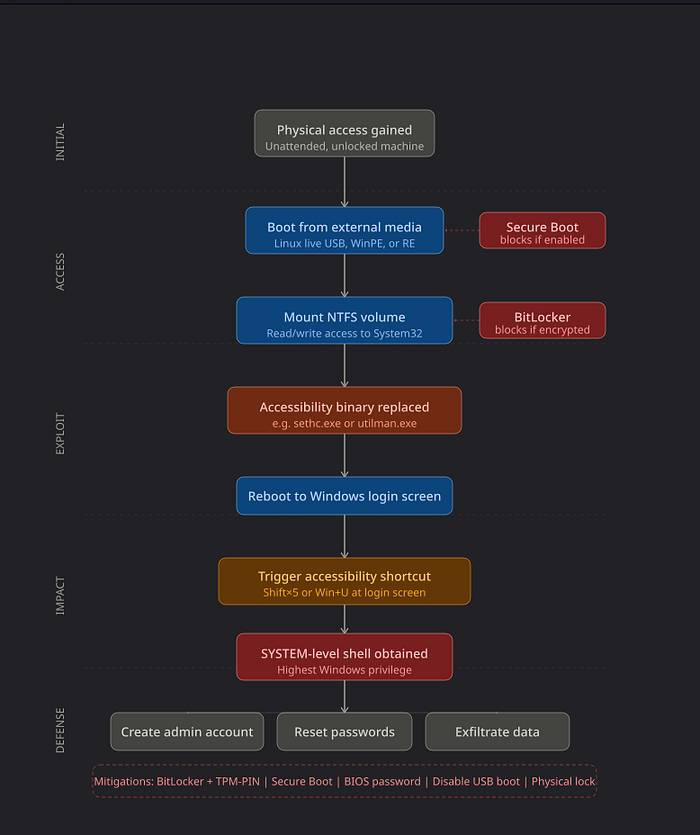
The critical point is that winlogon.exe is running as SYSTEM before any user credential is validated. Its child processes — including accessibility tools — inherit that privilege context.
Offline File System Access
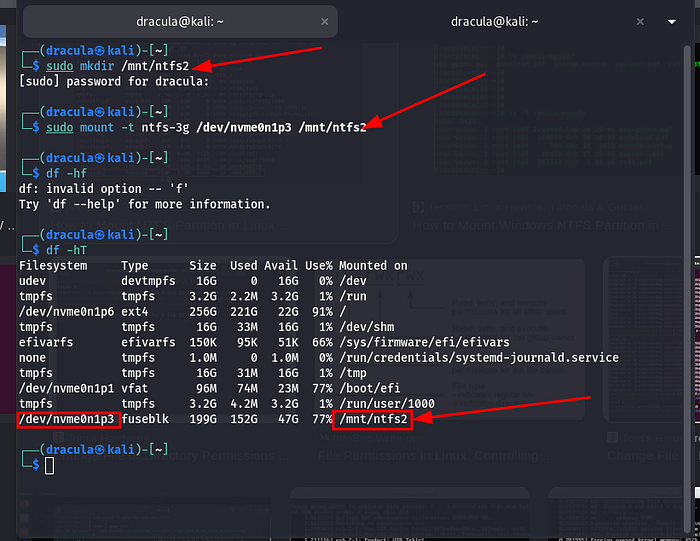
Modern operating systems can mount and read file systems from other operating systems without difficulty. Linux, in particular, has mature NTFS support through the ntfs-3g driver, which provides full read/write capability to Windows NTFS volumes. A Linux live environment booted from USB can mount a Windows system partition and modify its contents freely — unless that volume is encrypted.
This is not a vulnerability in any traditional sense. It is expected behavior. File systems are data structures. Any system with read/write access to the underlying storage medium can modify that data. Encryption is the mechanism that makes the data opaque to unauthorized readers. Without it, the file system is an open library.
Attack Surface Analysis
Prerequisites and Assumptions
This attack class requires a specific confluence of conditions. Security researchers should evaluate targets against this checklist:
Required conditions:
- Physical access to the machine, even briefly (3–10 minutes is sufficient)
- The ability to boot from external media OR access the hard drive directly
- An unencrypted Windows system volume (NTFS without BitLocker)
- A Windows version that invokes accessibility tools pre-authentication (all versions through Windows 11 23H2 confirmed)
Conditions that defeat the attack:
- BitLocker or equivalent full-disk encryption (renders the volume unreadable offline)
- Secure Boot with a locked key database (blocks unsigned bootloaders)
- BIOS/UEFI password protecting boot order changes
- TPM-bound BitLocker with PIN (ensures that decryption requires both the chip and the PIN)
The attack is therefore not a Windows vulnerability in the conventional sense — it is a configuration gap exploitation. It targets the space between what the OS can do and what administrators have actually configured.
Why System32 Is a Critical Target
System32 is the primary DLL and executable store for Windows. Operating system binaries in this directory run with elevated trust by default. Replacing a binary here with a shell or an alternative executable effectively hijacks whatever privilege context would have launched the original binary. In the case of sethc.exe and utilman.exe, that context is SYSTEM — the highest available privilege level in the Windows security model, above even local Administrator.
This makes System32 a uniquely high-value target for offline manipulation. There is no access control mechanism that survives a reboot into an alternative operating system with write access to the volume.
Exploitation Concept (High-Level)
The Binary Replacement Mechanism
The conceptual attack is straightforward: substitute the legitimate accessibility executable with a process that provides interactive shell access. When Windows boots and a user (or the attacker themselves) triggers the accessibility shortcut on the login screen, Windows faithfully invokes the replaced binary — under SYSTEM context.
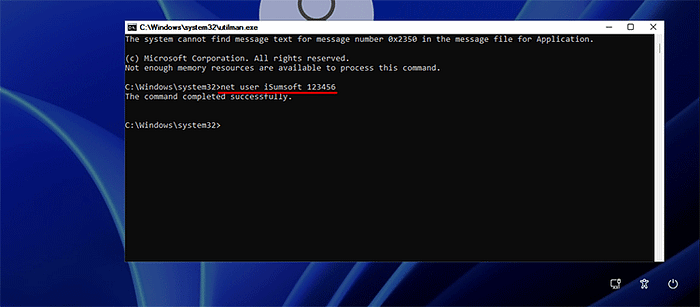
The shell that appears is not constrained to the Secure Desktop isolation in a way that prevents system modification. From it, an attacker can create user accounts, reset existing passwords, disable security software, or establish persistence mechanisms — all before any Windows authentication has occurred.
The elegance of the technique — and the reason it has persisted for so long — is that it requires no memory corruption, no kernel exploitation, and no vulnerability research. It is purely a file system operation performed offline, exploiting a legitimate architectural feature of the OS.
Why SYSTEM Context Is Obtained
The privilege inheritance is not a bug. winlogon.exe runs as SYSTEM because it needs that privilege to perform authentication operations: reading the SAM database, interacting with LSASS, managing Kerberos tickets. Its child processes — the accessibility tools — inherit this because the Windows process model propagates the parent token to children by default unless an explicit token replacement occurs.
Microsoft has acknowledged this architectural characteristic and has progressively added mitigations, but the root mechanism remains in place because changing it would break the accessibility invocation model.
Privilege Escalation to SYSTEM
From the attacker's perspective, this is not a privilege escalation in the traditional sense — it is a privilege inheritance. The attacker does not need to escalate from a low-privilege context. They begin at SYSTEM because they've replaced the binary that SYSTEM invokes. The attack bypasses the need for any local privilege escalation technique entirely.
Modern Windows Defenses
This is the section that matters most for practitioners. The attack works. The defenses also work, when deployed correctly. Understanding both is the point.
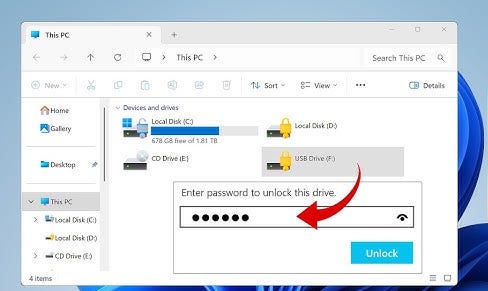
BitLocker Full-Disk Encryption
BitLocker is the primary and most effective defense against this attack class. When BitLocker is active on the system volume, booting from an external Linux environment and mounting the NTFS partition yields not a readable file system, but a block of encrypted data that is computationally indistinguishable from random noise without the decryption key.
BitLocker in its most secure configuration uses a TPM chip to seal the Volume Master Key, requiring the TPM's attestation that the boot configuration is unmodified. With a PIN added (TPM+PIN mode), the key is released only when the correct PIN is entered at boot — meaning even possession of the physical device and knowledge of the PIN entry mechanism does not help an attacker who doesn't know the PIN.
Configuration that matters: BitLocker without a PIN (TPM-only mode) still protects against the offline replacement attack — the volume won't mount without the TPM attestation. However, TPM-only mode is vulnerable to certain hardware-level attacks (TPM sniffing, cold boot attacks on the unsealed key). For a full threat model, TPM+PIN is the appropriate configuration.
Secure Boot
Secure Boot is a UEFI feature that validates the cryptographic signature of the bootloader before executing it. An unsigned Linux live environment — or a signed one whose certificate is not in the system's key database — will be refused execution.
Secure Boot's scope is specifically the boot chain. It prevents the attacker from booting an alternative OS to manipulate the file system. It does not protect against an attacker who removes the drive and connects it to another machine, or who can disable Secure Boot through the UEFI interface (which is why a UEFI/BIOS password is necessary as a companion control).
Windows Defender and System File Integrity
Windows Defender and Windows Resource Protection (WRP) monitor System32 and flag or block modifications to protected binaries — while Windows is running. These controls are fully bypassed by the offline attack, because they have no execution context when the attacker is operating from a Linux live environment.
This is a fundamental limitation of host-based security controls: they protect a running system. They cannot protect a file system that is mounted and manipulated offline.
Credential Guard and Virtualization-Based Security
Windows Credential Guard, introduced in Windows 10 and enabled by default on newer hardware, isolates credential material (NTLM hashes, Kerberos tickets) inside a hardware-isolated virtual secure mode container (VSM). This protects against credential theft attacks like Pass-the-Hash. However, it does not address pre-authentication binary replacement. Credential Guard defends the credential store; the Utilman attack bypasses the authentication step entirely.
Why the Attack Still Works in 2026
Given the effectiveness of BitLocker and Secure Boot, one might ask why this technique remains relevant. The answer is environmental reality.
Encryption Deployment Gaps
Mandiant's M-Trends reporting and various industry surveys consistently show that full-disk encryption adoption remains incomplete across enterprise environments. Legacy systems often predate BitLocker's widespread availability and were never retroactively encrypted. Windows Home edition's Device Encryption feature, while present, requires a Microsoft account and compatible hardware — and is frequently inactive on corporate machines managed by third-party imaging processes that strip default configurations.
BIOS/UEFI Misconfiguration
Secure Boot requires not just enablement but proper configuration. The default key database in many consumer systems includes Microsoft's third-party UEFI CA, which signs Linux bootloaders — meaning a standard Ubuntu live USB will boot on a Secure Boot-enabled system unless administrators have specifically configured a custom key database. This is a non-trivial operation that most environments have not performed.
External boot must also be disabled or deprioritized in boot order, and the UEFI interface itself must be password-protected. Without the password protection, an attacker with physical access can simply enter the UEFI settings and disable Secure Boot or re-enable USB boot.
Legacy and Operational Technology Systems
Medical devices, industrial control systems, and point-of-sale terminals frequently run Windows Embedded or legacy Windows versions in configurations that preclude BitLocker — either because the hardware lacks a TPM, the storage device is too small for encryption overhead, or the operational environment requires rapid reimaging that full-disk encryption complicates.
Incomplete Threat Modeling
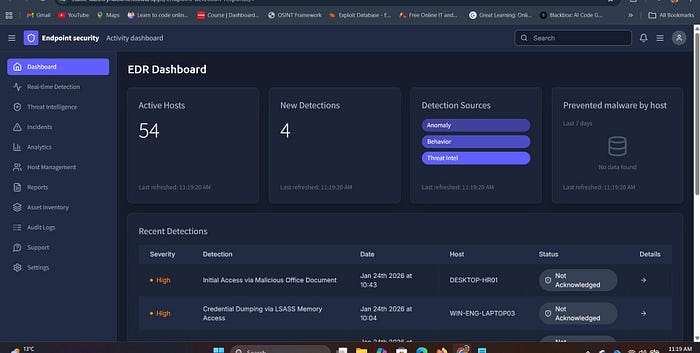
Many organizations deploy endpoint detection and response (EDR) solutions and consider their endpoint security posture addressed. EDR tools are highly effective against network-borne malware and many lateral movement techniques. They are not effective against an attacker who has physically disabled the machine, booted alternative media, and manipulated the file system before the EDR agent ever loads. The threat model for physical access attacks is fundamentally different from the threat model EDR is designed to address.
Impact Analysis
Account Takeover
With SYSTEM-level shell access at the login screen, an attacker can reset the password of any local account — including the built-in Administrator account — using standard Windows utilities. In environments that rely on local account authentication, this immediately grants full administrative access to the system and all data on it.
Data Exfiltration
From the pre-authentication SYSTEM shell, an attacker can copy files, compress directories, and transfer data — either to an attached USB drive or, if the network is accessible, to external destinations. File-level access controls are irrelevant at SYSTEM privilege. Encrypted files protected by user-level Encrypting File System (EFS) may still be protected if the user's private key is not cached, but all other data is accessible.
Persistence Establishment
An attacker with SYSTEM shell access can establish persistence mechanisms that survive reboots: scheduled tasks, registry run keys, service installations, or new administrative user accounts. These persist independently of the initial attack vector and may survive even if the accessibility binary replacement is discovered and reversed.
Enterprise Risk Multiplication
In domain-joined environments, a compromised workstation with physical access may be used as a launchpad for network reconnaissance, credential harvesting from cached domain credentials, or Kerberoasting attacks against the Active Directory environment. The initial physical access attack on a single workstation can be the first step in a full domain compromise chain.
Defensive Strategies
Primary Defense: BitLocker with TPM + PIN
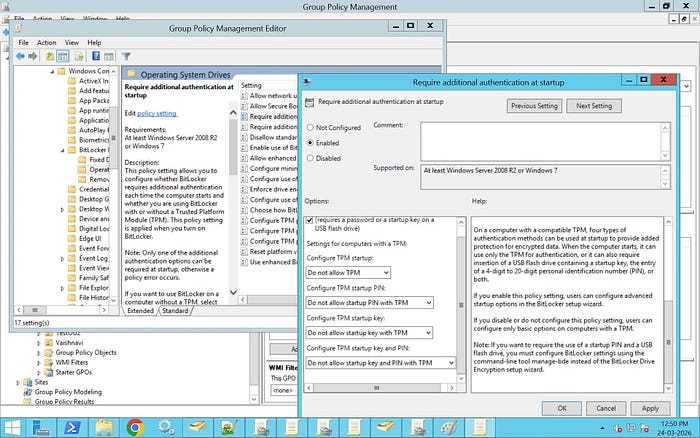
This single control defeats the attack entirely. With BitLocker active and a PIN required at boot, the volume cannot be mounted by an external OS, and the boot process will not complete without the PIN. Configuration guidance:
- Enable BitLocker on all system volumes via Group Policy
- Require TPM + PIN (not TPM-only) for the highest assurance
- Store recovery keys in Active Directory or Azure AD, not on the local machine
- Audit BitLocker status regularly — keys can be suspended or paused and not re-enabled
BIOS/UEFI Hardening
- Set a UEFI administrator password that is not the same as any user credential
- Disable boot from external media (USB, optical, PXE) or set internal disk as first boot priority with a boot password for other devices
- Enable Secure Boot and consider configuring a custom key database if the environment warrants it
- Enable firmware-level TPM and ensure it is provisioned
Physical Security Controls
Access control systems, cable locks, and enclosures are undervalued in enterprise security discussions. An attacker cannot perform a physical access attack against a machine they cannot physically reach. For high-value workstations — executive machines, security operation centers, domain controllers — physical security controls should match the sensitivity of the data processed.
Active Directory and Monitoring
- Audit for new local account creation on domain-joined machines — this is a common post-exploitation action
- Monitor for Secure Boot state changes and BitLocker status changes via configuration management tooling
- Deploy LAPS (Local Administrator Password Solution) to ensure local admin credentials are randomized and not reusable across machines
- Consider Microsoft Defender for Endpoint's tamper protection features, which at minimum raise the bar for on-system disablement
Vulnerability Assessment and Red Team Testing
Organizations should include physical access attack simulations in red team engagements. A red team that only assesses network-borne attack vectors is not evaluating the full threat model. Physical attack testing should include:
- Verification that BitLocker is active and properly configured (TPM+PIN, not suspended)
- Verification that UEFI/BIOS passwords are set
- Verification that external boot is disabled
- Testing whether a standard Linux live USB boots on a sample of endpoints
Ethical Considerations
This article is written for security professionals engaged in authorized testing, academic security research, and defensive security architecture. Every technique described in this analysis exists in public research literature, has been documented by Microsoft, and is catalogued in the MITRE ATT&CK framework under T1546.008 (Event Triggered Execution: Accessibility Features).
The purpose of this analysis is to communicate, with specificity, what attackers actually do and why defenses succeed or fail — because vague awareness does not drive effective defensive action. Defenders need to understand the attack well enough to assess their own environments against it.
Testing these techniques without explicit written authorization from the system owner is illegal under the Computer Fraud and Abuse Act (CFAA) and equivalent legislation in most jurisdictions. Professional penetration testers operate under signed statements of work that define scope, authorization, and rules of engagement. Nothing in this article constitutes authorization to test any system the reader does not own or does not have explicit written permission to test.
What Most People Misunderstand About This Attack
The most common misconception is that this is a "Windows vulnerability" that Microsoft should patch. It isn't. It is a consequence of a legitimate architectural decision — that accessibility tools must function before authentication — interacting with an absence of encryption. Microsoft's fix for this attack is BitLocker, and they have been saying so for fifteen years. The vulnerability is not in Windows. It is in the gap between what Windows provides and what administrators deploy.
The second most common misconception is that EDR or antivirus "would catch it." They would not. EDR agents run after the operating system boots, after
winlogoninitializes, after the accessibility binary is already in place. By the time any security software has execution context, the attack has already been staged. The attacker triggers their payload by pressing Shift five times on the login screen. At that point, no running security software is observing the pre-authentication desktop.
The third misconception is that Secure Boot makes this a non-issue. Secure Boot prevents booting an unsigned external OS — it does not prevent an attacker from removing the drive, connecting it to another machine (that they control), mounting the NTFS volume there, making the replacement, and returning the drive. Secure Boot is one control in a defense-in-depth stack, not a complete solution by itself.
Conclusion
The Utilman authentication bypass technique is not interesting because it is new. It is interesting because it is old and it still works — on a significant fraction of Windows machines in production environments in 2026. The reason it works is not that Windows is poorly designed. The reason it works is that the defense Microsoft provides — BitLocker, properly configured, with a TPM and PIN — is not universally deployed.
The takeaway for security architects is unambiguous: without full-disk encryption, Windows login screen authentication is not security. It is a suggestion. An attacker with physical access and ten minutes can bypass it on any unencrypted machine, without a single vulnerability, without any special knowledge, and without leaving traces that most organizations would detect.
The mitigations are well-understood, available at no additional cost in enterprise Windows licensing, and deployable via Group Policy at scale. The gap between knowing this and acting on it is the attack surface.
About the Author
This article was written in the style of a Red Team professional with experience across penetration testing, adversary simulation, and defensive security architecture. The analysis draws on documented public research, MITRE ATT&CK framework documentation (T1546.008), Microsoft security documentation, and field observations from enterprise security assessments. All techniques described are referenced against publicly available sources, including Microsoft's own BitLocker threat model documentation and the MITRE ATT&CK knowledge base.
References:
- MITRE ATT&CK T1546.008 — Event Triggered Execution: Accessibility Features
- Microsoft Security Documentation — BitLocker Overview and Threat Model
- Microsoft Docs — Secure Boot and UEFI Configuration
- Microsoft LAPS (Local Administrator Password Solution) documentation
- Mandiant M-Trends Annual Threat Intelligence Report
This article is intended for security professionals, researchers, and defenders. All testing of techniques described must be performed only on systems the tester owns or has explicit written authorization to test.