
Teaching an LLM to Query a 300-Table Database Without Breaking Security
We had a problem: a production database with 300+ tables, and users who wanted to ask questions in plain English.
Think of an order management system where a sales rep types "how many orders shipped to California last week?" and just gets an answer. No SQL. No dashboards. No waiting for someone on the data team to run a report on Tuesday afternoon.
This seemed achievable. It took three painful rounds of iteration — each one solving a problem we didn't see coming — before we had something we trusted in production.
Here's what actually happened.
Round 1: Dump the Schema, Hope for the Best
Our first attempt was beautifully simple.
Paste the entire database schema into the prompt and let the LLM figure it out. After all, these models have read the entire internet. Surely they can handle a few hundred tables.
The database had 300 tables.
The model responded with confidence and enthusiasm. Unfortunately, it also invented columns, joined imaginary tables, and produced SQL that looked perfectly reasonable while being completely wrong.
At one point it referenced a column called TotalCustomerDelight. We checked the schema. We checked again. Sadly, our database contains no measurable delight.
Here's the thing about confident wrong answers: they're worse than obvious errors. An error generates a support ticket. A plausible-but-wrong answer generates a bad business decision — and nobody files a ticket for that.
Beyond correctness, the token costs were brutal. 300 tables stuffed into every single prompt, whether the user asked about shipping or just said "hi."
Something had to change.
Round 2: Domain-Based Schema Segmentation
The fix was clear once we stopped staring at the problem: the LLM doesn't need to see everything. It needs exactly the tables relevant to the question, nothing else.
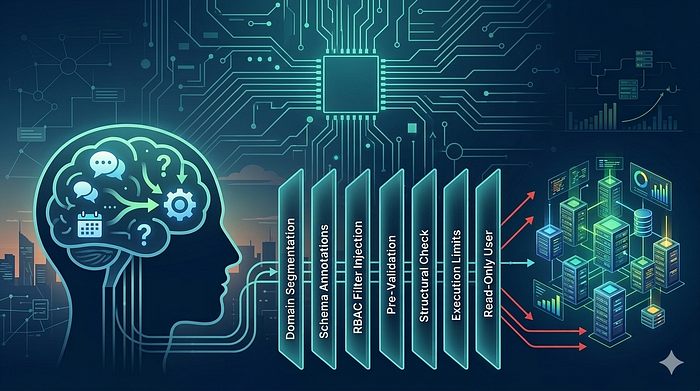
We split the database into domain-specific slices. Each AI tool got its own focused schema — 10 to 15 tables maximum:

Confusion dropped immediately. The model stopped inventing tables because every table it could "see" was real and relevant. It turns out that when you stop handing someone a 300-page manual and instead give them the one page they need, they perform better.
We also made three structural improvements:
Schema annotations. Dont give LLM raw DDL, but human-readable text with column descriptions, foreign key hints, and reminders like -- ALWAYS filter by RegionId. If you want the LLM to respect your data model, you have to explain it like you're onboarding a new engineer — not dump a CREATE TABLE statement and wish them luck.
Split prompts. Stable instructions (schema + rules) went into the system prompt, tuned once and reused. Per-request context (the actual question + mandatory filters) went into the user prompt. This made prompt engineering tractable instead of a single blob of text you're afraid to touch.
Sentinel patterns. If someone asks to modify data or act oversmart, the LLM returns a structured error string instead of SQL. No UPDATE. No DELETE. No "let me help you with that INSERT." Just a clean rejection.
But this is not enough, more on this later in the article.
Each tool became an expert in its domain. The system figured out which domain a question belonged to, routed it to the right tool, generated correct SQL, executed it, and returned the answer.
This worked. Until we hit the next problem.
(There's actually a much better way to handle the routing — a multi-agent architecture where an orchestrator decides not just which tool to use but how to combine them. That's the next post.)
Round 3: Correct SQL Is Not Safe SQL
Here's the thing that kept us up at night.
A sales rep in the East region types: "show me all orders."
The LLM generates:
SELECT * FROM OrdersTechnically correct. The SQL is valid. It will execute without error.
It will also return orders from every region in the company — including pipelines the sales rep has no business seeing.
The SQL is correct. It is also, depending on your industry, a compliance incident.
We briefly considered solving this with prompt engineering. We added instructions like "only query data the user is allowed to see." Then we remembered that prompts are suggestions, not law. A determined user — or a confused model — can work around any instruction you put in a system prompt.
Prompt engineering is not access control. Authorization belongs in code.
We needed something that would hold even when the LLM did something unexpected. So we built three layers of permission enforcement — and then added four more for good measure.
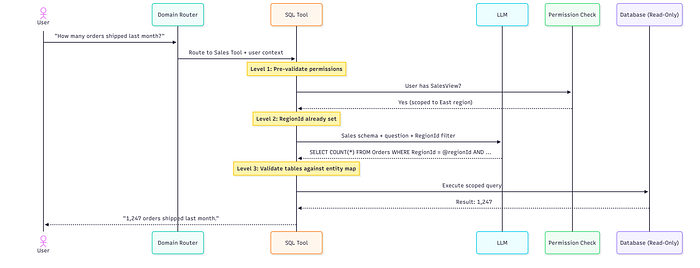
Three Levels of Permission Enforcement
L1 — Pre-Validation. Before the LLM generates any SQL, we check whether the user has the right permission types for this domain. Each tool declares its requirements (Sales Tool → requires: SalesView, OrderAdmin). No match? Reject immediately — no LLM call, no wasted tokens. The model never even gets a chance to help.
L2 — Scope Injection. Every tool is instantiated with the user's scope baked in — their RegionId, their TeamId. The LLM receives a schema where filters are already declared. It literally cannot generate a query outside the user's boundary without the query failing to parse. The model isn't trusted to add the right WHERE clause. We add it for them.
L3 — Entity Validation. After SQL generation, we parse which tables the query touches and validate the user has permission for each entity type. If the LLM tries to JOIN to a table the user can't access, we catch it here — before execution, not after.
Defense in Depth: Seven Layers
No single check is enough. We stack seven layers, each catching what the others miss:
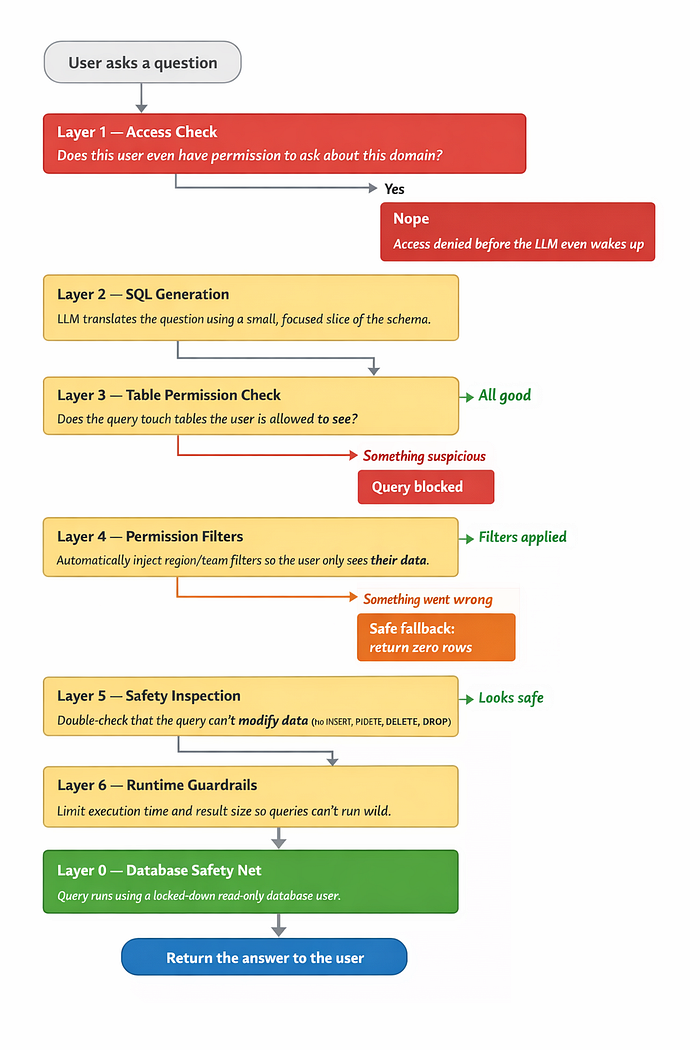
Layer 0 is the most important layer in the entire stack.
The AI pipeline connects using a dedicated SQL user that only has `SELECT` on specific whitelisted tables. No INSERT. No UPDATE. No DELETE. No schema modifications of any kind.
If the LLM somehow loses its mind and generates `DROP TABLE Orders`, the database simply responds:
> "Nice try."
Every other layer is application code — which means it can have bugs, edge cases, and Friday afternoon deployments. Layer 0 is enforced by the database engine itself. Even if every single application layer fails simultaneously, the database will still reject anything harmful. This is your last line of defense and it costs almost nothing to set up.
What if the RBAC filter merge fails? Just return zero rows, not too many. Getting an empty result is a recoverable situation. Leaking someone else's data is not.
The Cost Problem
Running every question through the best available model is great for accuracy and terrible for your cloud bill.
Hi, how are you? does not need a $0.15-per-call model.
We built an auto-classifier that evaluates two things — complexity (is this a simple lookup or a multi-step analytical question with aggregations and date math?) and priority (does this user need maximum precision or is good-enough fine?):
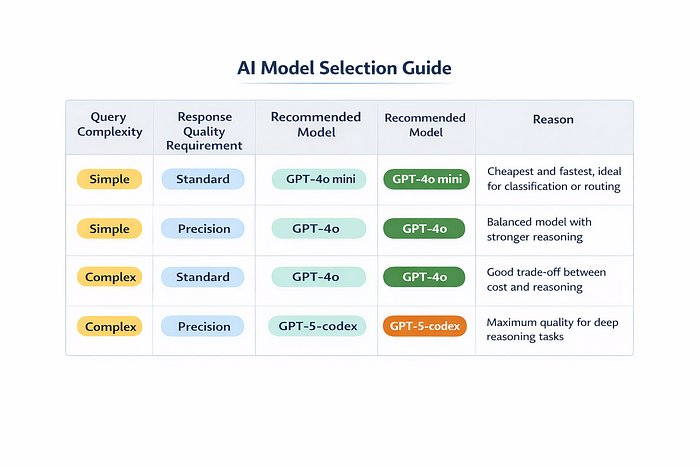
Conversational messages — "thanks!", "got it", "can you clarify?" — skip the agent pipeline entirely and hit the cheapest model. This saved roughly 80% on those calls specifically, and about 30% on total LLM spend overall.
The system picks the right model automatically. Users never think about it. They just notice it feels fast.
One thing we learned: the cost of a wrong query — a bad business decision made from incorrect data, or a security incident from data that shouldn't have been returned — far exceeds the cost of using a better model for that one call. Optimize for correctness first. Then optimize for cost.
Conslusion — What We Learned
On SQL generation: Segment your schema by domain — full-schema prompts produce garbage on real databases. Annotate schemas with column descriptions, FK hints, and mandatory filter reminders. Treat your schema like documentation for a new engineer, not a raw DDL dump. Use the best model for SQL generation even if cheaper models handle everything else.
On permissions: Return SQL filter fragments from your auth system, not booleans. Scope tools at instantiation time — don't trust the LLM to add the right WHERE clause. When the security mechanism breaks, return nothing ( 0 Rows )
On cost: Not every question needs your best model. Conversational bypass alone saved us ~30% on LLM costs. Complexity and priority routing does the rest automatically.
At the database level: Create a read-only SQL user with SELECT on only the tables the AI needs. Set it up once. Sleep better forever.
The LLM handles translation. Deterministic code handles authorization. The database enforces the floor.
None is sufficient alone. Together, they let users ask anything in plain English — without ever seeing what they shouldn't.
Finally
The LLM handles translation.
Deterministic code handles authorization.
The database enforces last line of defence.
None is sufficient alone. Together, they let users ask anything in plain English — without ever seeing what they shouldn't.