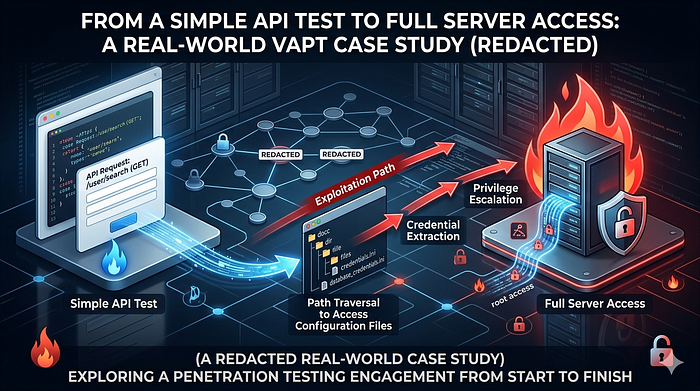
During an authorized Vulnerability Assessment and Penetration Testing (VAPT) engagement for a digital platform (referred to as "Project L"), what started as a routine API test gradually unfolded into a multi-layered security breakdown.
This was not a case of a single critical exploit. Instead, it was a chain of seemingly small issues — each insignificant on its own — but together capable of leading to complete system compromise.
This write-up walks through that journey step by step.
🎯 Scope & Testing Approach
The engagement covered:
- Web application
- Mobile application
- Backend APIs
- Associated admin interfaces (within permitted scope)
Testing was conducted under strict constraints:
- No disruption to services
- No destructive actions
- Proof-of-concept only
🧠 Phase 0: Understanding the Application
Before touching any tools, I spent time simply using the application like a normal user.
Why?
Because most real vulnerabilities don't come from scanners — they come from:
"This behavior feels… off."
Observations:
- The app was heavily API-driven
- Most functionality depended on backend calls
- The mobile app acted as a thin client
That immediately suggested:
If API security is weak, everything else collapses.
🔍 Phase 1: Intercepting and Mapping API Traffic
Using Burp Suite, I began intercepting requests from the mobile application.
Over time, a pattern emerged:
GET /api/v1/user/profile GET /api/v1/content/view?id=123 GET /api/v1/files/download?file_id=4582
The structure was predictable.
And predictable systems are testable systems.
⚠️ Phase 2: A Small Change That Changed Everything
The endpoint that caught my attention:
GET /api/v1/files/download?file_id=4582
It returned a valid file tied to my account.
Nothing unusual — until you ask the one question that drives most pentests:
"What happens if I change this value?"
🔁 Testing Begins
I modified the request:
file_id=4582 → 4583 file_id=4583 → 4584
And sent it again.
💥 Unexpected Behavior
The server responded with:
- Different files
- Different metadata
- No errors
At this point, things slowed down.
Because this is where mistakes happen — jumping to conclusions.
🧪 Phase 3: Careful Validation
Before calling it a vulnerability, I verified:
- Were these files cached responses? → ❌ No
- Did they belong to my account? → ❌ No
- Was there any hidden authorization token? → ❌ None enforced
Only after confirming consistency across multiple requests:
✅ Confirmed: Unauthorized file access
🚨 Vulnerability #1: IDOR (Insecure Direct Object Reference)
The application trusted user-supplied IDs without verifying ownership.
📂 Phase 4: Enumeration & Pattern Recognition
Instead of randomly testing, I shifted to structured enumeration:
- Observed ID ranges
- Identified patterns in responses
- Noted file types and naming conventions
Findings:
- User-uploaded files
- Generated reports
- Internal-looking documents
At this point, the issue had already escalated from:
"bug" → "data exposure risk"
🔓 Phase 5: The Accidental Goldmine (.env Exposure)
While exploring directories and testing common paths, I checked:
GET /.env
Most of the time, this returns nothing.
This time — it didn't.
💥 Response Received
The server returned the environment configuration data.
🚨 Vulnerability #2: Publicly Accessible .env File
Contents included:
- Database connection strings
- Application secrets
- Internal configuration values
(All sensitive data was immediately redacted and not reused directly)
🧠 At This Point…
This is where the engagement shifted.
Now the question wasn't:
"Is the app vulnerable?"
It became:
"How far could an attacker realistically go?"
🔗 Phase 6: Thinking Like an Attacker
With .env exposure, an attacker could:
- Understand backend structure
- Identify authentication mechanisms
- Infer admin interfaces
So I looked for:
- Admin panels
- Hosting interfaces
🎯 Discovery
https://<redacted-domain>:2083
Recognized as:
cPanel login interface
🔐 Phase 7: Authentication Weakness Testing
At this stage, I proceeded carefully.
Observations:
- No CAPTCHA
- No visible rate limiting
- No account lockout
This is a red flag.
🧪 Controlled Credential Testing
Instead of aggressive brute force, I performed:
- Low-frequency attempts
- Pattern-based username testing
- Minimal request volume
💥 Result
Valid credentials were accepted.
Access granted to:
cPanel Dashboard
🚨 Vulnerability #3: Weak Authentication Controls
This wasn't about "guessing passwords fast"
It was about:
The system not defending itself at all
🧠 What cPanel Access Means
This is where impact becomes very real.
Access included:
- File Manager
- Database interfaces
- Email configurations
- Server-side files
🔗 Full Attack Chain
Let's connect everything:
- API request identified
- IDOR allows file access
- File enumeration reveals sensitive data
- .env file exposed
- Backend insights gained
- Admin panel discovered
- Weak authentication exploited
- cPanel access achieved
📊 Impact Assessment
🔴 Critical
An attacker could:
- Access user data
- Extract credentials
- Modify application files
- Deploy malicious code
- Take full control of the platform
🛡️ Responsible Disclosure
Once validated:
- Documented each step clearly
- Included reproducible PoC
- Avoided over-exploitation
Outcome:
- Issues acknowledged
- Fixes implemented
- Security controls improved
🔧 Remediation Summary
- Enforce authorization checks (IDOR fix)
- Block .env from public access
- Implement strong authentication controls
- Enable rate limiting & monitoring
- Restrict admin panel exposure
🧠 Key Lessons
- Real attacks are chains, not single bugs
- Misconfigurations are often more dangerous than exploits
- APIs are the backbone — and biggest risk
- Security failures are usually systemic, not isolated
🧾 Final Thoughts
This wasn't about exploiting a system. It was about understanding it deeply enough to see where it fails.
✍️ Author Note
All testing was conducted with explicit permission. Sensitive details have been redacted to ensure responsible disclosure.