Volume 1, Post 4: Networking & Web Architecture Basics
It is impossible to hack a system you do not understand. Many beginners jump straight into using automated vulnerability scanners without understanding the underlying mechanics of the web. When the scanner fails, they are left blind.
To become an elite bug bounty hunter, you must understand the exact language that web browsers and servers use to communicate. In this post, we will dissect the architecture of the web, explore the HTTP protocol, and understand the most important security rule on the internet: The Same-Origin Policy (SOP).
What Happens When You Visit a Website?
When you type a URL into your browser and hit enter, a complex series of steps occurs in milliseconds. Understanding these steps is crucial, as hackers can manipulate almost every stage of this process:
- Extracting the Domain Name: The browser extracts the domain (e.g.,
www.target.com) from the URL. - Resolving the IP Address: Computers do not understand domain names; they route traffic using IP addresses. Your machine queries a Domain Name System (DNS) server to translate the human-readable domain into a machine-readable IP address.
- Establishing a TCP Connection: Before sending any web data, the browser establishes a reliable connection to the server using the Transmission Control Protocol (TCP). TCP ensures that packets arrive in order and without errors (unlike UDP, which prioritizes speed over reliability).
- Sending the HTTP Request: Once the TCP connection is open, the browser sends an HTTP (Hypertext Transfer Protocol) request to the server, asking for the specific web page or resource.
- Server Response: The server processes the request, interacts with databases or backend APIs if necessary, and sends back an HTTP response containing the requested data (like HTML, JSON, or images).
- Rendering the Response: Finally, your browser parses the HTML, CSS, and JavaScript to render the visual page you see on your screen.
The Language of the Web: HTTP Requests and Responses
As a bug hunter, you will spend 90% of your time intercepting, reading, and modifying HTTP traffic.
HTTP Requests
An HTTP request consists of three main parts: the request line, the headers, and the body.
- The Method: The request line starts with a method that tells the server what action to perform. The most common are
GET(retrieve data) andPOST(submit data), but others likePUT,DELETE, andCONNECTare also heavily used in modern APIs. - Headers: These are key-value pairs that provide metadata about the request. For hackers, headers are a playground. The
Hostheader tells the server which specific website is being requested (manipulating this can lead to Host Header Injection). TheCookieheader sends your session tokens to prove your identity,. - The Body: Used mostly in
POSTorPUTrequests to send data, such as login credentials or file uploads, to the server.
HTTP Responses
When the server replies, it includes a Status Code indicating the result of the request:
200 OK: The request was successful.302 Found / 301 Moved Permanently: The resource has moved, and the server is redirecting the browser to a new location.400 Bad Requestor403 Forbidden: Client-side errors.404 Not Found: The resource does not exist.500 Internal Server Error: The server crashed while processing the request (finding a 500 error is often a strong indicator of a potential vulnerability, as you forced the application into an unhandled state).
The Stateless Protocol and Session Management
By design, HTTP is a stateless protocol. This means the server treats every single request as a completely new, independent interaction; it has no memory of previous requests.
If HTTP is stateless, how does a website keep you logged in as you navigate from your profile to your dashboard?
The answer is Session Management. When you log in successfully, the server gives your browser a unique, temporary identifier (usually a session token or a JSON Web Token — JWT). Your browser stores this token and automatically attaches it via the Cookie or Authorization header in every subsequent HTTP request. If an attacker can steal this token (via vulnerabilities like Cross-Site Scripting), they can completely hijack your account without ever knowing your password.
The Holy Grail of Web Security: Same-Origin Policy (SOP)
As web applications became more dynamic, integrating scripts and data from all over the internet, browser vendors realized they had a massive security problem. What stops a malicious website you are visiting from making a background request to your bank and reading your account balance?
The answer is the Same-Origin Policy (SOP).
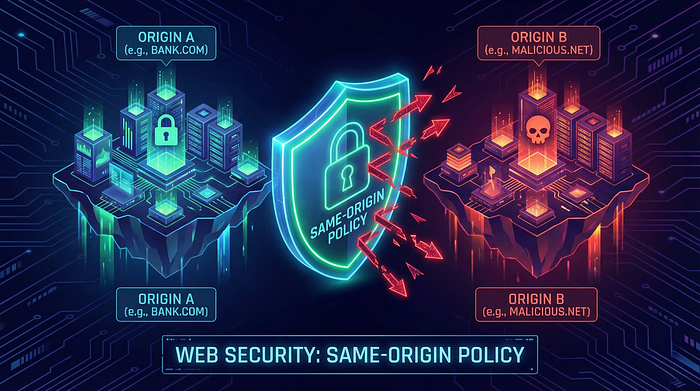
The SOP is a fundamental security mechanism implemented by all modern web browsers. It dictates that a web browser permits scripts contained in a first web page to access data in a second web page, but only if both web pages have the same origin.
An "origin" is defined by a strict combination of three elements:
- The Scheme (Protocol): e.g.,
httporhttps - The Domain: e.g.,
target.com - The Port: e.g.,
80(default for HTTP) or443(default for HTTPS).
SOP in Action
If you are logged into your bank (https://onlinebank.com) and you open a new tab to visit a malicious site (https://attacker.com), the SOP will actively prevent the malicious script hosted on attacker.com from reading the HTML data returned from onlinebank.com.
Let's look at how browsers evaluate origins compared to the base URL https://a.com/myInfo:
http://a.com/users.json-> Blocked (Different Scheme: HTTP vs HTTPS).https://api.a.com/info-> Blocked (Different Domain: api.a.com vs a.com).https://a.com:8443/files-> Blocked (Different Port).https://a.com/dashboard-> Allowed (Same Scheme, Domain, and Port).
While the SOP is incredibly effective, modern web applications need to share resources across different domains (e.g., a frontend hosted on app.com needs to talk to a backend on api.com). To allow this, developers use Cross-Origin Resource Sharing (CORS), a mechanism that uses HTTP headers to selectively relax the SOP. Misconfigurations in CORS are a massive source of high-paying bug bounties, which we will explore later in this course.
Wrapping Up Volume 1
You now understand the hacker's mindset, the methodologies of the pros, the Linux filesystem, and the fundamental architecture of web communications. You have built a rock-solid foundation.
In Volume 2, we will finally get our hands dirty. We will set up our Hacker's Lab, configure our interception proxies, and learn how to uncover the hidden infrastructure of our targets through advanced Reconnaissance.
Get your terminals ready. The real hunt begins now.