
That data rarely arrives all at once. File uploads come in chunks. HTTP responses are sent over time. Logs and metrics are continuous. Some connections stay open for minutes or hours.
Streams exist to handle this kind of data.

Instead of loading everything into memory and then processing it, streams let the backend work on data incrementally as it arrives. This keeps memory usage predictable and allows the system to stay responsive, even when handling large payloads or slow clients.
The same pattern shows up everywhere: reading files, handling request bodies, sending partial responses, pushing real-time updates, or streaming output from AI models. The use cases differ, but the problem is the same. Data flows over time, and buffering it all first is usually a mistake.
A stream response from Bun App
Streams become truly powerful when the backend can receive data and respond simultaneously. The example below demonstrates exactly that.
While the client is uploading a file, the server:
- writes the file to disk chunk by chunk
- keeps track of how much data has been received
- streams progress updates back to the client in real time
There is no "wait until the upload finishes" phase.
The backend stays responsive throughout the entire operation.
import { mkdir } from "fs/promises";
import { join } from "path";

await mkdir("uploads", { recursive: true });

const server = Bun.serve({
  port: 3000,

  async fetch(req) {
    if (!req.body) {
      return new Response("No body", { status: 400 });
    }

    const filePath = join("uploads", `upload-${Date.now()}.bin`);
    const file = Bun.file(filePath);

    const reader = req.body.getReader();
    const writer = file.writer();

    let bytes = 0;

    const responseStream = new ReadableStream({
      async start(controller) {
        try {
          while (true) {
            const { value, done } = await reader.read();
            if (done) break;

            bytes += value.byteLength;
            await writer.write(value);
            controller.enqueue(`Received ${Math.round(bytes / 1024)} KB\n`);
          }

          controller.enqueue("Upload complete\n");
        } catch (err) {
          controller.enqueue("Upload failed\n");
        } finally {
          await writer.end();
          controller.close();
        }
      },
    });

    return new Response(responseStream, {
      headers: {
        "Content-Type": "text/plain",
        "Transfer-Encoding": "chunked",
      },
    });
  },
});

console.log(`Server running on http://localhost:${server.port}`);
How the Streaming Pipeline Works
This example demonstrates a full streaming pipeline in a Bun backend. The server receives a file as a stream, writes it to disk chunk by chunk, and simultaneously streams progress updates back to the client.
There is no buffering of the full file and no blocking "upload then respond" phase.
Request body as a stream
const reader = req.body.getReader();The request body is a stream. We read it chunk by chunk instead of loading the entire file into memory.
Writing the file incrementally
const writer = Bun.file(filePath).writer();Each chunk from the request is written directly to disk. Memory usage stays constant, even for large files.
Streaming the response
const responseStream = new ReadableStream({ ... });The response itself is a stream. This lets the server send progress updates while the upload is still happening.
One loop, two directions
await writer.write(value);
controller.enqueue(`Received ${Math.round(bytes / 1024)} KB\n`);
For every chunk received:
- The file is written
- Progress is sent back to the client
The server is reading and responding simultaneously.
Streams in AI Agent Communication
AI agents don't communicate in single responses. They think, plan, act, and respond over time.
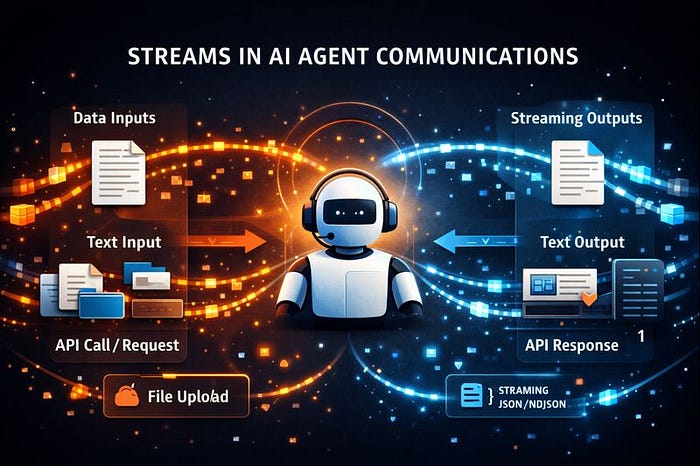
When an agent calls a tool, reasons about the result, and then continues, the backend isn't dealing with one payload. It's dealing with a flow of intermediate outputs. This is a streaming problem.
How AI Agents Actually Talk
A typical agent interaction looks like this:
- The user sends a prompt
- The model starts generating tokens
- The agent emits partial thoughts or steps
- A tool is invoked
- More tokens follow
- A final response is produced
None of this arrives at once. If the backend buffers everything until the end, the system feels slow, opaque, and fragile.
Code-wise, it would look something like this.
const responseStream = new ReadableStream({
  async start(controller) {
    for await (const token of agent.run(prompt)) {
      controller.enqueue(token);
    }
    controller.close();
  }
});
Where Streams Are Commonly Used
Streams are useful whenever data is large, continuous, or doesn't arrive all at once.
Some common examples:
- File uploads and downloads Handling large files without loading them fully into memory.
- HTTP request and response bodies Streaming large payloads or sending partial responses over time.
- Real-time updates Chats, notifications, activity feeds, and live dashboards.
- Logging and monitoring Processing logs and metrics as they are generated.
- Data processing pipelines Transforming, filtering, or enriching data on the fly.
- Long-running operations Imports, exports, background jobs, and progress reporting.
- AI and agent systems Streaming tokens, reasoning steps, and tool responses.
Different problems, same idea: data flows over time.
Streams are the abstraction that lets backend systems handle that flow reliably.
More from me: Understanding Polling, Long Polling, SSE, and WebSockets: When to Use What.
Writing code alone isn't enough for building production grade system
Building Hanma, the Shadcn for backend coding.
Stop uploading files to the server unnecessarily
Backend development: more than just CRUDs
A walk through arrays in JavaScript
Building Shadcn for the backend, an overview of Hanma
The problems I am facing while building Hanma
Understanding the conversions in JavaScript.
Functions are crazy in JavaScript
Backend development: More than endpoints
A deep dive into JavaScript Console
Follow me On X (Formely known as Twitter): https://x.com/Itstheanurag