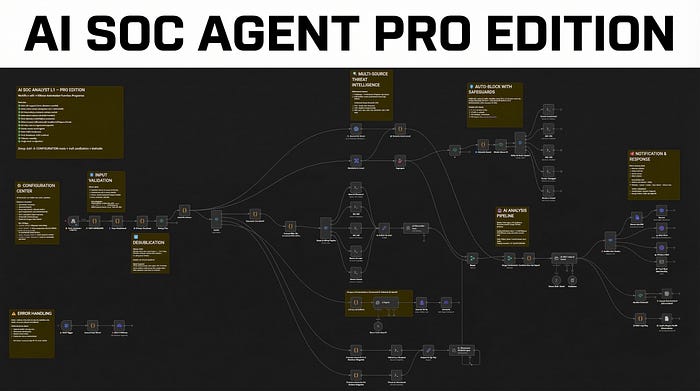

If you run Wazuh, you know the problem.
Alerts pile up. SSH brute force. Failed logins from IPs you've never seen. Vulnerability findings on packages you forgot existed. Every single one needs someone to look at it, check the IP, pull the logs, figure out if it's real, write something up, and decide what to do.
That someone is usually you. At 2 AM. Again.
I got tired of it. So I built a workflow that does all of that automatically and now I'm sharing it.
What It Does
The AI SOC Analyst Pro Edition is an n8n workflow that connects to your Wazuh deployment and handles Level 12+ alert triage end-to-end. No cloud. No subscriptions. No data leaving your network. Everything runs on your infrastructure using Ollama for AI inference.
Here's what happens when an alert fires:
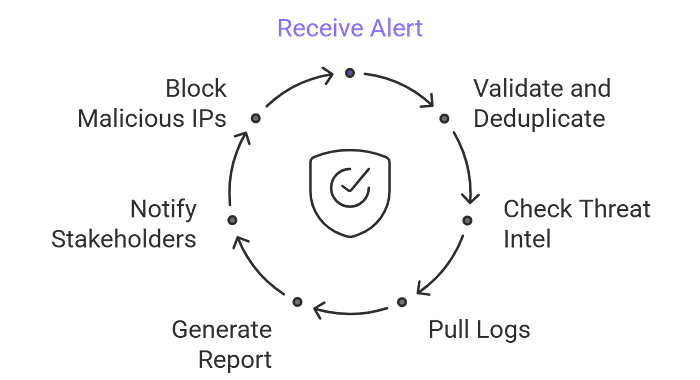
1. The alert comes in — Wazuh sends a webhook to n8n with the full alert payload.
2. It gets validated and deduplicated — The workflow sanitizes all inputs to prevent command injection, then checks if the same alert was already processed in the last 15 minutes. No more duplicate processing burning your API quota.
3. The IP gets checked against two threat intel sources — VirusTotal and AbuseIPDB run in parallel. The results get merged into a single threat score from 0 to 100. You see exactly how dangerous the source IP is, from which ISP, which country, and how many times it's been reported.
4. Logs get pulled from the affected machine — The workflow SSHs into the right VM (it auto-detects which one based on the agent name), pulls the last 200 log lines, and feeds them to an AI model that extracts the security-relevant events.
5. An AI writes the incident report — Ollama generates a structured report: false positive assessment, threat summary, multi-source intel findings, MITRE technique mapping, immediate actions, and recommendations. Ready to read, ready to act on.
6. You get notified — The report goes to Discord, Slack, Telegram, or Email. Your choice, one config value.
7. Malicious IPs get blocked automatically — If the threat score is high enough and the IP isn't in your whitelist, the workflow auto-blocks it via UFW on all your VMs. With safeguards configurable thresholds, CIDR whitelisting, and a master kill switch.
All of that happens in seconds. Not hours. Seconds.
Get the Workflow
The AI SOC Analyst L1 Pro Edition is available now on my Gumroad store as a ready-to-import n8n JSON with full setup documentation.
👉 Get it from — Here
It Also Handles Vulnerabilities
This is where it gets interesting. Most SOC automation workflows only deal with network attacks. This one also processes Wazuh's vulnerability detector output.
When Wazuh finds an unpatched CVE on one of your agents, the workflow catches it, extracts the full vulnerability data — CVE ID, CVSS score, attack vector, affected package, patch status — and sends it to a dedicated AI agent that writes a vulnerability assessment report.
The report includes an executive summary a manager can understand, technical details for the security team, and clear recommended actions. It gets delivered as a separate file attachment so vulnerability findings don't get lost in your intrusion alert channel.
Unpatched software is the number one way attackers get in. Now you have an AI watching for it 24/7.
What's Inside
The workflow ships as a single n8n JSON file. Import it, add your credentials, and you're running.
Here's what you get:
- 73 nodes — fully wired, tested, and documented
- Multi-OS support — Linux, Windows (PowerShell), and macOS paths all produce full reports
- Dual threat intelligence — VirusTotal + AbuseIPDB with a combined 0–100 threat score
- AI-powered analysis — Two Ollama calls per alert: log parsing and incident report generation
- Vulnerability assessment — Dedicated pipeline for Wazuh CVE findings with AI reports
- Auto-blocking with safeguards — UFW deny via SSH, with IP whitelist and configurable thresholds
- Alert deduplication — Fingerprint-based cooldown prevents duplicate processing
- Input sanitization — Blocks command injection via crafted alert payloads
- Multi-channel notifications — Discord, Slack, Telegram, or Email
- TheHive integration — Optional alerts creation
- Google Sheets audit log — Persistent incident log for compliance
- Error handling — Catches any node failure and alerts you immediately
- Single-node configuration — One node to edit. All thresholds, toggles, and settings in one place
- 9 sticky notes — On-canvas documentation explaining every section
- Zero hardcoded values — All credentials stripped, ready for your environment
Which Ollama Model Should You Use?
The workflow calls Ollama twice per alert, so speed matters. Here's what works at each hardware level:
8 GB RAM — Use Gemma 2 2B or Llama 3.2 3B. Fast, lightweight, gets the job done on a budget VPS or homelab.
16 GB RAM — Use Ministral 8B (this is what I run). Under 5 seconds per call, follows the report format reliably, leaves plenty of RAM for Wazuh and n8n on the same machine.
32 GB RAM — Use Ministral 14B (the default recommendation). Noticeably better reasoning, still fast enough at 8–12 seconds per call. The sweet spot for most deployments.
64 GB+ or GPU — Use Mistral Small 22B. The reports it writes are close to what a mid-level SOC analyst would produce.
Avoid Qwen 2.5/3 and DeepSeek R1 for this workflow — their reasoning variants dump visible <think> blocks into the output, which clutters your Discord/Slack notifications with hundreds of words of internal reasoning before the actual report.
You can swap models in one line in the config node. Try a few and see what fits your hardware.
Real Output: What the AI Actually Produces
These are real reports generated by the workflow. Not mockups. Not edited. This is what lands in your Discord/Slack channel seconds after an alert fires.
Vulnerability Report — CVE-2026–2781 (CVSS 9.8 Critical)
Executive Summary
A critical security flaw (CVSS 9.8/10) in libnss3 — a core component used by Firefox, Thunderbird, and Ubuntu — allows remote attackers to exploit an integer overflow to compromise confidentiality, integrity, and availability of affected systems. The vulnerability impacts WIndexer-VM (202.73.13.181) and extends to older versions of Firefox/Thunderbird. Immediate action is required.

Vulnerability Details
Type: Integer overflow in NSS (Network Security Services) libraries. Root Cause: Improper bounds checking in memory handling. Exploitability: Remote attack, no user interaction required.

Affected Assets
Software: libnss3 version 2:3.98-1ubuntu0.1 (Ubuntu) — Host: WIndexer-VM (IP: 202.73.13.181)

Risk Assessment
Severity: Critical (CVSS 9.8). Likelihood: High — exploitable via network-based attacks. Potential consequences: data breach, system compromise, operational downtime. Exploits may already exist in the wild.

Recommended Action
Priority: Immediate. Patch libnss3 via sudo apt update && sudo apt upgrade libnss3. Update Firefox/Thunderbird to ≥148 or ESR ≥140.8. Isolate WIndexer-VM if patching cannot be completed immediately. Monitor for signs of exploitation. Target completion: within 24 hours.
That's the AI reading a raw Wazuh vulnerability-detector alert and producing a report with executive summary, CVSS breakdown, affected assets, risk assessment, and step-by-step remediation — all in seconds.
Intrusion Report — Shellshock Exploit Attempt (Severity 9/10)
FALSE POSITIVE? No. Explicit firewall block + Shellshock exploit attempt with malicious payload.

THREAT SUMMARY
Shellshock (CVE-2014-6271) exploit targeting /cgi-bin/jarrewrite.sh via HTTP GET. Payload attempts to fetch and execute a remote shell script from a known malicious domain. Severity: 9/10 (active exploit attempt, blocked by UFW).

MULTI-SOURCE INTEL
VirusTotal: 9/55 malicious detections. AbuseIPDB: 100% confidence, 5,891 reports (data center/hosting ISP). Combined Threat Score: 50/100 — weighted as HIGH due to exploit specificity and payload severity.

KEY FINDINGS
Source IP (192.159.99.95): UK-based, data center-hosted. Attack Method: CVE-2014-6271 via HTTP header injection, payload uses wget/curl to fetch shell script. MITRE Technique: T1059.007 (Unix Shell) + T1105 (Ingress Tool Transfer).

IMMEDIATE ACTIONS
Block IP permanently. Patch Shellshock — verify CGI scripts are not vulnerable. Review UFW rules for bypass paths. Isolate exposed CGI endpoints.

RECOMMENDATIONS
Deploy WAF rules to block Shellshock patterns. Disable or replace CGI binaries with modern alternatives. Enable fail2ban. Hunt for related IPs and beaconing activity.

CONCLUSION
Active exploit attempt blocked by UFW, but high intent. Patch vulnerabilities, harden CGI exposure, and monitor for follow-up attacks. Threat actor likely automated.
Who Is This For?
SOC teams drowning in Wazuh alerts who need automated L1 triage.
MSPs and MSSPs managing multiple clients who want consistent, AI-generated reports without hiring more analysts.
Solo security engineers running everything themselves who need to sleep instead of triaging brute force alerts at night.
Homelabbers who want a production-grade SOC automation setup without paying for commercial SOAR platforms.
If you run Wazuh and n8n, this workflow saves you hours every week. Import the JSON, add your credentials, pick your Ollama model, and let the AI handle L1.
I write about SOC automation, Wazuh, n8n workflows, and offensive security. Follow me for more.