A practitioner's guide to transforming static analysis security testing — from creating the vision to selecting the right tools through rigorous, data-driven evaluation.
Most SAST programs fail not because of bad tooling, but because they lack a coherent vision, skip rigorous evaluation, or try to boil the ocean on day one. This three-part series walks through how to build a SAST program that developers actually adopt, security teams trust, and leadership funds — drawn from a real transformation at a major enterprise.
Part 1: Vision, Evaluation & Tool Selection
The Core Insight: Split the Problem
Before anything else, you need to confront a fundamental architectural decision that most organizations get wrong. Traditional SAST tools try to do everything in one scan: quick pattern matches, deep inter-procedural data flow analysis, cross-file taint tracking — all bundled together in a single, slow, noisy pipeline that blocks developers and erodes trust.
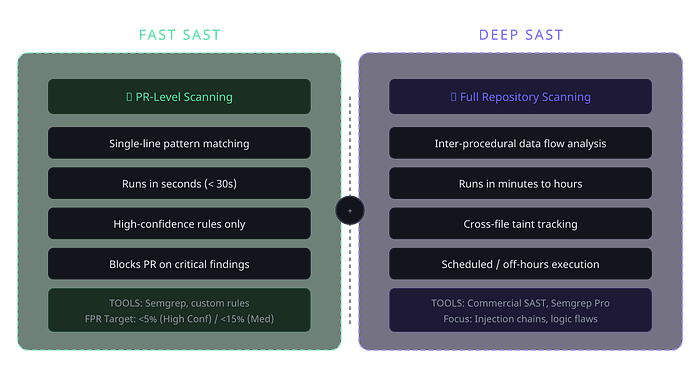
The breakthrough is splitting SAST into two distinct programs with different objectives, SLAs, and tooling:
Key Architecture Decision
FAST SAST handles single-line, pattern-based vulnerability detection directly in the PR pipeline. It runs in seconds, surfaces high-confidence issues, and gives developers immediate feedback before code is merged. Think of it as the fast lane — catching the low-hanging but critical fruit with minimal friction.
DEEP SAST handles complex, multi-file data flow analysis on full repository scans. These are the slower, deeper scans that find taint propagation, injection chains, and business logic flaws — issues that require understanding code paths across the entire codebase. These run on schedules or during off-hours, not in the PR pipeline.
This split is not just a performance optimization. It's a philosophical stance: developers should never be blocked by scans that take minutes when the vast majority of actionable findings come from pattern matches that take seconds. By separating the concerns, you can optimize each program independently — different tools, different thresholds, different remediation workflows.
Step 1: Create a Cross-Functional Vision
A SAST transformation is not a security project — it's an engineering platform initiative that happens to solve security problems. If you treat it as a security-only concern, you'll build something that security teams love and developers hate, which means it will fail.
The first thing I did was create an end-to-end vision architecture that cross-functional leads could understand and commit to supporting. This architecture had to answer several questions simultaneously: How does code flow from commit to scan to finding to remediation? Where do developers interact with the system? What data do security teams need? How does the rule management team govern rule quality?
The End-to-End Architecture Your architecture needs to cover three interconnected systems that talk to each other, each with its own lifecycle and stakeholders.
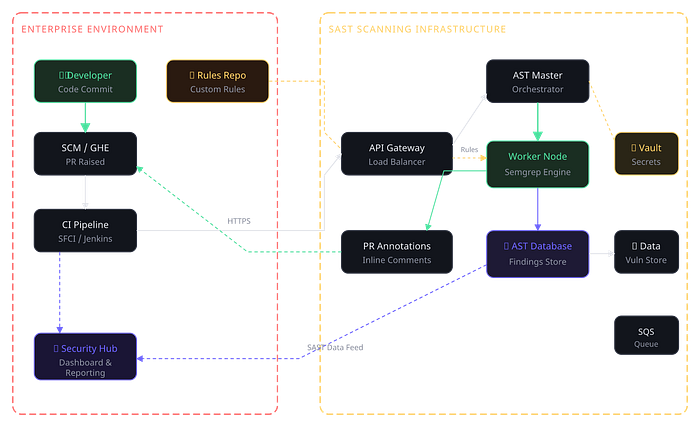
The architecture covers the full flow: a developer commits code, the SCM triggers the CI pipeline, which calls into the scanning infrastructure. The scan engine (in this case Semgrep running on worker nodes) clones the rules from a dedicated rules repo, executes the scan, and pushes results in two directions — back to the PR as inline annotations, and into the AST database for long-term tracking, reporting, and feeding the security hub dashboard.
Step 2: Rigorous Tool Evaluation
One of the most damaging things you can do is pick a SAST tool based on vendor demos, analyst reports, or what your peers use. Every organization's codebase is different. Language mix, framework choices, coding patterns — all of these dramatically affect how a tool performs in your environment.
I ran a controlled proof of concept with the top four tools, both open source and commercial, evaluating them against real codebases and real vulnerability categories. The evaluation framework had to be reproducible, quantitative, and focused on the metrics that actually matter for developer adoption.
Evaluation Criteria These are the dimensions that separate a good SAST tool from a bad one in production. Notice that "number of findings" is not on this list — more findings is often worse, not better.
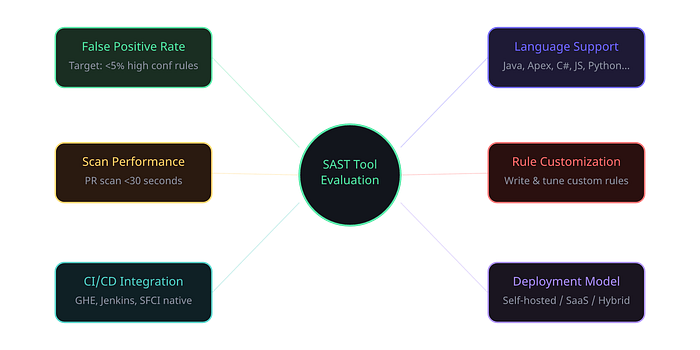
The POC Results After running each tool against the same set of repositories across multiple business units, here's how the evaluation shook out. I'm using generalized labels rather than specific vendor names, but the pattern is instructive for anyone doing this evaluation.
- Tool A (Commercial SAST): ~18% FPR, 45–90s PR scan, 25+ languages, Limited DSL rules, Good CI integration, Self-hosted available. (Rank #3)
- Tool B (Open-Source Pro): ~4% FPR, <15s PR scan, 30+ languages, YAML-based easy custom rules, Excellent CI integration, Self-hosted available. (Rank #1)
- Tool C (Commercial SaaS): ~12% FPR, 30–60s PR scan, 15+ languages, Proprietary rules, Good CI integration, SaaS only. (Rank #4)
- Tool D (Open-Source): ~22% FPR, 20–40s PR scan, 20+ languages, XML config rules, Moderate CI integration, Self-hosted available. (Rank #2)
The winner was clear for FAST SAST: an open-source-first tool with a commercial tier (in our case, Semgrep) dominated on every dimension that mattered for PR-level scanning. The false positive rate was dramatically lower, the scan speed was fastest, and the ability to write custom rules in a simple YAML-based DSL meant the security team could iterate on rule quality without needing vendor support cycles.
Lesson Learned Don't be seduced by the tool with the most findings. A tool that surfaces 500 findings with an 18% false positive rate creates more work and more developer friction than one that surfaces 200 findings with a 4% false positive rate. Precision matters more than recall in a FAST SAST program, because every false positive erodes developer trust.
Presenting to Leadership When presenting the evaluation results to leadership, I focused on three things: developer experience impact (scan time, false positive burden), total cost of ownership (including the hidden cost of developer time lost to triaging false positives), and the strategic flexibility of having a self-hosted option with easy rule customization.
Step 3: Define Your Deployment Architecture
Once you've chosen your tool, you need to decide how it runs. For a FAST SAST program at enterprise scale, you typically have two deployment models to consider, and the choice depends on your organization's data sensitivity, network topology, and operational maturity.
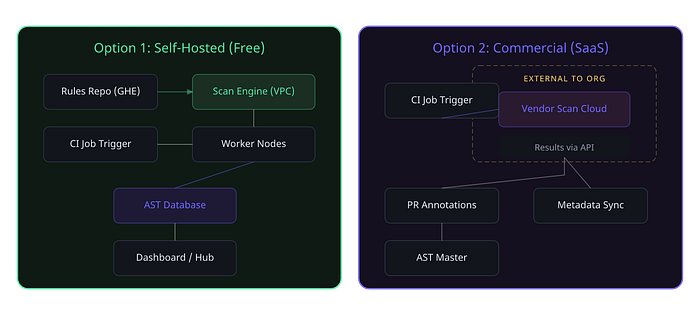
For most enterprises dealing with sensitive source code, a self-hosted deployment within your own VPC is the pragmatic choice for FAST SAST. It keeps code on-premise, gives you full control over the scanning infrastructure, and eliminates data residency concerns. The commercial SaaS option works better for organizations with less restrictive data policies or those that want to offload operational overhead.
In the program I led, we used a hybrid approach: self-hosted scanning infrastructure for the actual code analysis, with a commercial tier for advanced rule packs and support — keeping the best of both worlds.
What's in Part 2
With the vision set, the tool selected, and the architecture defined, Part 2 dives into the operational lifecycle — the rule management lifecycle that governs how rules are created, tested, prioritized, and retired, the issue remediation lifecycle that defines what happens when a finding hits a developer's PR, and the metrics collection framework that keeps the whole program honest. This is where the real engineering happens.