June 4, 2026
Shift Security Left: Detecting Code Vulnerabilities Early with CodeQL in GitHub Actions
Most CI pipelines are great at answering one question:
SwayamOps
4 min read
Does the application still work?
They run unit tests, integration tests, linting checks, and build validations to ensure functionality hasn't broken.
But there's another equally important question that often gets overlooked:
Is the code secure?
An application can pass every test and still contain vulnerabilities that attackers can exploit.
That's where Static Application Security Testing (SAST) comes in.
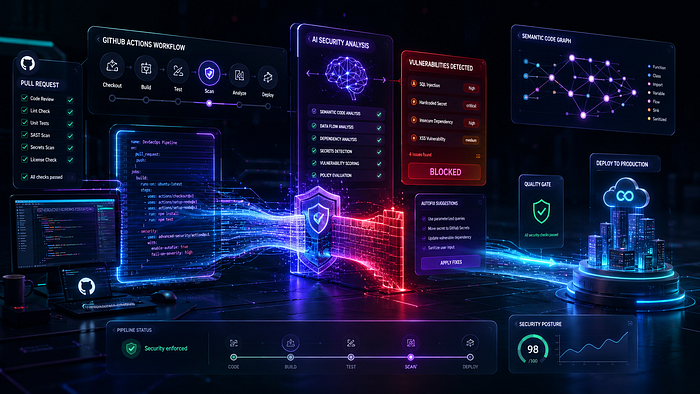
By integrating CodeQL into your CI pipeline, you can automatically analyze source code for security issues before they reach production.
In this article, we'll explore how CodeQL works, why it matters, and how to integrate it into GitHub Actions to strengthen your software delivery process.
Why Traditional Testing Isn't Enough
Imagine a developer introduces the following code:
query = f"SELECT * FROM users WHERE id = '{user_input}'"
cursor.execute(query)
query = f"SELECT * FROM users WHERE id = '{user_input}'"
cursor.execute(query)The application might:
- Build successfully
- Pass unit tests
- Pass integration tests
- Deploy successfully
Yet this code contains a potential SQL injection vulnerability.
Traditional testing validates behavior.
Security testing validates risk.
Without automated security analysis, vulnerabilities often remain hidden until:
- Security reviews
- Penetration tests
- Bug bounty reports
- Production incidents
The later a vulnerability is discovered, the more expensive it becomes to fix.
What Is CodeQL?
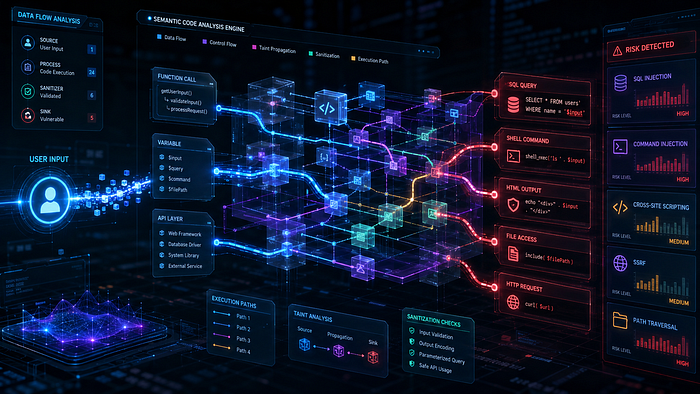
CodeQL is GitHub's semantic code analysis engine that treats source code like data.
Instead of simply matching patterns in text, CodeQL understands:
- Control flow
- Data flow
- Function calls
- Security-sensitive operations
- Application logic
This enables it to identify complex vulnerabilities that traditional linters often miss.
CodeQL supports multiple languages, including:
- Python
- JavaScript
- TypeScript
- Java
- C#
- C++
- Go
- Ruby
and many more.
How CodeQL Differs from Traditional Linters
Consider a linter checking this code:
password = request.args.get("password")password = request.args.get("password")A linter may not flag anything because the syntax is valid.
CodeQL, however, can track how data moves through the application.
For example:
user_input = request.args.get("id")
query = f"SELECT * FROM users WHERE id='{user_input}'"
db.execute(query)
user_input = request.args.get("id")
query = f"SELECT * FROM users WHERE id='{user_input}'"
db.execute(query)CodeQL can identify that:
User Input
      ↓
SQL Query
      ↓
Database Execution
User Input
↓
SQL Query
↓
Database Executionand recognize the risk of SQL injection.
This deeper understanding is what makes CodeQL particularly powerful for security analysis.
Real-World Vulnerabilities CodeQL Can Detect
Depending on the language and framework, CodeQL can identify issues such as:
- SQL Injection
- Command Injection
- Path Traversal
- Cross-Site Scripting (XSS)
- Hardcoded Credentials
- Unsafe Deserialization
- Server-Side Request Forgery (SSRF)
- Authentication Flaws
- Resource Leaks
Many of these vulnerabilities are difficult to detect through standard testing alone.
Why Run CodeQL in CI?
Security scans are most effective when developers receive feedback immediately.
Instead of:
Developer Writes Code
          ↓
Deploy to Production
          ↓
Security Team Finds Issue Weeks Later
Developer Writes Code
↓
Deploy to Production
↓
Security Team Finds Issue Weeks LaterYou get:
Developer Opens Pull Request
          ↓
CodeQL Scan Runs
          ↓
Issue Detected
          ↓
Fix Before Merge
Developer Opens Pull Request
↓
CodeQL Scan Runs
↓
Issue Detected
↓
Fix Before MergeThis approach aligns with the DevSecOps principle of shifting security left.
Integrating CodeQL into GitHub Actions
GitHub provides a ready-to-use CodeQL workflow.
Here's a basic example:
name: CodeQL Analysis
on:
  push:
    branches:
      - main
  pull_request:
jobs:
  analyze:
    name: Analyze
    runs-on: ubuntu-latest
    permissions:
      security-events: write
      contents: read
    strategy:
      fail-fast: false
      matrix:
        language:
          - python
    steps:
      - name: Checkout Repository
        uses: actions/checkout@v4
      - name: Initialize CodeQL
        uses: github/codeql-action/init@v3
        with:
          languages: ${{ matrix.language }}
      - name: Autobuild
        uses: github/codeql-action/autobuild@v3
      - name: Perform CodeQL Analysis
uses: github/codeql-action/analyze@v3name: CodeQL Analysis
on:
push:
branches:
- main
pull_request:
jobs:
analyze:
name: Analyze
runs-on: ubuntu-latest
permissions:
security-events: write
contents: read
strategy:
fail-fast: false
matrix:
language:
- python
steps:
- name: Checkout Repository
uses: actions/checkout@v4
- name: Initialize CodeQL
uses: github/codeql-action/init@v3
with:
languages: ${{ matrix.language }}
- name: Autobuild
uses: github/codeql-action/autobuild@v3
- name: Perform CodeQL Analysis
uses: github/codeql-action/analyze@v3Once configured, every push and pull request triggers a security scan.
A Practical Example
Suppose a developer introduces:
import os
filename = request.args.get("file")
os.system(f"cat {filename}")
import os
filename = request.args.get("file")
os.system(f"cat {filename}")At first glance, the code appears harmless.
However, an attacker could potentially provide:
/etc/passwd/etc/passwdor even:
file.txt && rm -rf /file.txt && rm -rf /depending on the execution context.
CodeQL can recognize that user-controlled input reaches a command execution sink and flag it as a command injection risk.
Instead of discovering the issue during a penetration test, developers receive feedback during the pull request stage.
Understanding CodeQL Results
When vulnerabilities are detected, GitHub displays findings directly within the repository's security interface.
A typical finding includes:
Issue:
Potential SQL Injection
Severity:
High
Location:
src/api/users.py:42
Recommendation:
Use parameterized queriesIssue:
Potential SQL Injection
Severity:
High
Location:
src/api/users.py:42
Recommendation:
Use parameterized queriesDevelopers can navigate directly to the affected code and address the issue before merging.
Scanning Pull Requests Automatically
One of the most valuable features of CodeQL is pull request integration.
Imagine a workflow like this:
Pull Request
      ↓
Unit Tests
      ↓
Linting
      ↓
CodeQL Analysis
      ↓
Approval
      ↓
Merge
Pull Request
↓
Unit Tests
↓
Linting
↓
CodeQL Analysis
↓
Approval
↓
MergeSecurity becomes part of the normal development process instead of a separate activity.
This significantly improves adoption because developers don't need to learn new tools or workflows.
Custom Queries and Advanced Analysis
Organizations with specific security requirements can extend CodeQL using custom queries.
For example:
- Internal coding standards
- Proprietary security controls
- Organization-specific anti-patterns
- Compliance requirements
Security teams can create reusable query packs and apply them across repositories.
This transforms CodeQL from a vulnerability scanner into a platform for enforcing secure coding practices.
Best Practices for Using CodeQL in CI
1. Scan Every Pull Request
The earlier issues are detected, the easier they are to fix.
Security findings should reach developers before code is merged.
2. Keep Queries Updated
GitHub regularly improves CodeQL query packs.
Updated queries often detect new vulnerability classes.
3. Combine with Other Security Controls
CodeQL is powerful, but it shouldn't be your only security measure.
A mature pipeline may also include:
- Secret scanning
- Dependency vulnerability scanning
- Container image scanning
- Infrastructure-as-Code scanning
Each control addresses a different risk area.
4. Treat Security Findings Like Test Failures
If a critical vulnerability is discovered:
Build FailedBuild Failedshould be treated no differently than:
Unit Tests FailedUnit Tests FailedSecurity issues are quality issues.
5. Start Small and Expand
Teams new to CodeQL should begin with default query packs.
Once adoption grows, introduce custom queries and stricter policies.
CodeQL vs Traditional SAST Tools
Many organizations compare CodeQL with traditional SAST platforms.
A simplified comparison looks like this:
| Feature                  | Traditional SAST | CodeQL    |
| ------------------------ | ---------------- | --------- |
| Source Code Analysis     | Yes              | Yes       |
| Data Flow Analysis       | Limited          | Strong    |
| GitHub Integration       | Varies           | Native    |
| Custom Queries           | Often Limited    | Extensive |
| Pull Request Integration | Varies           | Excellent |
| Feature | Traditional SAST | CodeQL |
| ------------------------ | ---------------- | --------- |
| Source Code Analysis | Yes | Yes |
| Data Flow Analysis | Limited | Strong |
| GitHub Integration | Varies | Native |
| Custom Queries | Often Limited | Extensive |
| Pull Request Integration | Varies | Excellent |For teams already using GitHub, CodeQL offers one of the smoothest paths to integrating security analysis directly into CI workflows.
Final Thoughts
Modern CI pipelines shouldn't stop at verifying functionality. They should also help teams build secure software.
That's exactly where CodeQL shines.
By integrating CodeQL into GitHub Actions, you can:
- Detect security vulnerabilities earlier
- Reduce remediation costs
- Embed security into everyday development workflows
- Strengthen DevSecOps practices
- Prevent risky code from reaching production
The most effective security checks are the ones developers encounter naturally during development. CodeQL brings security analysis directly into the CI process, making secure coding a continuous practice rather than an occasional review activity.
Have you started using CodeQL in your projects? What types of vulnerabilities has it helped you uncover? Share your experience, lessons learned, or favorite CodeQL use cases in the comments — I'd love to hear how your team is approaching application security in CI.